<?xml version="1.0" encoding="utf-8"?><?xml-stylesheet type="text/xsl" href="atom.xsl"?>
<feed xmlns="http://www.w3.org/2005/Atom">
    <id>https://kmesh.net/blog</id>
    <title>Kmesh Blog</title>
    <updated>2025-10-01T06:30:00.000Z</updated>
    <generator>https://github.com/jpmonette/feed</generator>
    <link rel="alternate" href="https://kmesh.net/blog"/>
    <subtitle>Kmesh Blog</subtitle>
    <icon>https://kmesh.net/img/favicons/favicon.ico</icon>
    <entry>
        <title type="html"><![CDATA[Kmesh: The Ultimate Guide to Service Mesh for Beginners]]></title>
        <id>https://kmesh.net/blog/kmesh-service-mesh-explained</id>
        <link href="https://kmesh.net/blog/kmesh-service-mesh-explained"/>
        <updated>2025-10-01T06:30:00.000Z</updated>
        <summary type="html"><![CDATA[If you know Kubernetes, but you've never heard of a "service mesh", this post is for you.]]></summary>
        <content type="html"><![CDATA[<p>If you know Kubernetes, but you've never heard of a "service mesh", this post is for you.</p>
<p>By the end of this post, you'll know:</p>
<ul>
<li>
<p>What problem Kmesh is solving (and why that problem matters)</p>
</li>
<li>
<p>How the current solutions work (and why they're slow)</p>
</li>
<li>
<p>What Kmesh does differently (and why it's faster)</p>
</li>
<li>
<p>How all the pieces fit together</p>
</li>
</ul>
<h2 class="anchor anchorWithStickyNavbar_LWe7" id="what-is-a-service-mesh-and-why-does-it-exist">What is a Service Mesh and Why Does It Exist?<a href="https://kmesh.net/blog/kmesh-service-mesh-explained#what-is-a-service-mesh-and-why-does-it-exist" class="hash-link" aria-label="Direct link to What is a Service Mesh and Why Does It Exist?" title="Direct link to What is a Service Mesh and Why Does It Exist?">​</a></h2>
<p>You must have deployed apps on Kubernetes. You know that your application runs inside a Pod, and that Pods talk to each other through Services. You write a YAML file, run <code>kubectl apply</code>, and your app is running.</p>
<p>Now imagine you're not deploying one app. You're deploying fifty. Imagine you are an engineer at a fast-growing <strong>e-commerce company</strong>. Your team started with a <strong>monolithic application</strong>—a single, large codebase handling user requests, inventory, and payments. As the company grew, you migrated to a microservices architecture with separate services for:</p>
<ul>
<li><strong>User Service</strong> (handles user accounts)</li>
<li><strong>Order Service</strong> (processes orders)</li>
<li><strong>Inventory Service</strong> (tracks stock)</li>
<li><strong>Payment Service</strong> (handles payments)</li>
</ul>
<p>At first, everything runs smoothly. But as complexity increases, several massive problems emerge:</p>
<ul>
<li><strong>Authentication &amp; Authorization is duplicated.</strong> Every microservice has to handle logins and permissions separately. Your developers are writing the same security logic over and over again for the Order Service, the Inventory Service, and the Payment Service.</li>
<li><strong>Failures become tougher to debug.</strong> Logs indicate errors in the Payment Service, but it's unclear whether these issues are from network glitches, load spikes, or faulty service updates. There is no central visibility.</li>
<li><strong>Unencrypted Security Risks.</strong> Sensitive data, like payment details, is being transmitted between your services unencrypted. Without proper encryption (like mTLS), any breach in your cluster becomes a major risk.</li>
<li><strong>Dumb Load Balancing.</strong> You have three replicas of your Payment Service. The Order Service is overwhelmed while the Inventory Service remains underutilized. Standard Kubernetes traffic distribution isn't smart enough to handle complex routing.</li>
<li><strong>Complex Canary Deployments.</strong> Let's say you want to release a new version of the Payment Service. Ideally, you want to route exactly 10% of your live traffic to the new version to test it out, but doing so without downtime is significantly challenging.</li>
</ul>
<p>Every production team eventually faces:</p>
<p><em>"Who is making sure all of this communication works properly?"</em></p>
<p>This growing complexity makes managing your microservices <strong>painful</strong>. Several solutions have been proposed to address this.</p>
<h2 class="anchor anchorWithStickyNavbar_LWe7" id="how-the-industry-tried-to-fix-it">How the Industry Tried to Fix It<a href="https://kmesh.net/blog/kmesh-service-mesh-explained#how-the-industry-tried-to-fix-it" class="hash-link" aria-label="Direct link to How the Industry Tried to Fix It" title="Direct link to How the Industry Tried to Fix It">​</a></h2>
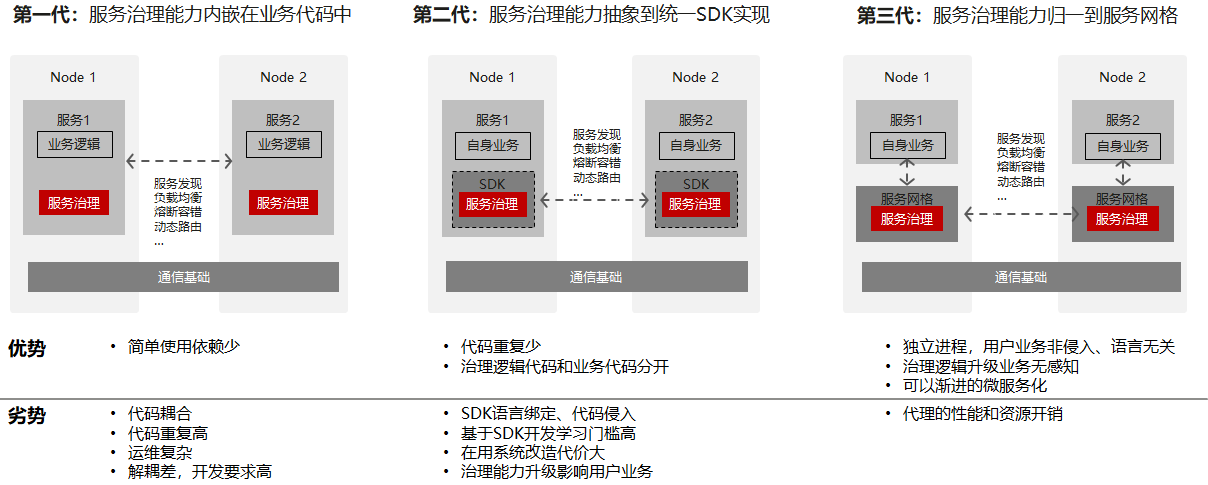
<p>These problems weren't unique to your company. Every engineering team building microservices ran into the same wall. And the industry didn't solve it overnight—it went through three distinct eras of trying.</p>
<p>Think of it like this: the networking logic that keeps your services talking to each other had to <em>live</em> somewhere. The question was always—<strong>where?</strong></p>
<p><img decoding="async" loading="lazy" alt="The evolution of service mesh" src="https://kmesh.net/assets/images/evolution-timeline-a8503d72f3ec7b24d7de5a66dee94d6c.png" width="1024" height="1024" class="img_ev3q"></p>
<hr>
<h3 class="anchor anchorWithStickyNavbar_LWe7" id="era-1-the-big-box-in-the-middle-hardware-load-balancers">Era 1: The Big Box in the Middle (Hardware Load Balancers)<a href="https://kmesh.net/blog/kmesh-service-mesh-explained#era-1-the-big-box-in-the-middle-hardware-load-balancers" class="hash-link" aria-label="Direct link to Era 1: The Big Box in the Middle (Hardware Load Balancers)" title="Direct link to Era 1: The Big Box in the Middle (Hardware Load Balancers)">​</a></h3>
<p>The earliest answer was straightforward: put a big, expensive box between your clients and your servers.</p>
<p>If you've been around infrastructure long enough, you've heard names like <strong>F5 BIG-IP</strong>, or maybe you've set up <strong>NGINX</strong> or <strong>HAProxy</strong> as a reverse proxy. The idea was simple—all traffic enters through one central point, and that point decides which backend server gets the request.</p>
<p><img decoding="async" loading="lazy" alt="Era 1: Hardware Load Balancers and Reverse Proxies" src="https://kmesh.net/assets/images/era1-load-balancers-15d907dc51e8021e6dcc05aa99b450fc.png" width="1024" height="1024" class="img_ev3q"></p>
<p>This worked fine when you had a handful of backend servers. Your company had maybe 3-5 services, and a load balancer in front of them was perfectly manageable.</p>
<p>But here's where it breaks down with microservices:</p>
<ul>
<li><strong>It only handles North-South traffic.</strong> A load balancer sits at the edge. It distributes traffic <em>coming into</em> your cluster. But what about Service A calling Service B calling Service C <em>inside</em> the cluster? That's East-West traffic, and the load balancer doesn't even see it.</li>
<li><strong>It becomes a single point of failure.</strong> Every request flows through one box. If that box goes down, everything goes down.</li>
<li><strong>It doesn't understand your application.</strong> A load balancer can do round-robin or weighted routing, sure. But it doesn't know how to retry a failed request, or detect that one of your services is unhealthy and should be pulled from rotation automatically.</li>
</ul>
<p>As the number of microservices grew from 5 to 50 to 500, pointing everything at one big box in the middle simply stopped making sense. The networking logic needed to move closer to the services themselves.</p>
<hr>
<h3 class="anchor anchorWithStickyNavbar_LWe7" id="era-2-bake-it-into-the-code-smart-libraries">Era 2: Bake It Into the Code (Smart Libraries)<a href="https://kmesh.net/blog/kmesh-service-mesh-explained#era-2-bake-it-into-the-code-smart-libraries" class="hash-link" aria-label="Direct link to Era 2: Bake It Into the Code (Smart Libraries)" title="Direct link to Era 2: Bake It Into the Code (Smart Libraries)">​</a></h3>
<p>Netflix was one of the first companies to really feel the pain of running hundreds of microservices. And their answer was pretty direct: if the infrastructure can't handle this, let's handle it <em>in the application code itself</em>.</p>
<p>They built a set of open-source Java libraries — collectively called <strong>Netflix OSS</strong> — that developers would import directly into their services. Think of it like adding an extra package to your project, except this package handled all the networking headaches for you:</p>
<ul>
<li><strong>How do I find another service?</strong> → Eureka (service discovery)</li>
<li><strong>What if that service is down?</strong> → Hystrix (stop calling a broken service, don't let it drag you down too)</li>
<li><strong>Which instance should I send my request to?</strong> → Ribbon (pick the healthiest one)</li>
<li><strong>How should I route incoming traffic?</strong> → Zuul (smart routing)</li>
</ul>
<p><img decoding="async" loading="lazy" alt="Era 2: Smart Libraries — every service carries duplicated networking code" src="https://kmesh.net/assets/images/era2-smart-libraries-176514889438e57842ee507567766c74.png" width="1024" height="1024" class="img_ev3q"></p>
<p>Every microservice now carried its own networking smarts built right into the application code.</p>
<p>Netflix scaled to hundreds of microservices this way. Other companies followed — Twitter built Finagle, Google had internal equivalents.</p>
<p>But as teams adopted this approach, cracks started showing:</p>
<ul>
<li><strong>Language lock-in.</strong> Netflix OSS was Java. If your ML team writes Python and your frontend team uses Node.js, you'd have to rewrite all that networking logic from scratch for each language. Not realistic.</li>
<li><strong>Upgrade nightmare.</strong> Found a bug in one of these libraries? You now need to update it in <em>every single microservice</em>, rebuild, test, and redeploy each one. With 200 services, that's not a quick patch — that's a week-long campaign.</li>
<li><strong>Your developers didn't sign up for this.</strong> They wanted to build a payment system, not debug why the load balancing library is sending traffic to a dead instance. Business logic and networking plumbing were tangled together in the same codebase.</li>
</ul>
<p>The big takeaway from this era was clear: <strong>the networking logic needs to live outside the application code</strong>. Developers should focus on business logic. Something else should handle the networking.</p>
<p>But that "something else" shouldn't be one big box in the middle either. What if you could pull the networking logic out of the code and run it <em>right next to</em> the application — but as its own separate process?</p>
<hr>
<h3 class="anchor anchorWithStickyNavbar_LWe7" id="era-3-the-sidecar-proxy-the-birth-of-the-service-mesh">Era 3: The Sidecar Proxy (The Birth of the Service Mesh)<a href="https://kmesh.net/blog/kmesh-service-mesh-explained#era-3-the-sidecar-proxy-the-birth-of-the-service-mesh" class="hash-link" aria-label="Direct link to Era 3: The Sidecar Proxy (The Birth of the Service Mesh)" title="Direct link to Era 3: The Sidecar Proxy (The Birth of the Service Mesh)">​</a></h3>
<p>Instead of embedding networking logic inside your application, you deploy a small, lightweight proxy <em>alongside</em> every instance of your service. In Kubernetes terms, this proxy runs as a second container inside the same Pod. The most popular one is <strong>Envoy</strong>, originally built at Lyft.</p>
<p>Here's how it works. Back to your e-commerce example:</p>
<ol>
<li>Your <strong>Order Service</strong> wants to call the <strong>Payment Service</strong>. It doesn't call it directly — the request gets transparently intercepted (via iptables rules) and redirected to the <strong>Envoy sidecar</strong> running in the same Pod.</li>
<li>The Envoy sidecar applies all the networking logic (load balancing, retries, mTLS encryption, timeouts) and forwards the request to the Payment Service's Pod.</li>
<li>There, the request hits the <strong>Envoy sidecar inside the Payment Service Pod</strong> first (rate limiting, auth checks), and only <em>then</em> reaches your actual Payment Service code.</li>
</ol>
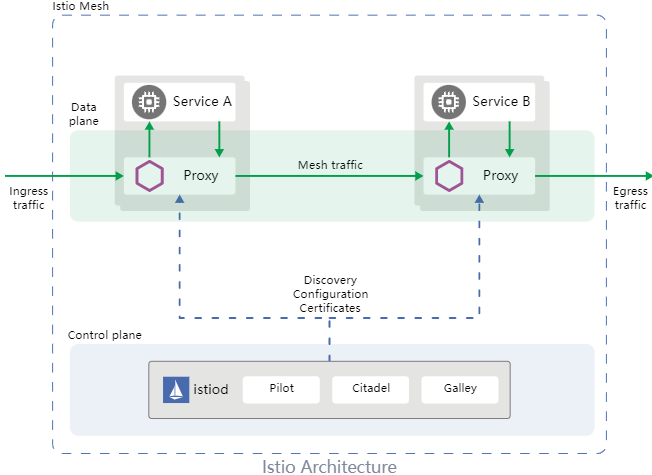
<p>Here's Istio's own architecture diagram showing this in action — the Data Plane (proxies) at the top and the Control Plane (Istiod) at the bottom:</p>
<p><img decoding="async" loading="lazy" alt="Istio Architecture — Data Plane + Control Plane" src="https://kmesh.net/assets/images/istio-arch-9a9fe3bf3a7ba09a469e35d8e5f198e4.png" width="652" height="475" class="img_ev3q"></p>
<p>And here's a more detailed view of the Service Mesh architecture with sidecar proxies managing all mesh traffic between pods:</p>
<p><img decoding="async" loading="lazy" alt="Service Mesh Architecture: Data Plane + Control Plane" src="https://kmesh.net/assets/images/era3-sidecar-proxies-7c369963600739d293b93addd8340109.png" width="1024" height="1024" class="img_ev3q"></p>
<p>Why was this a breakthrough?</p>
<ul>
<li><strong>Language independence:</strong> Order Service in Java, Payment Service in Go? Doesn't matter — the same Envoy proxy handles networking for all of them.</li>
<li><strong>No code changes:</strong> Developers write plain business logic. No networking libraries to import. The proxy handles everything transparently.</li>
<li><strong>Centralized control:</strong> All sidecars get their config from a <strong>Control Plane</strong> (like Istio's Istiod). Want mTLS everywhere? One policy change, pushed to every sidecar. No redeployments.</li>
<li><strong>Uniform observability:</strong> Every request flows through a sidecar, so you get metrics, traces, and logs for <em>all</em> service-to-service traffic automatically.</li>
</ul>
<p><strong>This</strong> is what a Service Mesh is:</p>
<blockquote>
<p><strong>A service mesh is an infrastructure layer that manages service-to-service communication. It consists of a Data Plane (the sidecar proxies handling the actual traffic) and a Control Plane (the central brain configuring all the proxies).</strong></p>
</blockquote>
<p>Projects like <strong>Istio</strong>, <strong>Linkerd</strong>, and <strong>Consul Connect</strong> implement this pattern. Authentication? The mesh handles it. Encryption? mTLS everywhere. Canary/test deployments? Route 10% of traffic to the new version with just one config change.</p>
<hr>
<h3 class="anchor anchorWithStickyNavbar_LWe7" id="so-if-the-service-mesh-solved-everything-why-are-we-still-talking">So If the Service Mesh Solved Everything, Why Are We Still Talking?<a href="https://kmesh.net/blog/kmesh-service-mesh-explained#so-if-the-service-mesh-solved-everything-why-are-we-still-talking" class="hash-link" aria-label="Direct link to So If the Service Mesh Solved Everything, Why Are We Still Talking?" title="Direct link to So If the Service Mesh Solved Everything, Why Are We Still Talking?">​</a></h3>
<p>Because it introduced a <em>new</em> problem. A performance problem.</p>
<p>Instead of Service A talking directly to Service B, the request bounces through <strong>four extra network hops</strong>: out of Service A's container → into Service A's sidecar → across the network → into Service B's sidecar → into Service B's container.</p>
<p><img decoding="async" loading="lazy" alt="extra hops" src="https://kmesh.net/assets/images/sidecar-network-hops-6043f66a9239e2bf3c3332ce0fa46217.png" width="1080" height="293" class="img_ev3q"></p>
<p>All that bouncing means data gets copied back and forth between <strong>user space</strong> and <strong>kernel space</strong> multiple times. It means extra TCP connections get established. It means more CPU cycles, more memory, and more latency.</p>
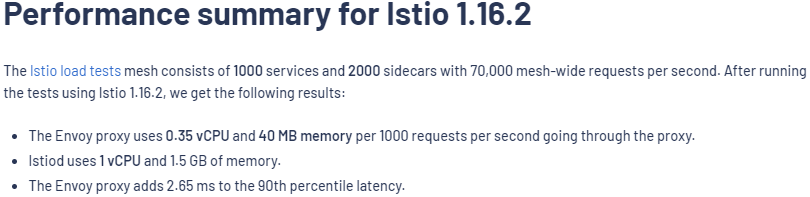
<p>According to Istio's own benchmarks, a single Envoy proxy adds approximately <strong>2.65 milliseconds</strong> of latency at the 90th percentile, and this overhead compounds as requests traverse multiple proxies/hops.</p>
<p><em>But what if the networking logic didn't have to run in user space at all?</em></p>
<p>That question is what leads us to eBPF and Kmesh — which we'll cover in the next section.</p>
<hr>
<h2 class="anchor anchorWithStickyNavbar_LWe7" id="why-traditional-service-meshes-are-slow">Why Traditional Service Meshes Are Slow<a href="https://kmesh.net/blog/kmesh-service-mesh-explained#why-traditional-service-meshes-are-slow" class="hash-link" aria-label="Direct link to Why Traditional Service Meshes Are Slow" title="Direct link to Why Traditional Service Meshes Are Slow">​</a></h2>
<p>To understand why, we need to understand how your operating system handles memory.</p>
<h3 class="anchor anchorWithStickyNavbar_LWe7" id="the-wall-between-user-space-and-kernel-space">The Wall Between User Space and Kernel Space<a href="https://kmesh.net/blog/kmesh-service-mesh-explained#the-wall-between-user-space-and-kernel-space" class="hash-link" aria-label="Direct link to The Wall Between User Space and Kernel Space" title="Direct link to The Wall Between User Space and Kernel Space">​</a></h3>
<p>Linux splits its memory into two strictly isolated zones:</p>
<p><img decoding="async" loading="lazy" alt="User Space vs Kernel Space — the system call boundary" src="https://kmesh.net/assets/images/userspace-vs-kernelspace-9d41c2cb9b7f8d4cd9aad499cb1fe737.png" width="1024" height="1024" class="img_ev3q"></p>
<p>Think of <strong>User Space</strong> as the safe playground where your application, your database, and your Envoy proxy live. If an app crashes here, it's isolated. No big deal.</p>
<p><strong>Kernel Space</strong>, on the other hand, is the engine room. It has direct access to the hardware (network cards, disks, CPU). It's incredibly fast, but if something crashes here, the whole server goes down. Because of this risk, programs in User Space are completely walled off from the hardware. If your app wants to send a network packet, it has to politely ask the Kernel to do it via a "system call."</p>
<p>Here is the golden rule of OS performance: <strong>Crossing that boundary between User Space and Kernel Space is expensive.</strong> It costs CPU cycles, memory copies, and time.</p>
<h3 class="anchor anchorWithStickyNavbar_LWe7" id="the-bouncing-problem">The Bouncing Problem<a href="https://kmesh.net/blog/kmesh-service-mesh-explained#the-bouncing-problem" class="hash-link" aria-label="Direct link to The Bouncing Problem" title="Direct link to The Bouncing Problem">​</a></h3>
<p>Without a service mesh, two microservices talking to each other cross that boundary exactly twice. App A sends a request down to the kernel, the kernel ships it across the network, and the receiving kernel passes it up to App B. Simple.</p>
<p>But watch what happens to that exact same request when we drop an Envoy sidecar proxy into the mix:</p>
<p><img decoding="async" loading="lazy" alt="The Bouncing Problem — 6 boundary crossings per request with sidecar proxies" src="https://kmesh.net/assets/images/sidecar-bouncing-problem-bbb22afa55c5014f839da07fdefa61c2.png" width="1024" height="559" class="img_ev3q"></p>
<p>Notice how the request is suddenly playing ping-pong across the system call boundary?</p>
<p>Instead of a clean, direct path, the traffic is intercepted by <code>iptables</code>, forced up into the Envoy sidecar, processed, and sent back down into the kernel. Then, the exact same steps happen on the receiving end.</p>
<p>What used to be 2 boundary crossings has exploded into <strong>6 boundary crossings</strong> for a single request.</p>
<h3 class="anchor anchorWithStickyNavbar_LWe7" id="where-is-the-time-actually-going">Where is the Time Actually Going?<a href="https://kmesh.net/blog/kmesh-service-mesh-explained#where-is-the-time-actually-going" class="hash-link" aria-label="Direct link to Where is the Time Actually Going?" title="Direct link to Where is the Time Actually Going?">​</a></h3>
<p>You might be thinking, <em>"Sure, but Envoy is doing a lot of valuable work like mTLS and intelligent routing!"</em></p>
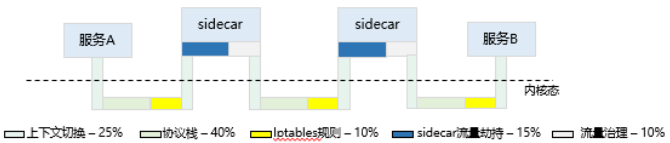
<p>You'd be right, but take a look at this breakdown of where the sidecar latency actually comes from:</p>
<p><img decoding="async" loading="lazy" alt="Sources of sidecar proxy latency — 90% is plumbing overhead" src="https://kmesh.net/assets/images/latency-breakdown-591ea477ae556273fba1e62a36f86d1e.png" width="1024" height="559" class="img_ev3q"></p>
<p>This is the harsh truth of traditional service meshes: <strong>90% of the overhead is just plumbing.</strong> Only a tiny sliver of the time (10%) is actually spent doing the traffic governance we bought the service mesh for in the first place! The rest is just the tax we pay for bouncing data back and forth between the kernel and our user-space proxy.</p>
<p>And the toll adds up. According to Istio's official benchmarks, <strong>a single Envoy proxy adds 2.65 milliseconds of latency</strong> to the 90th percentile:</p>
<p><img decoding="async" loading="lazy" alt="Istio performance benchmark — 2.65ms latency per proxy" src="https://kmesh.net/assets/images/istio-performance-7cd3e1b676ec6942e219514a71e38e8b.png" width="810" height="197" class="img_ev3q"></p>
<p><img decoding="async" loading="lazy" alt="Istio latency analysis — sidecar overhead breakdown" src="https://kmesh.net/assets/images/istio-perf-analysis-c73a4fa7d9760c5d38dd6fc175c4c07b.png" width="1024" height="1024" class="img_ev3q"></p>
<p>But, what if we could just run our networking logic directly inside the kernel, right where the traffic is already flowing?</p>
<p>That is done via eBPF.</p>
<hr>
<h2 class="anchor anchorWithStickyNavbar_LWe7" id="what-is-ebpf">What is eBPF?<a href="https://kmesh.net/blog/kmesh-service-mesh-explained#what-is-ebpf" class="hash-link" aria-label="Direct link to What is eBPF?" title="Direct link to What is eBPF?">​</a></h2>
<p><strong>eBPF</strong> (extended Berkeley Packet Filter) <strong>allows you to run your own custom programs safely inside the Linux kernel, without having to change the kernel source code or reboot the machine.</strong></p>
<h3 class="anchor anchorWithStickyNavbar_LWe7" id="how-does-that-even-work">How Does That Even Work?<a href="https://kmesh.net/blog/kmesh-service-mesh-explained#how-does-that-even-work" class="hash-link" aria-label="Direct link to How Does That Even Work?" title="Direct link to How Does That Even Work?">​</a></h3>
<p>Imagine the Linux kernel is a highly secure bank vault. Before eBPF, if you wanted to change how the vault operated, you had to rewrite the blueprint and rebuild the vault (writing a kernel module). It was slow, dangerous, and one mistake could blow the whole thing up.</p>
<p>eBPF changes the game. It gives you a way to slide instructions under the vault door.</p>
<p><img decoding="async" loading="lazy" alt="How eBPF works — hooks, verifier, and JIT compilation inside the kernel" src="https://kmesh.net/assets/images/ebpf-concept-a8b8212393a8a3ec04c695f863b0b0ef.png" width="1024" height="559" class="img_ev3q"></p>
<p>As you can see in the diagram, you write your eBPF program, and a built-in <strong>Verifier</strong> checks it to ensure it won't crash or get stuck in an infinite loop. Once it passes the security check, the kernel compiles it and attaches it to specific "hooks" on the network path.</p>
<p>Your custom code is now running safely inside the vault, at native wire speed.</p>
<h3 class="anchor anchorWithStickyNavbar_LWe7" id="why-this-changes-everything-for-service-meshes">Why This Changes Everything for Service Meshes<a href="https://kmesh.net/blog/kmesh-service-mesh-explained#why-this-changes-everything-for-service-meshes" class="hash-link" aria-label="Direct link to Why This Changes Everything for Service Meshes" title="Direct link to Why This Changes Everything for Service Meshes">​</a></h3>
<p><em>A hook is just a checkpoint in the kernel's code where eBPF programs can be attached. Each one works at a specific stage of the packet's journey, letting you inspect, modify, or redirect traffic without touching the kernel source.</em></p>
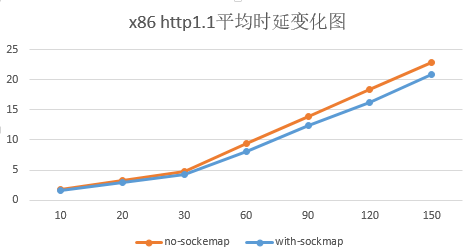
<p>With eBPF, we can short-circuit that entire journey. Look at the bottom hook in the diagram above — <strong>SK_MSG</strong>. It lets an eBPF program grab traffic right at the source and redirect it straight to its destination, without ever leaving the kernel. No detour through user space. No bouncing.</p>
<p><img decoding="async" loading="lazy" alt="eBPF sockmap redirecting traffic " src="https://kmesh.net/assets/images/ebpf-sockmap-pods-0a527ca9c8593bb906d894f0dc22acec.png" width="1024" height="1024" class="img_ev3q"></p>
<p>Think of it like this: instead of your package going through six different post offices (the bouncing problem), eBPF lets a worker inside the sorting facility hand it directly to the right truck. Same building. No unnecessary trips.</p>
<p><strong>This is the missing piece.</strong> If we can run our routing and load balancing logic as eBPF programs inside the kernel, we don't need sidecar proxies sitting in user space anymore.</p>
<p><em>And that is exactly what Kmesh does. Let's dive into it.</em></p>
<hr>
<h2 class="anchor anchorWithStickyNavbar_LWe7" id="how-kmesh-works">How Kmesh Works<a href="https://kmesh.net/blog/kmesh-service-mesh-explained#how-kmesh-works" class="hash-link" aria-label="Direct link to How Kmesh Works" title="Direct link to How Kmesh Works">​</a></h2>
<p>Now that we understand eBPF, the idea behind Kmesh becomes almost obvious: <strong>move the traffic governance logic from user-space sidecar proxies into the kernel using eBPF.</strong></p>
<h3 class="anchor anchorWithStickyNavbar_LWe7" id="from-3-hops-to-1-hop">From 3 Hops to 1 Hop<a href="https://kmesh.net/blog/kmesh-service-mesh-explained#from-3-hops-to-1-hop" class="hash-link" aria-label="Direct link to From 3 Hops to 1 Hop" title="Direct link to From 3 Hops to 1 Hop">​</a></h3>
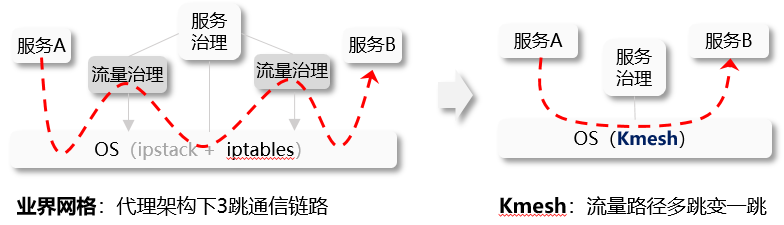
<p>In a traditional service mesh, every request between two services takes a route through three separate connections:</p>
<blockquote>
<p><strong>App A → Envoy Sidecar A → Envoy Sidecar B → App B</strong></p>
</blockquote>
<p>Three hops. Three TCP connections. Six boundary crossings between user space and kernel space. We've seen why that's expensive.</p>
<p>Kmesh removes the sidecars entirely:</p>
<p><img decoding="async" loading="lazy" alt="Traditional Mesh (3 Hops) vs Kmesh (1 Hop) — data path comparison" src="https://kmesh.net/assets/images/kmesh-datapath-compare-18c30fb8583fe1184e293940f22b6901.png" width="1024" height="1024" class="img_ev3q"></p>
<p>On the left, you can see the traditional approach where traffic bounces up to sidecar proxies for governance, then back down through the OS. On the right, Kmesh moves that governance logic directly into the OS layer using eBPF. The result is a single, clean hop:</p>
<blockquote>
<p><strong>App A → Kernel (Kmesh eBPF) → App B</strong></p>
</blockquote>
<p>One connection. Two boundary crossings. The routing decision, the load balancing, the traffic policy — it all happens inside the kernel, right on the natural path the packet was already taking.</p>
<h3 class="anchor anchorWithStickyNavbar_LWe7" id="how-does-kmesh-know-where-to-route-traffic">How Does Kmesh Know Where to Route Traffic?<a href="https://kmesh.net/blog/kmesh-service-mesh-explained#how-does-kmesh-know-where-to-route-traffic" class="hash-link" aria-label="Direct link to How Does Kmesh Know Where to Route Traffic?" title="Direct link to How Does Kmesh Know Where to Route Traffic?">​</a></h3>
<p>Kmesh doesn't reinvent any of the control plane logic. If you're already using Istio, defining your traffic rules works exactly the same way. Same YAML files, same routing policies, same canary deployments.</p>
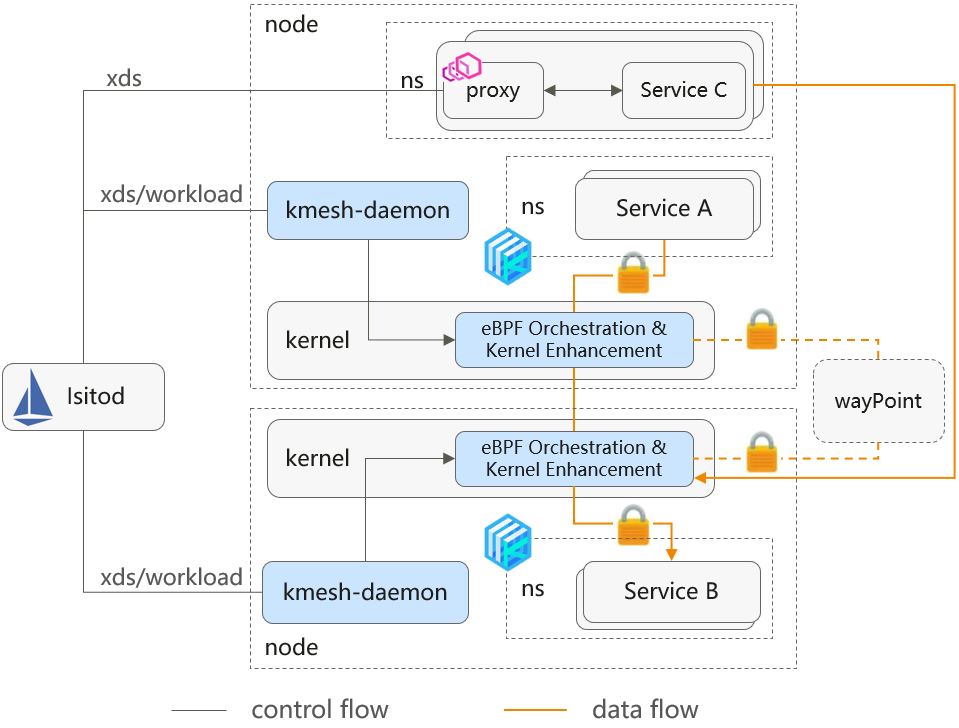
<p><img decoding="async" loading="lazy" alt="Kmesh architecture — kmesh-daemon translates xDS rules into eBPF programs" src="https://kmesh.net/assets/images/kmesh-daemon-flow-931f7a64dc5151a31e8dfb66b4020263.png" width="1024" height="1024" class="img_ev3q"></p>
<p>As the diagram shows, a lightweight component called <strong>kmesh-daemon</strong> runs on each node in your cluster. Its job is:</p>
<ol>
<li><strong>Listening</strong> to Istio's control plane for routing rules via <strong>xDS</strong> (a standard protocol that Istio uses to push configuration to its data plane) — both Envoy and Kmesh use xDS.</li>
<li><strong>Translate</strong> those rules into eBPF programs.</li>
<li><strong>Load</strong> them into the kernel.</li>
</ol>
<p>Once those eBPF programs are in the kernel, traffic between Pod A and Pod B is governed at wire speed — no proxy containers, no extra pods, no resource overhead per service.</p>
<h3 class="anchor anchorWithStickyNavbar_LWe7" id="what-about-complex-http-routing-l4-vs-l7">What About Complex HTTP Routing? (L4 vs L7)<a href="https://kmesh.net/blog/kmesh-service-mesh-explained#what-about-complex-http-routing-l4-vs-l7" class="hash-link" aria-label="Direct link to What About Complex HTTP Routing? (L4 vs L7)" title="Direct link to What About Complex HTTP Routing? (L4 vs L7)">​</a></h3>
<p>Not all traffic is equal, and this is where Kmesh gets smart about it.</p>
<p><strong>Layer 4 (L4)</strong> traffic — basic TCP connections, load balancing, connection management — is perfect for eBPF. It's straightforward enough that eBPF handles it entirely inside the kernel with zero overhead.</p>
<p>But <strong>Layer 7 (L7)</strong> traffic is a different beast. Think HTTP header-based routing (<em>"send requests with header X-Version: v2 to the canary deployment"</em>), complex retry policies, or request-level authentication. These need deep packet inspection that goes beyond what eBPF programs can efficiently do today.</p>
<p>Kmesh solves this with a smart split:</p>
<p><img decoding="async" loading="lazy" alt="Kmesh handles L4 vs L7 traffic differently — fast kernel path vs shared Waypoint Proxy" src="https://kmesh.net/assets/images/kmesh-l4-l7-split-fdf737a26e5e5100bef35142c5c6dc87.png" width="1024" height="1024" class="img_ev3q"></p>
<p>As you can see, most of your traffic (L4) takes the fast path — handled entirely in the kernel by eBPF with zero proxy overhead. Only the traffic that genuinely needs deep HTTP inspection gets routed to a shared <strong>Waypoint Proxy</strong>.</p>
<p>The key difference from traditional meshes: instead of <em>every</em> pod paying the sidecar tax, only the small slice of traffic that actually needs L7 processing touches a proxy. Everything else goes through the kernel.</p>
<hr>
<h2 class="anchor anchorWithStickyNavbar_LWe7" id="kmesh-vs-traditional-mesh">Kmesh vs Traditional Mesh<a href="https://kmesh.net/blog/kmesh-service-mesh-explained#kmesh-vs-traditional-mesh" class="hash-link" aria-label="Direct link to Kmesh vs Traditional Mesh" title="Direct link to Kmesh vs Traditional Mesh">​</a></h2>
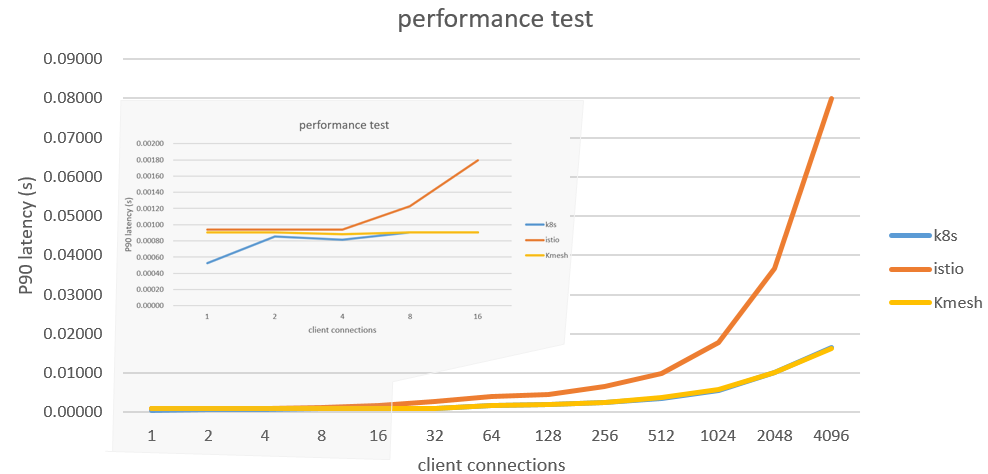
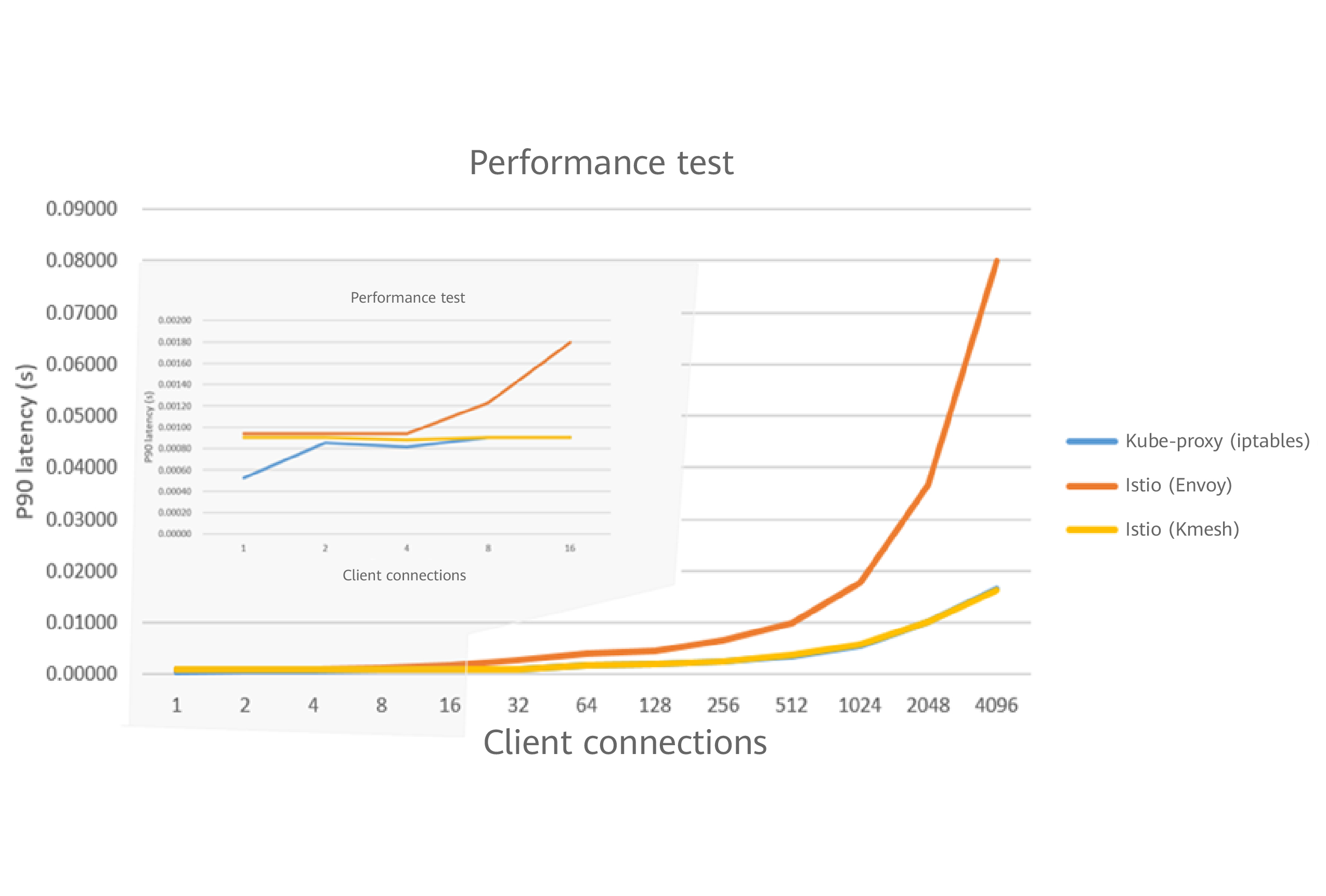
<p>Let's get to the numbers. This performance chart from the Kmesh project tells the whole story:</p>
<p><img decoding="async" loading="lazy" alt="Kmesh performance test — near-zero overhead compared to raw Kubernetes" src="https://kmesh.net/assets/images/kmesh-performance-3b8e015c3962aaca431d0f7cbcc1ec28.png" width="988" height="474" class="img_ev3q"></p>
<p>Look at what happens as connections scale up. The blue line (raw Kubernetes, no mesh) and the yellow line (Kmesh) stay nearly flat — Kmesh adds almost zero overhead compared to having no mesh at all. The orange line (Istio with Envoy sidecars) shoots up dramatically.</p>
<p>Here's the full comparison:</p>
<table><thead><tr><th></th><th><strong>Traditional Mesh</strong></th><th><strong>Kmesh</strong></th></tr></thead><tbody><tr><td><strong>Data path</strong></td><td>3 hops (App → Sidecar → Sidecar → App)</td><td>1 hop (App → Kernel → App)</td></tr><tr><td><strong>Latency overhead</strong></td><td>+2.65ms per hop</td><td>Near-zero</td></tr><tr><td><strong>Sidecar per pod</strong></td><td>Yes (0.35 vCPU + 40MB each)</td><td>No</td></tr><tr><td><strong>L4 performance</strong></td><td>User-space proxy</td><td>Kernel-speed eBPF</td></tr><tr><td><strong>L7 support</strong></td><td>Per-pod Envoy sidecar</td><td>Shared Waypoint Proxy</td></tr><tr><td><strong>Works with Istio</strong></td><td>Yes (native)</td><td>Yes (same xDS config)</td></tr><tr><td><strong>Linux kernel requirement</strong></td><td>Any</td><td>5.10+ (for eBPF features)</td></tr></tbody></table>
<p><strong>When to use Kmesh:</strong> You care about latency or you're running a modern Linux kernel (5.10+), and you want the benefits of a service mesh without the resource overhead.</p>
<p><strong>When to stick with traditional sidecars:</strong> You're on older kernels that don't support the required eBPF features, or you need every single request to go through deep L7 processing.</p>
<h3 class="anchor anchorWithStickyNavbar_LWe7" id="in-short">In Short<a href="https://kmesh.net/blog/kmesh-service-mesh-explained#in-short" class="hash-link" aria-label="Direct link to In Short" title="Direct link to In Short">​</a></h3>
<p>Traditional service meshes use sidecar proxies that bounce traffic between user space and kernel space — adding latency and eating resources. Kmesh uses eBPF to handle traffic governance directly inside the Linux kernel. Same features (load balancing, mTLS, routing), but without the sidecar overhead.</p>
<hr>
<h2 class="anchor anchorWithStickyNavbar_LWe7" id="getting-started">Getting Started<a href="https://kmesh.net/blog/kmesh-service-mesh-explained#getting-started" class="hash-link" aria-label="Direct link to Getting Started" title="Direct link to Getting Started">​</a></h2>
<p>Kmesh installs via Helm on any Kubernetes cluster with a modern Linux kernel. If you're already running Istio, Kmesh plugs right in as an alternative data plane — your existing traffic policies keep working.</p>
<ul>
<li>👉 <a href="https://kmesh.net/docs/setup/quickstart/" target="_blank" rel="noopener noreferrer"><strong>Quick Start Guide</strong></a> — Get Kmesh running in under 5 minutes</li>
<li>👉 <a href="https://github.com/kmesh-net/kmesh" target="_blank" rel="noopener noreferrer"><strong>GitHub Repository</strong></a> — Star the project and explore the code</li>
<li>👉 <a href="https://app.slack.com/client/T08PSQ7BQ/C06BU2GB8NL" target="_blank" rel="noopener noreferrer"><strong>Community Slack</strong></a> — Say hi, ask questions, find your first issue</li>
</ul>
<p>Kmesh is a <strong>CNCF Sandbox project</strong> and actively welcomes contributors. Whether it's fixing a bug, improving documentation, or just exploring the codebase — every contribution matters.</p>
<p><em>If you found this useful, share it with someone who's new to cloud-native networking — and come build with us.</em></p>]]></content>
        <author>
            <name>Gaurav Patil</name>
            <uri>https://github.com/devGPP23</uri>
        </author>
        <category label="introduce" term="introduce"/>
        <category label="beginner-guide" term="beginner-guide"/>
        <category label="eBPF" term="eBPF"/>
        <category label="service-mesh" term="service-mesh"/>
    </entry>
    <entry>
        <title type="html"><![CDATA[OSPP-2025 Automating Documentation and Release Workflows for Kmesh]]></title>
        <id>https://kmesh.net/blog/ospp_2025_automation_workflow</id>
        <link href="https://kmesh.net/blog/ospp_2025_automation_workflow"/>
        <updated>2025-09-30T00:00:00.000Z</updated>
        <summary type="html"><![CDATA[Introduction]]></summary>
        <content type="html"><![CDATA[<h2 class="anchor anchorWithStickyNavbar_LWe7" id="introduction">Introduction<a href="https://kmesh.net/blog/ospp_2025_automation_workflow#introduction" class="hash-link" aria-label="Direct link to Introduction" title="Direct link to Introduction">​</a></h2>
<p>Hello everyone! I’m <strong>Yash Israni</strong>, an open-source enthusiast passionate about automation, DevOps practices, and building tools that eliminate repetitive manual work.</p>
<p>This summer, I had the privilege of participating in the <strong>Open-Source Promotion Plan (OSPP) 2025</strong>, where I collaborated with the <a href="https://github.com/kmesh-net/kmesh" target="_blank" rel="noopener noreferrer">Kmesh</a> community to automate documentation and release workflows. Over the course of three months, I designed and implemented GitHub Actions pipelines that keep the Kmesh website always up-to-date, properly versioned, and reviewed for language quality.</p>
<p>In this blog, I’ll share my journey—from acceptance to project execution, the technical decisions I made, and the lessons I learned along the way.</p>
<h2 class="anchor anchorWithStickyNavbar_LWe7" id="ospp-program--overview">OSPP Program – Overview<a href="https://kmesh.net/blog/ospp_2025_automation_workflow#ospp-program--overview" class="hash-link" aria-label="Direct link to OSPP Program – Overview" title="Direct link to OSPP Program – Overview">​</a></h2>
<p>The <strong>Open-Source Promotion Plan (OSPP)</strong>, organized by the Institute of Software, Chinese Academy of Sciences (ISCAS), gives students and early-career contributors the opportunity to gain hands-on experience by working on impactful open-source projects under the guidance of mentors.</p>
<p>Each term runs for about <strong>three months</strong> (1 July – 30 September in my case). Contributors not only deliver real-world features but also learn how large open-source communities operate.</p>
<hr>
<h2 class="anchor anchorWithStickyNavbar_LWe7" id="my-acceptance">My Acceptance<a href="https://kmesh.net/blog/ospp_2025_automation_workflow#my-acceptance" class="hash-link" aria-label="Direct link to My Acceptance" title="Direct link to My Acceptance">​</a></h2>
<p>I have always enjoyed contributing to open source, and my interests naturally align with automation and cloud-native tooling. When I saw that <strong>Kmesh</strong> was offering projects under OSPP 2025, I was immediately drawn to their proposal for automating documentation workflows.</p>
<p>The project addressed a clear pain point: documentation updates and versioning were being done manually, often lagging behind releases. The opportunity to replace repetitive tasks with reliable automation felt both impactful and challenging.</p>
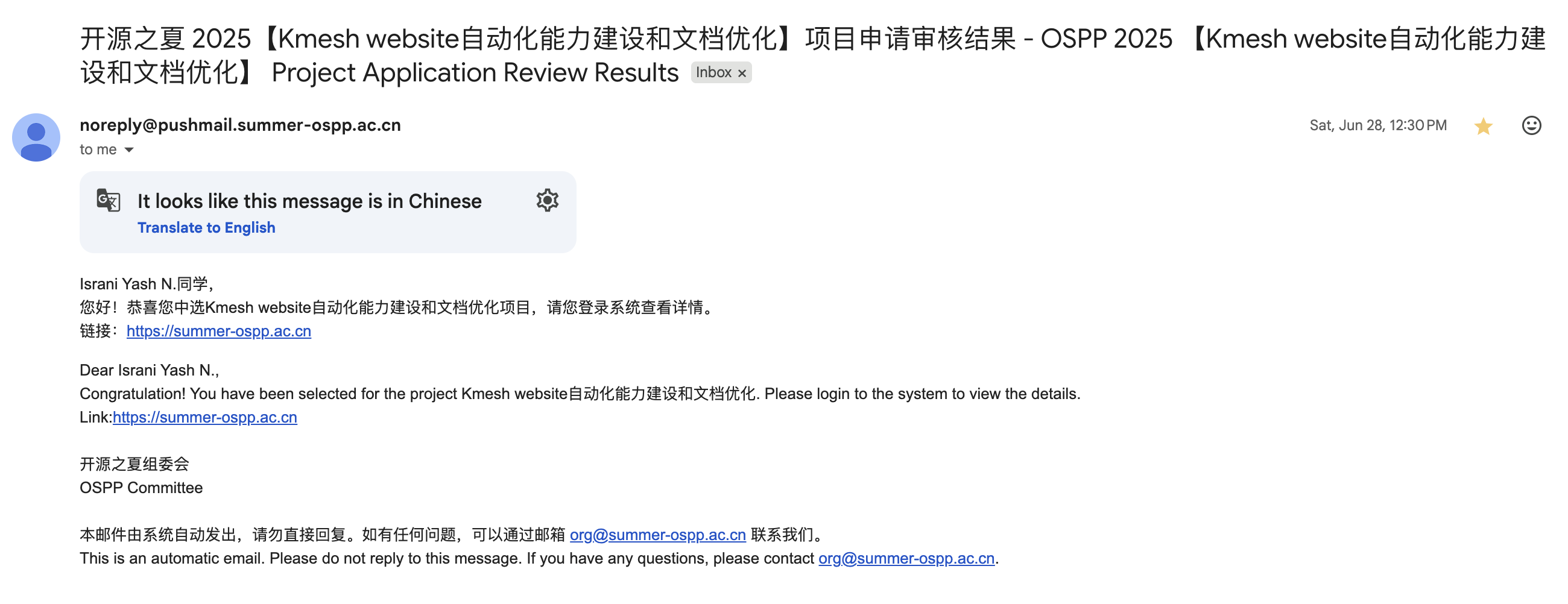
<p>I received my <strong>acceptance email on 28 June 2025</strong>, and the program officially ran from <strong>1 July to 30 September</strong>.</p>
<p><img decoding="async" loading="lazy" alt="email" src="https://kmesh.net/assets/images/acceptance-email-bfbc6527d55aace0fa05710f07b7b85f.png" width="2600" height="1002" class="img_ev3q"></p>
<p>Interestingly, I was able to complete the majority of my project work <strong>before the mid-term evaluation</strong>, so that checkpoint was skipped, giving me extra time to refine the workflows and write proper usage guidelines.</p>
<p><img decoding="async" loading="lazy" alt="slack" src="https://kmesh.net/assets/images/conversation-c31e1b10f154d7c82d2eb819fd294646.png" width="1502" height="468" class="img_ev3q"></p>
<hr>
<h2 class="anchor anchorWithStickyNavbar_LWe7" id="project-workthrough">Project Workthrough<a href="https://kmesh.net/blog/ospp_2025_automation_workflow#project-workthrough" class="hash-link" aria-label="Direct link to Project Workthrough" title="Direct link to Project Workthrough">​</a></h2>
<h3 class="anchor anchorWithStickyNavbar_LWe7" id="1-doc-sync-workflow">1. Doc-Sync Workflow<a href="https://kmesh.net/blog/ospp_2025_automation_workflow#1-doc-sync-workflow" class="hash-link" aria-label="Direct link to 1. Doc-Sync Workflow" title="Direct link to 1. Doc-Sync Workflow">​</a></h3>
<ul>
<li><strong>Trigger:</strong> on every push to the main branch</li>
<li><strong>Action:</strong> opens a pull request in the website repository with the latest documentation updates</li>
<li><strong>Enhancements:</strong> automatically labels the PR for triage and runs the site’s CI pipeline to validate changes</li>
</ul>
<h3 class="anchor anchorWithStickyNavbar_LWe7" id="2-release-versioning-workflow">2. Release Versioning Workflow<a href="https://kmesh.net/blog/ospp_2025_automation_workflow#2-release-versioning-workflow" class="hash-link" aria-label="Direct link to 2. Release Versioning Workflow" title="Direct link to 2. Release Versioning Workflow">​</a></h3>
<ul>
<li><strong>Trigger:</strong> when a new Git tag is pushed (release event)</li>
<li><strong>Action:</strong> generates a versioned snapshot of the documentation in the website repository</li>
<li><strong>Enhancements:</strong> automatically opens a PR for any versioning-related changes</li>
</ul>
<h3 class="anchor anchorWithStickyNavbar_LWe7" id="3-chinese-grammar-checker-workflow">3. Chinese Grammar Checker Workflow<a href="https://kmesh.net/blog/ospp_2025_automation_workflow#3-chinese-grammar-checker-workflow" class="hash-link" aria-label="Direct link to 3. Chinese Grammar Checker Workflow" title="Direct link to 3. Chinese Grammar Checker Workflow">​</a></h3>
<ul>
<li><strong>Trigger:</strong> on pull requests that modify Chinese documentation</li>
<li><strong>Action:</strong> uses the <strong>LanguageTool API</strong> to detect grammar and style issues</li>
<li><strong>Enhancements:</strong> posts line-level review comments as <strong>warnings (non-blocking)</strong> so contributors receive suggestions without being blocked from merging</li>
</ul>
<hr>
<h2 class="anchor anchorWithStickyNavbar_LWe7" id="results">Results<a href="https://kmesh.net/blog/ospp_2025_automation_workflow#results" class="hash-link" aria-label="Direct link to Results" title="Direct link to Results">​</a></h2>
<table><thead><tr><th>Metric</th><th>Before (Manual)</th><th>After (Automated)</th><th>Improvement</th></tr></thead><tbody><tr><td>Docs updated after release</td><td>3–5 days</td><td>&lt; 1 minute</td><td><strong>&gt;99% faster</strong> 🚀</td></tr><tr><td>Website versioning updates</td><td>Delayed / inconsistent</td><td>Instant with each release</td><td><strong>100% reliable</strong> ✅</td></tr><tr><td>Review time for Chinese docs</td><td>~20 min per PR</td><td>~1 min per PR</td><td><strong>95% time saved</strong> ⏱️</td></tr></tbody></table>
<p>These workflows have effectively <strong>eliminated delays and manual errors</strong>, ensuring Kmesh documentation stays accurate and up-to-date.</p>
<p>All three workflows are now live in both the Kmesh main repository and website repository under <code>.github/workflows</code>.</p>
<hr>
<h2 class="anchor anchorWithStickyNavbar_LWe7" id="key-technical-decisions">Key Technical Decisions<a href="https://kmesh.net/blog/ospp_2025_automation_workflow#key-technical-decisions" class="hash-link" aria-label="Direct link to Key Technical Decisions" title="Direct link to Key Technical Decisions">​</a></h2>
<ul>
<li>Adopted <strong>repository dispatch</strong> for secure cross-repo communication, eliminating the need for long-lived personal tokens</li>
<li>Granted the GitHub Actions token <strong>read &amp; write permissions</strong> only where necessary, while delegating other operations to a scoped bot account for better security</li>
<li>Implemented <strong>Docusaurus-compatible versioning</strong> by dynamically generating <code>versions.json</code>, keeping navigation in sync with releases</li>
<li>Added <strong>robust error handling</strong> in the doc-sync workflow to gracefully manage missing folders or files, preventing workflow crashes</li>
</ul>
<hr>
<h2 class="anchor anchorWithStickyNavbar_LWe7" id="mentorship-experience">Mentorship Experience<a href="https://kmesh.net/blog/ospp_2025_automation_workflow#mentorship-experience" class="hash-link" aria-label="Direct link to Mentorship Experience" title="Direct link to Mentorship Experience">​</a></h2>
<p>My mentors, <strong>Li Zhencheng</strong> and <strong>Zhonghu Xu</strong>, along with the Kmesh maintainers, were consistently supportive—whether through GitHub reviews or quick clarifications on Slack. Even though I delivered my main workflows ahead of schedule, their feedback helped me refine edge cases and improve overall reliability.</p>
<p>As a recognition of my contributions and active involvement, the Kmesh community welcomed me as a <strong>member of the organization</strong>. This acknowledgment was both humbling and motivating, and it strengthened my commitment to continue contributing to Kmesh and supporting its growth.</p>
<hr>
<h2 class="anchor anchorWithStickyNavbar_LWe7" id="lessons-learned">Lessons Learned<a href="https://kmesh.net/blog/ospp_2025_automation_workflow#lessons-learned" class="hash-link" aria-label="Direct link to Lessons Learned" title="Direct link to Lessons Learned">​</a></h2>
<ol>
<li><strong>Automation empowers humans</strong> – the goal isn’t to replace contributors but to free them from repetitive tasks so they can focus on meaningful reviews and design.</li>
<li><strong>Start small and iterate</strong> – building workflows in incremental, testable steps made debugging and maintenance far easier than deploying everything at once.</li>
<li><strong>Security matters</strong> – applying the principle of least privilege to tokens and permissions reduced risk while keeping automation safe.</li>
<li><strong>Expect edge cases</strong> – workflows behave differently across environments; testing on forks and multiple platforms prevented surprises in production.</li>
<li><strong>Documentation is part of the code</strong> – writing clear workflow descriptions and PR comments ensured maintainers trusted and understood what the automation was doing.</li>
</ol>
<hr>
<h2 class="anchor anchorWithStickyNavbar_LWe7" id="acknowledgements">Acknowledgements<a href="https://kmesh.net/blog/ospp_2025_automation_workflow#acknowledgements" class="hash-link" aria-label="Direct link to Acknowledgements" title="Direct link to Acknowledgements">​</a></h2>
<p>I would like to sincerely thank my mentors <strong>Li Zhencheng</strong> and <strong>Zhonghu Xu</strong> for their guidance, quick reviews, and encouragement. Thanks also to the <strong>OSPP program staff</strong> for ensuring smooth operations throughout the term.</p>
<hr>
<h2 class="anchor anchorWithStickyNavbar_LWe7" id="links">Links<a href="https://kmesh.net/blog/ospp_2025_automation_workflow#links" class="hash-link" aria-label="Direct link to Links" title="Direct link to Links">​</a></h2>
<ul>
<li><a href="https://github.com/kmesh-net/kmesh/issues/1412" target="_blank" rel="noopener noreferrer">Project issue &amp; Pull requests</a></li>
<li><a href="https://summer-ospp.ac.cn/" target="_blank" rel="noopener noreferrer">OSPP website</a></li>
<li><a href="https://github.com/yashisrani" target="_blank" rel="noopener noreferrer">Yash Israni's github</a></li>
</ul>
<hr>]]></content>
        <author>
            <name>Yash Israni</name>
            <uri>https://github.com/yashisrani</uri>
        </author>
        <category label="OSPP" term="OSPP"/>
        <category label="OSPP-2025" term="OSPP-2025"/>
        <category label="automation" term="automation"/>
        <category label="GitHub-Actions" term="GitHub-Actions"/>
        <category label="documentation" term="documentation"/>
        <category label="kmesh" term="kmesh"/>
    </entry>
    <entry>
        <title type="html"><![CDATA[OSPP-2025 Completing eBPF Unit Tests for Kmesh]]></title>
        <id>https://kmesh.net/blog/ospp_2025_ut_test</id>
        <link href="https://kmesh.net/blog/ospp_2025_ut_test"/>
        <updated>2025-09-30T00:00:00.000Z</updated>
        <summary type="html"><![CDATA[Introduction]]></summary>
        <content type="html"><![CDATA[<h2 class="anchor anchorWithStickyNavbar_LWe7" id="introduction">Introduction<a href="https://kmesh.net/blog/ospp_2025_ut_test#introduction" class="hash-link" aria-label="Direct link to Introduction" title="Direct link to Introduction">​</a></h2>
<p>Hello everyone! I'm <strong>Wu Xi</strong>, an open source enthusiast with deep interests in kernel networking, eBPF, and test engineering.</p>
<p>This summer, I had the privilege to participate in <strong>Open Source Promotion Plan (OSPP) 2025</strong> and collaborate with the <a href="https://github.com/kmesh-net/kmesh" target="_blank" rel="noopener noreferrer">Kmesh</a> community, focusing on eBPF program UT enhancement. Over three months, I primarily completed unit testing work for Kmesh eBPF programs. I wrote and successfully ran UT test code for sendMsg and cgroup programs, and supplemented testing documentation based on this work. Kmesh community developers can now verify eBPF program logic without depending on real kernel mounting and traffic simulation, significantly improving development efficiency.
In this blog, I'll share my complete experience—from acceptance to project execution, technical choices, and lessons learned along the way.</p>
<h2 class="anchor anchorWithStickyNavbar_LWe7" id="ospp-project-overview">OSPP Project Overview<a href="https://kmesh.net/blog/ospp_2025_ut_test#ospp-project-overview" class="hash-link" aria-label="Direct link to OSPP Project Overview" title="Direct link to OSPP Project Overview">​</a></h2>
<p><strong>Open Source Promotion Plan (OSPP)</strong> is organized by the <strong>Institute of Software, Chinese Academy of Sciences (ISCAS)</strong>, providing students and early-career developers with opportunities to collaborate on real open source projects under the guidance of experienced mentors.</p>
<p>Each session lasts approximately <strong>three months</strong> (my session was July 1st – September 30th). Participants not only deliver functional features but also experience firsthand how large open source communities operate.</p>
<hr>
<h2 class="anchor anchorWithStickyNavbar_LWe7" id="my-acceptance-experience">My Acceptance Experience<a href="https://kmesh.net/blog/ospp_2025_ut_test#my-acceptance-experience" class="hash-link" aria-label="Direct link to My Acceptance Experience" title="Direct link to My Acceptance Experience">​</a></h2>
<p>I've always enjoyed contributing to open source, and my interests happen to focus on network kernels and cloud-native tools. When I saw the "eBPF" and "unit testing" related topics offered by <strong>Kmesh</strong> in OSPP 2025, I was immediately attracted.</p>
<p>The pain points this project aimed to solve were very clear: eBPF program verification has long relied on black-box testing, which is not only inefficient but also has coverage that depends on testers' experience. By introducing a unit testing framework and supplementing key use cases, functional verification can be completed without requiring real kernel mounting, which is both valuable and challenging.</p>
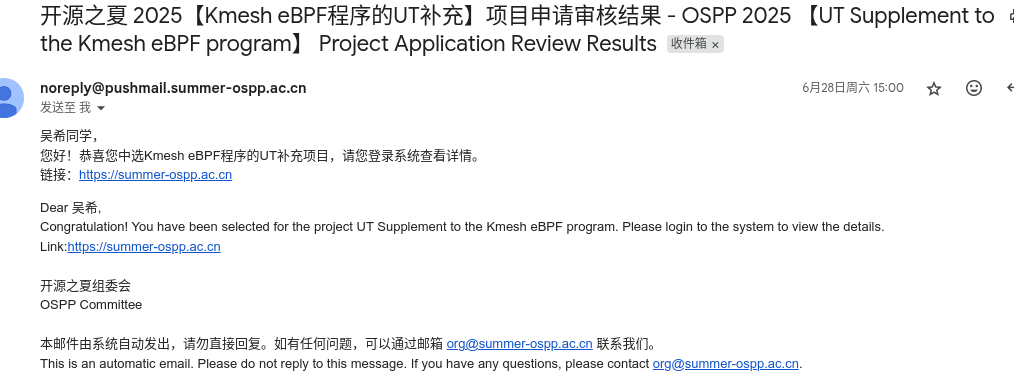
<p>I received my acceptance email on <strong>June 28, 2025</strong>, with the official project cycle running from <strong>July 1st to September 30th</strong>.</p>
<p><img decoding="async" loading="lazy" alt="email" src="https://kmesh.net/assets/images/acceptance-email-daaf0bebff442710adb9b2815abe6e4c.png" width="1014" height="387" class="img_ev3q"></p>
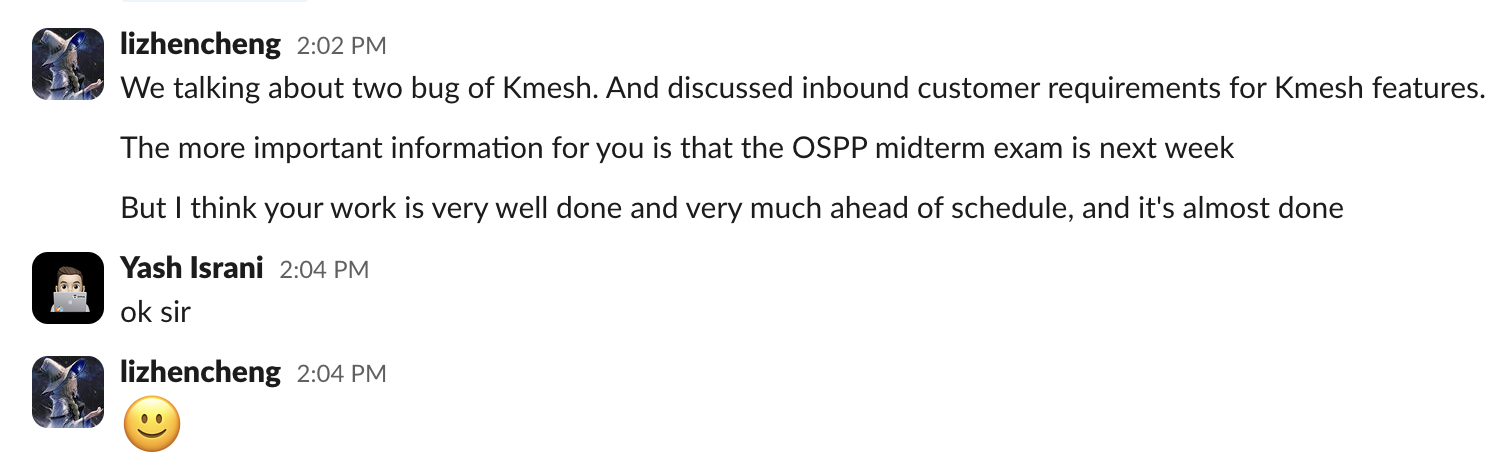
<p>Interestingly, I completed the main work of the project <strong>before the mid-term evaluation</strong>, so that stage was skipped. This gave me more time to refine the workflow and write usage documentation.</p>
<p><img decoding="async" loading="lazy" alt="slack" src="https://kmesh.net/assets/images/conversation1-c0e24f827a936614a852ff68bd3f16f1.png" width="1271" height="560" class="img_ev3q"></p>
<p><img decoding="async" loading="lazy" alt="slack" src="https://kmesh.net/assets/images/conversation2-35aa72a7675acdbab5218f6a4023be89.png" width="1147" height="660" class="img_ev3q"></p>
<p><img decoding="async" loading="lazy" alt="slack" src="https://kmesh.net/assets/images/conversation3-2a2a07f46f5296585dfcd5842fa9ed42.png" width="1154" height="631" class="img_ev3q"></p>
<p><img decoding="async" loading="lazy" alt="slack" src="https://kmesh.net/assets/images/conversation4-aaf9db9ef5f65c80a7d36350a303b06a.png" width="1170" height="553" class="img_ev3q"></p>
<hr>
<h2 class="anchor anchorWithStickyNavbar_LWe7" id="project-work-content">Project Work Content<a href="https://kmesh.net/blog/ospp_2025_ut_test#project-work-content" class="hash-link" aria-label="Direct link to Project Work Content" title="Direct link to Project Work Content">​</a></h2>
<h3 class="anchor anchorWithStickyNavbar_LWe7" id="1-ebpf-unit-testing-framework-construction">1. eBPF Unit Testing Framework Construction<a href="https://kmesh.net/blog/ospp_2025_ut_test#1-ebpf-unit-testing-framework-construction" class="hash-link" aria-label="Direct link to 1. eBPF Unit Testing Framework Construction" title="Direct link to 1. eBPF Unit Testing Framework Construction">​</a></h3>
<ul>
<li><strong>Core Technology:</strong> eBPF kernel function simulation based on #define mock macro replacement</li>
<li><strong>Test Coverage:</strong> Covers sendmsg TLV encoding, cgroup sock connection management, cgroup skb traffic processing</li>
<li><strong>Innovation:</strong> Embedding test infrastructure in production code through conditional compilation #ifdef KMESH_UNIT_TEST</li>
</ul>
<h3 class="anchor anchorWithStickyNavbar_LWe7" id="2-sendmsg-tlv-encoding-verification">2. sendmsg TLV Encoding Verification<a href="https://kmesh.net/blog/ospp_2025_ut_test#2-sendmsg-tlv-encoding-verification" class="hash-link" aria-label="Direct link to 2. sendmsg TLV Encoding Verification" title="Direct link to 2. sendmsg TLV Encoding Verification">​</a></h3>
<ul>
<li><strong>Test Objective:</strong> Verify correctness of TLV metadata encoding in waypoint scenarios</li>
<li><strong>Test Data:</strong> IPv4 (8.8.8.8:53) and IPv6 (fc00:dead:beef<!-- -->🔢<!-- -->🔡<!-- -->53) simulation data</li>
<li><strong>Verification Mechanism:</strong> Real-time parsing of TLV message format, verifying integrity of type, length, IP, and port</li>
</ul>
<h3 class="anchor anchorWithStickyNavbar_LWe7" id="3-cgroup-lifecycle-management-testing">3. cgroup Lifecycle Management Testing<a href="https://kmesh.net/blog/ospp_2025_ut_test#3-cgroup-lifecycle-management-testing" class="hash-link" aria-label="Direct link to 3. cgroup Lifecycle Management Testing" title="Direct link to 3. cgroup Lifecycle Management Testing">​</a></h3>
<ul>
<li><strong>Hook Coverage:</strong> cgroup/connect4, cgroup/connect6, cgroup/sendmsg4, cgroup/recvmsg4</li>
<li><strong>Test Scenarios:</strong> kmesh management process registration/deregistration, backend connections without waypoint, tail call mechanism</li>
<li><strong>Verification Method:</strong> Verify netns cookie management correctness through km_manage map state changes</li>
</ul>
<hr>
<h2 class="anchor anchorWithStickyNavbar_LWe7" id="project-results">Project Results<a href="https://kmesh.net/blog/ospp_2025_ut_test#project-results" class="hash-link" aria-label="Direct link to Project Results" title="Direct link to Project Results">​</a></h2>
<table><thead><tr><th>Metric</th><th>Before (Manual)</th><th>After (Automated)</th><th>Improvement</th></tr></thead><tbody><tr><td>TLV Encoding Verification Time</td><td>30-60 minutes/scenario</td><td>&lt; 5 seconds/scenario</td><td><strong>&gt;99% Faster</strong> 🚀</td></tr><tr><td>cgroup hook Regression Testing</td><td>Half-day manual deployment verification</td><td>Automated parallel execution</td><td><strong>95% Time Saved</strong> ⏱️</td></tr><tr><td>Test Environment Dependencies</td><td>Requires complete Kubernetes cluster</td><td>Pure eBPF program unit testing</td><td><strong>Zero Dependencies</strong> 🎯</td></tr></tbody></table>
<p>These testing frameworks effectively <strong>eliminated blind spots in eBPF program testing</strong>, ensuring the stability and correctness of Kmesh's data plane.</p>
<p>Currently, the testing framework has been integrated into the CI/CD pipeline, allowing execution of the complete eBPF unit test suite through the make run command, covering core components like workload, XDP, sockops, sendmsg, cgroup_skb, and cgroup_sock.</p>
<hr>
<h2 class="anchor anchorWithStickyNavbar_LWe7" id="key-technical-decisions">Key Technical Decisions<a href="https://kmesh.net/blog/ospp_2025_ut_test#key-technical-decisions" class="hash-link" aria-label="Direct link to Key Technical Decisions" title="Direct link to Key Technical Decisions">​</a></h2>
<ul>
<li>Used <strong>define mock</strong> for function replacement, replacing eBPF kernel functions at compile time through macro definitions like #define bpf_sk_storage_get mock_bpf_sk_storage_get, achieving dependency isolation in unit tests</li>
<li>Adopted <strong>conditional compilation</strong> test infrastructure, embedding test-specific map definitions and data structures in production code through #ifdef KMESH_UNIT_TEST macros, ensuring consistency between test and production code</li>
<li>Used <strong>Go + eBPF</strong> hybrid testing framework, combining C language eBPF program compilation with Go language test execution, implementing automated testing workflow through go test -v ./...</li>
</ul>
<hr>
<h2 class="anchor anchorWithStickyNavbar_LWe7" id="mentor-guidance-experience">Mentor Guidance Experience<a href="https://kmesh.net/blog/ospp_2025_ut_test#mentor-guidance-experience" class="hash-link" aria-label="Direct link to Mentor Guidance Experience" title="Direct link to Mentor Guidance Experience">​</a></h2>
<p>My mentors <strong>Li Zhencheng</strong> and <strong>Xu Zhonghu</strong>, along with other Kmesh maintainers, provided tremendous support throughout the UT testing framework development process.</p>
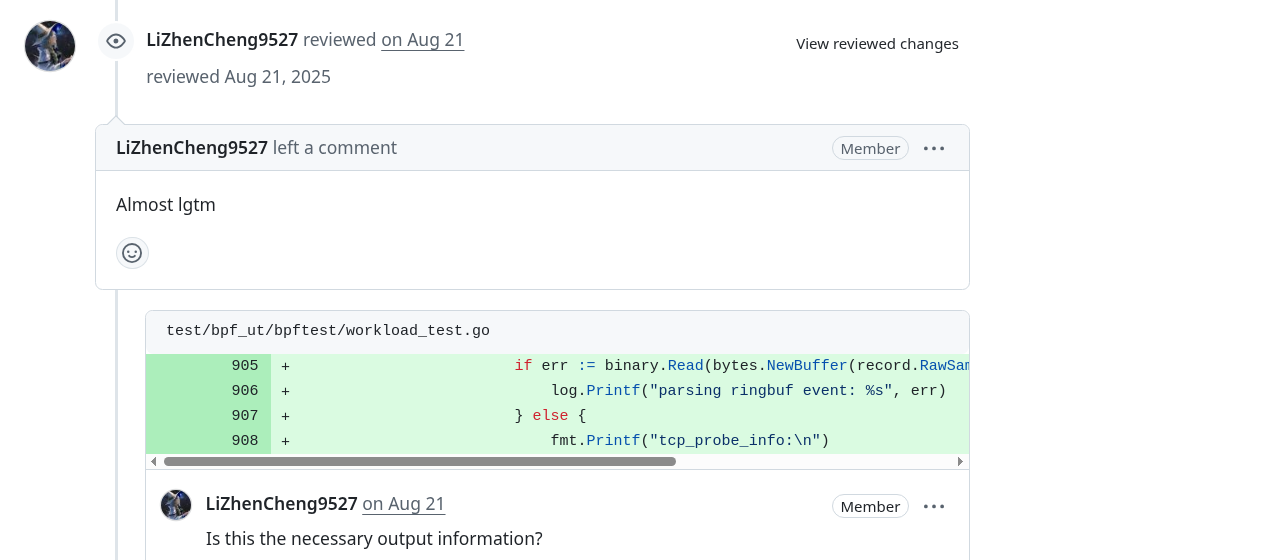
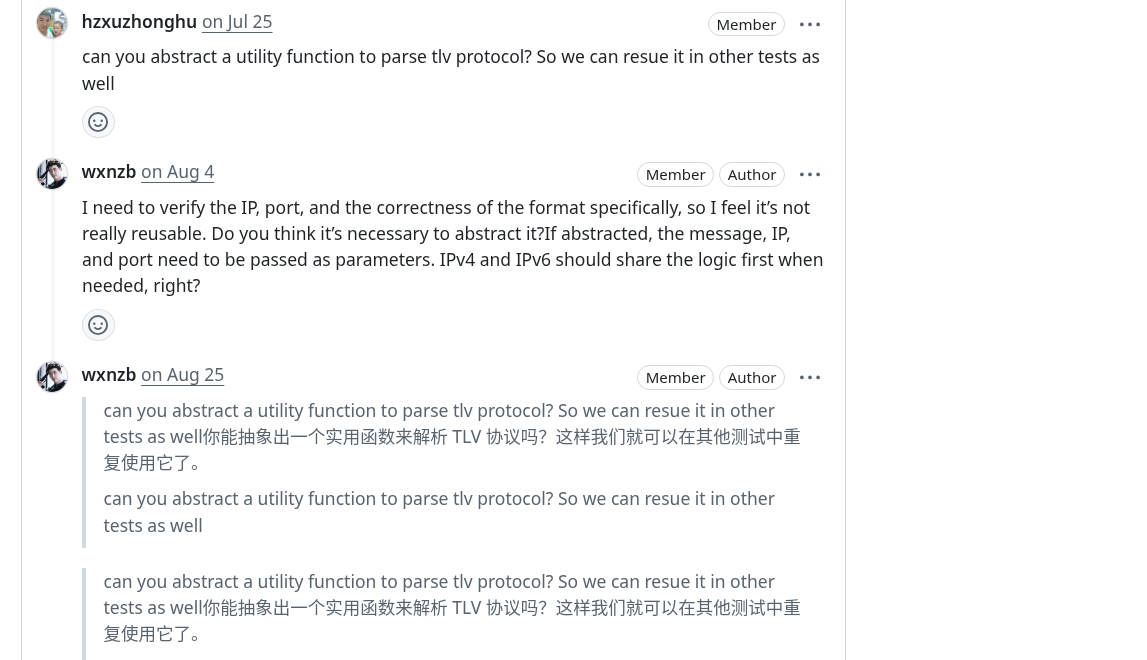
<p>They not only patiently pointed out improvements in test design during GitHub reviews but also quickly answered my questions about bpf helper mocking and map validation on Slack.</p>
<p>Although I completed the core UT for <code>sendMsg</code> and <code>cgroup</code> programs relatively early, mentor feedback helped me notice more edge cases and pushed me to further improve test coverage and documentation.</p>
<p>Finally, the Kmesh community invited me to become an <strong>organization member</strong> as recognition of my contributions and active participation. This not only made me feel humble but also strengthened my determination to continue participating in and supporting Kmesh's development.</p>
<hr>
<h2 class="anchor anchorWithStickyNavbar_LWe7" id="lessons-learned">Lessons Learned<a href="https://kmesh.net/blog/ospp_2025_ut_test#lessons-learned" class="hash-link" aria-label="Direct link to Lessons Learned" title="Direct link to Lessons Learned">​</a></h2>
<ol>
<li><strong>Unit testing is a tool to enhance development efficiency</strong> — It doesn't replace black-box testing but complements and frees developers, allowing them to focus faster on feature implementation and optimization.</li>
<li><strong>Start small and iterate gradually</strong> — First supplement UT for core eBPF programs (like sendMsg, cgroup_skb), then gradually expand to more scenarios, which is more stable than covering all logic at once.</li>
<li><strong>Anticipate edge cases</strong> — eBPF programs may behave differently across kernel versions or environments; simulating various inputs and exceptions in UT in advance helps avoid production environment surprises.</li>
<li><strong>Communication can accelerate learning progress</strong> — Every time I submitted a PR, mentors would comment with better solutions or questions, which taught me a lot in a short time.</li>
<li><strong>Facing challenges head-on is the recipe for progress</strong> — When learning fields you're interested in but haven't had much exposure to, setbacks are inevitable. Don't give up at these times; believe in yourself and keep trying—you'll eventually find solutions to problems.</li>
</ol>
<hr>
<h2 class="anchor anchorWithStickyNavbar_LWe7" id="acknowledgments">Acknowledgments<a href="https://kmesh.net/blog/ospp_2025_ut_test#acknowledgments" class="hash-link" aria-label="Direct link to Acknowledgments" title="Direct link to Acknowledgments">​</a></h2>
<p>I want to sincerely thank my mentors <strong>Li Zhencheng</strong> and <strong>Xu Zhonghu</strong> throughout the process. In every community meeting, they would actively solve my current problems and understand my progress. Whenever I submitted a PR, they would share their insights in the comments, making my thinking clearer and improving my problem-solving abilities. I also want to thank the <strong>OSPP organizing committee</strong> for providing us with a smoothly running environment. This open source participation was an extraordinary experience for me, and I will continue to dedicate myself to open source and love open source!</p>
<hr>
<h2 class="anchor anchorWithStickyNavbar_LWe7" id="related-links">Related Links<a href="https://kmesh.net/blog/ospp_2025_ut_test#related-links" class="hash-link" aria-label="Direct link to Related Links" title="Direct link to Related Links">​</a></h2>
<ul>
<li><a href="https://github.com/kmesh-net/kmesh/issues/1411" target="_blank" rel="noopener noreferrer">Project Issue &amp; Pull Requests</a></li>
<li><a href="https://summer-ospp.ac.cn/" target="_blank" rel="noopener noreferrer">OSPP Official Website</a></li>
<li><a href="https://github.com/wxnzb" target="_blank" rel="noopener noreferrer">Wu Xi's GitHub</a></li>
</ul>]]></content>
        <author>
            <name>Wu Xi</name>
            <uri>https://github.com/wxnzb</uri>
        </author>
        <category label="OSPP" term="OSPP"/>
        <category label="OSPP-2025" term="OSPP-2025"/>
        <category label="eBPF" term="eBPF"/>
        <category label="Unit Testing" term="Unit Testing"/>
        <category label="kmesh" term="kmesh"/>
    </entry>
    <entry>
        <title type="html"><![CDATA[Experience of LFX Mentorship - Kmesh Tcp Long Connection Metrics]]></title>
        <id>https://kmesh.net/blog/lfx_2025_tcp_long_conn</id>
        <link href="https://kmesh.net/blog/lfx_2025_tcp_long_conn"/>
        <updated>2025-05-28T11:11:23.000Z</updated>
        <summary type="html"><![CDATA[Introduction]]></summary>
        <content type="html"><![CDATA[<h2 class="anchor anchorWithStickyNavbar_LWe7" id="introduction">Introduction<a href="https://kmesh.net/blog/lfx_2025_tcp_long_conn#introduction" class="hash-link" aria-label="Direct link to Introduction" title="Direct link to Introduction">​</a></h2>
<p>Hello readers, I am Yash, a final Year student from India. I love building cool stuffs and solving real world problems. I’ve been working in the cloud-native space for the past three years, exploring technologies like Kubernetes, Cilium, Istio, and more.</p>
<p>I successfully completed my mentorship with Kmesh during the LFX 2025 Term-1 program, which was an enriching and invaluable experience. Over the past three months, I gained significant knowledge and hands-on experience while contributing to the project. In this blog, I’ve documented my mentorship journey and the work I accomplished as a mentee.</p>
<h2 class="anchor anchorWithStickyNavbar_LWe7" id="lfx-mentorship-program--overview">LFX Mentorship Program – Overview<a href="https://kmesh.net/blog/lfx_2025_tcp_long_conn#lfx-mentorship-program--overview" class="hash-link" aria-label="Direct link to LFX Mentorship Program – Overview" title="Direct link to LFX Mentorship Program – Overview">​</a></h2>
<p>The LFX Mentorship Program, run by the Linux Foundation, is designed to help students and early-career professionals gain hands-on experience in open source development by working on real-world projects under the guidance of experienced mentors</p>
<p>Participants contribute to high-impact projects hosted by foundations like CNCF, LF AI, LF Edge, and more. The program typically runs in 3 terms throughout the year, each lasting about three months.</p>
<p><a href="https://mentorship.lfx.linuxfoundation.org/#projects_all" target="_blank" rel="noopener noreferrer">More-info</a></p>
<h2 class="anchor anchorWithStickyNavbar_LWe7" id="my-acceptance">My Acceptance<a href="https://kmesh.net/blog/lfx_2025_tcp_long_conn#my-acceptance" class="hash-link" aria-label="Direct link to My Acceptance" title="Direct link to My Acceptance">​</a></h2>
<p>I am a regular opensource contributor and loves contributing to opensource. My interests heavily aligned with clound-native technologies. I was familiar with popular mentorship programs like LFX and GSoC, which are designed to help students get started in the open source world.
Based on my work the Kmesh community also promoted for the member of Kmesh
I had made up my mind to apply for LFX 2025 Term-1 and began exploring projects in early February. The projects under CNCF for LFX are listed in the <a href="https://github.com/cncf/mentoring" target="_blank" rel="noopener noreferrer">cncf/mentoring</a> GitHub repository. I came across the <a href="https://github.com/kmesh-net/kmesh" target="_blank" rel="noopener noreferrer">Kmesh</a> project, a newly added CNCF sandbox project participating in LFX for the first time.
I found the Kmesh project particularly exciting because of the problem it addresses—providing a sidecarless service mesh data plane. This approach can greatly benefit the community by improving performance and reducing overhead.</p>
<p>Kmesh came up with 4 projects in term-1, i selected <a href="https://github.com/kmesh-net/kmesh/issues/1211" target="_blank" rel="noopener noreferrer">long-connection-metrics</a> projects as it allows me to works with eBPF a already have a prior experience on working with eBPF.</p>
<p>I began exploring the Kmesh project by reading the documentation and contributing to Good First Issues. As I became more involved, the mentors started to take notice. I also submitted a <a href="https://github.com/kmesh-net/kmesh/blob/main/docs/proposal/tcp_long_connection_metrics.md" target="_blank" rel="noopener noreferrer">proposal</a> for the long connection metrics project.</p>
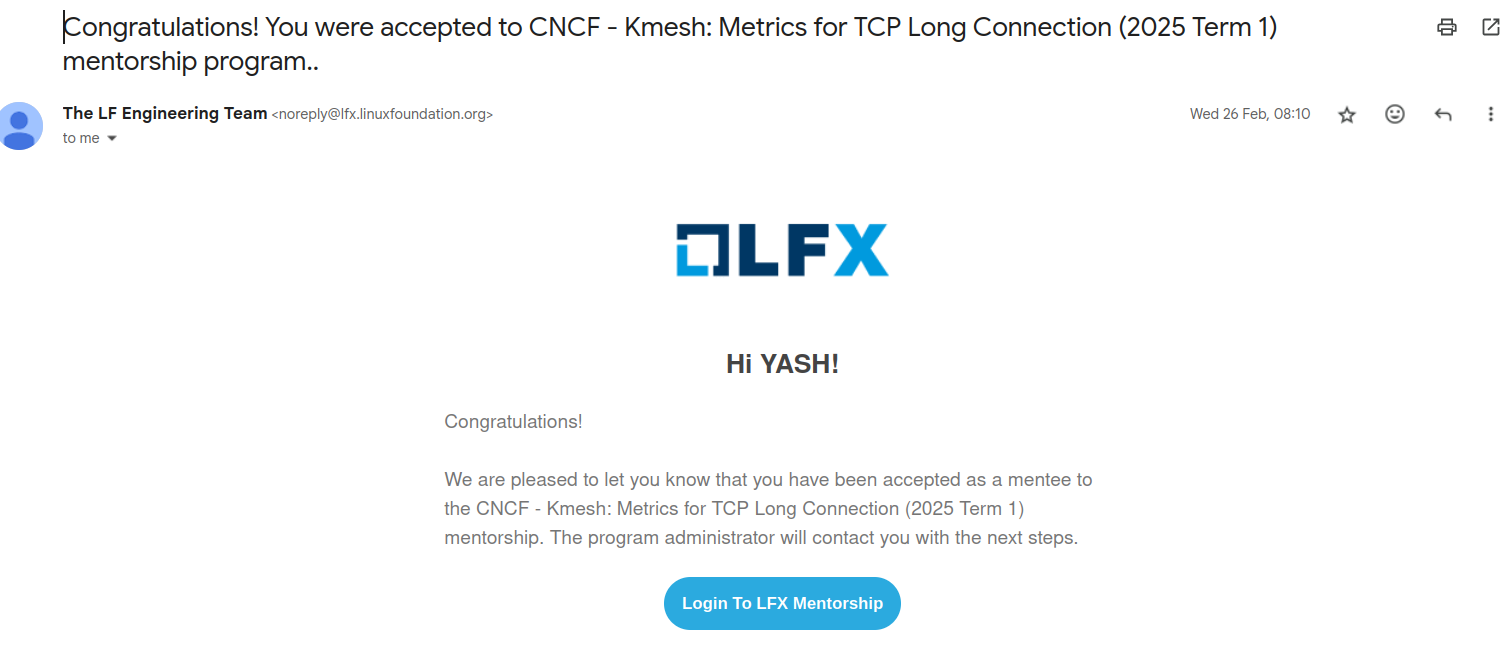
<p>In late February, I received an email from LFX notifying me of my selection.
<img decoding="async" loading="lazy" alt="email" src="https://kmesh.net/assets/images/acceptance-email-e4ad3b1c0dac69817f113a9a143b25c9.png" width="1511" height="645" class="img_ev3q"></p>
<h2 class="anchor anchorWithStickyNavbar_LWe7" id="project-workthrough">Project Workthrough<a href="https://kmesh.net/blog/lfx_2025_tcp_long_conn#project-workthrough" class="hash-link" aria-label="Direct link to Project Workthrough" title="Direct link to Project Workthrough">​</a></h2>
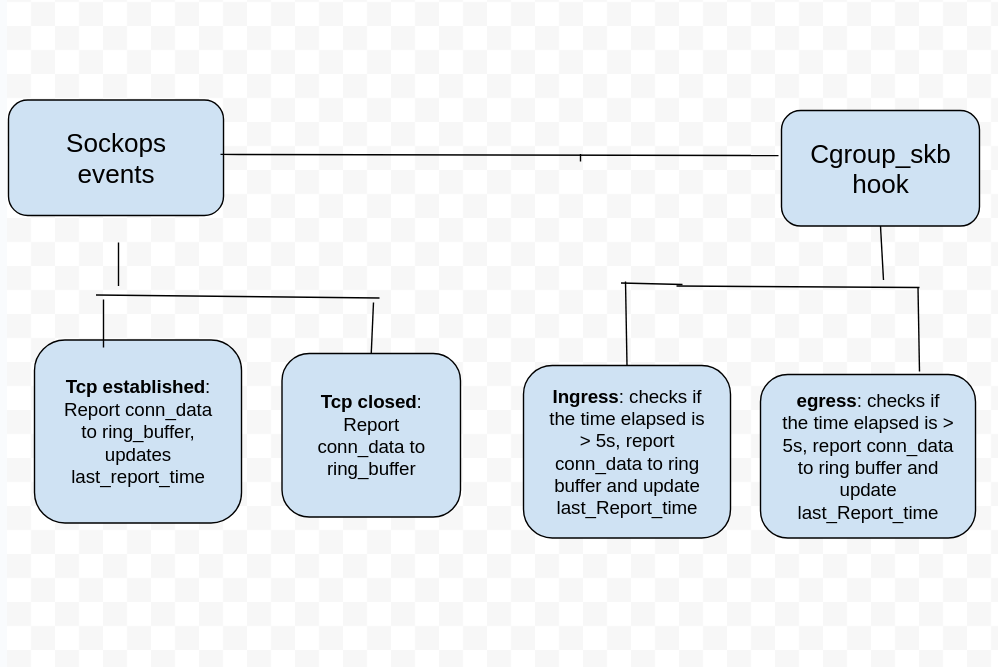
<p>The <code>tcp long connection metrics</code> project aims to implement access logs and metrics for TCP long connections, developing a continuous monitoring and reporting mechanisms that captures detailed, real-time data throughout the lifetime of long-lived TCP connections.</p>
<p>Ebpf hooks are used to collect connection stats such as send/received bytes, packets losts, retransmissions etc.</p>
<p><img decoding="async" loading="lazy" alt="design" src="https://kmesh.net/assets/images/tcp_long_conn_design-90eeb8afcc010fca6dc0e1657245f00e.png" width="998" height="667" class="img_ev3q"></p>
<p><a href="https://kmesh.net/docs/transpot-layer/l4-metrics" target="_blank" rel="noopener noreferrer">More-information</a></p>
<h2 class="anchor anchorWithStickyNavbar_LWe7" id="mentorship-experience">Mentorship Experience<a href="https://kmesh.net/blog/lfx_2025_tcp_long_conn#mentorship-experience" class="hash-link" aria-label="Direct link to Mentorship Experience" title="Direct link to Mentorship Experience">​</a></h2>
<p>The Kmesh maintainers were always available to help me with any doubts, whether on Slack or GitHub. Additionally, there is a community meeting held regularly every Thursday, where I could ask questions and discuss various topics. I’ve learned a lot from them, including how to approach problems effectively and consider edge cases during development in these three months.</p>
<p>Based on my contributions and active involvement, the Kmesh community recognized my efforts and promoted me to a member of the organization. This acknowledgment was truly encouraging and motivated me to continue contributing to Kmesh and help the project grow.</p>]]></content>
        <author>
            <name>Yash Patel</name>
            <uri>https://github.com/yp969803</uri>
        </author>
        <category label="LFX-2025" term="LFX-2025"/>
    </entry>
    <entry>
        <title type="html"><![CDATA[Kmesh V1.1.0 Officially Released!]]></title>
        <id>https://kmesh.net/blog/kmesh-1.1-release</id>
        <link href="https://kmesh.net/blog/kmesh-1.1-release"/>
        <updated>2025-05-23T00:00:00.000Z</updated>
        <summary type="html"><![CDATA[We are delighted to announce the release of ​​Kmesh v1.1.0​​, a milestone achieved through the collective efforts of our global community over the past three months. Special recognition goes to the contributors from the ​​LXF Project​​, whose dedication has been pivotal in driving this release forward.]]></summary>
        <content type="html"><![CDATA[<p>We are delighted to announce the release of ​​Kmesh v1.1.0​​, a milestone achieved through the collective efforts of our global community over the past three months. Special recognition goes to the contributors from the ​​LXF Project​​, whose dedication has been pivotal in driving this release forward.</p>
<p>Building on the foundation of v1.0.0, this release introduces significant enhancements to Kmesh’s architecture, observability, and ecosystem integration. The official Kmesh website has undergone a comprehensive redesign, offering an intuitive interface and streamlined documentation to empower both users and developers. Under the hood, we’ve refactored the DNS module and added metrics for long connections, providing deeper insights into more traffic patterns.</p>
<p>In Kernel-Native mode, we’ve reduced invasive kernel modifications. Also, we use global variables to replace the BPF config map to simplify the underlying complexity. Compatibility with ​​Istio 1.25​​ has been rigorously validated, ensuring seamless interoperability with the latest Istio version. Notably, the persistent TestKmeshRestart E2E test case flaky—a long-standing issue—has been resolved through long-term investigation and reconstruction of the underlying BPF program, marking a leap forward in runtime reliability.</p>
<h2 class="anchor anchorWithStickyNavbar_LWe7" id="main-features">Main Features<a href="https://kmesh.net/blog/kmesh-1.1-release#main-features" class="hash-link" aria-label="Direct link to Main Features" title="Direct link to Main Features">​</a></h2>
<h3 class="anchor anchorWithStickyNavbar_LWe7" id="website-overhaul">Website overhaul<a href="https://kmesh.net/blog/kmesh-1.1-release#website-overhaul" class="hash-link" aria-label="Direct link to Website overhaul" title="Direct link to Website overhaul">​</a></h3>
<p>The Kmesh official website has undergone a complete redesign, offering an intuitive user experience with improved documentation, reorganized content hierarchy and streamlined navigation. In addressing feedback from the previous iteration, we focused on key areas where user experience could be enhanced. The original interface presented some usability challenges that occasionally led to navigation difficulties. Our blog module in particular required attention, as its content organization and visual hierarchy impacted content discoverability and readability. From an engineering perspective, we recognized opportunities to improve the code structure through better component organization and more systematic styling approaches, as the existing implementation had grown complex to maintain over time.</p>
<p>To address these problems, we shifted to React with Docusaurus, a modern documentation framework that's much more developer-friendly. This allowed us to create modular components, eliminating redundant code through reusability. Docusaurus provides built-in navigation systems specifically designed for documentation and blogs, plus version-controlled documentation features. We've implemented multilingual support with both English and Chinese documentation, added advanced search functionality, and completely reorganized the content structure. The result is a dramatically improved experience that makes the Kmesh site more accessible and valuable for all users.</p>
<h3 class="anchor anchorWithStickyNavbar_LWe7" id="long-connection-metrics">Long connection metrics<a href="https://kmesh.net/blog/kmesh-1.1-release#long-connection-metrics" class="hash-link" aria-label="Direct link to Long connection metrics" title="Direct link to Long connection metrics">​</a></h3>
<p>Before this release, Kmesh provides access logs during termination and establishment of a TCP connection with more detailed information about the connection, such as bytes sent, received, packet lost, rtt and retransmits. Kmesh also provides workload and service specific metrics such as bytes sent and received, lost packets, minimum rtt, total connection opened and closed by a pod. These metrics are only updated after a connection is closed.</p>
<p>In this release, we implement access logs and metrics for TCP long connections, developing a continuous monitoring and reporting mechanism that captures detailed, real-time data throughout the lifetime of long-lived TCP connections. Access logs are reported periodically with information such as reporting time, connection establishment time, bytes sent, received, packet loss, rtt, retransmits and state. Metrics such as bytes sent and received, packet loss, retransmits are also reported periodically for long connections.</p>
<h3 class="anchor anchorWithStickyNavbar_LWe7" id="dns-refactor">DNS refactor<a href="https://kmesh.net/blog/kmesh-1.1-release#dns-refactor" class="hash-link" aria-label="Direct link to DNS refactor" title="Direct link to DNS refactor">​</a></h3>
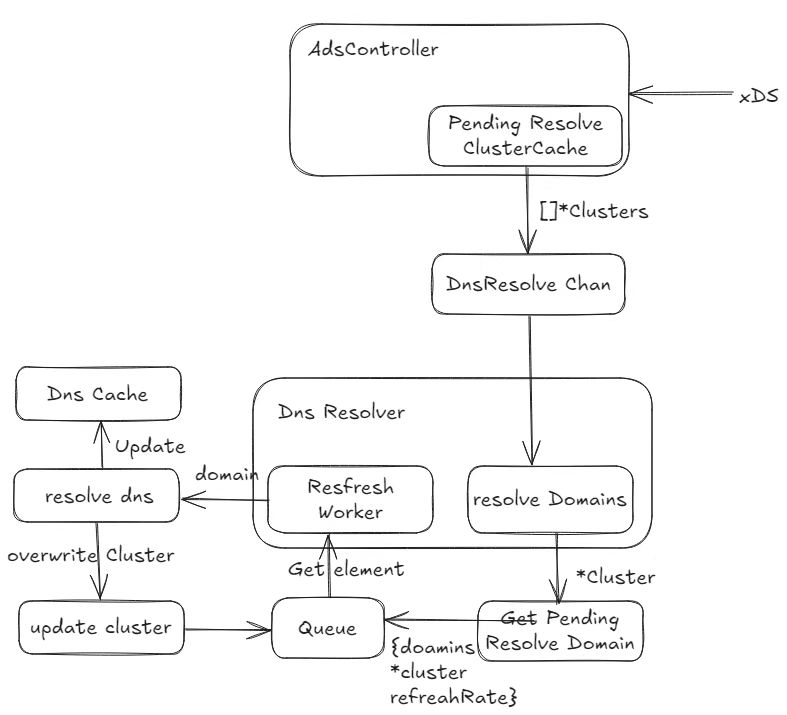
<p>The current DNS process includes the CDS refresh process. As a result, DNS is deeply coupled with kernel-native mode and cannot be used in dual-engine mode.</p>
<p><img decoding="async" loading="lazy" alt="image" src="https://kmesh.net/assets/images/dns1-7c31a381778c08b597ce644832f873a0.jpg" width="787" height="715" class="img_ev3q"></p>
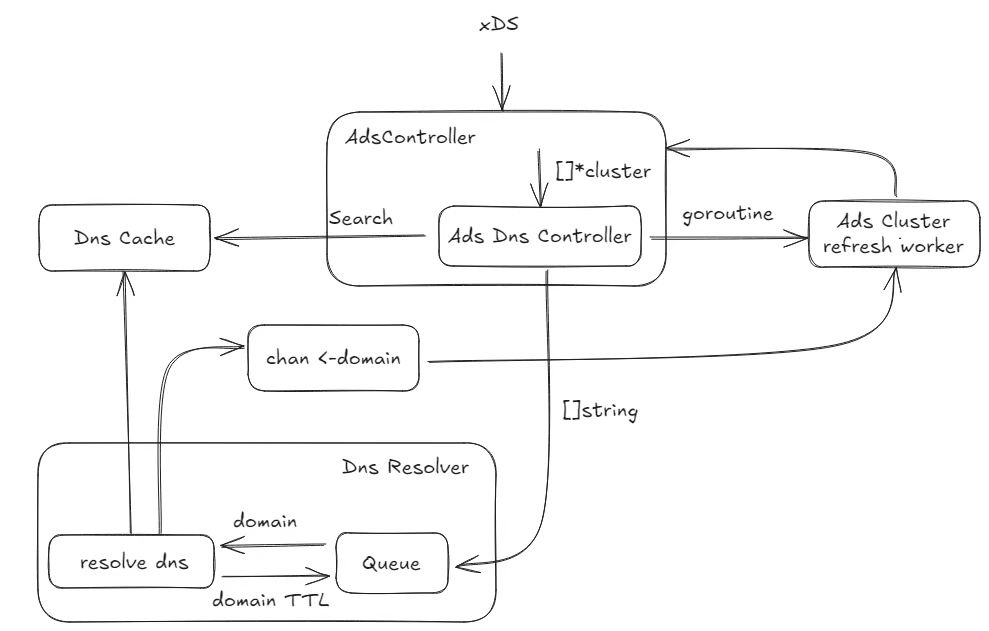
<p>In release 1.1 we refactored the DNS module of Kmesh. Instead of a structure containing cds, the data looped through the refresh queue in the Dns is now a domain, so that the Dns module no longer cares about the Kmesh mode, only providing the hostname to be resolved.</p>
<p><img decoding="async" loading="lazy" alt="image" src="https://kmesh.net/assets/images/dns2-8fce30851718fb6822f5e40e3211ae68.jpg" width="989" height="631" class="img_ev3q"></p>
<h3 class="anchor anchorWithStickyNavbar_LWe7" id="bpf-config-map-optimization">BPF config map optimization<a href="https://kmesh.net/blog/kmesh-1.1-release#bpf-config-map-optimization" class="hash-link" aria-label="Direct link to BPF config map optimization" title="Direct link to BPF config map optimization">​</a></h3>
<p>Kmesh has eliminated the dedicated kmesh_config_map BPF map, which previously stored global runtime configurations such as BPF logging level and monitoring toggle. These settings are now managed through global variables. Leveraging global variables simplifies BPF configuration management, enhancing runtime efficiency and maintainability.</p>
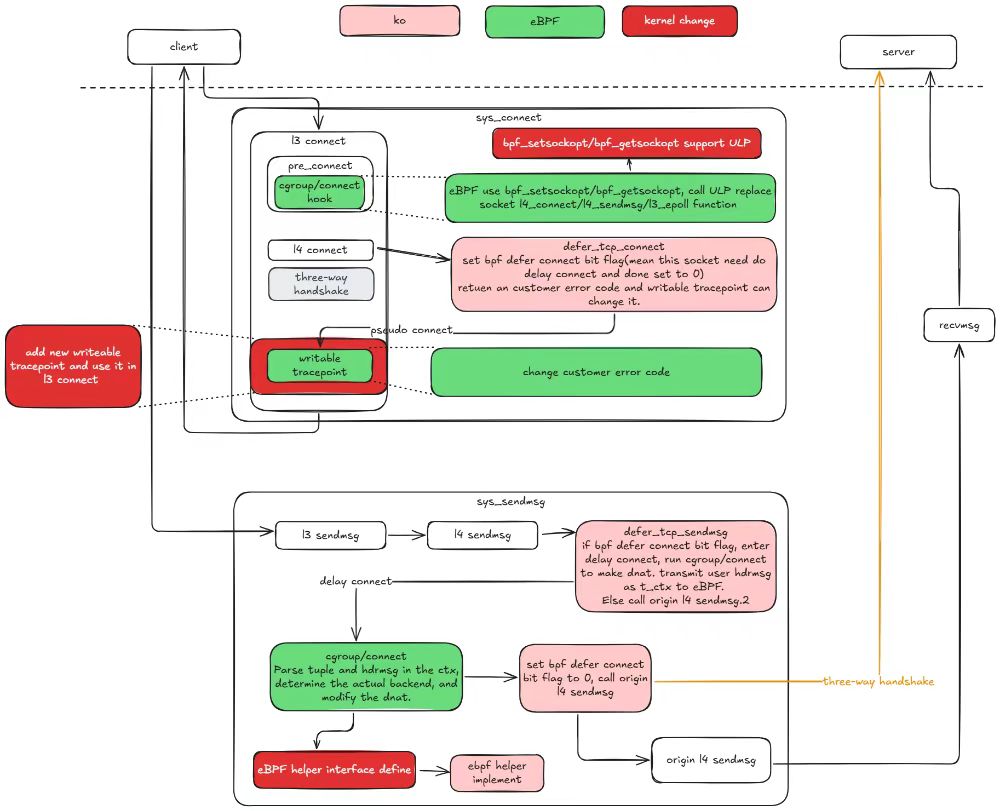
<p>Optimise Kernel Native mode to reduce intrusive modifications to the kernel
The kernel-native mode requires a large number of intrusive kernel reconstructions to implement HTTP-based traffic control. Some of these modifications may have a significant impact on the kernel, which makes the kernel-native mode difficult to deploy and use in a real production environment.
To resolve this problem, we have modified the kernel in kernel-native mode and the involved ko and eBPF synchronously. Through the optimization of this release. In kernel 5.10, the kernel modification is limited to four, and in kernel 6.6, the kernel modification is reduced to only one. This last one will be eliminated as much as possible, with the goal of eventually running kernel-native mode on native version 6.6 and above.</p>
<p><img decoding="async" loading="lazy" alt="image" src="https://kmesh.net/assets/images/bpf-e827d1750df1fb46d0ee9c28adc3a898.jpg" width="1000" height="811" class="img_ev3q"></p>
<h3 class="anchor anchorWithStickyNavbar_LWe7" id="adopt-istio-125">Adopt istio 1.25<a href="https://kmesh.net/blog/kmesh-1.1-release#adopt-istio-125" class="hash-link" aria-label="Direct link to Adopt istio 1.25" title="Direct link to Adopt istio 1.25">​</a></h3>
<p>Kmesh has verified compatibility with istio 1.25 and has added the corresponding E2E test to CI. The Kmesh community maintains verification of the three istio versions in CI, so the E2E test of istio 1.22 has been removed from CI.</p>
<h2 class="anchor anchorWithStickyNavbar_LWe7" id="critical-bug-fix">Critical Bug Fix<a href="https://kmesh.net/blog/kmesh-1.1-release#critical-bug-fix" class="hash-link" aria-label="Direct link to Critical Bug Fix" title="Direct link to Critical Bug Fix">​</a></h2>
<p><strong>kmeshctl install waypoint error (<a href="https://github.com/kmesh-net/kmesh/issues/1287" target="_blank" rel="noopener noreferrer">#1287</a>)</strong></p>
<p><em>root analysis:</em></p>
<p><em>Remove the extra v before the version number when building the waypoint image.</em></p>
<p><strong>TestKmeshRestart flaky (<a href="https://github.com/kmesh-net/kmesh/issues/1192" target="_blank" rel="noopener noreferrer">#1192</a>)</strong></p>
<p><em>root analysis:</em></p>
<p><em>This issue is actually not related Kmesh restart, and it can also be produced in non-restart scenario.</em></p>
<p><em>The root case is that it's not appropriate to use <a href="https://github.com/kmesh-net/kmesh/blob/main/bpf/kmesh/workload/cgroup_sock.c#L64" target="_blank" rel="noopener noreferrer">sk</a> as the key of map <a href="https://github.com/kmesh-net/kmesh/blob/main/bpf/kmesh/workload/cgroup_sock.c#L80" target="_blank" rel="noopener noreferrer">map_of_orig_dst</a>, because it is reused and the value of map will be incorrectly overwritten, resulting in the metadata is not being encoded when it should be encoded in the connection sent to the waypoint, resulting the reset error in this issue.</em></p>
<p><strong>TestServiceEntrySelectsWorkloadEntry flaky (<a href="https://github.com/kmesh-net/kmesh/issues/1352" target="_blank" rel="noopener noreferrer">#1352</a>)</strong></p>
<p><em>root analysis:</em></p>
<p><em>before this test case, there is a test <code>TestServiceEntryInlinedWorkloadEntry</code> which will generate two workload objects, for example, <code>Kubernetes/networking.istio.io/ServiceEntry/echo-1-21618/test-se-v4/10.244.1.103</code> and <code>ServiceEntry/echo-1-21618/test-se-v6/10.244.1.103</code>.</em></p>
<p><em>In the current use case, WorkloadEntry will generate the workload object <code>Kubernetes/networking.istio.io/WorkloadEntry/echo-1-21618/test-we</code>.</em></p>
<p><em>If the test case runs fast enough, the removal operation of the first two workload objects will be aggregated with the creation operation of the latter object.</em></p>
<p><em>Kmesh will process the new object first and then remove the old resources, <a href="https://github.com/kmesh-net/kmesh/blob/main/pkg/controller/workload/workload_processor.go#L841" target="_blank" rel="noopener noreferrer">reference</a>.</em></p>
<p><em>The IP addresses of these three objects are the same, which will eventually lead to the inability to find the IP address in the Kmesh workload cache, which will cause auth failure and connection timeout.</em></p>
<h2 class="anchor anchorWithStickyNavbar_LWe7" id="acknowledgment">Acknowledgment<a href="https://kmesh.net/blog/kmesh-1.1-release#acknowledgment" class="hash-link" aria-label="Direct link to Acknowledgment" title="Direct link to Acknowledgment">​</a></h2>
<p>Kmesh v1.1.0 includes 118 commits from 14 contributors. We would like to express our sincere gratitude to all contributors:</p>
<table><thead><tr><th></th><th></th><th></th><th></th></tr></thead><tbody><tr><td>@hzxuzhonghu</td><td>@LiZhenCheng9527</td><td>@YaoZengzeng</td><td>@silenceper</td></tr><tr><td>@weli-l</td><td>@sancppp</td><td>@Kuromesi</td><td>@yp969803</td></tr><tr><td>@lec-bit</td><td>@ravjot07</td><td>@jayesh9747</td><td>@harish2773</td></tr><tr><td>@Dhiren-Mhatre</td><td>@Murdock9803</td><td></td><td></td></tr></tbody></table>
<p>We have always developed Kmesh with an open and neutral attitude, and continue to build a benchmark solution for the Sidecarless service mesh industry, serving thousands of industries and promoting the healthy and orderly development of service mesh. Kmesh is currently in a stage of rapid development, and we sincerely invite people with lofty ideals to join us!</p>
<h2 class="anchor anchorWithStickyNavbar_LWe7" id="reference-links">Reference Links<a href="https://kmesh.net/blog/kmesh-1.1-release#reference-links" class="hash-link" aria-label="Direct link to Reference Links" title="Direct link to Reference Links">​</a></h2>
<ul>
<li><a href="https://github.com/kmesh-net/kmesh/releases/tag/v1.1.0" target="_blank" rel="noopener noreferrer">Kmesh Release v1.1.0</a></li>
<li><a href="https://github.com/kmesh-net/kmesh" target="_blank" rel="noopener noreferrer">Kmesh GitHub</a></li>
<li><a href="https://kmesh.net/" target="_blank" rel="noopener noreferrer">Kmesh Website</a></li>
</ul>]]></content>
        <author>
            <name>Kmesh</name>
            <uri>https://github.com/kmesh-bot</uri>
        </author>
    </entry>
    <entry>
        <title type="html"><![CDATA[From Contributor to Maintainer: My LFX Mentorship Journey]]></title>
        <id>https://kmesh.net/blog/lfx_2025_website_migration</id>
        <link href="https://kmesh.net/blog/lfx_2025_website_migration"/>
        <updated>2025-02-14T00:00:00.000Z</updated>
        <summary type="html"><![CDATA[Introduction]]></summary>
        <content type="html"><![CDATA[<h3 class="anchor anchorWithStickyNavbar_LWe7" id="introduction">Introduction<a href="https://kmesh.net/blog/lfx_2025_website_migration#introduction" class="hash-link" aria-label="Direct link to Introduction" title="Direct link to Introduction">​</a></h3>
<p>Hi everyone! I'm Jayesh Savaliya, a B.Tech student at IIIT Pune passionate about backend technologies and open source. Over the last two years, I've been selected for the C4GT program twice (2024 &amp; 2025) - yes, they let me back in - and recently completed LFX Mentorship 2025 (Term 1), where I somehow went from fixing typos to being responsible for reviewing other people's code at Kmesh.</p>
<p>In this blog, I'll share my journey and the strategies that actually worked (no generic "just be passionate" advice, I promise).</p>
<hr>
<h3 class="anchor anchorWithStickyNavbar_LWe7" id="my-background">My Background<a href="https://kmesh.net/blog/lfx_2025_website_migration#my-background" class="hash-link" aria-label="Direct link to My Background" title="Direct link to My Background">​</a></h3>
<p>When I applied to LFX, I wasn't starting from scratch. I had already battle-tested myself with:</p>
<ul>
<li><strong>Sunbird</strong> (EkStep Foundation) via C4GT, where I learned that education tech is harder than it looks</li>
<li><strong>Mifos</strong>, a GSoC organization focused on financial services (because debugging payment systems at 2 AM builds character)</li>
<li>Various backend projects where I definitely didn't break production. Much.</li>
</ul>
<h4 class="anchor anchorWithStickyNavbar_LWe7" id="choosing-kmesh">Choosing Kmesh<a href="https://kmesh.net/blog/lfx_2025_website_migration#choosing-kmesh" class="hash-link" aria-label="Direct link to Choosing Kmesh" title="Direct link to Choosing Kmesh">​</a></h4>
<p>I shortlisted projects from the LFX portal based on three key criteria:</p>
<ol>
<li><strong>Tech stack relevance</strong> - Technologies I wanted to master</li>
<li><strong>Learning potential</strong> - Projects that would challenge and grow my skills</li>
<li><strong>Active maintainers</strong> - Communities with responsive, helpful mentors</li>
</ol>
<p>I chose Kmesh, a high-performance service mesh data plane built on eBPF and programmable kernel technologies. Kmesh's sidecarless architecture eliminates proxy overhead, resulting in better performance and lower resource consumption.</p>
<p>Honestly? It had "eBPF" in the description and I wanted to sound cool at tech meetups. But it turned out to be genuinely fascinating work with a great community.</p>
<hr>
<h3 class="anchor anchorWithStickyNavbar_LWe7" id="how-to-succeed-in-open-source-programs">How to Succeed in Open Source Programs<a href="https://kmesh.net/blog/lfx_2025_website_migration#how-to-succeed-in-open-source-programs" class="hash-link" aria-label="Direct link to How to Succeed in Open Source Programs" title="Direct link to How to Succeed in Open Source Programs">​</a></h3>
<p>Here's my three-step approach that worked for LFX:</p>
<h4 class="anchor anchorWithStickyNavbar_LWe7" id="1-make-meaningful-contributions">1. Make Meaningful Contributions<a href="https://kmesh.net/blog/lfx_2025_website_migration#1-make-meaningful-contributions" class="hash-link" aria-label="Direct link to 1. Make Meaningful Contributions" title="Direct link to 1. Make Meaningful Contributions">​</a></h4>
<p>Start small and scale up gradually. Don't be the person who says "I'll rewrite the entire architecture!" on day one.</p>
<p>Instead:</p>
<ul>
<li><strong>Weeks 1-2:</strong> Fix typos, improve logs, update documentation</li>
<li><strong>Weeks 3-4:</strong> Fix small bugs, add tests</li>
<li><strong>Week 5+:</strong> Work on core features and refactoring</li>
</ul>
<p>This progression shows mentors you're not just throwing random PRs at the wall hoping something sticks.</p>
<h4 class="anchor anchorWithStickyNavbar_LWe7" id="2-write-a-strong-proposal">2. Write a Strong Proposal<a href="https://kmesh.net/blog/lfx_2025_website_migration#2-write-a-strong-proposal" class="hash-link" aria-label="Direct link to 2. Write a Strong Proposal" title="Direct link to 2. Write a Strong Proposal">​</a></h4>
<p>Your proposal should be:</p>
<ul>
<li><strong>Clear:</strong> Explain your approach in straightforward language</li>
<li><strong>Structured:</strong> Include a realistic timeline with milestones</li>
<li><strong>Convincing:</strong> Demonstrate why you're the right person for the project</li>
</ul>
<p>Make sure your proposal reflects genuine engagement with the project, not just surface-level research.</p>
<h4 class="anchor anchorWithStickyNavbar_LWe7" id="3-be-actively-involved">3. Be Actively Involved<a href="https://kmesh.net/blog/lfx_2025_website_migration#3-be-actively-involved" class="hash-link" aria-label="Direct link to 3. Be Actively Involved" title="Direct link to 3. Be Actively Involved">​</a></h4>
<p>Stay engaged in project channels (Slack, Discord, mailing lists). Communicate regularly with mentors, ask thoughtful questions, and contribute to discussions.</p>
<p>But also: don't be <em>that</em> person who asks questions Google could answer or pings everyone at 3 AM with "quick question." Balance is everything.</p>
<p><strong>The Formula:</strong> Consistent contributions + Strong proposal + Active communication = Standing out</p>
<hr>
<h3 class="anchor anchorWithStickyNavbar_LWe7" id="the-path-to-maintainership">The Path to Maintainership<a href="https://kmesh.net/blog/lfx_2025_website_migration#the-path-to-maintainership" class="hash-link" aria-label="Direct link to The Path to Maintainership" title="Direct link to The Path to Maintainership">​</a></h3>
<p>Becoming a maintainer wasn't planned. It happened naturally through sustained engagement after the mentorship period ended.</p>
<h4 class="anchor anchorWithStickyNavbar_LWe7" id="consistency">Consistency<a href="https://kmesh.net/blog/lfx_2025_website_migration#consistency" class="hash-link" aria-label="Direct link to Consistency" title="Direct link to Consistency">​</a></h4>
<p>I continued contributing regularly after my initial PRs were merged:</p>
<ul>
<li>Fixing overlooked bugs</li>
<li>Adding requested features</li>
<li>Refactoring code for better maintainability</li>
</ul>
<h4 class="anchor anchorWithStickyNavbar_LWe7" id="learning-mindset">Learning Mindset<a href="https://kmesh.net/blog/lfx_2025_website_migration#learning-mindset" class="hash-link" aria-label="Direct link to Learning Mindset" title="Direct link to Learning Mindset">​</a></h4>
<p>I embraced every learning opportunity, even when I had no idea what I was doing. eBPF concepts? Started clueless, ended slightly less clueless. Performance optimization? Learned by making things slower first. CI/CD improvements? Broke the build a few times, but now I own it.</p>
<h4 class="anchor anchorWithStickyNavbar_LWe7" id="patience--feedback">Patience &amp; Feedback<a href="https://kmesh.net/blog/lfx_2025_website_migration#patience--feedback" class="hash-link" aria-label="Direct link to Patience &amp; Feedback" title="Direct link to Patience &amp; Feedback">​</a></h4>
<p>Code reviews can be humbling (read: brutal). I learned to take feedback seriously even when it stung, iterate quickly, and stay patient when things inevitably broke.</p>
<h4 class="anchor anchorWithStickyNavbar_LWe7" id="taking-initiative">Taking Initiative<a href="https://kmesh.net/blog/lfx_2025_website_migration#taking-initiative" class="hash-link" aria-label="Direct link to Taking Initiative" title="Direct link to Taking Initiative">​</a></h4>
<p>I started acting like a maintainer before having the title:</p>
<ul>
<li>Suggesting project improvements</li>
<li>Writing comprehensive tests (because flaky tests are the worst)</li>
<li>Automating repetitive tasks (laziness is a virtue in programming)</li>
<li>Reviewing other contributors' work</li>
</ul>
<p>By the end of my mentorship, the trust I built with the team led to being granted maintainer access. Going from "hey, can I fix this typo?" to "you're now responsible for reviewing PRs" was equal parts surreal and terrifying.</p>
<hr>
<h3 class="anchor anchorWithStickyNavbar_LWe7" id="key-takeaways">Key Takeaways<a href="https://kmesh.net/blog/lfx_2025_website_migration#key-takeaways" class="hash-link" aria-label="Direct link to Key Takeaways" title="Direct link to Key Takeaways">​</a></h3>
<p>Here's what I learned that might help you:</p>
<p><strong>Start small, stay consistent</strong> - Begin with simple contributions and build from there. Consistency matters more than individual genius.</p>
<p><strong>Focus on learning</strong> - Getting selected is great, but learning enough to make real contributions is what counts.</p>
<p><strong>Communicate effectively</strong> - Ask questions, share progress, and be helpful. Respectful, clear communication goes a long way.</p>
<p><strong>Suggest improvements</strong> - If you see something that could be better, speak up. Good ideas are always welcome.</p>
<p><strong>Embrace feedback</strong> - Your first PR won't be perfect. Nobody's is. Take feedback as learning opportunities, iterate, and move on. Arguing about semicolons is not a productive use of anyone's time.</p>
<p>You don't need to be a genius. You just need to show up, contribute meaningfully, and improve consistently.</p>
<hr>
<h3 class="anchor anchorWithStickyNavbar_LWe7" id="final-thoughts">Final Thoughts<a href="https://kmesh.net/blog/lfx_2025_website_migration#final-thoughts" class="hash-link" aria-label="Direct link to Final Thoughts" title="Direct link to Final Thoughts">​</a></h3>
<p>The LFX Mentorship taught me more than just technical skills. I learned how to work with distributed teams across timezones, think critically about production software (logs are your friends!), and grow into a leadership role in an open source community.</p>
<p>If you're considering applying to LFX or any open source program, take the leap. With consistent effort and genuine engagement, you can make a real impact. If I can go from nervous first-time contributor to maintainer, so can you.</p>
<hr>
<h3 class="anchor anchorWithStickyNavbar_LWe7" id="connect-with-me">Connect With Me<a href="https://kmesh.net/blog/lfx_2025_website_migration#connect-with-me" class="hash-link" aria-label="Direct link to Connect With Me" title="Direct link to Connect With Me">​</a></h3>
<p>Feel free to reach out if you want to discuss open source, eBPF, or systems programming:</p>
<ul>
<li><a href="https://linkedin.com/in/jayesh-savaliya" target="_blank" rel="noopener noreferrer">LinkedIn</a></li>
<li><a href="https://github.com/jayesh9747" target="_blank" rel="noopener noreferrer">GitHub</a></li>
</ul>
<p>Thanks for reading, and see you in the next PR!</p>]]></content>
        <author>
            <name>Jayesh Savaliya</name>
            <uri>https://github.com/jayesh9747</uri>
        </author>
    </entry>
    <entry>
        <title type="html"><![CDATA[Using Kmesh as the Data Plane for Alibaba Cloud Service Mesh (ASM) Sidecarless Mode]]></title>
        <id>https://kmesh.net/blog/deploy-kmesh-in-asm</id>
        <link href="https://kmesh.net/blog/deploy-kmesh-in-asm"/>
        <updated>2024-11-27T00:00:00.000Z</updated>
        <summary type="html"><![CDATA[Using Kmesh as the Data Plane for Alibaba Cloud Service Mesh (ASM) Sidecarless Mode]]></summary>
        <content type="html"><![CDATA[<h2 class="anchor anchorWithStickyNavbar_LWe7" id="overview">Overview<a href="https://kmesh.net/blog/deploy-kmesh-in-asm#overview" class="hash-link" aria-label="Direct link to Overview" title="Direct link to Overview">​</a></h2>
<p>Alibaba Cloud Service Mesh (ASM) supports both Sidecar and Sidecarless modes. The Sidecar mode, where a proxy runs alongside each service instance, is currently the most selected and stable solution. However, this architecture introduces latency and resource overhead. To address the latency and resource consumption inherent in the Sidecar mode, various Sidecarless mode solutions have emerged in recent years, such as Istio Ambient. Istio Ambient deploys a ztunnel on each node to perform layer-4 traffic proxying for the Pods running on the node and deploy waypoints for layer-7 traffic proxying. While the Sidecarless mode can reduce latency and resource consumption, its stability and completeness in functionality still require improvement.</p>
<p>ASM currently supports different Sidecarless modes, such as Istio Ambient mode, ACMG mode, and Kmesh, among others. Kmesh (for more details, refer to <a href="https://kmesh.net/" target="_blank" rel="noopener noreferrer">https://kmesh.net/</a>) is a high-performance service mesh data plane software implemented based on eBPF and programmable kernel. By offloading traffic management to the kernel, Kmesh allows service communication within the mesh to occur without passing through proxy software, significantly reducing the traffic forwarding path and effectively enhancing the forwarding performance of service access.</p>
<h3 class="anchor anchorWithStickyNavbar_LWe7" id="introduction-to-kmesh">Introduction to Kmesh<a href="https://kmesh.net/blog/deploy-kmesh-in-asm#introduction-to-kmesh" class="hash-link" aria-label="Direct link to Introduction to Kmesh" title="Direct link to Introduction to Kmesh">​</a></h3>
<p>Kmesh's dual-engine mode uses eBPF to intercept traffic in kernel space and deploys a Waypoint Proxy to handle complex L7 traffic management, thus separating L4 and L7 governance between kernel space (eBPF) and user space (Waypoint). Compared to Istio's Ambient Mesh, it reduces latency by 30%. Compared to the kernel-native mode, the dual-engine mode does not require kernel enhancements, offering broader applicability.</p>
<p><img decoding="async" loading="lazy" alt="Dual-Engine Mode" src="https://kmesh.net/assets/images/kmesh-arch-b2156d693528f867523cbc9bd129075e.png" width="992" height="536" class="img_ev3q"></p>
<p>Currently, ASM supports using Kmesh's dual-engine mode as one of the data planes for the service mesh, enabling more efficient service management. Specifically, ASM can be used as the control plane, while Kmesh can be deployed as the data plane within an Alibaba Cloud Container Service for Kubernetes (ACK) cluster.</p>
<h2 class="anchor anchorWithStickyNavbar_LWe7" id="deploy-kmesh-in-ack-and-connect-to-asm">Deploy Kmesh in ACK and Connect to ASM<a href="https://kmesh.net/blog/deploy-kmesh-in-asm#deploy-kmesh-in-ack-and-connect-to-asm" class="hash-link" aria-label="Direct link to Deploy Kmesh in ACK and Connect to ASM" title="Direct link to Deploy Kmesh in ACK and Connect to ASM">​</a></h2>
<h3 class="anchor anchorWithStickyNavbar_LWe7" id="prerequisites">Prerequisites<a href="https://kmesh.net/blog/deploy-kmesh-in-asm#prerequisites" class="hash-link" aria-label="Direct link to Prerequisites" title="Direct link to Prerequisites">​</a></h3>
<p>Create an ASM cluster and add the ACK cluster to the ASM cluster for management. For detailed steps, you can refer to the documentation: <a href="https://www.alibabacloud.com/help/en/asm/getting-started/add-a-cluster-to-an-asm-instance-1?spm=a2c63.l28256.help-menu-search-147365.d_0" target="_blank" rel="noopener noreferrer">Add a cluster to an ASM instance</a>.</p>
<h3 class="anchor anchorWithStickyNavbar_LWe7" id="install-kmesh">Install Kmesh<a href="https://kmesh.net/blog/deploy-kmesh-in-asm#install-kmesh" class="hash-link" aria-label="Direct link to Install Kmesh" title="Direct link to Install Kmesh">​</a></h3>
<p>Run the following command to clone the Kmesh project into your local machine.</p>
<div class="language-shell codeBlockContainer_Ckt0 theme-code-block" style="--prism-color:#393A34;--prism-background-color:#f6f8fa"><div class="codeBlockContent_biex"><pre tabindex="0" class="prism-code language-shell codeBlock_bY9V thin-scrollbar" style="color:#393A34;background-color:#f6f8fa"><code class="codeBlockLines_e6Vv"><span class="token-line" style="color:#393A34"><span class="token function" style="color:#d73a49">git</span><span class="token plain"> clone https://github.com/kmesh-net/kmesh.git </span><span class="token operator" style="color:#393A34">&amp;&amp;</span><span class="token plain"> </span><span class="token builtin class-name">cd</span><span class="token plain"> kmesh</span><br></span></code></pre><div class="buttonGroup__atx"><button type="button" aria-label="Copy code to clipboard" title="Copy" class="clean-btn"><span class="copyButtonIcons_eSgA" aria-hidden="true"><svg viewBox="0 0 24 24" class="copyButtonIcon_y97N"><path fill="currentColor" d="M19,21H8V7H19M19,5H8A2,2 0 0,0 6,7V21A2,2 0 0,0 8,23H19A2,2 0 0,0 21,21V7A2,2 0 0,0 19,5M16,1H4A2,2 0 0,0 2,3V17H4V3H16V1Z"></path></svg><svg viewBox="0 0 24 24" class="copyButtonSuccessIcon_LjdS"><path fill="currentColor" d="M21,7L9,19L3.5,13.5L4.91,12.09L9,16.17L19.59,5.59L21,7Z"></path></svg></span></button></div></div></div>
<h4 class="anchor anchorWithStickyNavbar_LWe7" id="check-services-of-asm-control-plane">Check Services of ASM Control Plane<a href="https://kmesh.net/blog/deploy-kmesh-in-asm#check-services-of-asm-control-plane" class="hash-link" aria-label="Direct link to Check Services of ASM Control Plane" title="Direct link to Check Services of ASM Control Plane">​</a></h4>
<p>After the Kmesh is downloaded, you need to execute the following command first to check the Service name of the current ASM control plane in the cluster, in order to configure the connection between Kmesh and the ASM control plane.</p>
<div class="language-shell codeBlockContainer_Ckt0 theme-code-block" style="--prism-color:#393A34;--prism-background-color:#f6f8fa"><div class="codeBlockContent_biex"><pre tabindex="0" class="prism-code language-shell codeBlock_bY9V thin-scrollbar" style="color:#393A34;background-color:#f6f8fa"><code class="codeBlockLines_e6Vv"><span class="token-line" style="color:#393A34"><span class="token plain">kubectl get svc </span><span class="token parameter variable" style="color:#36acaa">-n</span><span class="token plain"> istio-system </span><span class="token operator" style="color:#393A34">|</span><span class="token plain"> </span><span class="token function" style="color:#d73a49">grep</span><span class="token plain"> istiod</span><br></span><span class="token-line" style="color:#393A34"><span class="token plain" style="display:inline-block"></span><br></span><span class="token-line" style="color:#393A34"><span class="token plain"></span><span class="token comment" style="color:#999988;font-style:italic"># istiod-1-22-6   ClusterIP   None   &lt;none&gt;   15012/TCP   2d</span><br></span></code></pre><div class="buttonGroup__atx"><button type="button" aria-label="Copy code to clipboard" title="Copy" class="clean-btn"><span class="copyButtonIcons_eSgA" aria-hidden="true"><svg viewBox="0 0 24 24" class="copyButtonIcon_y97N"><path fill="currentColor" d="M19,21H8V7H19M19,5H8A2,2 0 0,0 6,7V21A2,2 0 0,0 8,23H19A2,2 0 0,0 21,21V7A2,2 0 0,0 19,5M16,1H4A2,2 0 0,0 2,3V17H4V3H16V1Z"></path></svg><svg viewBox="0 0 24 24" class="copyButtonSuccessIcon_LjdS"><path fill="currentColor" d="M21,7L9,19L3.5,13.5L4.91,12.09L9,16.17L19.59,5.59L21,7Z"></path></svg></span></button></div></div></div>
<h4 class="anchor anchorWithStickyNavbar_LWe7" id="install-kmesh-with-kubectl">Install Kmesh with Kubectl<a href="https://kmesh.net/blog/deploy-kmesh-in-asm#install-kmesh-with-kubectl" class="hash-link" aria-label="Direct link to Install Kmesh with Kubectl" title="Direct link to Install Kmesh with Kubectl">​</a></h4>
<p>You can use kubectl or helm to install Kmesh in the ACK Kubernetes cluster. However, before installation, please add the <code>ClusterId</code> and <code>xdsAddress</code> environment variables to the Kmesh DaemonSet. These are used for the authentication and connection between Kmesh and the ASM control plane. The ClusterId is the ID of the ACK cluster where Kmesh is deployed, and the xdsAddress is the Service of the ASM control plane.</p>
<div class="language-yaml codeBlockContainer_Ckt0 theme-code-block" style="--prism-color:#393A34;--prism-background-color:#f6f8fa"><div class="codeBlockContent_biex"><pre tabindex="0" class="prism-code language-yaml codeBlock_bY9V thin-scrollbar" style="color:#393A34;background-color:#f6f8fa"><code class="codeBlockLines_e6Vv"><span class="token-line" style="color:#393A34"><span class="token comment" style="color:#999988;font-style:italic"># You can find the resource definition in the following files:</span><span class="token plain"></span><br></span><span class="token-line" style="color:#393A34"><span class="token plain"></span><span class="token comment" style="color:#999988;font-style:italic"># helm: deploy/charts/kmesh-helm/templates/daemonset.yaml</span><span class="token plain"></span><br></span><span class="token-line" style="color:#393A34"><span class="token plain"></span><span class="token comment" style="color:#999988;font-style:italic"># kubectl: deploy/yaml/kmesh.yaml</span><span class="token plain"></span><br></span><span class="token-line" style="color:#393A34"><span class="token plain"></span><span class="token key atrule" style="color:#00a4db">apiVersion</span><span class="token punctuation" style="color:#393A34">:</span><span class="token plain"> apps/v1</span><br></span><span class="token-line" style="color:#393A34"><span class="token plain"></span><span class="token key atrule" style="color:#00a4db">kind</span><span class="token punctuation" style="color:#393A34">:</span><span class="token plain"> DaemonSet</span><br></span><span class="token-line" style="color:#393A34"><span class="token plain"></span><span class="token key atrule" style="color:#00a4db">metadata</span><span class="token punctuation" style="color:#393A34">:</span><span class="token plain"></span><br></span><span class="token-line" style="color:#393A34"><span class="token plain">  </span><span class="token key atrule" style="color:#00a4db">name</span><span class="token punctuation" style="color:#393A34">:</span><span class="token plain"> kmesh</span><br></span><span class="token-line" style="color:#393A34"><span class="token plain">  </span><span class="token key atrule" style="color:#00a4db">labels</span><span class="token punctuation" style="color:#393A34">:</span><span class="token plain"></span><br></span><span class="token-line" style="color:#393A34"><span class="token plain">    </span><span class="token key atrule" style="color:#00a4db">app</span><span class="token punctuation" style="color:#393A34">:</span><span class="token plain"> kmesh</span><br></span><span class="token-line" style="color:#393A34"><span class="token plain">  </span><span class="token key atrule" style="color:#00a4db">namespace</span><span class="token punctuation" style="color:#393A34">:</span><span class="token plain"> kmesh</span><span class="token punctuation" style="color:#393A34">-</span><span class="token plain">system</span><br></span><span class="token-line" style="color:#393A34"><span class="token plain"></span><span class="token key atrule" style="color:#00a4db">spec</span><span class="token punctuation" style="color:#393A34">:</span><span class="token plain"></span><br></span><span class="token-line" style="color:#393A34"><span class="token plain">    </span><span class="token key atrule" style="color:#00a4db">spec</span><span class="token punctuation" style="color:#393A34">:</span><span class="token plain"></span><br></span><span class="token-line" style="color:#393A34"><span class="token plain">      </span><span class="token key atrule" style="color:#00a4db">containers</span><span class="token punctuation" style="color:#393A34">:</span><span class="token plain"></span><br></span><span class="token-line" style="color:#393A34"><span class="token plain">        </span><span class="token punctuation" style="color:#393A34">-</span><span class="token plain"> </span><span class="token key atrule" style="color:#00a4db">env</span><span class="token punctuation" style="color:#393A34">:</span><span class="token plain"></span><br></span><span class="token-line" style="color:#393A34"><span class="token plain">          </span><span class="token comment" style="color:#999988;font-style:italic"># ASM Control Plane Service</span><span class="token plain"></span><br></span><span class="token-line" style="color:#393A34"><span class="token plain">          </span><span class="token punctuation" style="color:#393A34">-</span><span class="token plain"> </span><span class="token key atrule" style="color:#00a4db">name</span><span class="token punctuation" style="color:#393A34">:</span><span class="token plain"> XDS_ADDRESS</span><br></span><span class="token-line" style="color:#393A34"><span class="token plain">            </span><span class="token key atrule" style="color:#00a4db">value</span><span class="token punctuation" style="color:#393A34">:</span><span class="token plain"> </span><span class="token string" style="color:#e3116c">"istiod-1-22-6.istio-system.svc:15012"</span><span class="token plain"></span><br></span><span class="token-line" style="color:#393A34"><span class="token plain">          </span><span class="token comment" style="color:#999988;font-style:italic"># add ACK cluster id</span><span class="token plain"></span><br></span><span class="token-line" style="color:#393A34"><span class="token plain">          </span><span class="token punctuation" style="color:#393A34">-</span><span class="token plain"> </span><span class="token key atrule" style="color:#00a4db">name</span><span class="token punctuation" style="color:#393A34">:</span><span class="token plain"> CLUSTER_ID</span><br></span><span class="token-line" style="color:#393A34"><span class="token plain">            </span><span class="token key atrule" style="color:#00a4db">value</span><span class="token punctuation" style="color:#393A34">:</span><span class="token plain"> </span><span class="token string" style="color:#e3116c">"cluster-id"</span><span class="token plain"></span><br></span><span class="token-line" style="color:#393A34"><span class="token plain">    </span><span class="token punctuation" style="color:#393A34">...</span><br></span></code></pre><div class="buttonGroup__atx"><button type="button" aria-label="Copy code to clipboard" title="Copy" class="clean-btn"><span class="copyButtonIcons_eSgA" aria-hidden="true"><svg viewBox="0 0 24 24" class="copyButtonIcon_y97N"><path fill="currentColor" d="M19,21H8V7H19M19,5H8A2,2 0 0,0 6,7V21A2,2 0 0,0 8,23H19A2,2 0 0,0 21,21V7A2,2 0 0,0 19,5M16,1H4A2,2 0 0,0 2,3V17H4V3H16V1Z"></path></svg><svg viewBox="0 0 24 24" class="copyButtonSuccessIcon_LjdS"><path fill="currentColor" d="M21,7L9,19L3.5,13.5L4.91,12.09L9,16.17L19.59,5.59L21,7Z"></path></svg></span></button></div></div></div>
<p>After the modification is done, you can run the following command to install Kmesh.</p>
<div class="language-shell codeBlockContainer_Ckt0 theme-code-block" style="--prism-color:#393A34;--prism-background-color:#f6f8fa"><div class="codeBlockContent_biex"><pre tabindex="0" class="prism-code language-shell codeBlock_bY9V thin-scrollbar" style="color:#393A34;background-color:#f6f8fa"><code class="codeBlockLines_e6Vv"><span class="token-line" style="color:#393A34"><span class="token comment" style="color:#999988;font-style:italic"># kubectl</span><span class="token plain"></span><br></span><span class="token-line" style="color:#393A34"><span class="token plain">kubectl apply </span><span class="token parameter variable" style="color:#36acaa">-f</span><span class="token plain"> deploy/yaml</span><br></span><span class="token-line" style="color:#393A34"><span class="token plain" style="display:inline-block"></span><br></span><span class="token-line" style="color:#393A34"><span class="token plain"></span><span class="token comment" style="color:#999988;font-style:italic"># helm</span><span class="token plain"></span><br></span><span class="token-line" style="color:#393A34"><span class="token plain">helm </span><span class="token function" style="color:#d73a49">install</span><span class="token plain"> kmesh deploy/charts/kmesh-helm </span><span class="token parameter variable" style="color:#36acaa">-n</span><span class="token plain"> kmesh-system --create-namespace</span><br></span></code></pre><div class="buttonGroup__atx"><button type="button" aria-label="Copy code to clipboard" title="Copy" class="clean-btn"><span class="copyButtonIcons_eSgA" aria-hidden="true"><svg viewBox="0 0 24 24" class="copyButtonIcon_y97N"><path fill="currentColor" d="M19,21H8V7H19M19,5H8A2,2 0 0,0 6,7V21A2,2 0 0,0 8,23H19A2,2 0 0,0 21,21V7A2,2 0 0,0 19,5M16,1H4A2,2 0 0,0 2,3V17H4V3H16V1Z"></path></svg><svg viewBox="0 0 24 24" class="copyButtonSuccessIcon_LjdS"><path fill="currentColor" d="M21,7L9,19L3.5,13.5L4.91,12.09L9,16.17L19.59,5.59L21,7Z"></path></svg></span></button></div></div></div>
<h3 class="anchor anchorWithStickyNavbar_LWe7" id="check-kmesh-startup-status">Check Kmesh Startup Status<a href="https://kmesh.net/blog/deploy-kmesh-in-asm#check-kmesh-startup-status" class="hash-link" aria-label="Direct link to Check Kmesh Startup Status" title="Direct link to Check Kmesh Startup Status">​</a></h3>
<p>After the installation is done, run the following command to check the Kmesh startup status.</p>
<div class="language-shell codeBlockContainer_Ckt0 theme-code-block" style="--prism-color:#393A34;--prism-background-color:#f6f8fa"><div class="codeBlockContent_biex"><pre tabindex="0" class="prism-code language-shell codeBlock_bY9V thin-scrollbar" style="color:#393A34;background-color:#f6f8fa"><code class="codeBlockLines_e6Vv"><span class="token-line" style="color:#393A34"><span class="token plain">kubectl get pods </span><span class="token parameter variable" style="color:#36acaa">-A</span><span class="token plain"> </span><span class="token operator" style="color:#393A34">|</span><span class="token plain"> </span><span class="token function" style="color:#d73a49">grep</span><span class="token plain"> kmesh</span><br></span><span class="token-line" style="color:#393A34"><span class="token plain" style="display:inline-block"></span><br></span><span class="token-line" style="color:#393A34"><span class="token plain"></span><span class="token comment" style="color:#999988;font-style:italic"># kmesh-system   kmesh-l5z2j   1/1   Running   0    117m</span><br></span></code></pre><div class="buttonGroup__atx"><button type="button" aria-label="Copy code to clipboard" title="Copy" class="clean-btn"><span class="copyButtonIcons_eSgA" aria-hidden="true"><svg viewBox="0 0 24 24" class="copyButtonIcon_y97N"><path fill="currentColor" d="M19,21H8V7H19M19,5H8A2,2 0 0,0 6,7V21A2,2 0 0,0 8,23H19A2,2 0 0,0 21,21V7A2,2 0 0,0 19,5M16,1H4A2,2 0 0,0 2,3V17H4V3H16V1Z"></path></svg><svg viewBox="0 0 24 24" class="copyButtonSuccessIcon_LjdS"><path fill="currentColor" d="M21,7L9,19L3.5,13.5L4.91,12.09L9,16.17L19.59,5.59L21,7Z"></path></svg></span></button></div></div></div>
<p>Run the following command to check Kmesh running status.</p>
<div class="language-shell codeBlockContainer_Ckt0 theme-code-block" style="--prism-color:#393A34;--prism-background-color:#f6f8fa"><div class="codeBlockContent_biex"><pre tabindex="0" class="prism-code language-shell codeBlock_bY9V thin-scrollbar" style="color:#393A34;background-color:#f6f8fa"><code class="codeBlockLines_e6Vv"><span class="token-line" style="color:#393A34"><span class="token plain">kubectl logs </span><span class="token parameter variable" style="color:#36acaa">-f</span><span class="token plain"> </span><span class="token parameter variable" style="color:#36acaa">-n</span><span class="token plain"> kmesh-system kmesh-l5z2j</span><br></span><span class="token-line" style="color:#393A34"><span class="token plain" style="display:inline-block"></span><br></span><span class="token-line" style="color:#393A34"><span class="token plain"></span><span class="token comment" style="color:#999988;font-style:italic"># time="2024-02-19T10:16:52Z" level=info msg="service node sidecar~192.168.11.53~kmesh-system.kmesh-system~kmesh-system.svc.cluster.local connect to discovery address istiod.istio-system.svc:15012" subsys=controller/envoy</span><span class="token plain"></span><br></span><span class="token-line" style="color:#393A34"><span class="token plain"></span><span class="token comment" style="color:#999988;font-style:italic"># time="2024-02-19T10:16:52Z" level=info msg="options InitDaemonConfig successful" subsys=manager</span><span class="token plain"></span><br></span><span class="token-line" style="color:#393A34"><span class="token plain"></span><span class="token comment" style="color:#999988;font-style:italic"># time="2024-02-19T10:16:53Z" level=info msg="bpf Start successful" subsys=manager</span><span class="token plain"></span><br></span><span class="token-line" style="color:#393A34"><span class="token plain"></span><span class="token comment" style="color:#999988;font-style:italic"># time="2024-02-19T10:16:53Z" level=info msg="controller Start successful" subsys=manager</span><span class="token plain"></span><br></span><span class="token-line" style="color:#393A34"><span class="token plain"></span><span class="token comment" style="color:#999988;font-style:italic"># time="2024-02-19T10:16:53Z" level=info msg="command StartServer successful" subsys=manager</span><span class="token plain"></span><br></span><span class="token-line" style="color:#393A34"><span class="token plain"></span><span class="token comment" style="color:#999988;font-style:italic"># time="2024-02-19T10:16:53Z" level=info msg="start write CNI config\n" subsys="cni installer"</span><span class="token plain"></span><br></span><span class="token-line" style="color:#393A34"><span class="token plain"></span><span class="token comment" style="color:#999988;font-style:italic"># time="2024-02-19T10:16:53Z" level=info msg="kmesh cni use chained\n" subsys="cni installer"</span><span class="token plain"></span><br></span><span class="token-line" style="color:#393A34"><span class="token plain"></span><span class="token comment" style="color:#999988;font-style:italic"># time="2024-02-19T10:16:54Z" level=info msg="Copied /usr/bin/kmesh-cni to /opt/cni/bin." subsys="cni installer"</span><span class="token plain"></span><br></span><span class="token-line" style="color:#393A34"><span class="token plain"></span><span class="token comment" style="color:#999988;font-style:italic"># time="2024-02-19T10:16:54Z" level=info msg="kubeconfig either does not exist or is out of date, writing a new one" subsys="cni installer"</span><span class="token plain"></span><br></span><span class="token-line" style="color:#393A34"><span class="token plain"></span><span class="token comment" style="color:#999988;font-style:italic"># time="2024-02-19T10:16:54Z" level=info msg="wrote kubeconfig file /etc/cni/net.d/kmesh-cni-kubeconfig" subsys="cni installer"</span><span class="token plain"></span><br></span><span class="token-line" style="color:#393A34"><span class="token plain"></span><span class="token comment" style="color:#999988;font-style:italic"># time="2024-02-19T10:16:54Z" level=info msg="command Start cni successful" subsys=manager</span><br></span></code></pre><div class="buttonGroup__atx"><button type="button" aria-label="Copy code to clipboard" title="Copy" class="clean-btn"><span class="copyButtonIcons_eSgA" aria-hidden="true"><svg viewBox="0 0 24 24" class="copyButtonIcon_y97N"><path fill="currentColor" d="M19,21H8V7H19M19,5H8A2,2 0 0,0 6,7V21A2,2 0 0,0 8,23H19A2,2 0 0,0 21,21V7A2,2 0 0,0 19,5M16,1H4A2,2 0 0,0 2,3V17H4V3H16V1Z"></path></svg><svg viewBox="0 0 24 24" class="copyButtonSuccessIcon_LjdS"><path fill="currentColor" d="M21,7L9,19L3.5,13.5L4.91,12.09L9,16.17L19.59,5.59L21,7Z"></path></svg></span></button></div></div></div>
<p>You can enable Kmesh for a specific namespace by executing the following command.</p>
<div class="language-shell codeBlockContainer_Ckt0 theme-code-block" style="--prism-color:#393A34;--prism-background-color:#f6f8fa"><div class="codeBlockContent_biex"><pre tabindex="0" class="prism-code language-shell codeBlock_bY9V thin-scrollbar" style="color:#393A34;background-color:#f6f8fa"><code class="codeBlockLines_e6Vv"><span class="token-line" style="color:#393A34"><span class="token plain">kubectl label namespace default istio.io/dataplane-mode</span><span class="token operator" style="color:#393A34">=</span><span class="token plain">Kmesh</span><br></span></code></pre><div class="buttonGroup__atx"><button type="button" aria-label="Copy code to clipboard" title="Copy" class="clean-btn"><span class="copyButtonIcons_eSgA" aria-hidden="true"><svg viewBox="0 0 24 24" class="copyButtonIcon_y97N"><path fill="currentColor" d="M19,21H8V7H19M19,5H8A2,2 0 0,0 6,7V21A2,2 0 0,0 8,23H19A2,2 0 0,0 21,21V7A2,2 0 0,0 19,5M16,1H4A2,2 0 0,0 2,3V17H4V3H16V1Z"></path></svg><svg viewBox="0 0 24 24" class="copyButtonSuccessIcon_LjdS"><path fill="currentColor" d="M21,7L9,19L3.5,13.5L4.91,12.09L9,16.17L19.59,5.59L21,7Z"></path></svg></span></button></div></div></div>
<h2 class="anchor anchorWithStickyNavbar_LWe7" id="traffic-shifting-demo">Traffic Shifting Demo<a href="https://kmesh.net/blog/deploy-kmesh-in-asm#traffic-shifting-demo" class="hash-link" aria-label="Direct link to Traffic Shifting Demo" title="Direct link to Traffic Shifting Demo">​</a></h2>
<h3 class="anchor anchorWithStickyNavbar_LWe7" id="deploy-demo-app-and-traffic-shifting-rules">Deploy Demo App and Traffic Shifting Rules<a href="https://kmesh.net/blog/deploy-kmesh-in-asm#deploy-demo-app-and-traffic-shifting-rules" class="hash-link" aria-label="Direct link to Deploy Demo App and Traffic Shifting Rules" title="Direct link to Deploy Demo App and Traffic Shifting Rules">​</a></h3>
<p>After enabling Kmesh for the default namespace, run the following command to install the sample application.</p>
<div class="language-shell codeBlockContainer_Ckt0 theme-code-block" style="--prism-color:#393A34;--prism-background-color:#f6f8fa"><div class="codeBlockContent_biex"><pre tabindex="0" class="prism-code language-shell codeBlock_bY9V thin-scrollbar" style="color:#393A34;background-color:#f6f8fa"><code class="codeBlockLines_e6Vv"><span class="token-line" style="color:#393A34"><span class="token plain">kubectl apply </span><span class="token parameter variable" style="color:#36acaa">-f</span><span class="token plain"> samples/fortio/fortio-route.yaml</span><br></span><span class="token-line" style="color:#393A34"><span class="token plain">kubectl apply </span><span class="token parameter variable" style="color:#36acaa">-f</span><span class="token plain"> samples/fortio/netutils.yaml</span><br></span></code></pre><div class="buttonGroup__atx"><button type="button" aria-label="Copy code to clipboard" title="Copy" class="clean-btn"><span class="copyButtonIcons_eSgA" aria-hidden="true"><svg viewBox="0 0 24 24" class="copyButtonIcon_y97N"><path fill="currentColor" d="M19,21H8V7H19M19,5H8A2,2 0 0,0 6,7V21A2,2 0 0,0 8,23H19A2,2 0 0,0 21,21V7A2,2 0 0,0 19,5M16,1H4A2,2 0 0,0 2,3V17H4V3H16V1Z"></path></svg><svg viewBox="0 0 24 24" class="copyButtonSuccessIcon_LjdS"><path fill="currentColor" d="M21,7L9,19L3.5,13.5L4.91,12.09L9,16.17L19.59,5.59L21,7Z"></path></svg></span></button></div></div></div>
<p>Run the following command to check the running status of the sample application.</p>
<div class="language-shell codeBlockContainer_Ckt0 theme-code-block" style="--prism-color:#393A34;--prism-background-color:#f6f8fa"><div class="codeBlockContent_biex"><pre tabindex="0" class="prism-code language-shell codeBlock_bY9V thin-scrollbar" style="color:#393A34;background-color:#f6f8fa"><code class="codeBlockLines_e6Vv"><span class="token-line" style="color:#393A34"><span class="token plain">kubectl get pod</span><br></span><span class="token-line" style="color:#393A34"><span class="token plain"></span><span class="token comment" style="color:#999988;font-style:italic"># NAME                         READY   STATUS    RESTARTS   AGE</span><span class="token plain"></span><br></span><span class="token-line" style="color:#393A34"><span class="token plain"></span><span class="token comment" style="color:#999988;font-style:italic"># fortio-v1-596b55cb8b-sfktr   1/1     Running   0          57m</span><span class="token plain"></span><br></span><span class="token-line" style="color:#393A34"><span class="token plain"></span><span class="token comment" style="color:#999988;font-style:italic"># fortio-v2-76997f99f4-qjsmd   1/1     Running   0          57m</span><span class="token plain"></span><br></span><span class="token-line" style="color:#393A34"><span class="token plain"></span><span class="token comment" style="color:#999988;font-style:italic"># netutils-575f5c569-lr98z     1/1     Running   0          67m</span><span class="token plain"></span><br></span><span class="token-line" style="color:#393A34"><span class="token plain" style="display:inline-block"></span><br></span><span class="token-line" style="color:#393A34"><span class="token plain">kubectl describe pod netutils-575f5c569-lr98z </span><span class="token operator" style="color:#393A34">|</span><span class="token plain"> </span><span class="token function" style="color:#d73a49">grep</span><span class="token plain"> Annotations</span><br></span><span class="token-line" style="color:#393A34"><span class="token plain"></span><span class="token comment" style="color:#999988;font-style:italic"># Annotations:      kmesh.net/redirection: enabled</span><br></span></code></pre><div class="buttonGroup__atx"><button type="button" aria-label="Copy code to clipboard" title="Copy" class="clean-btn"><span class="copyButtonIcons_eSgA" aria-hidden="true"><svg viewBox="0 0 24 24" class="copyButtonIcon_y97N"><path fill="currentColor" d="M19,21H8V7H19M19,5H8A2,2 0 0,0 6,7V21A2,2 0 0,0 8,23H19A2,2 0 0,0 21,21V7A2,2 0 0,0 19,5M16,1H4A2,2 0 0,0 2,3V17H4V3H16V1Z"></path></svg><svg viewBox="0 0 24 24" class="copyButtonSuccessIcon_LjdS"><path fill="currentColor" d="M21,7L9,19L3.5,13.5L4.91,12.09L9,16.17L19.59,5.59L21,7Z"></path></svg></span></button></div></div></div>
<p>Label <code>kmesh.net/redirection: enabled</code> of the pod indicates that Kmesh forwarding has been enabled for that Pod.</p>
<p>Run the following command to view the currently defined traffic routing rules. It can be seen that 90% of the traffic is directed to version v1 of fortio, and 10% of the traffic is directed to version v2 of fortio.</p>
<div class="language-shell codeBlockContainer_Ckt0 theme-code-block" style="--prism-color:#393A34;--prism-background-color:#f6f8fa"><div class="codeBlockContent_biex"><pre tabindex="0" class="prism-code language-shell codeBlock_bY9V thin-scrollbar" style="color:#393A34;background-color:#f6f8fa"><code class="codeBlockLines_e6Vv"><span class="token-line" style="color:#393A34"><span class="token plain">kubectl get virtualservices </span><span class="token parameter variable" style="color:#36acaa">-o</span><span class="token plain"> yaml</span><br></span><span class="token-line" style="color:#393A34"><span class="token plain" style="display:inline-block"></span><br></span><span class="token-line" style="color:#393A34"><span class="token plain"></span><span class="token comment" style="color:#999988;font-style:italic"># apiVersion: v1</span><span class="token plain"></span><br></span><span class="token-line" style="color:#393A34"><span class="token plain"></span><span class="token comment" style="color:#999988;font-style:italic"># items:</span><span class="token plain"></span><br></span><span class="token-line" style="color:#393A34"><span class="token plain"></span><span class="token comment" style="color:#999988;font-style:italic"># - apiVersion: networking.istio.io/v1beta1</span><span class="token plain"></span><br></span><span class="token-line" style="color:#393A34"><span class="token plain"></span><span class="token comment" style="color:#999988;font-style:italic">#   kind: VirtualService</span><span class="token plain"></span><br></span><span class="token-line" style="color:#393A34"><span class="token plain"></span><span class="token comment" style="color:#999988;font-style:italic">#   metadata:</span><span class="token plain"></span><br></span><span class="token-line" style="color:#393A34"><span class="token plain"></span><span class="token comment" style="color:#999988;font-style:italic">#     annotations:</span><span class="token plain"></span><br></span><span class="token-line" style="color:#393A34"><span class="token plain"></span><span class="token comment" style="color:#999988;font-style:italic">#       kubectl.kubernetes.io/last-applied-configuration: |</span><span class="token plain"></span><br></span><span class="token-line" style="color:#393A34"><span class="token plain"></span><span class="token comment" style="color:#999988;font-style:italic">#         {"apiVersion":"networking.istio.io/v1alpha3","kind":"VirtualService","metadata":{"annotations":{},"name":"fortio","namespace":"default"},"spec":{"hosts":["fortio"],"http":[{"route":[{"destination":{"host":"fortio","subset":"v1"},"weight":90},{"destination":{"host":"fortio","subset":"v2"},"weight":10}]}]}}</span><span class="token plain"></span><br></span><span class="token-line" style="color:#393A34"><span class="token plain"></span><span class="token comment" style="color:#999988;font-style:italic">#     creationTimestamp: "2024-07-09T09:00:36Z"</span><span class="token plain"></span><br></span><span class="token-line" style="color:#393A34"><span class="token plain"></span><span class="token comment" style="color:#999988;font-style:italic">#     generation: 1</span><span class="token plain"></span><br></span><span class="token-line" style="color:#393A34"><span class="token plain"></span><span class="token comment" style="color:#999988;font-style:italic">#     name: fortio</span><span class="token plain"></span><br></span><span class="token-line" style="color:#393A34"><span class="token plain"></span><span class="token comment" style="color:#999988;font-style:italic">#     namespace: default</span><span class="token plain"></span><br></span><span class="token-line" style="color:#393A34"><span class="token plain"></span><span class="token comment" style="color:#999988;font-style:italic">#     resourceVersion: "11166"</span><span class="token plain"></span><br></span><span class="token-line" style="color:#393A34"><span class="token plain"></span><span class="token comment" style="color:#999988;font-style:italic">#     uid: 0a07f283-ac26-4d86-b3bd-ce6aa07dc628</span><span class="token plain"></span><br></span><span class="token-line" style="color:#393A34"><span class="token plain"></span><span class="token comment" style="color:#999988;font-style:italic">#   spec:</span><span class="token plain"></span><br></span><span class="token-line" style="color:#393A34"><span class="token plain"></span><span class="token comment" style="color:#999988;font-style:italic">#     hosts:</span><span class="token plain"></span><br></span><span class="token-line" style="color:#393A34"><span class="token plain"></span><span class="token comment" style="color:#999988;font-style:italic">#     - fortio</span><span class="token plain"></span><br></span><span class="token-line" style="color:#393A34"><span class="token plain"></span><span class="token comment" style="color:#999988;font-style:italic">#     http:</span><span class="token plain"></span><br></span><span class="token-line" style="color:#393A34"><span class="token plain"></span><span class="token comment" style="color:#999988;font-style:italic">#     - route:</span><span class="token plain"></span><br></span><span class="token-line" style="color:#393A34"><span class="token plain"></span><span class="token comment" style="color:#999988;font-style:italic">#       - destination:</span><span class="token plain"></span><br></span><span class="token-line" style="color:#393A34"><span class="token plain"></span><span class="token comment" style="color:#999988;font-style:italic">#           host: fortio</span><span class="token plain"></span><br></span><span class="token-line" style="color:#393A34"><span class="token plain"></span><span class="token comment" style="color:#999988;font-style:italic">#           subset: v1</span><span class="token plain"></span><br></span><span class="token-line" style="color:#393A34"><span class="token plain"></span><span class="token comment" style="color:#999988;font-style:italic">#         weight: 90</span><span class="token plain"></span><br></span><span class="token-line" style="color:#393A34"><span class="token plain"></span><span class="token comment" style="color:#999988;font-style:italic">#       - destination:</span><span class="token plain"></span><br></span><span class="token-line" style="color:#393A34"><span class="token plain"></span><span class="token comment" style="color:#999988;font-style:italic">#           host: fortio</span><span class="token plain"></span><br></span><span class="token-line" style="color:#393A34"><span class="token plain"></span><span class="token comment" style="color:#999988;font-style:italic">#           subset: v2</span><span class="token plain"></span><br></span><span class="token-line" style="color:#393A34"><span class="token plain"></span><span class="token comment" style="color:#999988;font-style:italic">#         weight: 10</span><span class="token plain"></span><br></span><span class="token-line" style="color:#393A34"><span class="token plain"></span><span class="token comment" style="color:#999988;font-style:italic"># kind: List</span><span class="token plain"></span><br></span><span class="token-line" style="color:#393A34"><span class="token plain"></span><span class="token comment" style="color:#999988;font-style:italic"># metadata:</span><span class="token plain"></span><br></span><span class="token-line" style="color:#393A34"><span class="token plain"></span><span class="token comment" style="color:#999988;font-style:italic">#   resourceVersion: ""</span><br></span></code></pre><div class="buttonGroup__atx"><button type="button" aria-label="Copy code to clipboard" title="Copy" class="clean-btn"><span class="copyButtonIcons_eSgA" aria-hidden="true"><svg viewBox="0 0 24 24" class="copyButtonIcon_y97N"><path fill="currentColor" d="M19,21H8V7H19M19,5H8A2,2 0 0,0 6,7V21A2,2 0 0,0 8,23H19A2,2 0 0,0 21,21V7A2,2 0 0,0 19,5M16,1H4A2,2 0 0,0 2,3V17H4V3H16V1Z"></path></svg><svg viewBox="0 0 24 24" class="copyButtonSuccessIcon_LjdS"><path fill="currentColor" d="M21,7L9,19L3.5,13.5L4.91,12.09L9,16.17L19.59,5.59L21,7Z"></path></svg></span></button></div></div></div>
<h3 class="anchor anchorWithStickyNavbar_LWe7" id="deploy-waypoint-for-fortio-service">Deploy Waypoint for Fortio Service<a href="https://kmesh.net/blog/deploy-kmesh-in-asm#deploy-waypoint-for-fortio-service" class="hash-link" aria-label="Direct link to Deploy Waypoint for Fortio Service" title="Direct link to Deploy Waypoint for Fortio Service">​</a></h3>
<p>You can deploy Waypoint to handle service-level layer 7 traffic by executing the following command in the default namespace.</p>
<div class="language-shell codeBlockContainer_Ckt0 theme-code-block" style="--prism-color:#393A34;--prism-background-color:#f6f8fa"><div class="codeBlockContent_biex"><pre tabindex="0" class="prism-code language-shell codeBlock_bY9V thin-scrollbar" style="color:#393A34;background-color:#f6f8fa"><code class="codeBlockLines_e6Vv"><span class="token-line" style="color:#393A34"><span class="token plain">kubectl apply </span><span class="token parameter variable" style="color:#36acaa">-f</span><span class="token plain"> - </span><span class="token operator" style="color:#393A34">&lt;&lt;</span><span class="token string" style="color:#e3116c">EOF</span><br></span><span class="token-line" style="color:#393A34"><span class="token string" style="color:#e3116c">apiVersion: gateway.networking.k8s.io/v1</span><br></span><span class="token-line" style="color:#393A34"><span class="token string" style="color:#e3116c">kind: Gateway</span><br></span><span class="token-line" style="color:#393A34"><span class="token string" style="color:#e3116c">metadata:</span><br></span><span class="token-line" style="color:#393A34"><span class="token string" style="color:#e3116c">  labels:</span><br></span><span class="token-line" style="color:#393A34"><span class="token string" style="color:#e3116c">    istio.io/waypoint-for: service</span><br></span><span class="token-line" style="color:#393A34"><span class="token string" style="color:#e3116c">  name: fortio-waypoint</span><br></span><span class="token-line" style="color:#393A34"><span class="token string" style="color:#e3116c">  namespace: default</span><br></span><span class="token-line" style="color:#393A34"><span class="token string" style="color:#e3116c">spec:</span><br></span><span class="token-line" style="color:#393A34"><span class="token string" style="color:#e3116c">  gatewayClassName: istio-waypoint</span><br></span><span class="token-line" style="color:#393A34"><span class="token string" style="color:#e3116c">  listeners:</span><br></span><span class="token-line" style="color:#393A34"><span class="token string" style="color:#e3116c">  - name: mesh</span><br></span><span class="token-line" style="color:#393A34"><span class="token string" style="color:#e3116c">    port: 15008</span><br></span><span class="token-line" style="color:#393A34"><span class="token string" style="color:#e3116c">    protocol: HBONE</span><br></span><span class="token-line" style="color:#393A34"><span class="token string" style="color:#e3116c">EOF</span><br></span></code></pre><div class="buttonGroup__atx"><button type="button" aria-label="Copy code to clipboard" title="Copy" class="clean-btn"><span class="copyButtonIcons_eSgA" aria-hidden="true"><svg viewBox="0 0 24 24" class="copyButtonIcon_y97N"><path fill="currentColor" d="M19,21H8V7H19M19,5H8A2,2 0 0,0 6,7V21A2,2 0 0,0 8,23H19A2,2 0 0,0 21,21V7A2,2 0 0,0 19,5M16,1H4A2,2 0 0,0 2,3V17H4V3H16V1Z"></path></svg><svg viewBox="0 0 24 24" class="copyButtonSuccessIcon_LjdS"><path fill="currentColor" d="M21,7L9,19L3.5,13.5L4.91,12.09L9,16.17L19.59,5.59L21,7Z"></path></svg></span></button></div></div></div>
<p>Run the following enable Waypoint for fortio service.</p>
<div class="language-shell codeBlockContainer_Ckt0 theme-code-block" style="--prism-color:#393A34;--prism-background-color:#f6f8fa"><div class="codeBlockContent_biex"><pre tabindex="0" class="prism-code language-shell codeBlock_bY9V thin-scrollbar" style="color:#393A34;background-color:#f6f8fa"><code class="codeBlockLines_e6Vv"><span class="token-line" style="color:#393A34"><span class="token plain">kubectl label </span><span class="token function" style="color:#d73a49">service</span><span class="token plain"> fortio istio.io/use-waypoint</span><span class="token operator" style="color:#393A34">=</span><span class="token plain">fortio-waypoint</span><br></span></code></pre><div class="buttonGroup__atx"><button type="button" aria-label="Copy code to clipboard" title="Copy" class="clean-btn"><span class="copyButtonIcons_eSgA" aria-hidden="true"><svg viewBox="0 0 24 24" class="copyButtonIcon_y97N"><path fill="currentColor" d="M19,21H8V7H19M19,5H8A2,2 0 0,0 6,7V21A2,2 0 0,0 8,23H19A2,2 0 0,0 21,21V7A2,2 0 0,0 19,5M16,1H4A2,2 0 0,0 2,3V17H4V3H16V1Z"></path></svg><svg viewBox="0 0 24 24" class="copyButtonSuccessIcon_LjdS"><path fill="currentColor" d="M21,7L9,19L3.5,13.5L4.91,12.09L9,16.17L19.59,5.59L21,7Z"></path></svg></span></button></div></div></div>
<p>Run the following command to check the current Waypoint status.</p>
<div class="language-shell codeBlockContainer_Ckt0 theme-code-block" style="--prism-color:#393A34;--prism-background-color:#f6f8fa"><div class="codeBlockContent_biex"><pre tabindex="0" class="prism-code language-shell codeBlock_bY9V thin-scrollbar" style="color:#393A34;background-color:#f6f8fa"><code class="codeBlockLines_e6Vv"><span class="token-line" style="color:#393A34"><span class="token plain">kubectl get gateway.gateway.networking.k8s.io</span><br></span><span class="token-line" style="color:#393A34"><span class="token plain" style="display:inline-block"></span><br></span><span class="token-line" style="color:#393A34"><span class="token plain"></span><span class="token comment" style="color:#999988;font-style:italic"># NAME              CLASS            ADDRESS          PROGRAMMED   AGE</span><span class="token plain"></span><br></span><span class="token-line" style="color:#393A34"><span class="token plain"></span><span class="token comment" style="color:#999988;font-style:italic"># fortio-waypoint   istio-waypoint   192.168.227.95   True         8m37s</span><br></span></code></pre><div class="buttonGroup__atx"><button type="button" aria-label="Copy code to clipboard" title="Copy" class="clean-btn"><span class="copyButtonIcons_eSgA" aria-hidden="true"><svg viewBox="0 0 24 24" class="copyButtonIcon_y97N"><path fill="currentColor" d="M19,21H8V7H19M19,5H8A2,2 0 0,0 6,7V21A2,2 0 0,0 8,23H19A2,2 0 0,0 21,21V7A2,2 0 0,0 19,5M16,1H4A2,2 0 0,0 2,3V17H4V3H16V1Z"></path></svg><svg viewBox="0 0 24 24" class="copyButtonSuccessIcon_LjdS"><path fill="currentColor" d="M21,7L9,19L3.5,13.5L4.91,12.09L9,16.17L19.59,5.59L21,7Z"></path></svg></span></button></div></div></div>
<h3 class="anchor anchorWithStickyNavbar_LWe7" id="start-test-traffic">Start Test Traffic<a href="https://kmesh.net/blog/deploy-kmesh-in-asm#start-test-traffic" class="hash-link" aria-label="Direct link to Start Test Traffic" title="Direct link to Start Test Traffic">​</a></h3>
<p>You can start test traffic by executing the following command. You should see that only about 10% of the traffic is directed to version v2 of fortio.</p>
<div class="language-shell codeBlockContainer_Ckt0 theme-code-block" style="--prism-color:#393A34;--prism-background-color:#f6f8fa"><div class="codeBlockContent_biex"><pre tabindex="0" class="prism-code language-shell codeBlock_bY9V thin-scrollbar" style="color:#393A34;background-color:#f6f8fa"><code class="codeBlockLines_e6Vv"><span class="token-line" style="color:#393A34"><span class="token keyword" style="color:#00009f">for</span><span class="token plain"> </span><span class="token for-or-select variable" style="color:#36acaa">i</span><span class="token plain"> </span><span class="token keyword" style="color:#00009f">in</span><span class="token plain"> </span><span class="token punctuation" style="color:#393A34">{</span><span class="token number" style="color:#36acaa">1</span><span class="token punctuation" style="color:#393A34">..</span><span class="token number" style="color:#36acaa">20</span><span class="token punctuation" style="color:#393A34">}</span><span class="token punctuation" style="color:#393A34">;</span><span class="token plain"> </span><span class="token keyword" style="color:#00009f">do</span><span class="token plain"> kubectl </span><span class="token builtin class-name">exec</span><span class="token plain"> </span><span class="token parameter variable" style="color:#36acaa">-it</span><span class="token plain"> </span><span class="token variable" style="color:#36acaa">$(</span><span class="token variable" style="color:#36acaa">kubectl get pod </span><span class="token variable operator" style="color:#393A34">|</span><span class="token variable" style="color:#36acaa"> </span><span class="token variable function" style="color:#d73a49">grep</span><span class="token variable" style="color:#36acaa"> netutils </span><span class="token variable operator" style="color:#393A34">|</span><span class="token variable" style="color:#36acaa"> </span><span class="token variable function" style="color:#d73a49">awk</span><span class="token variable" style="color:#36acaa"> </span><span class="token variable string" style="color:#e3116c">'{print $1}'</span><span class="token variable" style="color:#36acaa">)</span><span class="token plain"> -- </span><span class="token function" style="color:#d73a49">curl</span><span class="token plain"> </span><span class="token parameter variable" style="color:#36acaa">-v</span><span class="token plain"> </span><span class="token variable" style="color:#36acaa">$(</span><span class="token variable" style="color:#36acaa">kubectl get svc </span><span class="token variable parameter variable" style="color:#36acaa">-owide</span><span class="token variable" style="color:#36acaa"> </span><span class="token variable operator" style="color:#393A34">|</span><span class="token variable" style="color:#36acaa"> </span><span class="token variable function" style="color:#d73a49">grep</span><span class="token variable" style="color:#36acaa"> fortio </span><span class="token variable operator" style="color:#393A34">|</span><span class="token variable" style="color:#36acaa"> </span><span class="token variable function" style="color:#d73a49">awk</span><span class="token variable" style="color:#36acaa"> </span><span class="token variable string" style="color:#e3116c">'{print $3}'</span><span class="token variable" style="color:#36acaa">)</span><span class="token plain">:80 </span><span class="token operator" style="color:#393A34">|</span><span class="token plain"> </span><span class="token function" style="color:#d73a49">grep</span><span class="token plain"> </span><span class="token string" style="color:#e3116c">"Server:"</span><span class="token punctuation" style="color:#393A34">;</span><span class="token plain"> </span><span class="token keyword" style="color:#00009f">done</span><span class="token plain"></span><br></span><span class="token-line" style="color:#393A34"><span class="token plain" style="display:inline-block"></span><br></span><span class="token-line" style="color:#393A34"><span class="token plain"></span><span class="token comment" style="color:#999988;font-style:italic"># &lt; Server: 1</span><span class="token plain"></span><br></span><span class="token-line" style="color:#393A34"><span class="token plain"></span><span class="token comment" style="color:#999988;font-style:italic"># &lt; Server: 1</span><span class="token plain"></span><br></span><span class="token-line" style="color:#393A34"><span class="token plain"></span><span class="token comment" style="color:#999988;font-style:italic"># &lt; Server: 1</span><span class="token plain"></span><br></span><span class="token-line" style="color:#393A34"><span class="token plain"></span><span class="token comment" style="color:#999988;font-style:italic"># &lt; Server: 1</span><span class="token plain"></span><br></span><span class="token-line" style="color:#393A34"><span class="token plain"></span><span class="token comment" style="color:#999988;font-style:italic"># &lt; Server: 1</span><span class="token plain"></span><br></span><span class="token-line" style="color:#393A34"><span class="token plain"></span><span class="token comment" style="color:#999988;font-style:italic"># &lt; Server: 1</span><span class="token plain"></span><br></span><span class="token-line" style="color:#393A34"><span class="token plain"></span><span class="token comment" style="color:#999988;font-style:italic"># &lt; Server: 1</span><span class="token plain"></span><br></span><span class="token-line" style="color:#393A34"><span class="token plain"></span><span class="token comment" style="color:#999988;font-style:italic"># &lt; Server: 1</span><span class="token plain"></span><br></span><span class="token-line" style="color:#393A34"><span class="token plain"></span><span class="token comment" style="color:#999988;font-style:italic"># &lt; Server: 2</span><span class="token plain"></span><br></span><span class="token-line" style="color:#393A34"><span class="token plain"></span><span class="token comment" style="color:#999988;font-style:italic"># &lt; Server: 1</span><span class="token plain"></span><br></span><span class="token-line" style="color:#393A34"><span class="token plain"></span><span class="token comment" style="color:#999988;font-style:italic"># &lt; Server: 1</span><span class="token plain"></span><br></span><span class="token-line" style="color:#393A34"><span class="token plain"></span><span class="token comment" style="color:#999988;font-style:italic"># &lt; Server: 1</span><span class="token plain"></span><br></span><span class="token-line" style="color:#393A34"><span class="token plain"></span><span class="token comment" style="color:#999988;font-style:italic"># &lt; Server: 1</span><span class="token plain"></span><br></span><span class="token-line" style="color:#393A34"><span class="token plain"></span><span class="token comment" style="color:#999988;font-style:italic"># &lt; Server: 1</span><span class="token plain"></span><br></span><span class="token-line" style="color:#393A34"><span class="token plain"></span><span class="token comment" style="color:#999988;font-style:italic"># &lt; Server: 1</span><span class="token plain"></span><br></span><span class="token-line" style="color:#393A34"><span class="token plain"></span><span class="token comment" style="color:#999988;font-style:italic"># &lt; Server: 1</span><span class="token plain"></span><br></span><span class="token-line" style="color:#393A34"><span class="token plain"></span><span class="token comment" style="color:#999988;font-style:italic"># &lt; Server: 1</span><span class="token plain"></span><br></span><span class="token-line" style="color:#393A34"><span class="token plain"></span><span class="token comment" style="color:#999988;font-style:italic"># &lt; Server: 2</span><span class="token plain"></span><br></span><span class="token-line" style="color:#393A34"><span class="token plain"></span><span class="token comment" style="color:#999988;font-style:italic"># &lt; Server: 1</span><span class="token plain"></span><br></span><span class="token-line" style="color:#393A34"><span class="token plain"></span><span class="token comment" style="color:#999988;font-style:italic"># &lt; Server: 1</span><br></span></code></pre><div class="buttonGroup__atx"><button type="button" aria-label="Copy code to clipboard" title="Copy" class="clean-btn"><span class="copyButtonIcons_eSgA" aria-hidden="true"><svg viewBox="0 0 24 24" class="copyButtonIcon_y97N"><path fill="currentColor" d="M19,21H8V7H19M19,5H8A2,2 0 0,0 6,7V21A2,2 0 0,0 8,23H19A2,2 0 0,0 21,21V7A2,2 0 0,0 19,5M16,1H4A2,2 0 0,0 2,3V17H4V3H16V1Z"></path></svg><svg viewBox="0 0 24 24" class="copyButtonSuccessIcon_LjdS"><path fill="currentColor" d="M21,7L9,19L3.5,13.5L4.91,12.09L9,16.17L19.59,5.59L21,7Z"></path></svg></span></button></div></div></div>]]></content>
    </entry>
    <entry>
        <title type="html"><![CDATA[Kmesh: Metrics and Accesslog in Detail]]></title>
        <id>https://kmesh.net/blog/kmesh-observability</id>
        <link href="https://kmesh.net/blog/kmesh-observability"/>
        <updated>2024-10-11T06:35:00.000Z</updated>
        <summary type="html"><![CDATA[Introduction]]></summary>
        <content type="html"><![CDATA[<h2 class="anchor anchorWithStickyNavbar_LWe7" id="introduction">Introduction<a href="https://kmesh.net/blog/kmesh-observability#introduction" class="hash-link" aria-label="Direct link to Introduction" title="Direct link to Introduction">​</a></h2>
<p>Kmesh is kernel native sidecarless service mesh data plane. It sinks traffic governance into the OS kernel with the help of <code>ebpf</code> and <code>programmable kernel</code>. It reduces the resource overhead and network latency of the service mesh.</p>
<p>And the data of the traffic can be obtained directly in the kernel and can uses <code>bpf map</code> passed to the user space. This data is used to build metrics and accesslogs.</p>
<h2 class="anchor anchorWithStickyNavbar_LWe7" id="how-to-get-data">How to Get Data<a href="https://kmesh.net/blog/kmesh-observability#how-to-get-data" class="hash-link" aria-label="Direct link to How to Get Data" title="Direct link to How to Get Data">​</a></h2>
<p>In the kernel, it is possible to get the metrics data carried by the socket directly.</p>
<p>The data carried in the bpf_tcp_sock is as follows:</p>
<div class="language-c codeBlockContainer_Ckt0 theme-code-block" style="--prism-color:#393A34;--prism-background-color:#f6f8fa"><div class="codeBlockContent_biex"><pre tabindex="0" class="prism-code language-c codeBlock_bY9V thin-scrollbar" style="color:#393A34;background-color:#f6f8fa"><code class="codeBlockLines_e6Vv"><span class="token-line" style="color:#393A34"><span class="token keyword" style="color:#00009f">struct</span><span class="token plain"> </span><span class="token class-name">bpf_tcp_sock</span><span class="token plain"> </span><span class="token punctuation" style="color:#393A34">{</span><span class="token plain"></span><br></span><span class="token-line" style="color:#393A34"><span class="token plain"> __u32 snd_cwnd</span><span class="token punctuation" style="color:#393A34">;</span><span class="token plain">  </span><span class="token comment" style="color:#999988;font-style:italic">/* Sending congestion window  */</span><span class="token plain"></span><br></span><span class="token-line" style="color:#393A34"><span class="token plain"> __u32 srtt_us</span><span class="token punctuation" style="color:#393A34">;</span><span class="token plain">  </span><span class="token comment" style="color:#999988;font-style:italic">/* smoothed round trip time &lt;&lt; 3 in usecs */</span><span class="token plain"></span><br></span><span class="token-line" style="color:#393A34"><span class="token plain"> __u32 rtt_min</span><span class="token punctuation" style="color:#393A34">;</span><span class="token plain"></span><br></span><span class="token-line" style="color:#393A34"><span class="token plain"> __u32 snd_ssthresh</span><span class="token punctuation" style="color:#393A34">;</span><span class="token plain"> </span><span class="token comment" style="color:#999988;font-style:italic">/* Slow start size threshold  */</span><span class="token plain"></span><br></span><span class="token-line" style="color:#393A34"><span class="token plain"> __u32 rcv_nxt</span><span class="token punctuation" style="color:#393A34">;</span><span class="token plain">  </span><span class="token comment" style="color:#999988;font-style:italic">/* What we want to receive next  */</span><span class="token plain"></span><br></span><span class="token-line" style="color:#393A34"><span class="token plain"> __u32 snd_nxt</span><span class="token punctuation" style="color:#393A34">;</span><span class="token plain">  </span><span class="token comment" style="color:#999988;font-style:italic">/* Next sequence we send  */</span><span class="token plain"></span><br></span><span class="token-line" style="color:#393A34"><span class="token plain"> __u32 snd_una</span><span class="token punctuation" style="color:#393A34">;</span><span class="token plain">  </span><span class="token comment" style="color:#999988;font-style:italic">/* First byte we want an ack for */</span><span class="token plain"></span><br></span><span class="token-line" style="color:#393A34"><span class="token plain"> __u32 mss_cache</span><span class="token punctuation" style="color:#393A34">;</span><span class="token plain"> </span><span class="token comment" style="color:#999988;font-style:italic">/* Cached effective mss, not including SACKS */</span><span class="token plain"></span><br></span><span class="token-line" style="color:#393A34"><span class="token plain"> __u32 ecn_flags</span><span class="token punctuation" style="color:#393A34">;</span><span class="token plain"> </span><span class="token comment" style="color:#999988;font-style:italic">/* ECN status bits.   */</span><span class="token plain"></span><br></span><span class="token-line" style="color:#393A34"><span class="token plain"> __u32 rate_delivered</span><span class="token punctuation" style="color:#393A34">;</span><span class="token plain"> </span><span class="token comment" style="color:#999988;font-style:italic">/* saved rate sample: packets delivered */</span><span class="token plain"></span><br></span><span class="token-line" style="color:#393A34"><span class="token plain"> __u32 rate_interval_us</span><span class="token punctuation" style="color:#393A34">;</span><span class="token plain"> </span><span class="token comment" style="color:#999988;font-style:italic">/* saved rate sample: time elapsed */</span><span class="token plain"></span><br></span><span class="token-line" style="color:#393A34"><span class="token plain"> __u32 packets_out</span><span class="token punctuation" style="color:#393A34">;</span><span class="token plain"> </span><span class="token comment" style="color:#999988;font-style:italic">/* Packets which are "in flight" */</span><span class="token plain"></span><br></span><span class="token-line" style="color:#393A34"><span class="token plain"> __u32 retrans_out</span><span class="token punctuation" style="color:#393A34">;</span><span class="token plain"> </span><span class="token comment" style="color:#999988;font-style:italic">/* Retransmitted packets out  */</span><span class="token plain"></span><br></span><span class="token-line" style="color:#393A34"><span class="token plain"> __u32 total_retrans</span><span class="token punctuation" style="color:#393A34">;</span><span class="token plain"> </span><span class="token comment" style="color:#999988;font-style:italic">/* Total retransmits for entire connection */</span><span class="token plain"></span><br></span><span class="token-line" style="color:#393A34"><span class="token plain"> __u32 segs_in</span><span class="token punctuation" style="color:#393A34">;</span><span class="token plain">  </span><span class="token comment" style="color:#999988;font-style:italic">/* RFC4898 tcpEStatsPerfSegsIn</span><br></span><span class="token-line" style="color:#393A34"><span class="token comment" style="color:#999988;font-style:italic">     * total number of segments in.</span><br></span><span class="token-line" style="color:#393A34"><span class="token comment" style="color:#999988;font-style:italic">     */</span><span class="token plain"></span><br></span><span class="token-line" style="color:#393A34"><span class="token plain"> __u32 data_segs_in</span><span class="token punctuation" style="color:#393A34">;</span><span class="token plain"> </span><span class="token comment" style="color:#999988;font-style:italic">/* RFC4898 tcpEStatsPerfDataSegsIn</span><br></span><span class="token-line" style="color:#393A34"><span class="token comment" style="color:#999988;font-style:italic">     * total number of data segments in.</span><br></span><span class="token-line" style="color:#393A34"><span class="token comment" style="color:#999988;font-style:italic">     */</span><span class="token plain"></span><br></span><span class="token-line" style="color:#393A34"><span class="token plain"> __u32 segs_out</span><span class="token punctuation" style="color:#393A34">;</span><span class="token plain">  </span><span class="token comment" style="color:#999988;font-style:italic">/* RFC4898 tcpEStatsPerfSegsOut</span><br></span><span class="token-line" style="color:#393A34"><span class="token comment" style="color:#999988;font-style:italic">     * The total number of segments sent.</span><br></span><span class="token-line" style="color:#393A34"><span class="token comment" style="color:#999988;font-style:italic">     */</span><span class="token plain"></span><br></span><span class="token-line" style="color:#393A34"><span class="token plain"> __u32 data_segs_out</span><span class="token punctuation" style="color:#393A34">;</span><span class="token plain"> </span><span class="token comment" style="color:#999988;font-style:italic">/* RFC4898 tcpEStatsPerfDataSegsOut</span><br></span><span class="token-line" style="color:#393A34"><span class="token comment" style="color:#999988;font-style:italic">     * total number of data segments sent.</span><br></span><span class="token-line" style="color:#393A34"><span class="token comment" style="color:#999988;font-style:italic">     */</span><span class="token plain"></span><br></span><span class="token-line" style="color:#393A34"><span class="token plain"> __u32 lost_out</span><span class="token punctuation" style="color:#393A34">;</span><span class="token plain">  </span><span class="token comment" style="color:#999988;font-style:italic">/* Lost packets   */</span><span class="token plain"></span><br></span><span class="token-line" style="color:#393A34"><span class="token plain"> __u32 sacked_out</span><span class="token punctuation" style="color:#393A34">;</span><span class="token plain"> </span><span class="token comment" style="color:#999988;font-style:italic">/* SACK'd packets   */</span><span class="token plain"></span><br></span><span class="token-line" style="color:#393A34"><span class="token plain"> __u64 bytes_received</span><span class="token punctuation" style="color:#393A34">;</span><span class="token plain"> </span><span class="token comment" style="color:#999988;font-style:italic">/* RFC4898 tcpEStatsAppHCThruOctetsReceived</span><br></span><span class="token-line" style="color:#393A34"><span class="token comment" style="color:#999988;font-style:italic">     * sum(delta(rcv_nxt)), or how many bytes</span><br></span><span class="token-line" style="color:#393A34"><span class="token comment" style="color:#999988;font-style:italic">     * were acked.</span><br></span><span class="token-line" style="color:#393A34"><span class="token comment" style="color:#999988;font-style:italic">     */</span><span class="token plain"></span><br></span><span class="token-line" style="color:#393A34"><span class="token plain"> __u64 bytes_acked</span><span class="token punctuation" style="color:#393A34">;</span><span class="token plain"> </span><span class="token comment" style="color:#999988;font-style:italic">/* RFC4898 tcpEStatsAppHCThruOctetsAcked</span><br></span><span class="token-line" style="color:#393A34"><span class="token comment" style="color:#999988;font-style:italic">     * sum(delta(snd_una)), or how many bytes</span><br></span><span class="token-line" style="color:#393A34"><span class="token comment" style="color:#999988;font-style:italic">     * were acked.</span><br></span><span class="token-line" style="color:#393A34"><span class="token comment" style="color:#999988;font-style:italic">     */</span><span class="token plain"></span><br></span><span class="token-line" style="color:#393A34"><span class="token plain"> __u32 dsack_dups</span><span class="token punctuation" style="color:#393A34">;</span><span class="token plain"> </span><span class="token comment" style="color:#999988;font-style:italic">/* RFC4898 tcpEStatsStackDSACKDups</span><br></span><span class="token-line" style="color:#393A34"><span class="token comment" style="color:#999988;font-style:italic">     * total number of DSACK blocks received</span><br></span><span class="token-line" style="color:#393A34"><span class="token comment" style="color:#999988;font-style:italic">     */</span><span class="token plain"></span><br></span><span class="token-line" style="color:#393A34"><span class="token plain"> __u32 delivered</span><span class="token punctuation" style="color:#393A34">;</span><span class="token plain"> </span><span class="token comment" style="color:#999988;font-style:italic">/* Total data packets delivered incl. rexmits */</span><span class="token plain"></span><br></span><span class="token-line" style="color:#393A34"><span class="token plain"> __u32 delivered_ce</span><span class="token punctuation" style="color:#393A34">;</span><span class="token plain"> </span><span class="token comment" style="color:#999988;font-style:italic">/* Like the above but only ECE marked packets */</span><span class="token plain"></span><br></span><span class="token-line" style="color:#393A34"><span class="token plain"> __u32 icsk_retransmits</span><span class="token punctuation" style="color:#393A34">;</span><span class="token plain"> </span><span class="token comment" style="color:#999988;font-style:italic">/* Number of unrecovered [RTO] timeouts */</span><span class="token plain"></span><br></span><span class="token-line" style="color:#393A34"><span class="token plain"></span><span class="token punctuation" style="color:#393A34">}</span><span class="token punctuation" style="color:#393A34">;</span><br></span></code></pre><div class="buttonGroup__atx"><button type="button" aria-label="Copy code to clipboard" title="Copy" class="clean-btn"><span class="copyButtonIcons_eSgA" aria-hidden="true"><svg viewBox="0 0 24 24" class="copyButtonIcon_y97N"><path fill="currentColor" d="M19,21H8V7H19M19,5H8A2,2 0 0,0 6,7V21A2,2 0 0,0 8,23H19A2,2 0 0,0 21,21V7A2,2 0 0,0 19,5M16,1H4A2,2 0 0,0 2,3V17H4V3H16V1Z"></path></svg><svg viewBox="0 0 24 24" class="copyButtonSuccessIcon_LjdS"><path fill="currentColor" d="M21,7L9,19L3.5,13.5L4.91,12.09L9,16.17L19.59,5.59L21,7Z"></path></svg></span></button></div></div></div>
<p><strong>Notes:</strong> The above data was not fully utilized for metrics and accesslog. Kmesh will fill in the metrics later in the development. The data used at this stage are:</p>
<div class="language-c codeBlockContainer_Ckt0 theme-code-block" style="--prism-color:#393A34;--prism-background-color:#f6f8fa"><div class="codeBlockContent_biex"><pre tabindex="0" class="prism-code language-c codeBlock_bY9V thin-scrollbar" style="color:#393A34;background-color:#f6f8fa"><code class="codeBlockLines_e6Vv"><span class="token-line" style="color:#393A34"><span class="token keyword" style="color:#00009f">struct</span><span class="token plain"> </span><span class="token class-name">tcp_probe_info</span><span class="token plain"> </span><span class="token punctuation" style="color:#393A34">{</span><span class="token plain"></span><br></span><span class="token-line" style="color:#393A34"><span class="token plain">    __u32 type</span><span class="token punctuation" style="color:#393A34">;</span><span class="token plain"> </span><span class="token comment" style="color:#999988;font-style:italic">/*type of connection (IPV4 or IPV6) */</span><span class="token plain"></span><br></span><span class="token-line" style="color:#393A34"><span class="token plain">  </span><br></span><span class="token-line" style="color:#393A34"><span class="token plain">    </span><span class="token keyword" style="color:#00009f">struct</span><span class="token plain"> </span><span class="token class-name">bpf_sock_tuple</span><span class="token plain"> tuple</span><span class="token punctuation" style="color:#393A34">;</span><span class="token plain"></span><br></span><span class="token-line" style="color:#393A34"><span class="token plain">    </span><span class="token keyword" style="color:#00009f">struct</span><span class="token plain"> </span><span class="token class-name">orig_dst_info</span><span class="token plain"> orig_dst</span><span class="token punctuation" style="color:#393A34">;</span><span class="token plain"></span><br></span><span class="token-line" style="color:#393A34"><span class="token plain" style="display:inline-block"></span><br></span><span class="token-line" style="color:#393A34"><span class="token plain">    __u32 sent_bytes</span><span class="token punctuation" style="color:#393A34">;</span><span class="token plain">     </span><span class="token comment" style="color:#999988;font-style:italic">/* Total send bytes from start to last_report_ns */</span><span class="token plain"></span><br></span><span class="token-line" style="color:#393A34"><span class="token plain">    __u32 received_bytes</span><span class="token punctuation" style="color:#393A34">;</span><span class="token plain"> </span><span class="token comment" style="color:#999988;font-style:italic">/* Total recv bytes from start to last_report_ns */</span><span class="token plain"></span><br></span><span class="token-line" style="color:#393A34"><span class="token plain">    __u32 conn_success</span><span class="token punctuation" style="color:#393A34">;</span><span class="token plain"></span><br></span><span class="token-line" style="color:#393A34"><span class="token plain">    __u32 direction</span><span class="token punctuation" style="color:#393A34">;</span><span class="token plain"></span><br></span><span class="token-line" style="color:#393A34"><span class="token plain">    __u32 state</span><span class="token punctuation" style="color:#393A34">;</span><span class="token plain">    </span><span class="token comment" style="color:#999988;font-style:italic">/* tcp state */</span><span class="token plain"></span><br></span><span class="token-line" style="color:#393A34"><span class="token plain">    __u64 duration</span><span class="token punctuation" style="color:#393A34">;</span><span class="token plain"> </span><span class="token comment" style="color:#999988;font-style:italic">// ns</span><span class="token plain"></span><br></span><span class="token-line" style="color:#393A34"><span class="token plain">    __u64 start_ns</span><span class="token punctuation" style="color:#393A34">;</span><span class="token plain"></span><br></span><span class="token-line" style="color:#393A34"><span class="token plain">    __u64 last_report_ns</span><span class="token punctuation" style="color:#393A34">;</span><span class="token plain"> </span><span class="token comment" style="color:#999988;font-style:italic">/*timestamp of the last metrics report*/</span><span class="token plain"></span><br></span><span class="token-line" style="color:#393A34"><span class="token plain">    __u32 protocol</span><span class="token punctuation" style="color:#393A34">;</span><span class="token plain"></span><br></span><span class="token-line" style="color:#393A34"><span class="token plain">    __u32 srtt_us</span><span class="token punctuation" style="color:#393A34">;</span><span class="token plain">       </span><span class="token comment" style="color:#999988;font-style:italic">/* smoothed round trip time &lt;&lt; 3 in usecs until last_report_ns */</span><span class="token plain"></span><br></span><span class="token-line" style="color:#393A34"><span class="token plain">    __u32 rtt_min</span><span class="token punctuation" style="color:#393A34">;</span><span class="token plain">       </span><span class="token comment" style="color:#999988;font-style:italic">/* min round trip time in usecs until last_report_ns */</span><span class="token plain"></span><br></span><span class="token-line" style="color:#393A34"><span class="token plain">    __u32 total_retrans</span><span class="token punctuation" style="color:#393A34">;</span><span class="token plain"> </span><span class="token comment" style="color:#999988;font-style:italic">/* Total retransmits from start to last_report_ns */</span><span class="token plain"></span><br></span><span class="token-line" style="color:#393A34"><span class="token plain">    __u32 lost_out</span><span class="token punctuation" style="color:#393A34">;</span><span class="token plain">      </span><span class="token comment" style="color:#999988;font-style:italic">/* Lost packets from start to last_report_ns */</span><span class="token plain"></span><br></span><span class="token-line" style="color:#393A34"><span class="token plain"></span><span class="token punctuation" style="color:#393A34">}</span><span class="token punctuation" style="color:#393A34">;</span><br></span></code></pre><div class="buttonGroup__atx"><button type="button" aria-label="Copy code to clipboard" title="Copy" class="clean-btn"><span class="copyButtonIcons_eSgA" aria-hidden="true"><svg viewBox="0 0 24 24" class="copyButtonIcon_y97N"><path fill="currentColor" d="M19,21H8V7H19M19,5H8A2,2 0 0,0 6,7V21A2,2 0 0,0 8,23H19A2,2 0 0,0 21,21V7A2,2 0 0,0 19,5M16,1H4A2,2 0 0,0 2,3V17H4V3H16V1Z"></path></svg><svg viewBox="0 0 24 24" class="copyButtonSuccessIcon_LjdS"><path fill="currentColor" d="M21,7L9,19L3.5,13.5L4.91,12.09L9,16.17L19.59,5.59L21,7Z"></path></svg></span></button></div></div></div>
<p>In addition to the TCP data that can be accessed directly, Kmesh temporarily records supplementary information during the connection establishment phase, such as the start time, connection direction, and the last report time. The last report time is used to periodically report connection metrics. After each report, Kmesh updates the last report time to the current timestamp, while also utilizing other stored information to enrich the reported data.</p>
<p>Connection stats is written to a ring buffer, allowing userspace applications to access it. Data is reported at key stages of the connection lifecycle: during connection establishment, at regular intervals throughout the connection's duration, and upon connection closure.</p>
<h2 class="anchor anchorWithStickyNavbar_LWe7" id="how-to-handle-tcp-stats">How to Handle TCP stats<a href="https://kmesh.net/blog/kmesh-observability#how-to-handle-tcp-stats" class="hash-link" aria-label="Direct link to How to Handle TCP stats" title="Direct link to How to Handle TCP stats">​</a></h2>
<p>After parsing the data from ringbuf in the user space, Kmesh builds <code>metricLabels</code> based on the linked source and destination information. It then updates the cache in the <code>metricController</code>.</p>
<p>This is because the data reported through the ring buffer is connection-specific, capturing details of individual TCP connections between applications. However, the metrics exposed to the user are expected at multiple levels of granularity — including connection, pod, and service levels. As a result, aggregation of the connection data is necessary to provide meaningful metrics at the higher pod and service granularity.</p>
<p>Get the hostname and namespace of the destination service in the cluster from the <code>Services</code> information in the destination Workload.</p>
<div class="language-go codeBlockContainer_Ckt0 theme-code-block" style="--prism-color:#393A34;--prism-background-color:#f6f8fa"><div class="codeBlockContent_biex"><pre tabindex="0" class="prism-code language-go codeBlock_bY9V thin-scrollbar" style="color:#393A34;background-color:#f6f8fa"><code class="codeBlockLines_e6Vv"><span class="token-line" style="color:#393A34"><span class="token plain">namespacedhost </span><span class="token operator" style="color:#393A34">:=</span><span class="token plain"> </span><span class="token string" style="color:#e3116c">""</span><span class="token plain"></span><br></span><span class="token-line" style="color:#393A34"><span class="token plain"></span><span class="token keyword" style="color:#00009f">for</span><span class="token plain"> k</span><span class="token punctuation" style="color:#393A34">,</span><span class="token plain"> portList </span><span class="token operator" style="color:#393A34">:=</span><span class="token plain"> </span><span class="token keyword" style="color:#00009f">range</span><span class="token plain"> dstWorkload</span><span class="token punctuation" style="color:#393A34">.</span><span class="token plain">Services </span><span class="token punctuation" style="color:#393A34">{</span><span class="token plain"></span><br></span><span class="token-line" style="color:#393A34"><span class="token plain">    </span><span class="token keyword" style="color:#00009f">for</span><span class="token plain"> </span><span class="token boolean" style="color:#36acaa">_</span><span class="token punctuation" style="color:#393A34">,</span><span class="token plain"> port </span><span class="token operator" style="color:#393A34">:=</span><span class="token plain"> </span><span class="token keyword" style="color:#00009f">range</span><span class="token plain"> portList</span><span class="token punctuation" style="color:#393A34">.</span><span class="token plain">Ports </span><span class="token punctuation" style="color:#393A34">{</span><span class="token plain"></span><br></span><span class="token-line" style="color:#393A34"><span class="token plain">        </span><span class="token keyword" style="color:#00009f">if</span><span class="token plain"> port</span><span class="token punctuation" style="color:#393A34">.</span><span class="token plain">TargetPort </span><span class="token operator" style="color:#393A34">==</span><span class="token plain"> </span><span class="token function" style="color:#d73a49">uint32</span><span class="token punctuation" style="color:#393A34">(</span><span class="token plain">dstPort</span><span class="token punctuation" style="color:#393A34">)</span><span class="token plain"> </span><span class="token punctuation" style="color:#393A34">{</span><span class="token plain"></span><br></span><span class="token-line" style="color:#393A34"><span class="token plain">            namespacedhost </span><span class="token operator" style="color:#393A34">=</span><span class="token plain"> k</span><br></span><span class="token-line" style="color:#393A34"><span class="token plain">            </span><span class="token keyword" style="color:#00009f">break</span><span class="token plain"></span><br></span><span class="token-line" style="color:#393A34"><span class="token plain">        </span><span class="token punctuation" style="color:#393A34">}</span><span class="token plain"></span><br></span><span class="token-line" style="color:#393A34"><span class="token plain">    </span><span class="token punctuation" style="color:#393A34">}</span><span class="token plain"></span><br></span><span class="token-line" style="color:#393A34"><span class="token plain">    </span><span class="token keyword" style="color:#00009f">if</span><span class="token plain"> namespacedhost </span><span class="token operator" style="color:#393A34">!=</span><span class="token plain"> </span><span class="token string" style="color:#e3116c">""</span><span class="token plain"> </span><span class="token punctuation" style="color:#393A34">{</span><span class="token plain"></span><br></span><span class="token-line" style="color:#393A34"><span class="token plain">        </span><span class="token keyword" style="color:#00009f">break</span><span class="token plain"></span><br></span><span class="token-line" style="color:#393A34"><span class="token plain">    </span><span class="token punctuation" style="color:#393A34">}</span><span class="token plain"></span><br></span><span class="token-line" style="color:#393A34"><span class="token plain"></span><span class="token punctuation" style="color:#393A34">}</span><br></span></code></pre><div class="buttonGroup__atx"><button type="button" aria-label="Copy code to clipboard" title="Copy" class="clean-btn"><span class="copyButtonIcons_eSgA" aria-hidden="true"><svg viewBox="0 0 24 24" class="copyButtonIcon_y97N"><path fill="currentColor" d="M19,21H8V7H19M19,5H8A2,2 0 0,0 6,7V21A2,2 0 0,0 8,23H19A2,2 0 0,0 21,21V7A2,2 0 0,0 19,5M16,1H4A2,2 0 0,0 2,3V17H4V3H16V1Z"></path></svg><svg viewBox="0 0 24 24" class="copyButtonSuccessIcon_LjdS"><path fill="currentColor" d="M21,7L9,19L3.5,13.5L4.91,12.09L9,16.17L19.59,5.59L21,7Z"></path></svg></span></button></div></div></div>
<p>After building the metriclabels at the workload granularity, service granularity and connection granularity update the cache.</p>
<p>Every 5 seconds, the metrics information will be updated into Prometheus through the Prometheus API.</p>
<p>Access log data is generated during the processing of metrics and subsequently emitted by the daemon.</p>
<p>The architecture diagram is shown below:</p>
<p><img decoding="async" loading="lazy" alt="probe" src="https://kmesh.net/assets/images/probe-13810114e7549c9dc88dba82dc140c55.svg" class="img_ev3q"></p>
<h3 class="anchor anchorWithStickyNavbar_LWe7" id="result">Result<a href="https://kmesh.net/blog/kmesh-observability#result" class="hash-link" aria-label="Direct link to Result" title="Direct link to Result">​</a></h3>
<p>Metrics monitored by Kmesh L4 at this stage:</p>
<h4 class="anchor anchorWithStickyNavbar_LWe7" id="workload-metrics">Workload Metrics<a href="https://kmesh.net/blog/kmesh-observability#workload-metrics" class="hash-link" aria-label="Direct link to Workload Metrics" title="Direct link to Workload Metrics">​</a></h4>
<p>Give information about traffic behavior and performance between workloads.</p>
<table><thead><tr><th>Name</th><th>Description</th></tr></thead><tbody><tr><td><code>kmesh_tcp_workload_connections_opened_total</code></td><td>The total number of TCP connections opened to a workload</td></tr><tr><td><code>kmesh_tcp_workload_connections_closed_total</code></td><td>The total number of TCP connections closed to a workload</td></tr><tr><td><code>kmesh_tcp_workload_received_bytes_total</code></td><td>The size of the total number of bytes received in response to a workload over a TCP connection</td></tr><tr><td><code>kmesh_tcp_workload_sent_bytes_total</code></td><td>The size of the total number of bytes sent in response to a workload over a TCP connection</td></tr><tr><td><code>kmesh_tcp_workload_conntections_failed_total</code></td><td>The total number of TCP connections failed to a workload</td></tr><tr><td><code>kmesh_tcp_retrans_total</code></td><td>Total number of retransmissions of the workload over the TCP connection</td></tr><tr><td><code>kmesh_tcp_packet_loss_total</code></td><td>Total number of TCP packets lost between source and destination workload</td></tr></tbody></table>
<p>Metric Result:</p>
<div class="language-bash codeBlockContainer_Ckt0 theme-code-block" style="--prism-color:#393A34;--prism-background-color:#f6f8fa"><div class="codeBlockContent_biex"><pre tabindex="0" class="prism-code language-bash codeBlock_bY9V thin-scrollbar" style="color:#393A34;background-color:#f6f8fa"><code class="codeBlockLines_e6Vv"><span class="token-line" style="color:#393A34"><span class="token plain">kmesh_tcp_workload_received_bytes_total</span><span class="token punctuation" style="color:#393A34">{</span><span class="token plain">connection_security_policy</span><span class="token operator" style="color:#393A34">=</span><span class="token string" style="color:#e3116c">"mutual_tls"</span><span class="token plain">,destination_app</span><span class="token operator" style="color:#393A34">=</span><span class="token string" style="color:#e3116c">"ws-server"</span><span class="token plain">,destination_canonical_revision</span><span class="token operator" style="color:#393A34">=</span><span class="token string" style="color:#e3116c">"latest"</span><span class="token plain">,destination_canonical_service</span><span class="token operator" style="color:#393A34">=</span><span class="token string" style="color:#e3116c">"ws-server"</span><span class="token plain">,destination_cluster</span><span class="token operator" style="color:#393A34">=</span><span class="token string" style="color:#e3116c">"Kubernetes"</span><span class="token plain">,destination_pod_address</span><span class="token operator" style="color:#393A34">=</span><span class="token string" style="color:#e3116c">"10.244.2.80"</span><span class="token plain">,destination_pod_name</span><span class="token operator" style="color:#393A34">=</span><span class="token string" style="color:#e3116c">"ws-server"</span><span class="token plain">,destination_pod_namespace</span><span class="token operator" style="color:#393A34">=</span><span class="token string" style="color:#e3116c">"default"</span><span class="token plain">,destination_principal</span><span class="token operator" style="color:#393A34">=</span><span class="token string" style="color:#e3116c">"-"</span><span class="token plain">,destination_version</span><span class="token operator" style="color:#393A34">=</span><span class="token string" style="color:#e3116c">"latest"</span><span class="token plain">,destination_workload</span><span class="token operator" style="color:#393A34">=</span><span class="token string" style="color:#e3116c">"ws-server"</span><span class="token plain">,destination_workload_namespace</span><span class="token operator" style="color:#393A34">=</span><span class="token string" style="color:#e3116c">"default"</span><span class="token plain">,reporter</span><span class="token operator" style="color:#393A34">=</span><span class="token string" style="color:#e3116c">"source"</span><span class="token plain">,request_protocol</span><span class="token operator" style="color:#393A34">=</span><span class="token string" style="color:#e3116c">"tcp"</span><span class="token plain">,response_flags</span><span class="token operator" style="color:#393A34">=</span><span class="token string" style="color:#e3116c">"-"</span><span class="token plain">,source_app</span><span class="token operator" style="color:#393A34">=</span><span class="token string" style="color:#e3116c">"ws-client"</span><span class="token plain">,source_canonical_revision</span><span class="token operator" style="color:#393A34">=</span><span class="token string" style="color:#e3116c">"latest"</span><span class="token plain">,source_canonical_service</span><span class="token operator" style="color:#393A34">=</span><span class="token string" style="color:#e3116c">"ws-client"</span><span class="token plain">,source_cluster</span><span class="token operator" style="color:#393A34">=</span><span class="token string" style="color:#e3116c">"Kubernetes"</span><span class="token plain">,source_principal</span><span class="token operator" style="color:#393A34">=</span><span class="token string" style="color:#e3116c">"-"</span><span class="token plain">,source_version</span><span class="token operator" style="color:#393A34">=</span><span class="token string" style="color:#e3116c">"latest"</span><span class="token plain">,source_workload</span><span class="token operator" style="color:#393A34">=</span><span class="token string" style="color:#e3116c">"ws-client"</span><span class="token plain">,source_workload_namespace</span><span class="token operator" style="color:#393A34">=</span><span class="token string" style="color:#e3116c">"default"</span><span class="token punctuation" style="color:#393A34">}</span><span class="token plain"> </span><span class="token number" style="color:#36acaa">6</span><br></span></code></pre><div class="buttonGroup__atx"><button type="button" aria-label="Copy code to clipboard" title="Copy" class="clean-btn"><span class="copyButtonIcons_eSgA" aria-hidden="true"><svg viewBox="0 0 24 24" class="copyButtonIcon_y97N"><path fill="currentColor" d="M19,21H8V7H19M19,5H8A2,2 0 0,0 6,7V21A2,2 0 0,0 8,23H19A2,2 0 0,0 21,21V7A2,2 0 0,0 19,5M16,1H4A2,2 0 0,0 2,3V17H4V3H16V1Z"></path></svg><svg viewBox="0 0 24 24" class="copyButtonSuccessIcon_LjdS"><path fill="currentColor" d="M21,7L9,19L3.5,13.5L4.91,12.09L9,16.17L19.59,5.59L21,7Z"></path></svg></span></button></div></div></div>
<h4 class="anchor anchorWithStickyNavbar_LWe7" id="service-metrics">Service Metrics<a href="https://kmesh.net/blog/kmesh-observability#service-metrics" class="hash-link" aria-label="Direct link to Service Metrics" title="Direct link to Service Metrics">​</a></h4>
<p>Give information about traffic behavior and performance between services.</p>
<table><thead><tr><th>Name</th><th>Description</th></tr></thead><tbody><tr><td><code>kmesh_tcp_connections_opened_total</code></td><td>The total number of TCP connections opened to a service</td></tr><tr><td><code>kmesh_tcp_connections_closed_total</code></td><td>The total number of TCP connections closed to a service</td></tr><tr><td><code>kmesh_tcp_received_bytes_total</code></td><td>The size of the total number of bytes received in response to a service over a TCP connection</td></tr><tr><td><code>kmesh_tcp_sent_bytes_total</code></td><td>The size of the total number of bytes sent in response to a service over a TCP connection</td></tr><tr><td><code>kmesh_tcp_conntections_failed_total</code></td><td>The total number of TCP connections failed to a service</td></tr></tbody></table>
<p>Metric Result:</p>
<div class="language-bash codeBlockContainer_Ckt0 theme-code-block" style="--prism-color:#393A34;--prism-background-color:#f6f8fa"><div class="codeBlockContent_biex"><pre tabindex="0" class="prism-code language-bash codeBlock_bY9V thin-scrollbar" style="color:#393A34;background-color:#f6f8fa"><code class="codeBlockLines_e6Vv"><span class="token-line" style="color:#393A34"><span class="token plain">kmesh_tcp_received_bytes_total</span><span class="token punctuation" style="color:#393A34">{</span><span class="token plain">connection_security_policy</span><span class="token operator" style="color:#393A34">=</span><span class="token string" style="color:#e3116c">"mutual_tls"</span><span class="token plain">,destination_app</span><span class="token operator" style="color:#393A34">=</span><span class="token string" style="color:#e3116c">"ws-server"</span><span class="token plain">,destination_canonical_revision</span><span class="token operator" style="color:#393A34">=</span><span class="token string" style="color:#e3116c">"latest"</span><span class="token plain">,destination_canonical_service</span><span class="token operator" style="color:#393A34">=</span><span class="token string" style="color:#e3116c">"ws-server"</span><span class="token plain">,destination_cluster</span><span class="token operator" style="color:#393A34">=</span><span class="token string" style="color:#e3116c">"Kubernetes"</span><span class="token plain">,destination_principal</span><span class="token operator" style="color:#393A34">=</span><span class="token string" style="color:#e3116c">"-"</span><span class="token plain">,destination_service</span><span class="token operator" style="color:#393A34">=</span><span class="token string" style="color:#e3116c">"ws-server-service.default.svc.cluster.local"</span><span class="token plain">,destination_service_name</span><span class="token operator" style="color:#393A34">=</span><span class="token string" style="color:#e3116c">"ws-server-service"</span><span class="token plain">,destination_service_namespace</span><span class="token operator" style="color:#393A34">=</span><span class="token string" style="color:#e3116c">"default"</span><span class="token plain">,destination_version</span><span class="token operator" style="color:#393A34">=</span><span class="token string" style="color:#e3116c">"latest"</span><span class="token plain">,destination_workload</span><span class="token operator" style="color:#393A34">=</span><span class="token string" style="color:#e3116c">"ws-server"</span><span class="token plain">,destination_workload_namespace</span><span class="token operator" style="color:#393A34">=</span><span class="token string" style="color:#e3116c">"default"</span><span class="token plain">,reporter</span><span class="token operator" style="color:#393A34">=</span><span class="token string" style="color:#e3116c">"source"</span><span class="token plain">,request_protocol</span><span class="token operator" style="color:#393A34">=</span><span class="token string" style="color:#e3116c">"tcp"</span><span class="token plain">,response_flags</span><span class="token operator" style="color:#393A34">=</span><span class="token string" style="color:#e3116c">"-"</span><span class="token plain">,source_app</span><span class="token operator" style="color:#393A34">=</span><span class="token string" style="color:#e3116c">"ws-client"</span><span class="token plain">,source_canonical_revision</span><span class="token operator" style="color:#393A34">=</span><span class="token string" style="color:#e3116c">"latest"</span><span class="token plain">,source_canonical_service</span><span class="token operator" style="color:#393A34">=</span><span class="token string" style="color:#e3116c">"ws-client"</span><span class="token plain">,source_cluster</span><span class="token operator" style="color:#393A34">=</span><span class="token string" style="color:#e3116c">"Kubernetes"</span><span class="token plain">,source_principal</span><span class="token operator" style="color:#393A34">=</span><span class="token string" style="color:#e3116c">"-"</span><span class="token plain">,source_version</span><span class="token operator" style="color:#393A34">=</span><span class="token string" style="color:#e3116c">"latest"</span><span class="token plain">,source_workload</span><span class="token operator" style="color:#393A34">=</span><span class="token string" style="color:#e3116c">"ws-client"</span><span class="token plain">,source_workload_namespace</span><span class="token operator" style="color:#393A34">=</span><span class="token string" style="color:#e3116c">"default"</span><span class="token punctuation" style="color:#393A34">}</span><span class="token plain"> </span><span class="token number" style="color:#36acaa">5</span><br></span></code></pre><div class="buttonGroup__atx"><button type="button" aria-label="Copy code to clipboard" title="Copy" class="clean-btn"><span class="copyButtonIcons_eSgA" aria-hidden="true"><svg viewBox="0 0 24 24" class="copyButtonIcon_y97N"><path fill="currentColor" d="M19,21H8V7H19M19,5H8A2,2 0 0,0 6,7V21A2,2 0 0,0 8,23H19A2,2 0 0,0 21,21V7A2,2 0 0,0 19,5M16,1H4A2,2 0 0,0 2,3V17H4V3H16V1Z"></path></svg><svg viewBox="0 0 24 24" class="copyButtonSuccessIcon_LjdS"><path fill="currentColor" d="M21,7L9,19L3.5,13.5L4.91,12.09L9,16.17L19.59,5.59L21,7Z"></path></svg></span></button></div></div></div>
<h4 class="anchor anchorWithStickyNavbar_LWe7" id="connection-metrics">Connection Metrics<a href="https://kmesh.net/blog/kmesh-observability#connection-metrics" class="hash-link" aria-label="Direct link to Connection Metrics" title="Direct link to Connection Metrics">​</a></h4>
<p>Give information about traffic behavior and performance of a established tcp connection(duration &gt; 30 seconds). These metrics are particularly valuable in clusters running workloads that establish long-lived TCP connections, such as databases, message brokers, audio/video streaming services, AI applications etc.</p>
<table><thead><tr><th>Name</th><th>Description</th></tr></thead><tbody><tr><td><code>kmesh_tcp_connection_sent_bytes_total</code></td><td>The total number of bytes sent over established TCP connection</td></tr><tr><td><code>kmesh_tcp_connection_received_bytes_total</code></td><td>The total number of bytes received over established TCP connection</td></tr><tr><td><code>kmesh_tcp_connection_packet_lost_total</code></td><td>Total number of packets lost during transmission in a TCP connection</td></tr><tr><td><code>kmesh_tcp_connection_retrans_total</code></td><td>The total number of retransmits over established TCP connection</td></tr></tbody></table>
<p>Metric Result:</p>
<div class="language-bash codeBlockContainer_Ckt0 theme-code-block" style="--prism-color:#393A34;--prism-background-color:#f6f8fa"><div class="codeBlockContent_biex"><pre tabindex="0" class="prism-code language-bash codeBlock_bY9V thin-scrollbar" style="color:#393A34;background-color:#f6f8fa"><code class="codeBlockLines_e6Vv"><span class="token-line" style="color:#393A34"><span class="token plain">kmesh_tcp_connection_received_bytes_total</span><span class="token punctuation" style="color:#393A34">{</span><span class="token plain">connection_security_policy</span><span class="token operator" style="color:#393A34">=</span><span class="token string" style="color:#e3116c">"mutual_tls"</span><span class="token plain">,destination_address</span><span class="token operator" style="color:#393A34">=</span><span class="token string" style="color:#e3116c">"10.244.2.80:8080"</span><span class="token plain">,destination_app</span><span class="token operator" style="color:#393A34">=</span><span class="token string" style="color:#e3116c">"ws-server"</span><span class="token plain">,destination_canonical_revision</span><span class="token operator" style="color:#393A34">=</span><span class="token string" style="color:#e3116c">"latest"</span><span class="token plain">,destination_canonical_service</span><span class="token operator" style="color:#393A34">=</span><span class="token string" style="color:#e3116c">"ws-server"</span><span class="token plain">,destination_cluster</span><span class="token operator" style="color:#393A34">=</span><span class="token string" style="color:#e3116c">"Kubernetes"</span><span class="token plain">,destination_pod_address</span><span class="token operator" style="color:#393A34">=</span><span class="token string" style="color:#e3116c">"10.244.2.80"</span><span class="token plain">,destination_pod_name</span><span class="token operator" style="color:#393A34">=</span><span class="token string" style="color:#e3116c">"ws-server"</span><span class="token plain">,destination_pod_namespace</span><span class="token operator" style="color:#393A34">=</span><span class="token string" style="color:#e3116c">"default"</span><span class="token plain">,destination_principal</span><span class="token operator" style="color:#393A34">=</span><span class="token string" style="color:#e3116c">"-"</span><span class="token plain">,destination_service</span><span class="token operator" style="color:#393A34">=</span><span class="token string" style="color:#e3116c">"ws-server-service.default.svc.cluster.local"</span><span class="token plain">,destination_service_name</span><span class="token operator" style="color:#393A34">=</span><span class="token string" style="color:#e3116c">"ws-server-service"</span><span class="token plain">,destination_service_namespace</span><span class="token operator" style="color:#393A34">=</span><span class="token string" style="color:#e3116c">"default"</span><span class="token plain">,destination_version</span><span class="token operator" style="color:#393A34">=</span><span class="token string" style="color:#e3116c">"latest"</span><span class="token plain">,destination_workload</span><span class="token operator" style="color:#393A34">=</span><span class="token string" style="color:#e3116c">"ws-server"</span><span class="token plain">,destination_workload_namespace</span><span class="token operator" style="color:#393A34">=</span><span class="token string" style="color:#e3116c">"default"</span><span class="token plain">,reporter</span><span class="token operator" style="color:#393A34">=</span><span class="token string" style="color:#e3116c">"destination"</span><span class="token plain">,request_protocol</span><span class="token operator" style="color:#393A34">=</span><span class="token string" style="color:#e3116c">"tcp"</span><span class="token plain">,response_flags</span><span class="token operator" style="color:#393A34">=</span><span class="token string" style="color:#e3116c">"-"</span><span class="token plain">,source_address</span><span class="token operator" style="color:#393A34">=</span><span class="token string" style="color:#e3116c">"10.244.2.81:47660"</span><span class="token plain">,source_app</span><span class="token operator" style="color:#393A34">=</span><span class="token string" style="color:#e3116c">"ws-client"</span><span class="token plain">,source_canonical_revision</span><span class="token operator" style="color:#393A34">=</span><span class="token string" style="color:#e3116c">"latest"</span><span class="token plain">,source_canonical_service</span><span class="token operator" style="color:#393A34">=</span><span class="token string" style="color:#e3116c">"ws-client"</span><span class="token plain">,source_cluster</span><span class="token operator" style="color:#393A34">=</span><span class="token string" style="color:#e3116c">"Kubernetes"</span><span class="token plain">,source_principal</span><span class="token operator" style="color:#393A34">=</span><span class="token string" style="color:#e3116c">"-"</span><span class="token plain">,source_version</span><span class="token operator" style="color:#393A34">=</span><span class="token string" style="color:#e3116c">"latest"</span><span class="token plain">,source_workload</span><span class="token operator" style="color:#393A34">=</span><span class="token string" style="color:#e3116c">"ws-client"</span><span class="token plain">,source_workload_namespace</span><span class="token operator" style="color:#393A34">=</span><span class="token string" style="color:#e3116c">"default"</span><span class="token plain">,start_time</span><span class="token operator" style="color:#393A34">=</span><span class="token string" style="color:#e3116c">"2025-04-24 12:47:54.439318976 +0000 UTC"</span><span class="token punctuation" style="color:#393A34">}</span><span class="token plain"> </span><span class="token number" style="color:#36acaa">8680</span><br></span></code></pre><div class="buttonGroup__atx"><button type="button" aria-label="Copy code to clipboard" title="Copy" class="clean-btn"><span class="copyButtonIcons_eSgA" aria-hidden="true"><svg viewBox="0 0 24 24" class="copyButtonIcon_y97N"><path fill="currentColor" d="M19,21H8V7H19M19,5H8A2,2 0 0,0 6,7V21A2,2 0 0,0 8,23H19A2,2 0 0,0 21,21V7A2,2 0 0,0 19,5M16,1H4A2,2 0 0,0 2,3V17H4V3H16V1Z"></path></svg><svg viewBox="0 0 24 24" class="copyButtonSuccessIcon_LjdS"><path fill="currentColor" d="M21,7L9,19L3.5,13.5L4.91,12.09L9,16.17L19.59,5.59L21,7Z"></path></svg></span></button></div></div></div>
<p>It can also be viewed via the prometheus dashboard. Refer to <a href="https://kmesh.net/docs/transpot-layer/l4-metrics">Kmesh observability</a></p>
<p>Accesslog monitored by Kmesh L4 at this stage:</p>
<table><thead><tr><th>Name</th><th>Describe</th></tr></thead><tbody><tr><td>src.addr</td><td>Source address and port, source workload of the request</td></tr><tr><td>src.workload</td><td>Name of the Pod that initiated the request</td></tr><tr><td>src.namespace</td><td>Namespace of source worklaod</td></tr><tr><td>dst.addr</td><td>Destination address and port, destination workload of the request</td></tr><tr><td>dst.service</td><td>Hostname of deatination service</td></tr><tr><td>dst.workload</td><td>Name of the Pod receiving the request</td></tr><tr><td>dst.namespace</td><td>Namespace of destination workload</td></tr><tr><td>direction</td><td>The direction of the traffic. INBOUND means into the destination service, OUTBOUND means out of the source service</td></tr><tr><td>sent_bytes</td><td>Total bytes sent over the connection so far</td></tr><tr><td>received_bytes</td><td>Total bytes received over the connection so far connection</td></tr><tr><td>duration</td><td>Duration of this connection so far</td></tr><tr><td>start_time</td><td>Start time of the connection</td></tr><tr><td>packet_loss</td><td>Total packets lost in transmission in the connection so far</td></tr><tr><td>retransmissions</td><td>Total retransmissions in the connection so far</td></tr><tr><td>srtt</td><td>Smoothed Round-Trip Time of the connection so far</td></tr><tr><td>min_rtt</td><td>Minimum Round-Trip Time of the connection so far</td></tr><tr><td>state</td><td>Current state of the connection</td></tr></tbody></table>
<p>Accesslog Result:</p>
<div class="language-bash codeBlockContainer_Ckt0 theme-code-block" style="--prism-color:#393A34;--prism-background-color:#f6f8fa"><div class="codeBlockContent_biex"><pre tabindex="0" class="prism-code language-bash codeBlock_bY9V thin-scrollbar" style="color:#393A34;background-color:#f6f8fa"><code class="codeBlockLines_e6Vv"><span class="token-line" style="color:#393A34"><span class="token plain">accesslog: </span><span class="token number" style="color:#36acaa">2025</span><span class="token plain">-04-24 08:54:40.971980208 +0000 UTC </span><span class="token assign-left variable" style="color:#36acaa">src.addr</span><span class="token operator" style="color:#393A34">=</span><span class="token number" style="color:#36acaa">10.244</span><span class="token plain">.2.79:41978, </span><span class="token assign-left variable" style="color:#36acaa">src.workload</span><span class="token operator" style="color:#393A34">=</span><span class="token plain">ws-client, </span><span class="token assign-left variable" style="color:#36acaa">src.namespace</span><span class="token operator" style="color:#393A34">=</span><span class="token plain">default, </span><span class="token assign-left variable" style="color:#36acaa">dst.addr</span><span class="token operator" style="color:#393A34">=</span><span class="token number" style="color:#36acaa">10.244</span><span class="token plain">.2.78:8080, </span><span class="token assign-left variable" style="color:#36acaa">dst.service</span><span class="token operator" style="color:#393A34">=</span><span class="token plain">ws-server-service.default.svc.cluster.local, </span><span class="token assign-left variable" style="color:#36acaa">dst.workload</span><span class="token operator" style="color:#393A34">=</span><span class="token plain">ws-server, </span><span class="token assign-left variable" style="color:#36acaa">dst.namespace</span><span class="token operator" style="color:#393A34">=</span><span class="token plain">default, </span><span class="token assign-left variable" style="color:#36acaa">start_time</span><span class="token operator" style="color:#393A34">=</span><span class="token number" style="color:#36acaa">2025</span><span class="token plain">-04-24 08:53:50.919245381 +0000 UTC, </span><span class="token assign-left variable" style="color:#36acaa">direction</span><span class="token operator" style="color:#393A34">=</span><span class="token plain">OUTBOUND, </span><span class="token assign-left variable" style="color:#36acaa">state</span><span class="token operator" style="color:#393A34">=</span><span class="token plain">BPF_TCP_ESTABLISHED, </span><span class="token assign-left variable" style="color:#36acaa">sent_bytes</span><span class="token operator" style="color:#393A34">=</span><span class="token number" style="color:#36acaa">3</span><span class="token plain">, </span><span class="token assign-left variable" style="color:#36acaa">received_bytes</span><span class="token operator" style="color:#393A34">=</span><span class="token number" style="color:#36acaa">227</span><span class="token plain">, </span><span class="token assign-left variable" style="color:#36acaa">packet_loss</span><span class="token operator" style="color:#393A34">=</span><span class="token number" style="color:#36acaa">0</span><span class="token plain">, </span><span class="token assign-left variable" style="color:#36acaa">retransmissions</span><span class="token operator" style="color:#393A34">=</span><span class="token number" style="color:#36acaa">0</span><span class="token plain">, </span><span class="token assign-left variable" style="color:#36acaa">srtt</span><span class="token operator" style="color:#393A34">=</span><span class="token plain">40515us, </span><span class="token assign-left variable" style="color:#36acaa">min_rtt</span><span class="token operator" style="color:#393A34">=</span><span class="token plain">34us, </span><span class="token assign-left variable" style="color:#36acaa">duration</span><span class="token operator" style="color:#393A34">=</span><span class="token number" style="color:#36acaa">50052</span><span class="token plain">.734827ms</span><br></span></code></pre><div class="buttonGroup__atx"><button type="button" aria-label="Copy code to clipboard" title="Copy" class="clean-btn"><span class="copyButtonIcons_eSgA" aria-hidden="true"><svg viewBox="0 0 24 24" class="copyButtonIcon_y97N"><path fill="currentColor" d="M19,21H8V7H19M19,5H8A2,2 0 0,0 6,7V21A2,2 0 0,0 8,23H19A2,2 0 0,0 21,21V7A2,2 0 0,0 19,5M16,1H4A2,2 0 0,0 2,3V17H4V3H16V1Z"></path></svg><svg viewBox="0 0 24 24" class="copyButtonSuccessIcon_LjdS"><path fill="currentColor" d="M21,7L9,19L3.5,13.5L4.91,12.09L9,16.17L19.59,5.59L21,7Z"></path></svg></span></button></div></div></div>
<h2 class="anchor anchorWithStickyNavbar_LWe7" id="summary">Summary<a href="https://kmesh.net/blog/kmesh-observability#summary" class="hash-link" aria-label="Direct link to Summary" title="Direct link to Summary">​</a></h2>
<p>Kmesh takes the traffic data directly from the socket and passes it as ringbuf to the user space to generate <code>Metric</code> and <code>Accesslog</code>. and expose it to Prometheus.</p>
<p>Avoid intercepting traffic in the user space and getting metrics in a native way. And batch update Metrics in user space at regular intervals to avoid increasing network latency during heavy traffic.</p>
<p>Subsequently, we will also develop the trace to complement the observability capability of kmesh.</p>
<p>Welcome to participate in the <a href="https://github.com/kmesh-net/kmesh" target="_blank" rel="noopener noreferrer">Kmesh community</a>!</p>]]></content>
        <author>
            <name>lizhencheng</name>
            <uri>https://github.com/LiZhenCheng9527</uri>
        </author>
        <author>
            <name>Yash Patel</name>
            <uri>https://github.com/yp969803</uri>
        </author>
        <category label="introduce" term="introduce"/>
    </entry>
    <entry>
        <title type="html"><![CDATA[Kmesh Joins CNCF Cloud Native Landscape]]></title>
        <id>https://kmesh.net/blog/Kmesh has been included in CNCF Cloud Native Landscape in the Service Mesh category.</id>
        <link href="https://kmesh.net/blog/Kmesh has been included in CNCF Cloud Native Landscape in the Service Mesh category."/>
        <updated>2024-07-17T08:46:09.000Z</updated>
        <summary type="html"><![CDATA[CNCF Landscape helps users understand specific software and product choices in each cloud-native practice phase. Kmesh joins CNCF Landscape and becomes a part of CNCF's best practice in building a cloud-native service mesh.]]></summary>
        <content type="html"><![CDATA[<p>CNCF Landscape helps users understand specific software and product choices in each cloud-native practice phase. Kmesh joins CNCF Landscape and becomes a part of CNCF's best practice in building a cloud-native service mesh.</p>
<p><img decoding="async" loading="lazy" alt="image" src="https://kmesh.net/assets/images/introduce-2bb6c460c66e313bce898a01dcf99d60.png" width="830" height="387" class="img_ev3q"></p>
<h2 class="anchor anchorWithStickyNavbar_LWe7" id="kmesh-industrys-first-kernel-based-sidecarless-traffic-management-engine">Kmesh: Industry's First Kernel-Based Sidecarless Traffic Management Engine<a href="https://kmesh.net/blog/Kmesh%20has%20been%20included%20in%20CNCF%20Cloud%20Native%20Landscape%20in%20the%20Service%20Mesh%20category.#kmesh-industrys-first-kernel-based-sidecarless-traffic-management-engine" class="hash-link" aria-label="Direct link to Kmesh: Industry's First Kernel-Based Sidecarless Traffic Management Engine" title="Direct link to Kmesh: Industry's First Kernel-Based Sidecarless Traffic Management Engine">​</a></h2>
<h3 class="anchor anchorWithStickyNavbar_LWe7" id="ebpf-and-sidecarless-being-the-future-of-service-mesh">eBPF and Sidecarless Being the Future of Service Mesh<a href="https://kmesh.net/blog/Kmesh%20has%20been%20included%20in%20CNCF%20Cloud%20Native%20Landscape%20in%20the%20Service%20Mesh%20category.#ebpf-and-sidecarless-being-the-future-of-service-mesh" class="hash-link" aria-label="Direct link to eBPF and Sidecarless Being the Future of Service Mesh" title="Direct link to eBPF and Sidecarless Being the Future of Service Mesh">​</a></h3>
<p>Service mesh has grown in popularity over recent years, but despite this, the sidecar pattern still faces challenges in resource overhead, upgrade and deployment, and latency. How to reduce the proxy overhead and build the sidecarless service mesh has become a longstanding problem in the industry.</p>
<p>At the beginning of project initiation, Kmesh innovatively proposed the industry's first kernel-based sidecarless traffic management engine to resolve this problem. The eBPF and programmable kernel technologies are used to sink L4–L7 traffic management into the OS. The traffic does not need to pass through a proxy and the service communication path in this case reduces from three hops to just one hop, eliminating the proxy overhead and implementing sidecarless service mesh.</p>
<p><img decoding="async" loading="lazy" alt="image" src="https://kmesh.net/assets/images/kmesh-arch-b2156d693528f867523cbc9bd129075e.png" width="992" height="536" class="img_ev3q"></p>
<h3 class="anchor anchorWithStickyNavbar_LWe7" id="advantages-of-kmesh">Advantages of Kmesh<a href="https://kmesh.net/blog/Kmesh%20has%20been%20included%20in%20CNCF%20Cloud%20Native%20Landscape%20in%20the%20Service%20Mesh%20category.#advantages-of-kmesh" class="hash-link" aria-label="Direct link to Advantages of Kmesh" title="Direct link to Advantages of Kmesh">​</a></h3>
<ul>
<li><strong>High performance</strong>
Making use of kernel, it provides native support for L4–L7 traffic governance underneath, reducing the microservice forwarding latency by 60% and improving the microservice bootstrap performance by 40% compared with sidecar.</li>
<li><strong>Low overhead</strong>
Workload has no sidecar injected, reducing the data plane overhead by 70%.</li>
<li><strong>High availability</strong>
Kernel traffic management does not terminate connections, and Kmesh component upgrade and restart do not affect existing service connections.</li>
<li><strong>Zero-trust network</strong>
Transparent zero-trust network can be achieved based on kernel mTLS.</li>
<li><strong>Security isolation</strong>
eBPF-based VM security and cgroup-level governance isolation are supported.</li>
<li><strong>Flexible management mode</strong>
In addition to the full-kernel management, Kmesh also supports slicing L4 and L7 management for isolation. The kernel eBPF program and waypoint component process L4 and L7 traffic respectively. It allows users to gradually migrate from layer 4 service management to layer 7 service management.</li>
<li><strong>Seamless compatibility</strong>
It can seamlessly integrate with any control plane that supports xDS protocol in theory. Istio is the first one that Kmesh integrates with, and both Istio APIs and Gateway APIs are supported. Meanwhile, Kmesh can interop with sidecar, which allows migrating from sidecar to Kmesh seamlessly.</li>
</ul>
<h3 class="anchor anchorWithStickyNavbar_LWe7" id="why-kmesh">Why Kmesh?<a href="https://kmesh.net/blog/Kmesh%20has%20been%20included%20in%20CNCF%20Cloud%20Native%20Landscape%20in%20the%20Service%20Mesh%20category.#why-kmesh" class="hash-link" aria-label="Direct link to Why Kmesh?" title="Direct link to Why Kmesh?">​</a></h3>
<p>Kmesh is built with sidecarless network architecture, which is currently recognized by both the Istio community and the Cilium community. Sidecarless is also widely accepted by users. Compared with sidecar, sidecarless avoids extra resource overhead. It separates the application and proxy lifecycles, eliminating one-to-one binding and streamlining deployment and maintenance.</p>
<p>Kmesh leverages eBPF technology to perform traffic management in kernel mode, ensuring that traffic management operates seamlessly with traffic flows. By preventing service connections from being cut off, Kmesh reduces the number of connections along the traffic path and minimizes application access delays.</p>
<p><img decoding="async" loading="lazy" alt="image" src="https://kmesh.net/assets/images/compare-5bb5317ff00c8de2f2dfe6eba147b8fd.png" width="2550" height="1723" class="img_ev3q"></p>
<p>One significant drawback of user-mode traffic management is that proxy upgrades can result in service traffic loss. Kmesh addresses this issue by harnessing programmable kernel technology. In doing so, Kmesh gains a substantial industry advantage. The potential of eBPF technology is evident, and it is poised to drive further network innovations.</p>
<p>Kmesh also provides an advanced mode that enhances L7 traffic management by separating L4 and L7. This separation allows finer-grained physical isolation. Tenants, namespaces, or services can exclusively utilize L7 proxy waypoints. Waypoints can be dynamically scaled-in/scaled-out based on traffic load, which is more flexible and reliable. Unlike traditional centralized gateways, waypoints have no single point of failure.</p>
<p><strong>Therefore, we firmly believe that the optimal architecture of the sidecarless mode is combining eBPF technology with waypoint. This approach aims to reduce resource overhead and latency. Specifically, eBPF handles L4 routing and straightforward L7 traffic management on nodes, while more complex L7 protocols are routed to waypoint for comprehensive management.</strong></p>
<h3 class="anchor anchorWithStickyNavbar_LWe7" id="contributing-to-the-community">Contributing to the Community<a href="https://kmesh.net/blog/Kmesh%20has%20been%20included%20in%20CNCF%20Cloud%20Native%20Landscape%20in%20the%20Service%20Mesh%20category.#contributing-to-the-community" class="hash-link" aria-label="Direct link to Contributing to the Community" title="Direct link to Contributing to the Community">​</a></h3>
<p>Kmesh, initiated by Huawei and incubated in the openEuler community, is currently hosted on GitHub as an independent project. It offers users traffic management technical solutions with exceptional performance.</p>
<p>Huawei, as the first vendor in China to engage in service mesh, has been contributing to the Istio community since 2018, making most contributions in Asia. Huawei also holds a seat in the Istio Steering Committee, which is responsible for governing Istio community.</p>
<p><img decoding="async" loading="lazy" alt="image" src="https://kmesh.net/assets/images/contribution-8ee6cda46c864f286e2144d5504e1f90.png" width="912" height="453" class="img_ev3q"></p>
<p>Having accumulated extensive experience within the Istio community, we aspire to foster Kmesh's growth in an open and neutral manner. Our goal is to create an industry-leading sidecarless service mesh benchmark solution, catering to diverse industries, and fostering the healthy and organized evolution of service mesh technology. Kmesh is currently undergoing rapid development, and we warmly invite passionate individuals to join our efforts.</p>
<p><strong>Kmesh community:</strong> <a href="https://github.com/kmesh-net/kmesh" target="_blank" rel="noopener noreferrer">https://github.com/kmesh-net/kmesh</a></p>
<h3 class="anchor anchorWithStickyNavbar_LWe7" id="reference">Reference<a href="https://kmesh.net/blog/Kmesh%20has%20been%20included%20in%20CNCF%20Cloud%20Native%20Landscape%20in%20the%20Service%20Mesh%20category.#reference" class="hash-link" aria-label="Direct link to Reference" title="Direct link to Reference">​</a></h3>
<p>[1] CNCF Landscape: <a href="https://landscape.cncf.io/" target="_blank" rel="noopener noreferrer">https://landscape.cncf.io/</a></p>
<p>[2] Introducing Ambient Mesh: <a href="https://istio.io/latest/blog/2022/introducing-ambient-mesh/" target="_blank" rel="noopener noreferrer">https://istio.io/latest/blog/2022/introducing-ambient-mesh/</a></p>
<p>[3] Huawei Cloud ASM: <a href="https://support.huaweicloud.com/intl/en-us/asm/index.html" target="_blank" rel="noopener noreferrer">https://support.huaweicloud.com/intl/en-us/asm/index.html</a></p>
<p>[4] Quick Start of Kmesh: <a href="https://kmesh.net/en/docs/setup/quickstart/" target="_blank" rel="noopener noreferrer">https://kmesh.net/en/docs/setup/quickstart/</a></p>]]></content>
        <author>
            <name>Kmesh</name>
            <uri>https://github.com/kmesh-bot</uri>
        </author>
        <category label="introduce" term="introduce"/>
    </entry>
    <entry>
        <title type="html"><![CDATA[Kmesh: Kernel-Level Traffic Management Engine, Bring Ultimate Performance Experience]]></title>
        <id>https://kmesh.net/blog/Kernel-Level Traffic Management Engine, Bring Ultimate Performance Experience.</id>
        <link href="https://kmesh.net/blog/Kernel-Level Traffic Management Engine, Bring Ultimate Performance Experience."/>
        <updated>2024-03-08T02:05:09.000Z</updated>
        <summary type="html"><![CDATA[Kmesh is a brand new kernel-level traffic management engine, which helps users build high-performance communication infrastructure in cloud-native scenarios through basic software innovation. Users can deploy Kmesh[1] with one click using helm in a service mesh environment, seamlessly connecting to Istiod. By sinking the traffic management down to the OS, Kmesh achieves more than a 50% reduction in forwarding latency compared to the Istio Sidecar solution, providing applications with an ultimate forwarding performance experience.]]></summary>
        <content type="html"><![CDATA[<p>Kmesh is a brand new kernel-level traffic management engine, which helps users build high-performance communication infrastructure in cloud-native scenarios through basic software innovation. Users can deploy Kmesh<sup>[1]</sup> with one click using helm in a service mesh environment, seamlessly connecting to Istiod. By sinking the traffic management down to the OS, Kmesh achieves more than a 50% reduction in forwarding latency compared to the Istio Sidecar solution, providing applications with an ultimate forwarding performance experience.</p>
<h2 class="anchor anchorWithStickyNavbar_LWe7" id="introduction-to-kmesh">Introduction to Kmesh<a href="https://kmesh.net/blog/Kernel-Level%20Traffic%20Management%20Engine,%20Bring%20Ultimate%20Performance%20Experience.#introduction-to-kmesh" class="hash-link" aria-label="Direct link to Introduction to Kmesh" title="Direct link to Introduction to Kmesh">​</a></h2>
<p>Based on eBPF and programmable kernel technology, Kmesh sinks traffic management into the OS, eliminating the need for a proxy layer on the data path, and realizing a kernel-level sidecarless mesh data plane.
<img decoding="async" loading="lazy" alt="image" src="https://kmesh.net/assets/images/kmesh-arch-76c1c4cb8c85e3b55525ff0f18994671.png" width="959" height="728" class="img_ev3q">
Key Capabilities of Kmesh:</p>
<ul>
<li>High Performance: Native support for L4~L7 traffic management functions in the kernel, enabling governance processes without passing through physical proxy components. This reduces the service communication path within the mesh from three hops under a proxy architecture to one hop, significantly improving the forwarding performance of the mesh data plane.</li>
<li>Low Overhead: No need to deploy Sidecar alongside workload pods, greatly reducing the resource overhead of the mesh infrastructure.</li>
<li>Safety Isolation: Runtime security based on eBPF, which support cgroup-level governance isolation.</li>
<li>Seamless Compatibility: Support integration with control planes of service meshes that support the xDS protocol, such as Istiod, and can also work collaboratively with existing Sidecar meshes.
<img decoding="async" loading="lazy" alt="image" src="https://kmesh.net/assets/images/kmesh-comp-8d47da5972e497782489e9cb15b6a9ed.png" width="524" height="424" class="img_ev3q">
The main components of Kmesh include:</li>
<li>kmesh-controller: Responsible for bpf lifecycle management, xDS resources subscription, observability and other functions.</li>
<li>kmesh-api: Adapter layer consisting of the orchestration API after xDS transformation, observability channels, etc.</li>
<li>kmesh-runtime: Runtime implemented in the kernel to support L4~L7 traffic orchestration; the capability for Layer 7 orchestration runtime depends on enhancements to the kernel.</li>
<li>kmesh-orchestration: Implements L4~L7 traffic orchestration based on eBPF, such as routing, canary releasing, load balancing, etc.</li>
<li>kmesh-probe: Observability probe providing end-to-end observability capabilities.</li>
</ul>
<h2 class="anchor anchorWithStickyNavbar_LWe7" id="performance-testing">Performance Testing<a href="https://kmesh.net/blog/Kernel-Level%20Traffic%20Management%20Engine,%20Bring%20Ultimate%20Performance%20Experience.#performance-testing" class="hash-link" aria-label="Direct link to Performance Testing" title="Direct link to Performance Testing">​</a></h2>
<p>We used fortio to test the performance of Istio (Envoy) and Istio(Kmesh) under the same traffic management scenarios, while also testing the latency of service communication based on kube-proxy(iptables) as a baseline reference.
Latency comparison at different numbers of connections:
<img decoding="async" loading="lazy" alt="image" src="https://kmesh.net/assets/images/kmesh-perf-latency-ade6c082d8bcb88da8bec2b1056be488.png" width="1202" height="519" class="img_ev3q">
Comparison of CPU overhead at the same QPS:
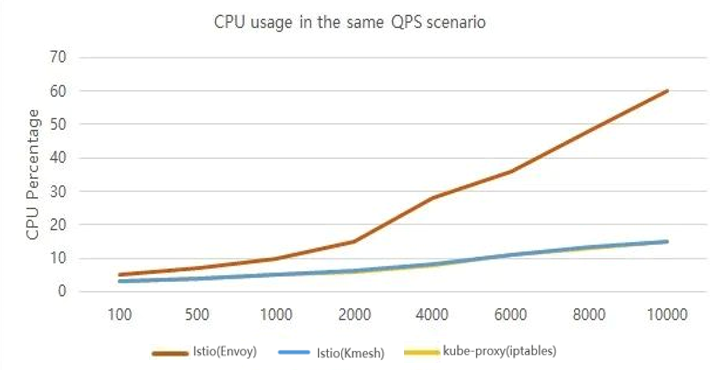
<img decoding="async" loading="lazy" alt="image" src="https://kmesh.net/assets/images/kmesh-perf-cpu-0989d3153ec3044d9b9b514ed5ad03b4.png" width="717" height="370" class="img_ev3q">
From the test results, we can see that:</p>
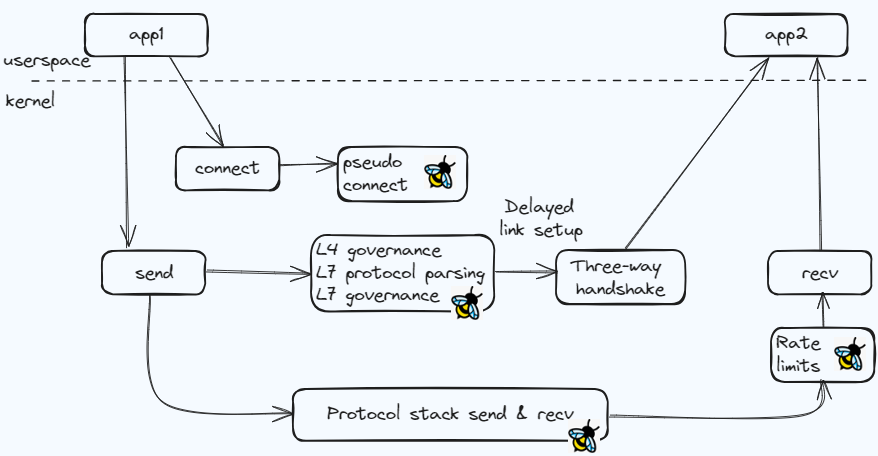
<ul>
<li>Kmesh's forwarding latency is almost close to the native Kubernetes forwarding latency, and it shows a significant improvement on latency compared with Istio sidecar mode.</li>
<li>With the same QPS, Kmesh's CPU overhead is basically equivalent to the native CPU overhead of Kubernetes, showing a significant reduction compared to Istio sidecar mode.
For detailed demo test details, you can watch our demonstration video:</li>
</ul>
<div class="video-responsive"><iframe src=" https://youtube.com/embed/Sk39kNJIKZE" frameborder="0"></iframe></div>
<h2 class="anchor anchorWithStickyNavbar_LWe7" id="key-technology-analysis-of-kmesh">Key Technology Analysis of Kmesh<a href="https://kmesh.net/blog/Kernel-Level%20Traffic%20Management%20Engine,%20Bring%20Ultimate%20Performance%20Experience.#key-technology-analysis-of-kmesh" class="hash-link" aria-label="Direct link to Key Technology Analysis of Kmesh" title="Direct link to Key Technology Analysis of Kmesh">​</a></h2>
<h3 class="anchor anchorWithStickyNavbar_LWe7" id="kernel-level-traffic-orchestration-runtime">Kernel-Level Traffic Orchestration Runtime<a href="https://kmesh.net/blog/Kernel-Level%20Traffic%20Management%20Engine,%20Bring%20Ultimate%20Performance%20Experience.#kernel-level-traffic-orchestration-runtime" class="hash-link" aria-label="Direct link to Kernel-Level Traffic Orchestration Runtime" title="Direct link to Kernel-Level Traffic Orchestration Runtime">​</a></h3>
<p>In microservice communication, connections are generally established before sending business messages. If you want to orchestrate business messages seamlessly, traffic interception is usually required. After orchestration is completed, the adjusted messages are then forwarded based on the interception. This is the current implementation of Proxy agents. Kmesh aims to complete governance work along with the flow and delays link establishment until the business message sending phase in order to achieve higher orchestration processing performance.</p>
<ul>
<li>Pseudo Connection Establishment
The pre_connect process loads the BPF prog. If the target address being accessed is within the scope of the xDS listener, it calls bpf_setsockopt to reload the tcp proto hook of the current socket to the kmesh_defer kernel module via TCP_ULP.</li>
<li>Delayed Connection Establishment
The kmesh_defer kernel module rewrites the connect/send hooks (enhancements made on the native hooks):<!-- -->
<ul>
<li>When the service first reaches the connect hook, it sets the bpf_defer_connect flag and does not trigger the handshake process.</li>
<li>In the send hook, if the sock has the bpf_defer_connect flag set, it triggers the connect. At this point, it calls the BPF_SOCK_OPS_TCP_DEFER_CONNECT_CB through an extended BPF prog, completes traffic management, and then establishes a connection and sends messages based on the adjusted communication quintuple and messages.
The entire governance process is roughly as shown in the following diagram:
<img decoding="async" loading="lazy" alt="image" src="https://kmesh.net/assets/images/kmesh-orch-7278d5e05d0729b0f860a49b87eae9f0.png" width="878" height="456" class="img_ev3q"></li>
</ul>
</li>
</ul>
<h3 class="anchor anchorWithStickyNavbar_LWe7" id="xds-rule-management">xDS Rule Management<a href="https://kmesh.net/blog/Kernel-Level%20Traffic%20Management%20Engine,%20Bring%20Ultimate%20Performance%20Experience.#xds-rule-management" class="hash-link" aria-label="Direct link to xDS Rule Management" title="Direct link to xDS Rule Management">​</a></h3>
<p>The xDS model is a hierarchical tree-like rule expression, and different version model definitions may be adjusted. Kmesh needs to convert the model information into eBPF map storage while maintaining the hierarchical relationships between model rules.</p>
<ul>
<li>Convert the xDS model into eBPF map data
<img decoding="async" loading="lazy" alt="image" src="https://kmesh.net/assets/images/kmesh-xds-18a5ca3d49d7eb56ca2c46a9324a386a.png" width="440" height="333" class="img_ev3q">
Specific Process:</li>
</ul>
<ol>
<li>Kmesh subscribes to Istiod's xDS model and converts the pb model into a C data structure style based on protobuf-c.</li>
<li>For the top-level model (e.g., listener), Kmesh defines well-known map tables corresponding to it, and the data structure of the value reuses the C struct exported by protobuf-c.</li>
<li>Map updates start from the well-known map table of the top-level model. For pointer members in the records, the xds-adapter creates an inner-map table to store the actual data area pointed to by the pointer, adds the map fd of the inner-map to the map-in-map table, and finally uses its key (index) in the map-in-map table as the value for the pointer member.</li>
</ol>
<ul>
<li>map-in-map addresses the hierarchical nature of the xDS model
<img decoding="async" loading="lazy" alt="image" src="https://kmesh.net/assets/images/kmesh-map-in-map-797a0ca039ce4fef3eb7c3ee610c4466.png" width="1012" height="357" class="img_ev3q">
For the value members of map records, if they are pointer variables (involving references to other data structures), the data area pointed to is stored through the inner-map:<!-- -->
<ul>
<li>If the value member is a basic data type (such as int), it is accessed directly.</li>
<li>If the value member is a pointer type, the value stored by the pointer is the index of the inner-map storing the actual data in the map-in-map table (Note: the index is written in coordination with updating the bpf map in the kmesh-daemon's xds-adapter module). When accessing, the map fd of the inner-map is first found based on the index, and then the actual data is retrieved from the inner-map table. For multi-level pointer members, this process is repeated until all pointer information is stripped away.</li>
</ul>
</li>
</ul>
<h3 class="anchor anchorWithStickyNavbar_LWe7" id="traffic-management-orchestration-implementation">Traffic Management Orchestration Implementation<a href="https://kmesh.net/blog/Kernel-Level%20Traffic%20Management%20Engine,%20Bring%20Ultimate%20Performance%20Experience.#traffic-management-orchestration-implementation" class="hash-link" aria-label="Direct link to Traffic Management Orchestration Implementation" title="Direct link to Traffic Management Orchestration Implementation">​</a></h3>
<p>The governance rules of xDS are complex, involving hierarchical matching, which exceeds the complexity limit of a single eBPF program. Based on the eBPF Tail Calls feature, Kmesh divides the governance process into multiple independent eBPF progs, thus having good scalability.
<img decoding="async" loading="lazy" alt="image" src="https://kmesh.net/assets/images/kmesh-bpf-tailcall-c0ec101550a1be4c4ded19cc545403d2.png" width="992" height="62" class="img_ev3q"></p>
<h2 class="anchor anchorWithStickyNavbar_LWe7" id="key-features-of-kmesh-latest">Key Features of Kmesh latest<a href="https://kmesh.net/blog/Kernel-Level%20Traffic%20Management%20Engine,%20Bring%20Ultimate%20Performance%20Experience.#key-features-of-kmesh-latest" class="hash-link" aria-label="Direct link to Key Features of Kmesh latest" title="Direct link to Key Features of Kmesh latest">​</a></h2>
<ul>
<li>One-Click Deployment
The Kmesh community has released deployment images for Kmesh <sup>[2]</sup> and supports one-click deployment of Kmesh via helm <sup>[3]</sup>.</li>
<li>Namespace-based Enablement for Kmesh
Kmesh supports enabling traffic takeover scope based on namespace, such as: kubectl label namespace default label istio.io/dataplane-mode=Kmesh</li>
<li>Seamless Integration with Istio Sidecar
For namespaces in the cluster that do not have Kmesh data plane enabled, if a sidecar proxy (such as Envoy) is used, Kmesh also supports interconnection. Additionally, sockmap can be used to accelerate traffic forwarding for the sidecar, resulting in a 10% to 15% performance improvement in forwarding without impacting the business process.</li>
<li>Automated Integration with Service Mesh Control Plane
Kmesh supports automatic integration with Istiod, and in theory, any mesh control plane following the xDS protocol can integrate with Kmesh. This can be specified by modifying the MESH_CONTROLLER environment variable in the yaml.</li>
<li>Support xDS/workload
Kmesh supports the xDS model, enabling TCP traffic forwarding, HTTP/1.1 header matching, routing, and gray release. It also supports random and round-robin load balancing algorithms. Furthermore, it provides basic forwarding functionality based on the workload model.</li>
</ul>
<h2 class="anchor anchorWithStickyNavbar_LWe7" id="looking-ahead">Looking Ahead<a href="https://kmesh.net/blog/Kernel-Level%20Traffic%20Management%20Engine,%20Bring%20Ultimate%20Performance%20Experience.#looking-ahead" class="hash-link" aria-label="Direct link to Looking Ahead" title="Direct link to Looking Ahead">​</a></h2>
<p>Kmesh is a high-performance traffic management engine based on eBPF and programmable kernel implementation. Compared to industry solutions, it offers higher forwarding performance and lower resource overhead. It can run in compatible mode on kernel versions without enhanced patches. For full governance capabilities of Kmesh, the current openEuler 23.03 version<sup>[4]</sup> already provides native support, while other operating systems require building based on enhanced patches<sup>[5]</sup>.
Kmesh is gradually evolving into a more popular traffic management engine, and there is still a lot of work to be done. Currently, support for forwarding L7 traffic to waypoint and mTLS features has been planned. We welcome everyone to try Kmesh and stay connected with the Kmesh community<sup>[6]</sup>. Your participation is also highly anticipated.</p>
<h2 class="anchor anchorWithStickyNavbar_LWe7" id="meet-kmesh-at-kubecon--cloudnativecon-europe-2024">Meet Kmesh at KubeCon + CloudNativeCon Europe 2024<a href="https://kmesh.net/blog/Kernel-Level%20Traffic%20Management%20Engine,%20Bring%20Ultimate%20Performance%20Experience.#meet-kmesh-at-kubecon--cloudnativecon-europe-2024" class="hash-link" aria-label="Direct link to Meet Kmesh at KubeCon + CloudNativeCon Europe 2024" title="Direct link to Meet Kmesh at KubeCon + CloudNativeCon Europe 2024">​</a></h2>
<p>Kmesh will participate in several activities during KubeCon + CloudNativeCon Europe 2024, including:</p>
<h3 class="anchor anchorWithStickyNavbar_LWe7" id="kmesh-display">Kmesh Display<a href="https://kmesh.net/blog/Kernel-Level%20Traffic%20Management%20Engine,%20Bring%20Ultimate%20Performance%20Experience.#kmesh-display" class="hash-link" aria-label="Direct link to Kmesh Display" title="Direct link to Kmesh Display">​</a></h3>
<p>March 20-22 all day : Stop by Booth J1 at KubeCon to speak with an expert or see a demo!</p>
<h3 class="anchor anchorWithStickyNavbar_LWe7" id="kmesh-openspeech">Kmesh OpenSpeech<a href="https://kmesh.net/blog/Kernel-Level%20Traffic%20Management%20Engine,%20Bring%20Ultimate%20Performance%20Experience.#kmesh-openspeech" class="hash-link" aria-label="Direct link to Kmesh OpenSpeech" title="Direct link to Kmesh OpenSpeech">​</a></h3>
<p>Friday，Mar 22, 11:10-11:30 am CET
Kernel-native Traffic Governance Framework Brings New Performance Experience
<img decoding="async" loading="lazy" alt="image" src="https://kmesh.net/assets/images/kmesh-kubecon-europe-84901776f90aa220ebb587a2bada8d21.png" width="1500" height="500" class="img_ev3q"></p>
<h2 class="anchor anchorWithStickyNavbar_LWe7" id="reference-links">Reference Links<a href="https://kmesh.net/blog/Kernel-Level%20Traffic%20Management%20Engine,%20Bring%20Ultimate%20Performance%20Experience.#reference-links" class="hash-link" aria-label="Direct link to Reference Links" title="Direct link to Reference Links">​</a></h2>
<p>[1] Kmesh releases: <a href="https://github.com/kmesh-net/kmesh/releases" target="_blank" rel="noopener noreferrer">https://github.com/kmesh-net/kmesh/releases</a></p>
<p>[2] Deployment images for Kmesh: <a href="https://github.com/orgs/kmesh-net/packages" target="_blank" rel="noopener noreferrer">https://github.com/orgs/kmesh-net/packages</a></p>
<p>[3] One-click deployment of Kmesh: <a href="https://github.com/kmesh-net/kmesh?tab=readme-ov-file#quick-start" target="_blank" rel="noopener noreferrer">https://github.com/kmesh-net/kmesh?tab=readme-ov-file#quick-start</a></p>
<p>[4] openEuler 23.03 version: <a href="https://repo.openeuler.org/openEuler-23.03/" target="_blank" rel="noopener noreferrer">https://repo.openeuler.org/openEuler-23.03/</a></p>
<p>[5] Building based on enhanced patches: <a href="https://github.com/kmesh-net/kmesh/blob/main/docs/kmesh_kernel_compile.md" target="_blank" rel="noopener noreferrer">https://github.com/kmesh-net/kmesh/blob/main/docs/kmesh_kernel_compile.md</a></p>
<p>[6] Kmesh community address: <a href="https://github.com/kmesh-net/kmesh" target="_blank" rel="noopener noreferrer">https://github.com/kmesh-net/kmesh</a></p>]]></content>
        <author>
            <name>Kmesh</name>
            <uri>https://github.com/kmesh-bot</uri>
        </author>
        <category label="introduce" term="introduce"/>
    </entry>
    <entry>
        <title type="html"><![CDATA[Kmesh: High-performance service mesh data plane]]></title>
        <id>https://kmesh.net/blog/kmesh_introduce</id>
        <link href="https://kmesh.net/blog/kmesh_introduce"/>
        <updated>2023-07-08T02:05:09.000Z</updated>
        <summary type="html"><![CDATA[What is a Service Mesh]]></summary>
        <content type="html"><![CDATA[<h2 class="anchor anchorWithStickyNavbar_LWe7" id="what-is-a-service-mesh">What is a Service Mesh<a href="https://kmesh.net/blog/kmesh_introduce#what-is-a-service-mesh" class="hash-link" aria-label="Direct link to What is a Service Mesh" title="Direct link to What is a Service Mesh">​</a></h2>
<p>The concept of a service mesh was introduced by Buoyant, the company behind the development of Linkerd software, in 2016. Willian Morgan, the CEO of Linkerd, provided the initial definition of a service mesh:</p>
<blockquote>
<p>A service mesh is a dedicated layer for handling service-to-service communication. It’s responsible for the reliable delivery of requests through the complex topology of services that comprise a modern, cloud-native application. In practice, the service mesh is typically implemented as an array of lightweight network proxies that are deployed alongside application code, without the application needing to be aware.</p>
</blockquote>
<p>In simple terms, a service mesh is an layer that handles communication between services. It ensures transparent and reliable network communication for modern cloud-native applications through an array of lightweight network proxies.</p>
<p>The essence of a service mesh is to address the challenge of how microservices can communicate effectively. By implementing governance rules such as load balancing, canary routing, and circuit breaking, the service mesh orchestrates traffic flow to maximize the capabilities of the service cluster. It is a product of the evolution of service governance.</p>
<p>We can divide the evolution of service governance into three generations and compare them. From this evolution, we can observe that service governance capabilities gradually decouple from business logic and move down to the level.</p>
<p><img decoding="async" loading="lazy" alt="image" src="https://kmesh.net/assets/images/servicemesh-evolution-6352f999bdc58386ea73eb5f092b7116.png" width="1208" height="485" class="img_ev3q"></p>
<p>As an layer for handling service-to-service communication, a service mesh effectively fills the gaps in microservice governance in Kubernetes (k8s). As the next-generation technology for cloud-native environments, it has become a critical component of cloud.</p>
<p>In recent years, service mesh has gained significant attention, leading to the emergence of various service mesh software solutions such as Linkerd, Istio, Consul Connect, and Kuma. While they may have slight differences in their software architecture, let's take Istio as an example (one of the most popular service mesh projects) to illustrate the basic architecture of a service mesh:</p>
<p><img decoding="async" loading="lazy" alt="image" src="https://kmesh.net/assets/images/istio-arch-9a9fe3bf3a7ba09a469e35d8e5f198e4.png" width="652" height="475" class="img_ev3q"></p>
<p>Taking a Kubernetes cluster as an example, when a Pod instance is created, the service mesh software transparently deploys a proxy container (also known as a sidecar, with Envoy being the default sidecar software in Istio) alongside the application code. The basic flow of communication between Pods is as follows:</p>
<ul>
<li>Traffic is transparently intercepted by iptables rules and directed to the proxy component within the Pod.</li>
<li>The proxy component applies traffic governance logic (e.g., circuit breaking, routing, load balancing) to determine the destination service instance and forwards the message.</li>
<li>The proxy component within the destination Pod intercepts the incoming traffic, applies basic traffic governance logic (e.g., rate limiting), and then forwards the traffic to the Pod.</li>
<li>After processing, the response is returned to the requesting Pod following the original path.</li>
</ul>
<h2 class="anchor anchorWithStickyNavbar_LWe7" id="challenges-of-the-service-mesh-data-plane">Challenges of the Service Mesh Data Plane<a href="https://kmesh.net/blog/kmesh_introduce#challenges-of-the-service-mesh-data-plane" class="hash-link" aria-label="Direct link to Challenges of the Service Mesh Data Plane" title="Direct link to Challenges of the Service Mesh Data Plane">​</a></h2>
<p>As mentioned earlier, a service mesh introduces a proxy layer in the data plane to achieve transparent service governance. However, this comes at a cost: the introduction of the proxy layer inevitably increases latency and decreases performance in service communication.</p>
<p>Using data provided by the Istio official website as an example, in a cluster environment, the average per-hop latency between microservices increases by 2.65ms. Considering that in a microservice cluster, an external request often involves multiple invocations between microservices, the latency overhead introduced by the service mesh is significant. As service mesh adoption continues to grow, the additional latency introduced by the proxy architecture has become a critical challenge.</p>
<p><img decoding="async" loading="lazy" alt="image" src="https://kmesh.net/assets/images/istio-performance-7cd3e1b676ec6942e219514a71e38e8b.png" width="810" height="197" class="img_ev3q"></p>
<p>To address this issue, we conducted performance testing on L7 load balancing for HTTP services to analyze the communication performance of the service mesh. The breakdown of time consumption is as follows:</p>
<p><img decoding="async" loading="lazy" alt="image" src="https://kmesh.net/assets/images/istio-perf-analysis-8942af8f6249da10809da45d0cc68924.png" width="670" height="143" class="img_ev3q"></p>
<p>From the detailed analysis of mesh traffic, we can see that inter-service communication transitions from one connection establishment to three, and from two protocol stack traversals to six. The time consumption mainly focuses on data copying, connection establishment, context switching, etc. The actual overhead of traffic governance is relatively small.</p>
<p>This raises the question: Can we reduce the latency overhead of the service mesh while maintaining transparent governance for applications?</p>
<h2 class="anchor anchorWithStickyNavbar_LWe7" id="high-performance-service-mesh-data-plane-kmesh">High-Performance Service Mesh Data Plane: Kmesh<a href="https://kmesh.net/blog/kmesh_introduce#high-performance-service-mesh-data-plane-kmesh" class="hash-link" aria-label="Direct link to High-Performance Service Mesh Data Plane: Kmesh" title="Direct link to High-Performance Service Mesh Data Plane: Kmesh">​</a></h2>
<p>Based on the performance analysis mentioned above, we have conducted a two-stage optimization for the service mesh data plane.</p>
<h3 class="anchor anchorWithStickyNavbar_LWe7" id="sockmap-accelerating-the-service-mesh-data-plane-with-sockmap">Sockmap: Accelerating the Service Mesh Data Plane with Sockmap<a href="https://kmesh.net/blog/kmesh_introduce#sockmap-accelerating-the-service-mesh-data-plane-with-sockmap" class="hash-link" aria-label="Direct link to Sockmap: Accelerating the Service Mesh Data Plane with Sockmap" title="Direct link to Sockmap: Accelerating the Service Mesh Data Plane with Sockmap">​</a></h3>
<p>Sockmap is an eBPF feature introduced in Linux 4.14, which enables the redirection of data flows between sockets within a node without going through the complex kernel protocol stack. It optimizes the performance of data forwarding between sockets on the network path.</p>
<p>In the context of a service mesh, the default communication between the business container within a Pod and the local proxy component goes through the complete kernel protocol stack, incurring unnecessary overhead. This overhead can be optimized using Sockmap. The following diagram illustrates the concept:</p>
<p><img decoding="async" loading="lazy" alt="image" src="https://kmesh.net/assets/images/sockmap-be91b08014ddf3ede3b4369440f4e64c.png" width="1180" height="235" class="img_ev3q"></p>
<p>The basic steps for accelerating the service mesh data plane with Sockmap are as follows:</p>
<ul>
<li>During the connection establishment process, an eBPF program (of type BPF_PROG_TYPE_SOCK_OPS) is attached to intercept all TCP connection establishment actions.<!-- -->
<ul>
<li>In the BPF_SOCK_OPS_ACTIVE_ESTABLISHED_CB state, a client-side Sockmap record is added.</li>
<li>In the BPF_SOCK_OPS_PASSIVE_ESTABLISHED_CB state, a server-side Sockmap record is added.</li>
<li>The socket information of both communication parties is stored in the Sockmap table.</li>
</ul>
</li>
<li>During the sendmsg process, an eBPF program (of type BPF_PROG_TYPE_SK_MSG) is attached to intercept message sending actions.<!-- -->
<ul>
<li>The program looks up the Sockmap table based on the current socket information and associates it with the socket information of the destination party. It then directly redirects the traffic to the receiving queue of the destination socket.</li>
</ul>
</li>
</ul>
<p>By leveraging Sockmap to accelerate the service mesh data plane, we observed a 10% to 15% reduction in average latency for service access in a scenario with 60 long-lived connections.</p>
<p><img decoding="async" loading="lazy" alt="image" src="https://kmesh.net/assets/images/sockmap-performance-caad5491ca9d1faaeea85ba329efc0da.png" width="475" height="252" class="img_ev3q"></p>
<p>While Sockmap is a commonly used solution for optimizing the service mesh data plane, it does not fully address the performance challenges associated with service mesh latency.</p>
<h3 class="anchor anchorWithStickyNavbar_LWe7" id="offload-offloading-traffic-governance-to-the-operating-system-with-programmable-kernel">Offload: Offloading Traffic Governance to the Operating System with Programmable Kernel<a href="https://kmesh.net/blog/kmesh_introduce#offload-offloading-traffic-governance-to-the-operating-system-with-programmable-kernel" class="hash-link" aria-label="Direct link to Offload: Offloading Traffic Governance to the Operating System with Programmable Kernel" title="Direct link to Offload: Offloading Traffic Governance to the Operating System with Programmable Kernel">​</a></h3>
<p>Based on the performance analysis mentioned earlier, it is evident that a significant portion of the additional overhead introduced by the service mesh is spent on redirecting traffic to the proxy component. The actual overhead of performing traffic governance is relatively small. This raises the question: Can we bypass the proxy component and perform traffic governance directly within the kernel, which is naturally involved in network communication?</p>
<p>Kmesh is our proposed high-performance service mesh data plane solution that leverages a programmable kernel to offload traffic governance to the operating system. With Kmesh, the data plane no longer goes through the proxy component, and service-to-service communication is reduced from three hops to one hop, enabling traffic governance to be performed along the path of traffic transmission. The flow of traffic between microservices in Kmesh is illustrated below:</p>
<p><img decoding="async" loading="lazy" alt="image" src="https://kmesh.net/assets/images/istio-kmesh-datapath-compare-df4a529f3ff617c8321813f10c0c8816.png" width="784" height="225" class="img_ev3q"></p>
<p>The software architecture of Kmesh consists of the following components:</p>
<ul>
<li>kmesh-controller: The management program responsible for Kmesh lifecycle management, XDS protocol integration, observability, and other functions.</li>
<li>kmesh-api: The API interface layer provided by Kmesh, including the orchestrated API transformed from XDS and observability channels.</li>
<li>kmesh-runtime: The runtime implemented in the kernel that supports L3-L7 traffic orchestration.</li>
<li>kmesh-orchestration: The L3-L7 traffic orchestration implemented based on eBPF, including routing, canary deployments, load balancing, and more.</li>
<li>kmesh-probe: The observability probe that provides end-to-end observability capabilities.</li>
</ul>
<p>We deployed an Istio mesh environment and conducted comparative testing on the performance of different data plane solutions (Envoy/Kmesh) for L7 load balancing of HTTP services using the Fortio testing tool. The results showed that Kmesh achieved a 5x performance improvement in service-to-service communication compared to the native data plane of Istio (Envoy).</p>
<p><img decoding="async" loading="lazy" alt="image" src="https://kmesh.net/assets/images/kmesh-performance-3b8e015c3962aaca431d0f7cbcc1ec28.png" width="988" height="474" class="img_ev3q"></p>
<p>It is worth noting that we also tested the performance of service-to-service communication in a non-mesh environment based on Kubernetes, and the performance was comparable to Kmesh. This further validates the latency performance of Kmesh. (The testing scenario involved L7 load balancing in a laboratory environment, and the actual performance in real-world governance scenarios may not be as ideal. Preliminary evaluations suggest a 2-3x improvement over Istio.)</p>
<h2 class="anchor anchorWithStickyNavbar_LWe7" id="conclusion">Conclusion<a href="https://kmesh.net/blog/kmesh_introduce#conclusion" class="hash-link" aria-label="Direct link to Conclusion" title="Direct link to Conclusion">​</a></h2>
<p>As the next-generation technology for cloud-native environments, a service mesh provides transparent service governance for applications. However, the proxy architecture introduces additional latency overhead, which has become a critical challenge for widespread adoption of service meshes. Kmesh proposes a new approach by offloading traffic governance to the operating system using a programmable kernel. By doing so, Kmesh significantly improves the performance of the service mesh data plane. It offers a fresh perspective for the development of the service mesh data plane.</p>
<h2 class="anchor anchorWithStickyNavbar_LWe7" id="reference">reference<a href="https://kmesh.net/blog/kmesh_introduce#reference" class="hash-link" aria-label="Direct link to reference" title="Direct link to reference">​</a></h2>
<p><a href="https://linkerd.io/2017/04/25/whats-a-service-mesh-and-why-do-i-need-one" target="_blank" rel="noopener noreferrer">https://linkerd.io/2017/04/25/whats-a-service-mesh-and-why-do-i-need-one</a></p>
<p><a href="https://istio.io/latest/docs/ops/deployment/architecture" target="_blank" rel="noopener noreferrer">https://istio.io/latest/docs/ops/deployment/architecture</a></p>
<p><a href="https://istio.io/v1.16/docs/ops/deployment/performance-and-scalability/#performance-summary-for-istio-hahahugoshortcode-s0-hbhb" target="_blank" rel="noopener noreferrer">https://istio.io/v1.16/docs/ops/deployment/performance-and-scalability/#performance-summary-for-istio-hahahugoshortcode-s0-hbhb</a></p>]]></content>
        <author>
            <name>Kmesh</name>
            <uri>https://github.com/kmesh-bot</uri>
        </author>
        <category label="introduce" term="introduce"/>
    </entry>
    <entry>
        <title type="html"><![CDATA[Accelerating ServiceMesh Data Plane Based on Sockmap]]></title>
        <id>https://kmesh.net/blog/sockmap-itroduce</id>
        <link href="https://kmesh.net/blog/sockmap-itroduce"/>
        <updated>2023-07-01T00:00:00.000Z</updated>
        <summary type="html"><![CDATA[Background Introduction]]></summary>
        <content type="html"><![CDATA[<h2 class="anchor anchorWithStickyNavbar_LWe7" id="background-introduction">Background Introduction<a href="https://kmesh.net/blog/sockmap-itroduce#background-introduction" class="hash-link" aria-label="Direct link to Background Introduction" title="Direct link to Background Introduction">​</a></h2>
<p>Early microservices architectures faced various challenges such as service discovery, load balancing, and authorization/authentication. Initially, practitioners of microservices implemented their own distributed communication systems to address these challenges. However, this approach resulted in redundant business functionality. To solve this problem, a solution was proposed: extracting the common distributed system communication code into a framework and providing it as a library for programmatic use. However, this seemingly perfect solution had several fatal weaknesses:</p>
<ul>
<li>The framework required invasive modifications to the business code, necessitating developers to learn how to use the framework.</li>
<li>The framework could not be used across different programming languages.</li>
<li>Managing compatibility issues with complex project frameworks and library versions was challenging, as upgrading the framework often forced businesses to upgrade as well.</li>
</ul>
<p>As microservices architecture evolved, the first-generation service mesh emerged, represented by Linkeerd/Envoy/NginxMesh and the sidecar proxy pattern. As an infrastructure layer, the sidecar proxy is decoupled from the business processes and deployed alongside them. It takes over the communication between business components, abstracting the network data transmission into a separate layer. This layer centrally handles functions such as service discovery, load balancing, and authorization/authentication required by distributed systems, achieving reliable transmission of requests in the network topology. It provides a more comprehensive solution to the problems encountered with microservice framework libraries.</p>
<p><img decoding="async" loading="lazy" alt="Image 1" src="https://kmesh.net/assets/images/1-cdba42a5964053f5452dd85130b5e216.png" width="1080" height="239" class="img_ev3q"></p>
<p>However, there is no silver bullet in software development. While service mesh brings many conveniences, it also inevitably presents some issues. In traditional approaches, messages between clients and servers only need to go through the kernel protocol stack once to complete the message delivery. In the sidecar proxy mode, however, the business traffic is typically intercepted using the iptables capability of the kernel, resulting in multiple passes through the kernel protocol stack for business data. This increases latency and reduces throughput.</p>
<p><img decoding="async" loading="lazy" alt="Image 2" src="https://kmesh.net/assets/images/2-6043f66a9239e2bf3c3332ce0fa46217.png" width="1080" height="293" class="img_ev3q"></p>
<p>We conducted benchmark tests on service mesh performance and found that the sidecar mode (with Envoy) had significantly worse latency compared to the non-sidecar mode (without Envoy).</p>
<p><img decoding="async" loading="lazy" alt="Image 3" src="https://kmesh.net/assets/images/3-31f98f8f8a22b51e42eea68ba7d63b21.png" width="461" height="427" class="img_ev3q"></p>
<h2 class="anchor anchorWithStickyNavbar_LWe7" id="accelerating-servicemesh-with-ebpf-capabilities">Accelerating ServiceMesh with eBPF Capabilities<a href="https://kmesh.net/blog/sockmap-itroduce#accelerating-servicemesh-with-ebpf-capabilities" class="hash-link" aria-label="Direct link to Accelerating ServiceMesh with eBPF Capabilities" title="Direct link to Accelerating ServiceMesh with eBPF Capabilities">​</a></h2>
<p>Is there a way to reduce and eliminate the impact of network latency while enjoying the convenience provided by ServiceMesh? Here, we have to mention eBPF technology. eBPF is a revolutionary technology in the kernel that aims to extend the kernel's capabilities more securely and effectively without modifying the kernel code or loading kernel modules. By using eBPF capabilities to bypass the kernel network protocol stack, we can reduce network latency and improve the user experience of ServiceMesh. This is currently a common practice in the industry.</p>
<p><img decoding="async" loading="lazy" alt="Image 4" src="https://kmesh.net/assets/images/4-f4b773458c6bf9736ac5f11d6d892d04.png" width="840" height="213" class="img_ev3q"></p>
<p>To achieve the goal of bypassing the kernel network protocol stack, we need to utilize two capabilities provided by eBPF: sockops and socket redirection.</p>
<ul>
<li>Sockops provides the ability to identify and store sockets (usually identified by a tuple of four elements) in a sockmap data structure when creating TCP connections.</li>
<li>Socket redirection supports referencing sockets from the sockmap based on keys during the transmission of TCP data. When a match is found, the data can be directly forwarded to the corresponding socket.</li>
<li>For sockets not found in the sockmap, the packets are sent through the kernel network protocol stack as usual.</li>
</ul>
<p>By combining these capabilities, we can forward packets directly to the corresponding socket without going through the kernel network protocol stack, reducing the time spent in the kernel network protocol stack.</p>
<p><img decoding="async" loading="lazy" alt="Image 5" src="https://kmesh.net/assets/images/5-83cd85b240c04328d5f4613ab2473e0c.png" width="1008" height="403" class="img_ev3q"></p>
<p>During the process of establishing a TCP socket connection, there are actually two connection establishment processes: forward connection and reverse connection. In general, iptables information is used to obtain the actual IP address and port number during the connection establishment of both forward and reverse connections. By calling bpf_get_sockopt, we can actively obtain the addresses transformed by iptables in the eBPF function. This allows us to establish an auxiliary map to store the corresponding relationships between forward and reverse connections. When performing socket redirection, we first look for the connection information of the peer from the auxiliary map. If the connection information is found successfully, we proceed with the socket forwarding action. The principle is shown in the following diagram:</p>
<p><img decoding="async" loading="lazy" alt="Image 6" src="https://kmesh.net/assets/images/6-bb02bbb7cc8755033badd0c0e8127b5b.png" width="1080" height="526" class="img_ev3q"></p>
<p>We conducted actual tests on openEuler 21.03 to evaluate the acceleration achieved through sockmap capabilities. The test environment was openEuler-21.03 / 5.10.0-4.17.0.28.oe1.x86_64, and the network configuration was set as fortio-envoy-envoy:80-fortio_server:80.</p>
<p>Based on the test results, compared to not using ServiceMesh, the QPS was improved by approximately 18% and the average latency was reduced by 15% when utilizing sockmap acceleration.</p>
<p><img decoding="async" loading="lazy" alt="Image 7" src="https://kmesh.net/assets/images/7-b91dab286e7be96158ed0ed4a2147263.png" width="461" height="424" class="img_ev3q"></p>
<h2 class="anchor anchorWithStickyNavbar_LWe7" id="can-service-mesh-performance-overhead-be-eliminated-entirely">Can service mesh performance overhead be eliminated entirely?<a href="https://kmesh.net/blog/sockmap-itroduce#can-service-mesh-performance-overhead-be-eliminated-entirely" class="hash-link" aria-label="Direct link to Can service mesh performance overhead be eliminated entirely?" title="Direct link to Can service mesh performance overhead be eliminated entirely?">​</a></h2>
<p>However, despite the significant acceleration achieved with sockmap for ServiceMesh, there still remains a considerable gap compared to not using ServiceMesh. This is primarily due to the substantial latency overhead introduced by the current proxy architecture of the service mesh. To completely eliminate the performance impact introduced by the service mesh, it is crucial to optimize at the architectural level.</p>
<p>Kmesh is actively exploring new approaches at the data plane architecture level to address this challenge, and the industry has also made significant efforts in this regard. In upcoming articles, we will provide detailed insights into these initiatives and optimization measures.</p>]]></content>
        <author>
            <name>Kmesh</name>
            <uri>https://github.com/kmesh-bot</uri>
        </author>
        <category label="introduce" term="introduce"/>
    </entry>
</feed>