<?xml version="1.0" encoding="utf-8"?><?xml-stylesheet type="text/xsl" href="atom.xsl"?>
<feed xmlns="http://www.w3.org/2005/Atom">
    <id>https://kmesh.net/zh/blog</id>
    <title>Kmesh Blog</title>
    <updated>2025-10-01T06:30:00.000Z</updated>
    <generator>https://github.com/jpmonette/feed</generator>
    <link rel="alternate" href="https://kmesh.net/zh/blog"/>
    <subtitle>Kmesh Blog</subtitle>
    <icon>https://kmesh.net/zh/img/favicons/favicon.ico</icon>
    <entry>
        <title type="html"><![CDATA[Kmesh: The Ultimate Guide to Service Mesh for Beginners]]></title>
        <id>https://kmesh.net/zh/blog/kmesh-service-mesh-explained</id>
        <link href="https://kmesh.net/zh/blog/kmesh-service-mesh-explained"/>
        <updated>2025-10-01T06:30:00.000Z</updated>
        <summary type="html"><![CDATA[If you know Kubernetes, but you've never heard of a "service mesh", this post is for you.]]></summary>
        <content type="html"><![CDATA[<p>If you know Kubernetes, but you've never heard of a "service mesh", this post is for you.</p>
<p>By the end of this post, you'll know:</p>
<ul>
<li>
<p>What problem Kmesh is solving (and why that problem matters)</p>
</li>
<li>
<p>How the current solutions work (and why they're slow)</p>
</li>
<li>
<p>What Kmesh does differently (and why it's faster)</p>
</li>
<li>
<p>How all the pieces fit together</p>
</li>
</ul>
<h2 class="anchor anchorWithStickyNavbar_LWe7" id="what-is-a-service-mesh-and-why-does-it-exist">What is a Service Mesh and Why Does It Exist?<a href="https://kmesh.net/zh/blog/kmesh-service-mesh-explained#what-is-a-service-mesh-and-why-does-it-exist" class="hash-link" aria-label="What is a Service Mesh and Why Does It Exist?的直接链接" title="What is a Service Mesh and Why Does It Exist?的直接链接">​</a></h2>
<p>You must have deployed apps on Kubernetes. You know that your application runs inside a Pod, and that Pods talk to each other through Services. You write a YAML file, run <code>kubectl apply</code>, and your app is running.</p>
<p>Now imagine you're not deploying one app. You're deploying fifty. Imagine you are an engineer at a fast-growing <strong>e-commerce company</strong>. Your team started with a <strong>monolithic application</strong>—a single, large codebase handling user requests, inventory, and payments. As the company grew, you migrated to a microservices architecture with separate services for:</p>
<ul>
<li><strong>User Service</strong> (handles user accounts)</li>
<li><strong>Order Service</strong> (processes orders)</li>
<li><strong>Inventory Service</strong> (tracks stock)</li>
<li><strong>Payment Service</strong> (handles payments)</li>
</ul>
<p>At first, everything runs smoothly. But as complexity increases, several massive problems emerge:</p>
<ul>
<li><strong>Authentication &amp; Authorization is duplicated.</strong> Every microservice has to handle logins and permissions separately. Your developers are writing the same security logic over and over again for the Order Service, the Inventory Service, and the Payment Service.</li>
<li><strong>Failures become tougher to debug.</strong> Logs indicate errors in the Payment Service, but it's unclear whether these issues are from network glitches, load spikes, or faulty service updates. There is no central visibility.</li>
<li><strong>Unencrypted Security Risks.</strong> Sensitive data, like payment details, is being transmitted between your services unencrypted. Without proper encryption (like mTLS), any breach in your cluster becomes a major risk.</li>
<li><strong>Dumb Load Balancing.</strong> You have three replicas of your Payment Service. The Order Service is overwhelmed while the Inventory Service remains underutilized. Standard Kubernetes traffic distribution isn't smart enough to handle complex routing.</li>
<li><strong>Complex Canary Deployments.</strong> Let's say you want to release a new version of the Payment Service. Ideally, you want to route exactly 10% of your live traffic to the new version to test it out, but doing so without downtime is significantly challenging.</li>
</ul>
<p>Every production team eventually faces:</p>
<p><em>"Who is making sure all of this communication works properly?"</em></p>
<p>This growing complexity makes managing your microservices <strong>painful</strong>. Several solutions have been proposed to address this.</p>
<h2 class="anchor anchorWithStickyNavbar_LWe7" id="how-the-industry-tried-to-fix-it">How the Industry Tried to Fix It<a href="https://kmesh.net/zh/blog/kmesh-service-mesh-explained#how-the-industry-tried-to-fix-it" class="hash-link" aria-label="How the Industry Tried to Fix It的直接链接" title="How the Industry Tried to Fix It的直接链接">​</a></h2>
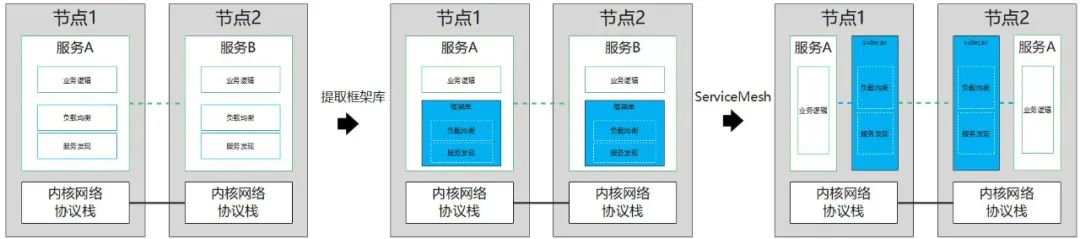
<p>These problems weren't unique to your company. Every engineering team building microservices ran into the same wall. And the industry didn't solve it overnight—it went through three distinct eras of trying.</p>
<p>Think of it like this: the networking logic that keeps your services talking to each other had to <em>live</em> somewhere. The question was always—<strong>where?</strong></p>
<p><img decoding="async" loading="lazy" alt="The evolution of service mesh" src="https://kmesh.net/zh/assets/images/evolution-timeline-a8503d72f3ec7b24d7de5a66dee94d6c.png" width="1024" height="1024" class="img_ev3q"></p>
<hr>
<h3 class="anchor anchorWithStickyNavbar_LWe7" id="era-1-the-big-box-in-the-middle-hardware-load-balancers">Era 1: The Big Box in the Middle (Hardware Load Balancers)<a href="https://kmesh.net/zh/blog/kmesh-service-mesh-explained#era-1-the-big-box-in-the-middle-hardware-load-balancers" class="hash-link" aria-label="Era 1: The Big Box in the Middle (Hardware Load Balancers)的直接链接" title="Era 1: The Big Box in the Middle (Hardware Load Balancers)的直接链接">​</a></h3>
<p>The earliest answer was straightforward: put a big, expensive box between your clients and your servers.</p>
<p>If you've been around infrastructure long enough, you've heard names like <strong>F5 BIG-IP</strong>, or maybe you've set up <strong>NGINX</strong> or <strong>HAProxy</strong> as a reverse proxy. The idea was simple—all traffic enters through one central point, and that point decides which backend server gets the request.</p>
<p><img decoding="async" loading="lazy" alt="Era 1: Hardware Load Balancers and Reverse Proxies" src="https://kmesh.net/zh/assets/images/era1-load-balancers-15d907dc51e8021e6dcc05aa99b450fc.png" width="1024" height="1024" class="img_ev3q"></p>
<p>This worked fine when you had a handful of backend servers. Your company had maybe 3-5 services, and a load balancer in front of them was perfectly manageable.</p>
<p>But here's where it breaks down with microservices:</p>
<ul>
<li><strong>It only handles North-South traffic.</strong> A load balancer sits at the edge. It distributes traffic <em>coming into</em> your cluster. But what about Service A calling Service B calling Service C <em>inside</em> the cluster? That's East-West traffic, and the load balancer doesn't even see it.</li>
<li><strong>It becomes a single point of failure.</strong> Every request flows through one box. If that box goes down, everything goes down.</li>
<li><strong>It doesn't understand your application.</strong> A load balancer can do round-robin or weighted routing, sure. But it doesn't know how to retry a failed request, or detect that one of your services is unhealthy and should be pulled from rotation automatically.</li>
</ul>
<p>As the number of microservices grew from 5 to 50 to 500, pointing everything at one big box in the middle simply stopped making sense. The networking logic needed to move closer to the services themselves.</p>
<hr>
<h3 class="anchor anchorWithStickyNavbar_LWe7" id="era-2-bake-it-into-the-code-smart-libraries">Era 2: Bake It Into the Code (Smart Libraries)<a href="https://kmesh.net/zh/blog/kmesh-service-mesh-explained#era-2-bake-it-into-the-code-smart-libraries" class="hash-link" aria-label="Era 2: Bake It Into the Code (Smart Libraries)的直接链接" title="Era 2: Bake It Into the Code (Smart Libraries)的直接链接">​</a></h3>
<p>Netflix was one of the first companies to really feel the pain of running hundreds of microservices. And their answer was pretty direct: if the infrastructure can't handle this, let's handle it <em>in the application code itself</em>.</p>
<p>They built a set of open-source Java libraries — collectively called <strong>Netflix OSS</strong> — that developers would import directly into their services. Think of it like adding an extra package to your project, except this package handled all the networking headaches for you:</p>
<ul>
<li><strong>How do I find another service?</strong> → Eureka (service discovery)</li>
<li><strong>What if that service is down?</strong> → Hystrix (stop calling a broken service, don't let it drag you down too)</li>
<li><strong>Which instance should I send my request to?</strong> → Ribbon (pick the healthiest one)</li>
<li><strong>How should I route incoming traffic?</strong> → Zuul (smart routing)</li>
</ul>
<p><img decoding="async" loading="lazy" alt="Era 2: Smart Libraries — every service carries duplicated networking code" src="https://kmesh.net/zh/assets/images/era2-smart-libraries-176514889438e57842ee507567766c74.png" width="1024" height="1024" class="img_ev3q"></p>
<p>Every microservice now carried its own networking smarts built right into the application code.</p>
<p>Netflix scaled to hundreds of microservices this way. Other companies followed — Twitter built Finagle, Google had internal equivalents.</p>
<p>But as teams adopted this approach, cracks started showing:</p>
<ul>
<li><strong>Language lock-in.</strong> Netflix OSS was Java. If your ML team writes Python and your frontend team uses Node.js, you'd have to rewrite all that networking logic from scratch for each language. Not realistic.</li>
<li><strong>Upgrade nightmare.</strong> Found a bug in one of these libraries? You now need to update it in <em>every single microservice</em>, rebuild, test, and redeploy each one. With 200 services, that's not a quick patch — that's a week-long campaign.</li>
<li><strong>Your developers didn't sign up for this.</strong> They wanted to build a payment system, not debug why the load balancing library is sending traffic to a dead instance. Business logic and networking plumbing were tangled together in the same codebase.</li>
</ul>
<p>The big takeaway from this era was clear: <strong>the networking logic needs to live outside the application code</strong>. Developers should focus on business logic. Something else should handle the networking.</p>
<p>But that "something else" shouldn't be one big box in the middle either. What if you could pull the networking logic out of the code and run it <em>right next to</em> the application — but as its own separate process?</p>
<hr>
<h3 class="anchor anchorWithStickyNavbar_LWe7" id="era-3-the-sidecar-proxy-the-birth-of-the-service-mesh">Era 3: The Sidecar Proxy (The Birth of the Service Mesh)<a href="https://kmesh.net/zh/blog/kmesh-service-mesh-explained#era-3-the-sidecar-proxy-the-birth-of-the-service-mesh" class="hash-link" aria-label="Era 3: The Sidecar Proxy (The Birth of the Service Mesh)的直接链接" title="Era 3: The Sidecar Proxy (The Birth of the Service Mesh)的直接链接">​</a></h3>
<p>Instead of embedding networking logic inside your application, you deploy a small, lightweight proxy <em>alongside</em> every instance of your service. In Kubernetes terms, this proxy runs as a second container inside the same Pod. The most popular one is <strong>Envoy</strong>, originally built at Lyft.</p>
<p>Here's how it works. Back to your e-commerce example:</p>
<ol>
<li>Your <strong>Order Service</strong> wants to call the <strong>Payment Service</strong>. It doesn't call it directly — the request gets transparently intercepted (via iptables rules) and redirected to the <strong>Envoy sidecar</strong> running in the same Pod.</li>
<li>The Envoy sidecar applies all the networking logic (load balancing, retries, mTLS encryption, timeouts) and forwards the request to the Payment Service's Pod.</li>
<li>There, the request hits the <strong>Envoy sidecar inside the Payment Service Pod</strong> first (rate limiting, auth checks), and only <em>then</em> reaches your actual Payment Service code.</li>
</ol>
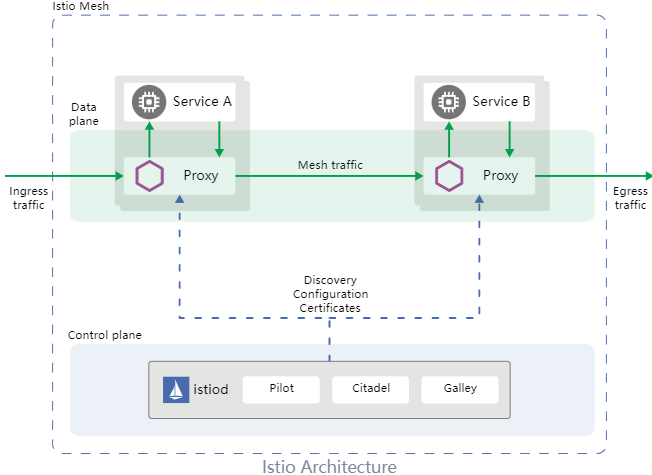
<p>Here's Istio's own architecture diagram showing this in action — the Data Plane (proxies) at the top and the Control Plane (Istiod) at the bottom:</p>
<p><img decoding="async" loading="lazy" alt="Istio Architecture — Data Plane + Control Plane" src="https://kmesh.net/zh/assets/images/istio-arch-9a9fe3bf3a7ba09a469e35d8e5f198e4.png" width="652" height="475" class="img_ev3q"></p>
<p>And here's a more detailed view of the Service Mesh architecture with sidecar proxies managing all mesh traffic between pods:</p>
<p><img decoding="async" loading="lazy" alt="Service Mesh Architecture: Data Plane + Control Plane" src="https://kmesh.net/zh/assets/images/era3-sidecar-proxies-7c369963600739d293b93addd8340109.png" width="1024" height="1024" class="img_ev3q"></p>
<p>Why was this a breakthrough?</p>
<ul>
<li><strong>Language independence:</strong> Order Service in Java, Payment Service in Go? Doesn't matter — the same Envoy proxy handles networking for all of them.</li>
<li><strong>No code changes:</strong> Developers write plain business logic. No networking libraries to import. The proxy handles everything transparently.</li>
<li><strong>Centralized control:</strong> All sidecars get their config from a <strong>Control Plane</strong> (like Istio's Istiod). Want mTLS everywhere? One policy change, pushed to every sidecar. No redeployments.</li>
<li><strong>Uniform observability:</strong> Every request flows through a sidecar, so you get metrics, traces, and logs for <em>all</em> service-to-service traffic automatically.</li>
</ul>
<p><strong>This</strong> is what a Service Mesh is:</p>
<blockquote>
<p><strong>A service mesh is an infrastructure layer that manages service-to-service communication. It consists of a Data Plane (the sidecar proxies handling the actual traffic) and a Control Plane (the central brain configuring all the proxies).</strong></p>
</blockquote>
<p>Projects like <strong>Istio</strong>, <strong>Linkerd</strong>, and <strong>Consul Connect</strong> implement this pattern. Authentication? The mesh handles it. Encryption? mTLS everywhere. Canary/test deployments? Route 10% of traffic to the new version with just one config change.</p>
<hr>
<h3 class="anchor anchorWithStickyNavbar_LWe7" id="so-if-the-service-mesh-solved-everything-why-are-we-still-talking">So If the Service Mesh Solved Everything, Why Are We Still Talking?<a href="https://kmesh.net/zh/blog/kmesh-service-mesh-explained#so-if-the-service-mesh-solved-everything-why-are-we-still-talking" class="hash-link" aria-label="So If the Service Mesh Solved Everything, Why Are We Still Talking?的直接链接" title="So If the Service Mesh Solved Everything, Why Are We Still Talking?的直接链接">​</a></h3>
<p>Because it introduced a <em>new</em> problem. A performance problem.</p>
<p>Instead of Service A talking directly to Service B, the request bounces through <strong>four extra network hops</strong>: out of Service A's container → into Service A's sidecar → across the network → into Service B's sidecar → into Service B's container.</p>
<p><img decoding="async" loading="lazy" alt="extra hops" src="https://kmesh.net/zh/assets/images/sidecar-network-hops-6043f66a9239e2bf3c3332ce0fa46217.png" width="1080" height="293" class="img_ev3q"></p>
<p>All that bouncing means data gets copied back and forth between <strong>user space</strong> and <strong>kernel space</strong> multiple times. It means extra TCP connections get established. It means more CPU cycles, more memory, and more latency.</p>
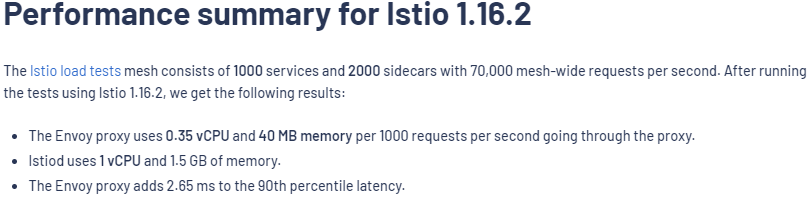
<p>According to Istio's own benchmarks, a single Envoy proxy adds approximately <strong>2.65 milliseconds</strong> of latency at the 90th percentile, and this overhead compounds as requests traverse multiple proxies/hops.</p>
<p><em>But what if the networking logic didn't have to run in user space at all?</em></p>
<p>That question is what leads us to eBPF and Kmesh — which we'll cover in the next section.</p>
<hr>
<h2 class="anchor anchorWithStickyNavbar_LWe7" id="why-traditional-service-meshes-are-slow">Why Traditional Service Meshes Are Slow<a href="https://kmesh.net/zh/blog/kmesh-service-mesh-explained#why-traditional-service-meshes-are-slow" class="hash-link" aria-label="Why Traditional Service Meshes Are Slow的直接链接" title="Why Traditional Service Meshes Are Slow的直接链接">​</a></h2>
<p>To understand why, we need to understand how your operating system handles memory.</p>
<h3 class="anchor anchorWithStickyNavbar_LWe7" id="the-wall-between-user-space-and-kernel-space">The Wall Between User Space and Kernel Space<a href="https://kmesh.net/zh/blog/kmesh-service-mesh-explained#the-wall-between-user-space-and-kernel-space" class="hash-link" aria-label="The Wall Between User Space and Kernel Space的直接链接" title="The Wall Between User Space and Kernel Space的直接链接">​</a></h3>
<p>Linux splits its memory into two strictly isolated zones:</p>
<p><img decoding="async" loading="lazy" alt="User Space vs Kernel Space — the system call boundary" src="https://kmesh.net/zh/assets/images/userspace-vs-kernelspace-9d41c2cb9b7f8d4cd9aad499cb1fe737.png" width="1024" height="1024" class="img_ev3q"></p>
<p>Think of <strong>User Space</strong> as the safe playground where your application, your database, and your Envoy proxy live. If an app crashes here, it's isolated. No big deal.</p>
<p><strong>Kernel Space</strong>, on the other hand, is the engine room. It has direct access to the hardware (network cards, disks, CPU). It's incredibly fast, but if something crashes here, the whole server goes down. Because of this risk, programs in User Space are completely walled off from the hardware. If your app wants to send a network packet, it has to politely ask the Kernel to do it via a "system call."</p>
<p>Here is the golden rule of OS performance: <strong>Crossing that boundary between User Space and Kernel Space is expensive.</strong> It costs CPU cycles, memory copies, and time.</p>
<h3 class="anchor anchorWithStickyNavbar_LWe7" id="the-bouncing-problem">The Bouncing Problem<a href="https://kmesh.net/zh/blog/kmesh-service-mesh-explained#the-bouncing-problem" class="hash-link" aria-label="The Bouncing Problem的直接链接" title="The Bouncing Problem的直接链接">​</a></h3>
<p>Without a service mesh, two microservices talking to each other cross that boundary exactly twice. App A sends a request down to the kernel, the kernel ships it across the network, and the receiving kernel passes it up to App B. Simple.</p>
<p>But watch what happens to that exact same request when we drop an Envoy sidecar proxy into the mix:</p>
<p><img decoding="async" loading="lazy" alt="The Bouncing Problem — 6 boundary crossings per request with sidecar proxies" src="https://kmesh.net/zh/assets/images/sidecar-bouncing-problem-bbb22afa55c5014f839da07fdefa61c2.png" width="1024" height="559" class="img_ev3q"></p>
<p>Notice how the request is suddenly playing ping-pong across the system call boundary?</p>
<p>Instead of a clean, direct path, the traffic is intercepted by <code>iptables</code>, forced up into the Envoy sidecar, processed, and sent back down into the kernel. Then, the exact same steps happen on the receiving end.</p>
<p>What used to be 2 boundary crossings has exploded into <strong>6 boundary crossings</strong> for a single request.</p>
<h3 class="anchor anchorWithStickyNavbar_LWe7" id="where-is-the-time-actually-going">Where is the Time Actually Going?<a href="https://kmesh.net/zh/blog/kmesh-service-mesh-explained#where-is-the-time-actually-going" class="hash-link" aria-label="Where is the Time Actually Going?的直接链接" title="Where is the Time Actually Going?的直接链接">​</a></h3>
<p>You might be thinking, <em>"Sure, but Envoy is doing a lot of valuable work like mTLS and intelligent routing!"</em></p>
<p>You'd be right, but take a look at this breakdown of where the sidecar latency actually comes from:</p>
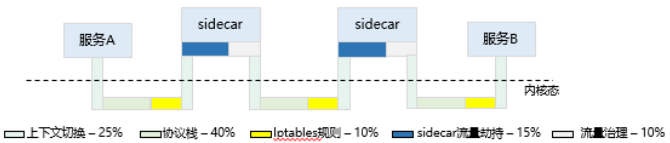
<p><img decoding="async" loading="lazy" alt="Sources of sidecar proxy latency — 90% is plumbing overhead" src="https://kmesh.net/zh/assets/images/latency-breakdown-591ea477ae556273fba1e62a36f86d1e.png" width="1024" height="559" class="img_ev3q"></p>
<p>This is the harsh truth of traditional service meshes: <strong>90% of the overhead is just plumbing.</strong> Only a tiny sliver of the time (10%) is actually spent doing the traffic governance we bought the service mesh for in the first place! The rest is just the tax we pay for bouncing data back and forth between the kernel and our user-space proxy.</p>
<p>And the toll adds up. According to Istio's official benchmarks, <strong>a single Envoy proxy adds 2.65 milliseconds of latency</strong> to the 90th percentile:</p>
<p><img decoding="async" loading="lazy" alt="Istio performance benchmark — 2.65ms latency per proxy" src="https://kmesh.net/zh/assets/images/istio-performance-7cd3e1b676ec6942e219514a71e38e8b.png" width="810" height="197" class="img_ev3q"></p>
<p><img decoding="async" loading="lazy" alt="Istio latency analysis — sidecar overhead breakdown" src="https://kmesh.net/zh/assets/images/istio-perf-analysis-c73a4fa7d9760c5d38dd6fc175c4c07b.png" width="1024" height="1024" class="img_ev3q"></p>
<p>But, what if we could just run our networking logic directly inside the kernel, right where the traffic is already flowing?</p>
<p>That is done via eBPF.</p>
<hr>
<h2 class="anchor anchorWithStickyNavbar_LWe7" id="what-is-ebpf">What is eBPF?<a href="https://kmesh.net/zh/blog/kmesh-service-mesh-explained#what-is-ebpf" class="hash-link" aria-label="What is eBPF?的直接链接" title="What is eBPF?的直接链接">​</a></h2>
<p><strong>eBPF</strong> (extended Berkeley Packet Filter) <strong>allows you to run your own custom programs safely inside the Linux kernel, without having to change the kernel source code or reboot the machine.</strong></p>
<h3 class="anchor anchorWithStickyNavbar_LWe7" id="how-does-that-even-work">How Does That Even Work?<a href="https://kmesh.net/zh/blog/kmesh-service-mesh-explained#how-does-that-even-work" class="hash-link" aria-label="How Does That Even Work?的直接链接" title="How Does That Even Work?的直接链接">​</a></h3>
<p>Imagine the Linux kernel is a highly secure bank vault. Before eBPF, if you wanted to change how the vault operated, you had to rewrite the blueprint and rebuild the vault (writing a kernel module). It was slow, dangerous, and one mistake could blow the whole thing up.</p>
<p>eBPF changes the game. It gives you a way to slide instructions under the vault door.</p>
<p><img decoding="async" loading="lazy" alt="How eBPF works — hooks, verifier, and JIT compilation inside the kernel" src="https://kmesh.net/zh/assets/images/ebpf-concept-a8b8212393a8a3ec04c695f863b0b0ef.png" width="1024" height="559" class="img_ev3q"></p>
<p>As you can see in the diagram, you write your eBPF program, and a built-in <strong>Verifier</strong> checks it to ensure it won't crash or get stuck in an infinite loop. Once it passes the security check, the kernel compiles it and attaches it to specific "hooks" on the network path.</p>
<p>Your custom code is now running safely inside the vault, at native wire speed.</p>
<h3 class="anchor anchorWithStickyNavbar_LWe7" id="why-this-changes-everything-for-service-meshes">Why This Changes Everything for Service Meshes<a href="https://kmesh.net/zh/blog/kmesh-service-mesh-explained#why-this-changes-everything-for-service-meshes" class="hash-link" aria-label="Why This Changes Everything for Service Meshes的直接链接" title="Why This Changes Everything for Service Meshes的直接链接">​</a></h3>
<p><em>A hook is just a checkpoint in the kernel's code where eBPF programs can be attached. Each one works at a specific stage of the packet's journey, letting you inspect, modify, or redirect traffic without touching the kernel source.</em></p>
<p>With eBPF, we can short-circuit that entire journey. Look at the bottom hook in the diagram above — <strong>SK_MSG</strong>. It lets an eBPF program grab traffic right at the source and redirect it straight to its destination, without ever leaving the kernel. No detour through user space. No bouncing.</p>
<p><img decoding="async" loading="lazy" alt="eBPF sockmap redirecting traffic " src="https://kmesh.net/zh/assets/images/ebpf-sockmap-pods-0a527ca9c8593bb906d894f0dc22acec.png" width="1024" height="1024" class="img_ev3q"></p>
<p>Think of it like this: instead of your package going through six different post offices (the bouncing problem), eBPF lets a worker inside the sorting facility hand it directly to the right truck. Same building. No unnecessary trips.</p>
<p><strong>This is the missing piece.</strong> If we can run our routing and load balancing logic as eBPF programs inside the kernel, we don't need sidecar proxies sitting in user space anymore.</p>
<p><em>And that is exactly what Kmesh does. Let's dive into it.</em></p>
<hr>
<h2 class="anchor anchorWithStickyNavbar_LWe7" id="how-kmesh-works">How Kmesh Works<a href="https://kmesh.net/zh/blog/kmesh-service-mesh-explained#how-kmesh-works" class="hash-link" aria-label="How Kmesh Works的直接链接" title="How Kmesh Works的直接链接">​</a></h2>
<p>Now that we understand eBPF, the idea behind Kmesh becomes almost obvious: <strong>move the traffic governance logic from user-space sidecar proxies into the kernel using eBPF.</strong></p>
<h3 class="anchor anchorWithStickyNavbar_LWe7" id="from-3-hops-to-1-hop">From 3 Hops to 1 Hop<a href="https://kmesh.net/zh/blog/kmesh-service-mesh-explained#from-3-hops-to-1-hop" class="hash-link" aria-label="From 3 Hops to 1 Hop的直接链接" title="From 3 Hops to 1 Hop的直接链接">​</a></h3>
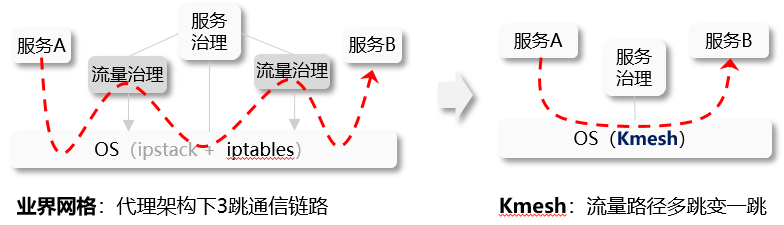
<p>In a traditional service mesh, every request between two services takes a route through three separate connections:</p>
<blockquote>
<p><strong>App A → Envoy Sidecar A → Envoy Sidecar B → App B</strong></p>
</blockquote>
<p>Three hops. Three TCP connections. Six boundary crossings between user space and kernel space. We've seen why that's expensive.</p>
<p>Kmesh removes the sidecars entirely:</p>
<p><img decoding="async" loading="lazy" alt="Traditional Mesh (3 Hops) vs Kmesh (1 Hop) — data path comparison" src="https://kmesh.net/zh/assets/images/kmesh-datapath-compare-18c30fb8583fe1184e293940f22b6901.png" width="1024" height="1024" class="img_ev3q"></p>
<p>On the left, you can see the traditional approach where traffic bounces up to sidecar proxies for governance, then back down through the OS. On the right, Kmesh moves that governance logic directly into the OS layer using eBPF. The result is a single, clean hop:</p>
<blockquote>
<p><strong>App A → Kernel (Kmesh eBPF) → App B</strong></p>
</blockquote>
<p>One connection. Two boundary crossings. The routing decision, the load balancing, the traffic policy — it all happens inside the kernel, right on the natural path the packet was already taking.</p>
<h3 class="anchor anchorWithStickyNavbar_LWe7" id="how-does-kmesh-know-where-to-route-traffic">How Does Kmesh Know Where to Route Traffic?<a href="https://kmesh.net/zh/blog/kmesh-service-mesh-explained#how-does-kmesh-know-where-to-route-traffic" class="hash-link" aria-label="How Does Kmesh Know Where to Route Traffic?的直接链接" title="How Does Kmesh Know Where to Route Traffic?的直接链接">​</a></h3>
<p>Kmesh doesn't reinvent any of the control plane logic. If you're already using Istio, defining your traffic rules works exactly the same way. Same YAML files, same routing policies, same canary deployments.</p>
<p><img decoding="async" loading="lazy" alt="Kmesh architecture — kmesh-daemon translates xDS rules into eBPF programs" src="https://kmesh.net/zh/assets/images/kmesh-daemon-flow-931f7a64dc5151a31e8dfb66b4020263.png" width="1024" height="1024" class="img_ev3q"></p>
<p>As the diagram shows, a lightweight component called <strong>kmesh-daemon</strong> runs on each node in your cluster. Its job is:</p>
<ol>
<li><strong>Listening</strong> to Istio's control plane for routing rules via <strong>xDS</strong> (a standard protocol that Istio uses to push configuration to its data plane) — both Envoy and Kmesh use xDS.</li>
<li><strong>Translate</strong> those rules into eBPF programs.</li>
<li><strong>Load</strong> them into the kernel.</li>
</ol>
<p>Once those eBPF programs are in the kernel, traffic between Pod A and Pod B is governed at wire speed — no proxy containers, no extra pods, no resource overhead per service.</p>
<h3 class="anchor anchorWithStickyNavbar_LWe7" id="what-about-complex-http-routing-l4-vs-l7">What About Complex HTTP Routing? (L4 vs L7)<a href="https://kmesh.net/zh/blog/kmesh-service-mesh-explained#what-about-complex-http-routing-l4-vs-l7" class="hash-link" aria-label="What About Complex HTTP Routing? (L4 vs L7)的直接链接" title="What About Complex HTTP Routing? (L4 vs L7)的直接链接">​</a></h3>
<p>Not all traffic is equal, and this is where Kmesh gets smart about it.</p>
<p><strong>Layer 4 (L4)</strong> traffic — basic TCP connections, load balancing, connection management — is perfect for eBPF. It's straightforward enough that eBPF handles it entirely inside the kernel with zero overhead.</p>
<p>But <strong>Layer 7 (L7)</strong> traffic is a different beast. Think HTTP header-based routing (<em>"send requests with header X-Version: v2 to the canary deployment"</em>), complex retry policies, or request-level authentication. These need deep packet inspection that goes beyond what eBPF programs can efficiently do today.</p>
<p>Kmesh solves this with a smart split:</p>
<p><img decoding="async" loading="lazy" alt="Kmesh handles L4 vs L7 traffic differently — fast kernel path vs shared Waypoint Proxy" src="https://kmesh.net/zh/assets/images/kmesh-l4-l7-split-fdf737a26e5e5100bef35142c5c6dc87.png" width="1024" height="1024" class="img_ev3q"></p>
<p>As you can see, most of your traffic (L4) takes the fast path — handled entirely in the kernel by eBPF with zero proxy overhead. Only the traffic that genuinely needs deep HTTP inspection gets routed to a shared <strong>Waypoint Proxy</strong>.</p>
<p>The key difference from traditional meshes: instead of <em>every</em> pod paying the sidecar tax, only the small slice of traffic that actually needs L7 processing touches a proxy. Everything else goes through the kernel.</p>
<hr>
<h2 class="anchor anchorWithStickyNavbar_LWe7" id="kmesh-vs-traditional-mesh">Kmesh vs Traditional Mesh<a href="https://kmesh.net/zh/blog/kmesh-service-mesh-explained#kmesh-vs-traditional-mesh" class="hash-link" aria-label="Kmesh vs Traditional Mesh的直接链接" title="Kmesh vs Traditional Mesh的直接链接">​</a></h2>
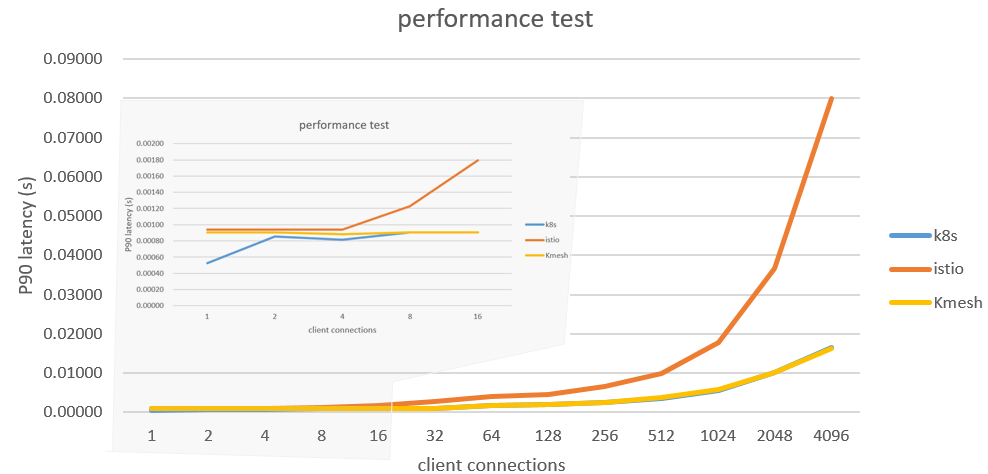
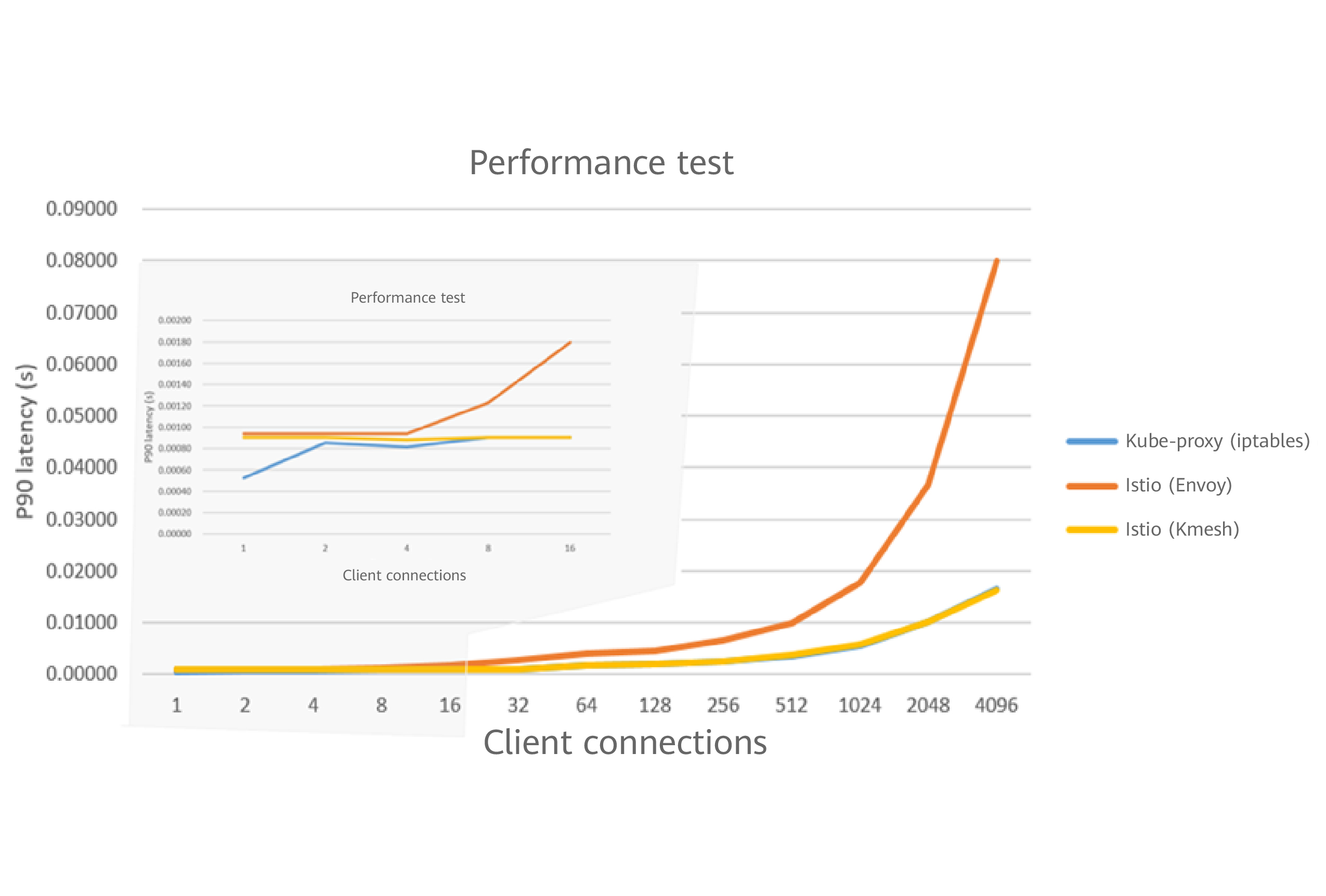
<p>Let's get to the numbers. This performance chart from the Kmesh project tells the whole story:</p>
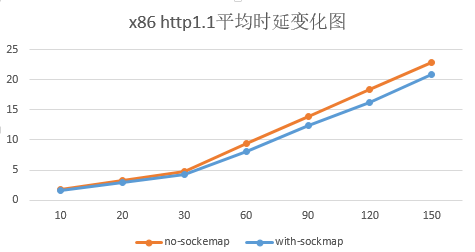
<p><img decoding="async" loading="lazy" alt="Kmesh performance test — near-zero overhead compared to raw Kubernetes" src="https://kmesh.net/zh/assets/images/kmesh-performance-3b8e015c3962aaca431d0f7cbcc1ec28.png" width="988" height="474" class="img_ev3q"></p>
<p>Look at what happens as connections scale up. The blue line (raw Kubernetes, no mesh) and the yellow line (Kmesh) stay nearly flat — Kmesh adds almost zero overhead compared to having no mesh at all. The orange line (Istio with Envoy sidecars) shoots up dramatically.</p>
<p>Here's the full comparison:</p>
<table><thead><tr><th></th><th><strong>Traditional Mesh</strong></th><th><strong>Kmesh</strong></th></tr></thead><tbody><tr><td><strong>Data path</strong></td><td>3 hops (App → Sidecar → Sidecar → App)</td><td>1 hop (App → Kernel → App)</td></tr><tr><td><strong>Latency overhead</strong></td><td>+2.65ms per hop</td><td>Near-zero</td></tr><tr><td><strong>Sidecar per pod</strong></td><td>Yes (0.35 vCPU + 40MB each)</td><td>No</td></tr><tr><td><strong>L4 performance</strong></td><td>User-space proxy</td><td>Kernel-speed eBPF</td></tr><tr><td><strong>L7 support</strong></td><td>Per-pod Envoy sidecar</td><td>Shared Waypoint Proxy</td></tr><tr><td><strong>Works with Istio</strong></td><td>Yes (native)</td><td>Yes (same xDS config)</td></tr><tr><td><strong>Linux kernel requirement</strong></td><td>Any</td><td>5.10+ (for eBPF features)</td></tr></tbody></table>
<p><strong>When to use Kmesh:</strong> You care about latency or you're running a modern Linux kernel (5.10+), and you want the benefits of a service mesh without the resource overhead.</p>
<p><strong>When to stick with traditional sidecars:</strong> You're on older kernels that don't support the required eBPF features, or you need every single request to go through deep L7 processing.</p>
<h3 class="anchor anchorWithStickyNavbar_LWe7" id="in-short">In Short<a href="https://kmesh.net/zh/blog/kmesh-service-mesh-explained#in-short" class="hash-link" aria-label="In Short的直接链接" title="In Short的直接链接">​</a></h3>
<p>Traditional service meshes use sidecar proxies that bounce traffic between user space and kernel space — adding latency and eating resources. Kmesh uses eBPF to handle traffic governance directly inside the Linux kernel. Same features (load balancing, mTLS, routing), but without the sidecar overhead.</p>
<hr>
<h2 class="anchor anchorWithStickyNavbar_LWe7" id="getting-started">Getting Started<a href="https://kmesh.net/zh/blog/kmesh-service-mesh-explained#getting-started" class="hash-link" aria-label="Getting Started的直接链接" title="Getting Started的直接链接">​</a></h2>
<p>Kmesh installs via Helm on any Kubernetes cluster with a modern Linux kernel. If you're already running Istio, Kmesh plugs right in as an alternative data plane — your existing traffic policies keep working.</p>
<ul>
<li>👉 <a href="https://kmesh.net/docs/setup/quickstart/" target="_blank" rel="noopener noreferrer"><strong>Quick Start Guide</strong></a> — Get Kmesh running in under 5 minutes</li>
<li>👉 <a href="https://github.com/kmesh-net/kmesh" target="_blank" rel="noopener noreferrer"><strong>GitHub Repository</strong></a> — Star the project and explore the code</li>
<li>👉 <a href="https://app.slack.com/client/T08PSQ7BQ/C06BU2GB8NL" target="_blank" rel="noopener noreferrer"><strong>Community Slack</strong></a> — Say hi, ask questions, find your first issue</li>
</ul>
<p>Kmesh is a <strong>CNCF Sandbox project</strong> and actively welcomes contributors. Whether it's fixing a bug, improving documentation, or just exploring the codebase — every contribution matters.</p>
<p><em>If you found this useful, share it with someone who's new to cloud-native networking — and come build with us.</em></p>]]></content>
        <author>
            <name>Gaurav Patil</name>
            <uri>https://github.com/devGPP23</uri>
        </author>
        <category label="introduce" term="introduce"/>
        <category label="beginner-guide" term="beginner-guide"/>
        <category label="eBPF" term="eBPF"/>
        <category label="service-mesh" term="service-mesh"/>
    </entry>
    <entry>
        <title type="html"><![CDATA[OSPP-2025 Automating Documentation and Release Workflows for Kmesh]]></title>
        <id>https://kmesh.net/zh/blog/ospp_2025_automation_workflow</id>
        <link href="https://kmesh.net/zh/blog/ospp_2025_automation_workflow"/>
        <updated>2025-09-30T00:00:00.000Z</updated>
        <summary type="html"><![CDATA[Introduction]]></summary>
        <content type="html"><![CDATA[<h2 class="anchor anchorWithStickyNavbar_LWe7" id="introduction">Introduction<a href="https://kmesh.net/zh/blog/ospp_2025_automation_workflow#introduction" class="hash-link" aria-label="Introduction的直接链接" title="Introduction的直接链接">​</a></h2>
<p>Hello everyone! I’m <strong>Yash Israni</strong>, an open-source enthusiast passionate about automation, DevOps practices, and building tools that eliminate repetitive manual work.</p>
<p>This summer, I had the privilege of participating in the <strong>Open-Source Promotion Plan (OSPP) 2025</strong>, where I collaborated with the <a href="https://github.com/kmesh-net/kmesh" target="_blank" rel="noopener noreferrer">Kmesh</a> community to automate documentation and release workflows. Over the course of three months, I designed and implemented GitHub Actions pipelines that keep the Kmesh website always up-to-date, properly versioned, and reviewed for language quality.</p>
<p>In this blog, I’ll share my journey—from acceptance to project execution, the technical decisions I made, and the lessons I learned along the way.</p>
<h2 class="anchor anchorWithStickyNavbar_LWe7" id="ospp-program--overview">OSPP Program – Overview<a href="https://kmesh.net/zh/blog/ospp_2025_automation_workflow#ospp-program--overview" class="hash-link" aria-label="OSPP Program – Overview的直接链接" title="OSPP Program – Overview的直接链接">​</a></h2>
<p>The <strong>Open-Source Promotion Plan (OSPP)</strong>, organized by the Institute of Software, Chinese Academy of Sciences (ISCAS), gives students and early-career contributors the opportunity to gain hands-on experience by working on impactful open-source projects under the guidance of mentors.</p>
<p>Each term runs for about <strong>three months</strong> (1 July – 30 September in my case). Contributors not only deliver real-world features but also learn how large open-source communities operate.</p>
<hr>
<h2 class="anchor anchorWithStickyNavbar_LWe7" id="my-acceptance">My Acceptance<a href="https://kmesh.net/zh/blog/ospp_2025_automation_workflow#my-acceptance" class="hash-link" aria-label="My Acceptance的直接链接" title="My Acceptance的直接链接">​</a></h2>
<p>I have always enjoyed contributing to open source, and my interests naturally align with automation and cloud-native tooling. When I saw that <strong>Kmesh</strong> was offering projects under OSPP 2025, I was immediately drawn to their proposal for automating documentation workflows.</p>
<p>The project addressed a clear pain point: documentation updates and versioning were being done manually, often lagging behind releases. The opportunity to replace repetitive tasks with reliable automation felt both impactful and challenging.</p>
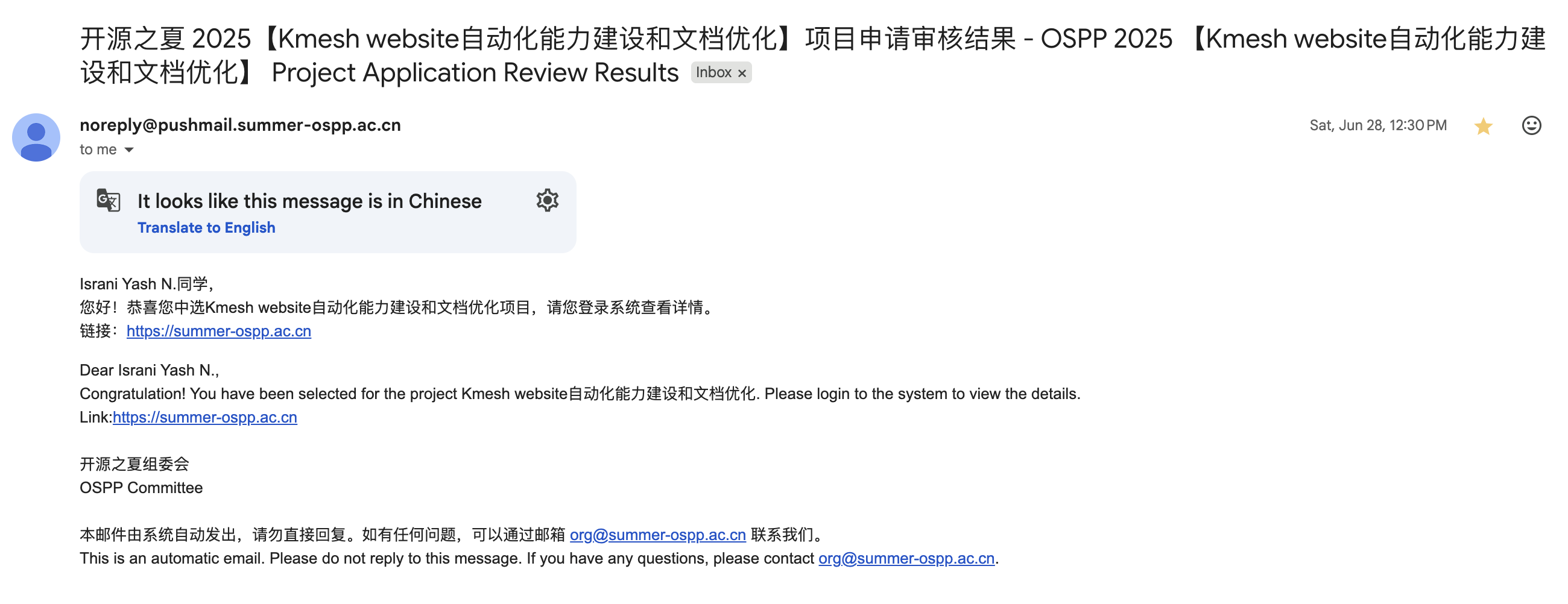
<p>I received my <strong>acceptance email on 28 June 2025</strong>, and the program officially ran from <strong>1 July to 30 September</strong>.</p>
<p><img decoding="async" loading="lazy" alt="email" src="https://kmesh.net/zh/assets/images/acceptance-email-bfbc6527d55aace0fa05710f07b7b85f.png" width="2600" height="1002" class="img_ev3q"></p>
<p>Interestingly, I was able to complete the majority of my project work <strong>before the mid-term evaluation</strong>, so that checkpoint was skipped, giving me extra time to refine the workflows and write proper usage guidelines.</p>
<p><img decoding="async" loading="lazy" alt="slack" src="https://kmesh.net/zh/assets/images/conversation-c31e1b10f154d7c82d2eb819fd294646.png" width="1502" height="468" class="img_ev3q"></p>
<hr>
<h2 class="anchor anchorWithStickyNavbar_LWe7" id="project-workthrough">Project Workthrough<a href="https://kmesh.net/zh/blog/ospp_2025_automation_workflow#project-workthrough" class="hash-link" aria-label="Project Workthrough的直接链接" title="Project Workthrough的直接链接">​</a></h2>
<h3 class="anchor anchorWithStickyNavbar_LWe7" id="1-doc-sync-workflow">1. Doc-Sync Workflow<a href="https://kmesh.net/zh/blog/ospp_2025_automation_workflow#1-doc-sync-workflow" class="hash-link" aria-label="1. Doc-Sync Workflow的直接链接" title="1. Doc-Sync Workflow的直接链接">​</a></h3>
<ul>
<li><strong>Trigger:</strong> on every push to the main branch</li>
<li><strong>Action:</strong> opens a pull request in the website repository with the latest documentation updates</li>
<li><strong>Enhancements:</strong> automatically labels the PR for triage and runs the site’s CI pipeline to validate changes</li>
</ul>
<h3 class="anchor anchorWithStickyNavbar_LWe7" id="2-release-versioning-workflow">2. Release Versioning Workflow<a href="https://kmesh.net/zh/blog/ospp_2025_automation_workflow#2-release-versioning-workflow" class="hash-link" aria-label="2. Release Versioning Workflow的直接链接" title="2. Release Versioning Workflow的直接链接">​</a></h3>
<ul>
<li><strong>Trigger:</strong> when a new Git tag is pushed (release event)</li>
<li><strong>Action:</strong> generates a versioned snapshot of the documentation in the website repository</li>
<li><strong>Enhancements:</strong> automatically opens a PR for any versioning-related changes</li>
</ul>
<h3 class="anchor anchorWithStickyNavbar_LWe7" id="3-chinese-grammar-checker-workflow">3. Chinese Grammar Checker Workflow<a href="https://kmesh.net/zh/blog/ospp_2025_automation_workflow#3-chinese-grammar-checker-workflow" class="hash-link" aria-label="3. Chinese Grammar Checker Workflow的直接链接" title="3. Chinese Grammar Checker Workflow的直接链接">​</a></h3>
<ul>
<li><strong>Trigger:</strong> on pull requests that modify Chinese documentation</li>
<li><strong>Action:</strong> uses the <strong>LanguageTool API</strong> to detect grammar and style issues</li>
<li><strong>Enhancements:</strong> posts line-level review comments as <strong>warnings (non-blocking)</strong> so contributors receive suggestions without being blocked from merging</li>
</ul>
<hr>
<h2 class="anchor anchorWithStickyNavbar_LWe7" id="results">Results<a href="https://kmesh.net/zh/blog/ospp_2025_automation_workflow#results" class="hash-link" aria-label="Results的直接链接" title="Results的直接链接">​</a></h2>
<table><thead><tr><th>Metric</th><th>Before (Manual)</th><th>After (Automated)</th><th>Improvement</th></tr></thead><tbody><tr><td>Docs updated after release</td><td>3–5 days</td><td>&lt; 1 minute</td><td><strong>&gt;99% faster</strong> 🚀</td></tr><tr><td>Website versioning updates</td><td>Delayed / inconsistent</td><td>Instant with each release</td><td><strong>100% reliable</strong> ✅</td></tr><tr><td>Review time for Chinese docs</td><td>~20 min per PR</td><td>~1 min per PR</td><td><strong>95% time saved</strong> ⏱️</td></tr></tbody></table>
<p>These workflows have effectively <strong>eliminated delays and manual errors</strong>, ensuring Kmesh documentation stays accurate and up-to-date.</p>
<p>All three workflows are now live in both the Kmesh main repository and website repository under <code>.github/workflows</code>.</p>
<hr>
<h2 class="anchor anchorWithStickyNavbar_LWe7" id="key-technical-decisions">Key Technical Decisions<a href="https://kmesh.net/zh/blog/ospp_2025_automation_workflow#key-technical-decisions" class="hash-link" aria-label="Key Technical Decisions的直接链接" title="Key Technical Decisions的直接链接">​</a></h2>
<ul>
<li>Adopted <strong>repository dispatch</strong> for secure cross-repo communication, eliminating the need for long-lived personal tokens</li>
<li>Granted the GitHub Actions token <strong>read &amp; write permissions</strong> only where necessary, while delegating other operations to a scoped bot account for better security</li>
<li>Implemented <strong>Docusaurus-compatible versioning</strong> by dynamically generating <code>versions.json</code>, keeping navigation in sync with releases</li>
<li>Added <strong>robust error handling</strong> in the doc-sync workflow to gracefully manage missing folders or files, preventing workflow crashes</li>
</ul>
<hr>
<h2 class="anchor anchorWithStickyNavbar_LWe7" id="mentorship-experience">Mentorship Experience<a href="https://kmesh.net/zh/blog/ospp_2025_automation_workflow#mentorship-experience" class="hash-link" aria-label="Mentorship Experience的直接链接" title="Mentorship Experience的直接链接">​</a></h2>
<p>My mentors, <strong>Li Zhencheng</strong> and <strong>Zhonghu Xu</strong>, along with the Kmesh maintainers, were consistently supportive—whether through GitHub reviews or quick clarifications on Slack. Even though I delivered my main workflows ahead of schedule, their feedback helped me refine edge cases and improve overall reliability.</p>
<p>As a recognition of my contributions and active involvement, the Kmesh community welcomed me as a <strong>member of the organization</strong>. This acknowledgment was both humbling and motivating, and it strengthened my commitment to continue contributing to Kmesh and supporting its growth.</p>
<hr>
<h2 class="anchor anchorWithStickyNavbar_LWe7" id="lessons-learned">Lessons Learned<a href="https://kmesh.net/zh/blog/ospp_2025_automation_workflow#lessons-learned" class="hash-link" aria-label="Lessons Learned的直接链接" title="Lessons Learned的直接链接">​</a></h2>
<ol>
<li><strong>Automation empowers humans</strong> – the goal isn’t to replace contributors but to free them from repetitive tasks so they can focus on meaningful reviews and design.</li>
<li><strong>Start small and iterate</strong> – building workflows in incremental, testable steps made debugging and maintenance far easier than deploying everything at once.</li>
<li><strong>Security matters</strong> – applying the principle of least privilege to tokens and permissions reduced risk while keeping automation safe.</li>
<li><strong>Expect edge cases</strong> – workflows behave differently across environments; testing on forks and multiple platforms prevented surprises in production.</li>
<li><strong>Documentation is part of the code</strong> – writing clear workflow descriptions and PR comments ensured maintainers trusted and understood what the automation was doing.</li>
</ol>
<hr>
<h2 class="anchor anchorWithStickyNavbar_LWe7" id="acknowledgements">Acknowledgements<a href="https://kmesh.net/zh/blog/ospp_2025_automation_workflow#acknowledgements" class="hash-link" aria-label="Acknowledgements的直接链接" title="Acknowledgements的直接链接">​</a></h2>
<p>I would like to sincerely thank my mentors <strong>Li Zhencheng</strong> and <strong>Zhonghu Xu</strong> for their guidance, quick reviews, and encouragement. Thanks also to the <strong>OSPP program staff</strong> for ensuring smooth operations throughout the term.</p>
<hr>
<h2 class="anchor anchorWithStickyNavbar_LWe7" id="links">Links<a href="https://kmesh.net/zh/blog/ospp_2025_automation_workflow#links" class="hash-link" aria-label="Links的直接链接" title="Links的直接链接">​</a></h2>
<ul>
<li><a href="https://github.com/kmesh-net/kmesh/issues/1412" target="_blank" rel="noopener noreferrer">Project issue &amp; Pull requests</a></li>
<li><a href="https://summer-ospp.ac.cn/" target="_blank" rel="noopener noreferrer">OSPP website</a></li>
<li><a href="https://github.com/yashisrani" target="_blank" rel="noopener noreferrer">Yash Israni's github</a></li>
</ul>
<hr>]]></content>
        <author>
            <name>Yash Israni</name>
            <uri>https://github.com/yashisrani</uri>
        </author>
        <category label="OSPP" term="OSPP"/>
        <category label="OSPP-2025" term="OSPP-2025"/>
        <category label="automation" term="automation"/>
        <category label="GitHub-Actions" term="GitHub-Actions"/>
        <category label="documentation" term="documentation"/>
        <category label="kmesh" term="kmesh"/>
    </entry>
    <entry>
        <title type="html"><![CDATA[OSPP-2025 Completing eBPF Unit Tests for Kmesh]]></title>
        <id>https://kmesh.net/zh/blog/ospp_2025_ut_test</id>
        <link href="https://kmesh.net/zh/blog/ospp_2025_ut_test"/>
        <updated>2025-09-30T00:00:00.000Z</updated>
        <summary type="html"><![CDATA[Introduction]]></summary>
        <content type="html"><![CDATA[<h2 class="anchor anchorWithStickyNavbar_LWe7" id="introduction">Introduction<a href="https://kmesh.net/zh/blog/ospp_2025_ut_test#introduction" class="hash-link" aria-label="Introduction的直接链接" title="Introduction的直接链接">​</a></h2>
<p>Hello everyone! I'm <strong>Wu Xi</strong>, an open source enthusiast with deep interests in kernel networking, eBPF, and test engineering.</p>
<p>This summer, I had the privilege to participate in <strong>Open Source Promotion Plan (OSPP) 2025</strong> and collaborate with the <a href="https://github.com/kmesh-net/kmesh" target="_blank" rel="noopener noreferrer">Kmesh</a> community, focusing on eBPF program UT enhancement. Over three months, I primarily completed unit testing work for Kmesh eBPF programs. I wrote and successfully ran UT test code for sendMsg and cgroup programs, and supplemented testing documentation based on this work. Kmesh community developers can now verify eBPF program logic without depending on real kernel mounting and traffic simulation, significantly improving development efficiency.
In this blog, I'll share my complete experience—from acceptance to project execution, technical choices, and lessons learned along the way.</p>
<h2 class="anchor anchorWithStickyNavbar_LWe7" id="ospp-project-overview">OSPP Project Overview<a href="https://kmesh.net/zh/blog/ospp_2025_ut_test#ospp-project-overview" class="hash-link" aria-label="OSPP Project Overview的直接链接" title="OSPP Project Overview的直接链接">​</a></h2>
<p><strong>Open Source Promotion Plan (OSPP)</strong> is organized by the <strong>Institute of Software, Chinese Academy of Sciences (ISCAS)</strong>, providing students and early-career developers with opportunities to collaborate on real open source projects under the guidance of experienced mentors.</p>
<p>Each session lasts approximately <strong>three months</strong> (my session was July 1st – September 30th). Participants not only deliver functional features but also experience firsthand how large open source communities operate.</p>
<hr>
<h2 class="anchor anchorWithStickyNavbar_LWe7" id="my-acceptance-experience">My Acceptance Experience<a href="https://kmesh.net/zh/blog/ospp_2025_ut_test#my-acceptance-experience" class="hash-link" aria-label="My Acceptance Experience的直接链接" title="My Acceptance Experience的直接链接">​</a></h2>
<p>I've always enjoyed contributing to open source, and my interests happen to focus on network kernels and cloud-native tools. When I saw the "eBPF" and "unit testing" related topics offered by <strong>Kmesh</strong> in OSPP 2025, I was immediately attracted.</p>
<p>The pain points this project aimed to solve were very clear: eBPF program verification has long relied on black-box testing, which is not only inefficient but also has coverage that depends on testers' experience. By introducing a unit testing framework and supplementing key use cases, functional verification can be completed without requiring real kernel mounting, which is both valuable and challenging.</p>
<p>I received my acceptance email on <strong>June 28, 2025</strong>, with the official project cycle running from <strong>July 1st to September 30th</strong>.</p>
<p><img decoding="async" loading="lazy" alt="email" src="https://kmesh.net/zh/assets/images/acceptance-email-daaf0bebff442710adb9b2815abe6e4c.png" width="1014" height="387" class="img_ev3q"></p>
<p>Interestingly, I completed the main work of the project <strong>before the mid-term evaluation</strong>, so that stage was skipped. This gave me more time to refine the workflow and write usage documentation.</p>
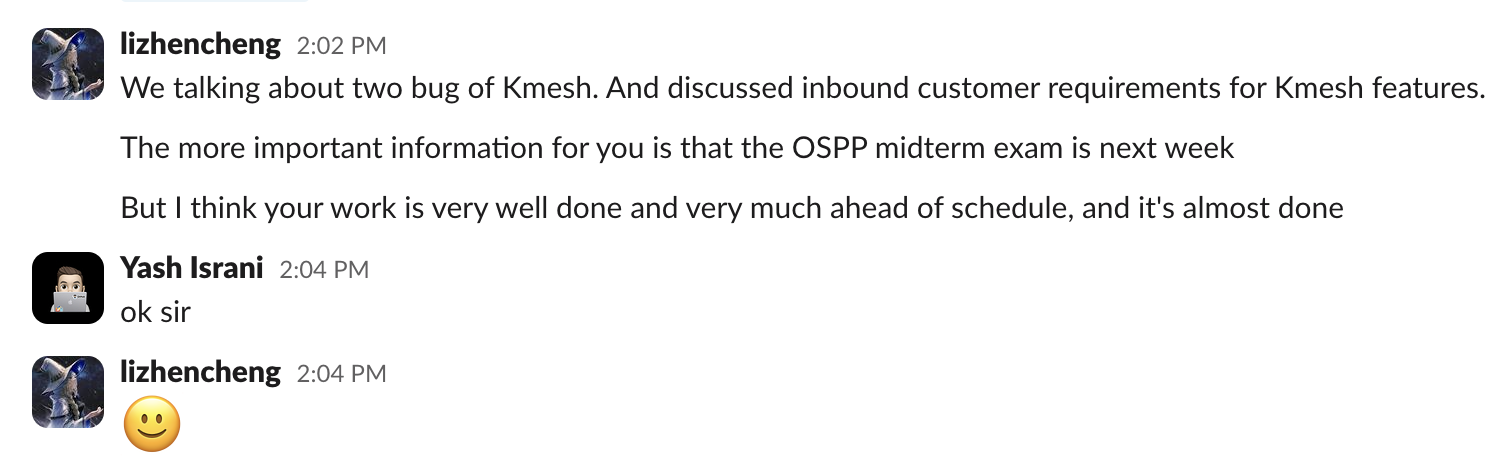
<p><img decoding="async" loading="lazy" alt="slack" src="https://kmesh.net/zh/assets/images/conversation1-c0e24f827a936614a852ff68bd3f16f1.png" width="1271" height="560" class="img_ev3q"></p>
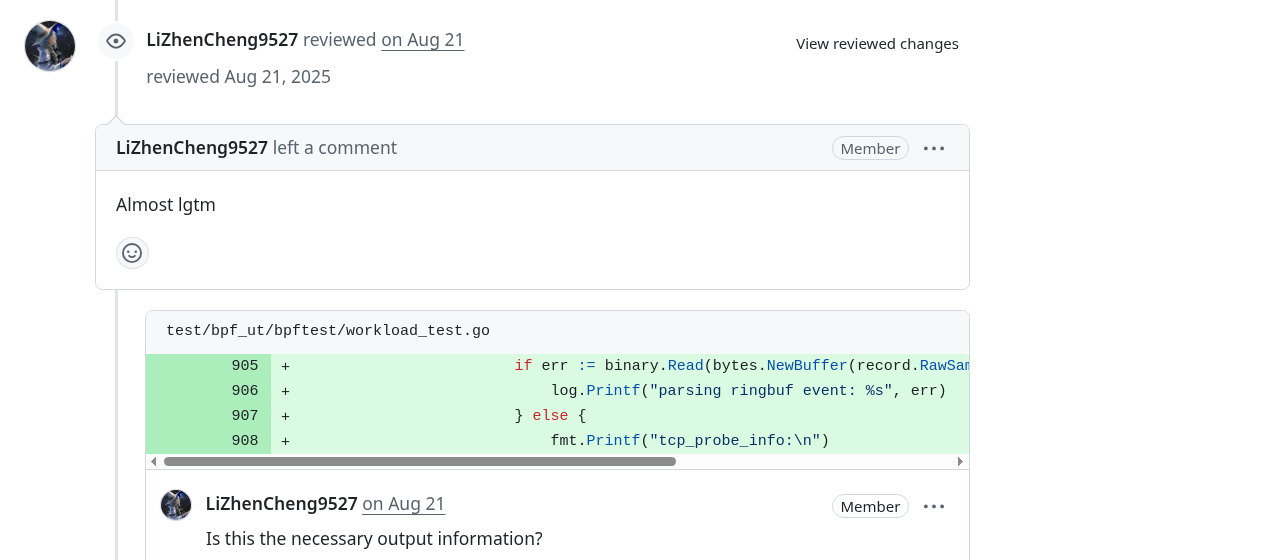
<p><img decoding="async" loading="lazy" alt="slack" src="https://kmesh.net/zh/assets/images/conversation2-35aa72a7675acdbab5218f6a4023be89.png" width="1147" height="660" class="img_ev3q"></p>
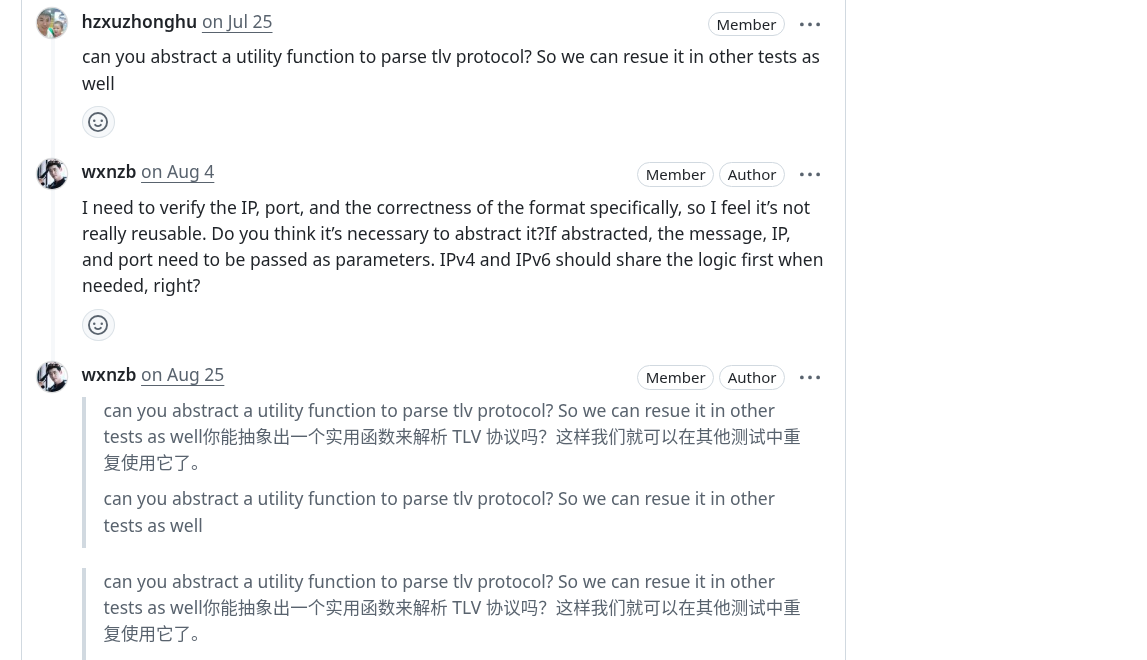
<p><img decoding="async" loading="lazy" alt="slack" src="https://kmesh.net/zh/assets/images/conversation3-2a2a07f46f5296585dfcd5842fa9ed42.png" width="1154" height="631" class="img_ev3q"></p>
<p><img decoding="async" loading="lazy" alt="slack" src="https://kmesh.net/zh/assets/images/conversation4-aaf9db9ef5f65c80a7d36350a303b06a.png" width="1170" height="553" class="img_ev3q"></p>
<hr>
<h2 class="anchor anchorWithStickyNavbar_LWe7" id="project-work-content">Project Work Content<a href="https://kmesh.net/zh/blog/ospp_2025_ut_test#project-work-content" class="hash-link" aria-label="Project Work Content的直接链接" title="Project Work Content的直接链接">​</a></h2>
<h3 class="anchor anchorWithStickyNavbar_LWe7" id="1-ebpf-unit-testing-framework-construction">1. eBPF Unit Testing Framework Construction<a href="https://kmesh.net/zh/blog/ospp_2025_ut_test#1-ebpf-unit-testing-framework-construction" class="hash-link" aria-label="1. eBPF Unit Testing Framework Construction的直接链接" title="1. eBPF Unit Testing Framework Construction的直接链接">​</a></h3>
<ul>
<li><strong>Core Technology:</strong> eBPF kernel function simulation based on #define mock macro replacement</li>
<li><strong>Test Coverage:</strong> Covers sendmsg TLV encoding, cgroup sock connection management, cgroup skb traffic processing</li>
<li><strong>Innovation:</strong> Embedding test infrastructure in production code through conditional compilation #ifdef KMESH_UNIT_TEST</li>
</ul>
<h3 class="anchor anchorWithStickyNavbar_LWe7" id="2-sendmsg-tlv-encoding-verification">2. sendmsg TLV Encoding Verification<a href="https://kmesh.net/zh/blog/ospp_2025_ut_test#2-sendmsg-tlv-encoding-verification" class="hash-link" aria-label="2. sendmsg TLV Encoding Verification的直接链接" title="2. sendmsg TLV Encoding Verification的直接链接">​</a></h3>
<ul>
<li><strong>Test Objective:</strong> Verify correctness of TLV metadata encoding in waypoint scenarios</li>
<li><strong>Test Data:</strong> IPv4 (8.8.8.8:53) and IPv6 (fc00:dead:beef<!-- -->🔢<!-- -->🔡<!-- -->53) simulation data</li>
<li><strong>Verification Mechanism:</strong> Real-time parsing of TLV message format, verifying integrity of type, length, IP, and port</li>
</ul>
<h3 class="anchor anchorWithStickyNavbar_LWe7" id="3-cgroup-lifecycle-management-testing">3. cgroup Lifecycle Management Testing<a href="https://kmesh.net/zh/blog/ospp_2025_ut_test#3-cgroup-lifecycle-management-testing" class="hash-link" aria-label="3. cgroup Lifecycle Management Testing的直接链接" title="3. cgroup Lifecycle Management Testing的直接链接">​</a></h3>
<ul>
<li><strong>Hook Coverage:</strong> cgroup/connect4, cgroup/connect6, cgroup/sendmsg4, cgroup/recvmsg4</li>
<li><strong>Test Scenarios:</strong> kmesh management process registration/deregistration, backend connections without waypoint, tail call mechanism</li>
<li><strong>Verification Method:</strong> Verify netns cookie management correctness through km_manage map state changes</li>
</ul>
<hr>
<h2 class="anchor anchorWithStickyNavbar_LWe7" id="project-results">Project Results<a href="https://kmesh.net/zh/blog/ospp_2025_ut_test#project-results" class="hash-link" aria-label="Project Results的直接链接" title="Project Results的直接链接">​</a></h2>
<table><thead><tr><th>Metric</th><th>Before (Manual)</th><th>After (Automated)</th><th>Improvement</th></tr></thead><tbody><tr><td>TLV Encoding Verification Time</td><td>30-60 minutes/scenario</td><td>&lt; 5 seconds/scenario</td><td><strong>&gt;99% Faster</strong> 🚀</td></tr><tr><td>cgroup hook Regression Testing</td><td>Half-day manual deployment verification</td><td>Automated parallel execution</td><td><strong>95% Time Saved</strong> ⏱️</td></tr><tr><td>Test Environment Dependencies</td><td>Requires complete Kubernetes cluster</td><td>Pure eBPF program unit testing</td><td><strong>Zero Dependencies</strong> 🎯</td></tr></tbody></table>
<p>These testing frameworks effectively <strong>eliminated blind spots in eBPF program testing</strong>, ensuring the stability and correctness of Kmesh's data plane.</p>
<p>Currently, the testing framework has been integrated into the CI/CD pipeline, allowing execution of the complete eBPF unit test suite through the make run command, covering core components like workload, XDP, sockops, sendmsg, cgroup_skb, and cgroup_sock.</p>
<hr>
<h2 class="anchor anchorWithStickyNavbar_LWe7" id="key-technical-decisions">Key Technical Decisions<a href="https://kmesh.net/zh/blog/ospp_2025_ut_test#key-technical-decisions" class="hash-link" aria-label="Key Technical Decisions的直接链接" title="Key Technical Decisions的直接链接">​</a></h2>
<ul>
<li>Used <strong>define mock</strong> for function replacement, replacing eBPF kernel functions at compile time through macro definitions like #define bpf_sk_storage_get mock_bpf_sk_storage_get, achieving dependency isolation in unit tests</li>
<li>Adopted <strong>conditional compilation</strong> test infrastructure, embedding test-specific map definitions and data structures in production code through #ifdef KMESH_UNIT_TEST macros, ensuring consistency between test and production code</li>
<li>Used <strong>Go + eBPF</strong> hybrid testing framework, combining C language eBPF program compilation with Go language test execution, implementing automated testing workflow through go test -v ./...</li>
</ul>
<hr>
<h2 class="anchor anchorWithStickyNavbar_LWe7" id="mentor-guidance-experience">Mentor Guidance Experience<a href="https://kmesh.net/zh/blog/ospp_2025_ut_test#mentor-guidance-experience" class="hash-link" aria-label="Mentor Guidance Experience的直接链接" title="Mentor Guidance Experience的直接链接">​</a></h2>
<p>My mentors <strong>Li Zhencheng</strong> and <strong>Xu Zhonghu</strong>, along with other Kmesh maintainers, provided tremendous support throughout the UT testing framework development process.</p>
<p>They not only patiently pointed out improvements in test design during GitHub reviews but also quickly answered my questions about bpf helper mocking and map validation on Slack.</p>
<p>Although I completed the core UT for <code>sendMsg</code> and <code>cgroup</code> programs relatively early, mentor feedback helped me notice more edge cases and pushed me to further improve test coverage and documentation.</p>
<p>Finally, the Kmesh community invited me to become an <strong>organization member</strong> as recognition of my contributions and active participation. This not only made me feel humble but also strengthened my determination to continue participating in and supporting Kmesh's development.</p>
<hr>
<h2 class="anchor anchorWithStickyNavbar_LWe7" id="lessons-learned">Lessons Learned<a href="https://kmesh.net/zh/blog/ospp_2025_ut_test#lessons-learned" class="hash-link" aria-label="Lessons Learned的直接链接" title="Lessons Learned的直接链接">​</a></h2>
<ol>
<li><strong>Unit testing is a tool to enhance development efficiency</strong> — It doesn't replace black-box testing but complements and frees developers, allowing them to focus faster on feature implementation and optimization.</li>
<li><strong>Start small and iterate gradually</strong> — First supplement UT for core eBPF programs (like sendMsg, cgroup_skb), then gradually expand to more scenarios, which is more stable than covering all logic at once.</li>
<li><strong>Anticipate edge cases</strong> — eBPF programs may behave differently across kernel versions or environments; simulating various inputs and exceptions in UT in advance helps avoid production environment surprises.</li>
<li><strong>Communication can accelerate learning progress</strong> — Every time I submitted a PR, mentors would comment with better solutions or questions, which taught me a lot in a short time.</li>
<li><strong>Facing challenges head-on is the recipe for progress</strong> — When learning fields you're interested in but haven't had much exposure to, setbacks are inevitable. Don't give up at these times; believe in yourself and keep trying—you'll eventually find solutions to problems.</li>
</ol>
<hr>
<h2 class="anchor anchorWithStickyNavbar_LWe7" id="acknowledgments">Acknowledgments<a href="https://kmesh.net/zh/blog/ospp_2025_ut_test#acknowledgments" class="hash-link" aria-label="Acknowledgments的直接链接" title="Acknowledgments的直接链接">​</a></h2>
<p>I want to sincerely thank my mentors <strong>Li Zhencheng</strong> and <strong>Xu Zhonghu</strong> throughout the process. In every community meeting, they would actively solve my current problems and understand my progress. Whenever I submitted a PR, they would share their insights in the comments, making my thinking clearer and improving my problem-solving abilities. I also want to thank the <strong>OSPP organizing committee</strong> for providing us with a smoothly running environment. This open source participation was an extraordinary experience for me, and I will continue to dedicate myself to open source and love open source!</p>
<hr>
<h2 class="anchor anchorWithStickyNavbar_LWe7" id="related-links">Related Links<a href="https://kmesh.net/zh/blog/ospp_2025_ut_test#related-links" class="hash-link" aria-label="Related Links的直接链接" title="Related Links的直接链接">​</a></h2>
<ul>
<li><a href="https://github.com/kmesh-net/kmesh/issues/1411" target="_blank" rel="noopener noreferrer">Project Issue &amp; Pull Requests</a></li>
<li><a href="https://summer-ospp.ac.cn/" target="_blank" rel="noopener noreferrer">OSPP Official Website</a></li>
<li><a href="https://github.com/wxnzb" target="_blank" rel="noopener noreferrer">Wu Xi's GitHub</a></li>
</ul>]]></content>
        <author>
            <name>Wu Xi</name>
            <uri>https://github.com/wxnzb</uri>
        </author>
        <category label="OSPP" term="OSPP"/>
        <category label="OSPP-2025" term="OSPP-2025"/>
        <category label="eBPF" term="eBPF"/>
        <category label="Unit Testing" term="Unit Testing"/>
        <category label="kmesh" term="kmesh"/>
    </entry>
    <entry>
        <title type="html"><![CDATA[Experience of LFX Mentorship - Kmesh Tcp Long Connection Metrics]]></title>
        <id>https://kmesh.net/zh/blog/lfx_2025_tcp_long_conn</id>
        <link href="https://kmesh.net/zh/blog/lfx_2025_tcp_long_conn"/>
        <updated>2025-05-28T11:11:23.000Z</updated>
        <summary type="html"><![CDATA[Introduction]]></summary>
        <content type="html"><![CDATA[<h2 class="anchor anchorWithStickyNavbar_LWe7" id="introduction">Introduction<a href="https://kmesh.net/zh/blog/lfx_2025_tcp_long_conn#introduction" class="hash-link" aria-label="Introduction的直接链接" title="Introduction的直接链接">​</a></h2>
<p>Hello readers, I am Yash, a final Year student from India. I love building cool stuffs and solving real world problems. I’ve been working in the cloud-native space for the past three years, exploring technologies like Kubernetes, Cilium, Istio, and more.</p>
<p>I successfully completed my mentorship with Kmesh during the LFX 2025 Term-1 program, which was an enriching and invaluable experience. Over the past three months, I gained significant knowledge and hands-on experience while contributing to the project. In this blog, I’ve documented my mentorship journey and the work I accomplished as a mentee.</p>
<h2 class="anchor anchorWithStickyNavbar_LWe7" id="lfx-mentorship-program--overview">LFX Mentorship Program – Overview<a href="https://kmesh.net/zh/blog/lfx_2025_tcp_long_conn#lfx-mentorship-program--overview" class="hash-link" aria-label="LFX Mentorship Program – Overview的直接链接" title="LFX Mentorship Program – Overview的直接链接">​</a></h2>
<p>The LFX Mentorship Program, run by the Linux Foundation, is designed to help students and early-career professionals gain hands-on experience in open source development by working on real-world projects under the guidance of experienced mentors</p>
<p>Participants contribute to high-impact projects hosted by foundations like CNCF, LF AI, LF Edge, and more. The program typically runs in 3 terms throughout the year, each lasting about three months.</p>
<p><a href="https://mentorship.lfx.linuxfoundation.org/#projects_all" target="_blank" rel="noopener noreferrer">More-info</a></p>
<h2 class="anchor anchorWithStickyNavbar_LWe7" id="my-acceptance">My Acceptance<a href="https://kmesh.net/zh/blog/lfx_2025_tcp_long_conn#my-acceptance" class="hash-link" aria-label="My Acceptance的直接链接" title="My Acceptance的直接链接">​</a></h2>
<p>I am a regular opensource contributor and loves contributing to opensource. My interests heavily aligned with clound-native technologies. I was familiar with popular mentorship programs like LFX and GSoC, which are designed to help students get started in the open source world.
Based on my work the Kmesh community also promoted for the member of Kmesh
I had made up my mind to apply for LFX 2025 Term-1 and began exploring projects in early February. The projects under CNCF for LFX are listed in the <a href="https://github.com/cncf/mentoring" target="_blank" rel="noopener noreferrer">cncf/mentoring</a> GitHub repository. I came across the <a href="https://github.com/kmesh-net/kmesh" target="_blank" rel="noopener noreferrer">Kmesh</a> project, a newly added CNCF sandbox project participating in LFX for the first time.
I found the Kmesh project particularly exciting because of the problem it addresses—providing a sidecarless service mesh data plane. This approach can greatly benefit the community by improving performance and reducing overhead.</p>
<p>Kmesh came up with 4 projects in term-1, i selected <a href="https://github.com/kmesh-net/kmesh/issues/1211" target="_blank" rel="noopener noreferrer">long-connection-metrics</a> projects as it allows me to works with eBPF a already have a prior experience on working with eBPF.</p>
<p>I began exploring the Kmesh project by reading the documentation and contributing to Good First Issues. As I became more involved, the mentors started to take notice. I also submitted a <a href="https://github.com/kmesh-net/kmesh/blob/main/docs/proposal/tcp_long_connection_metrics.md" target="_blank" rel="noopener noreferrer">proposal</a> for the long connection metrics project.</p>
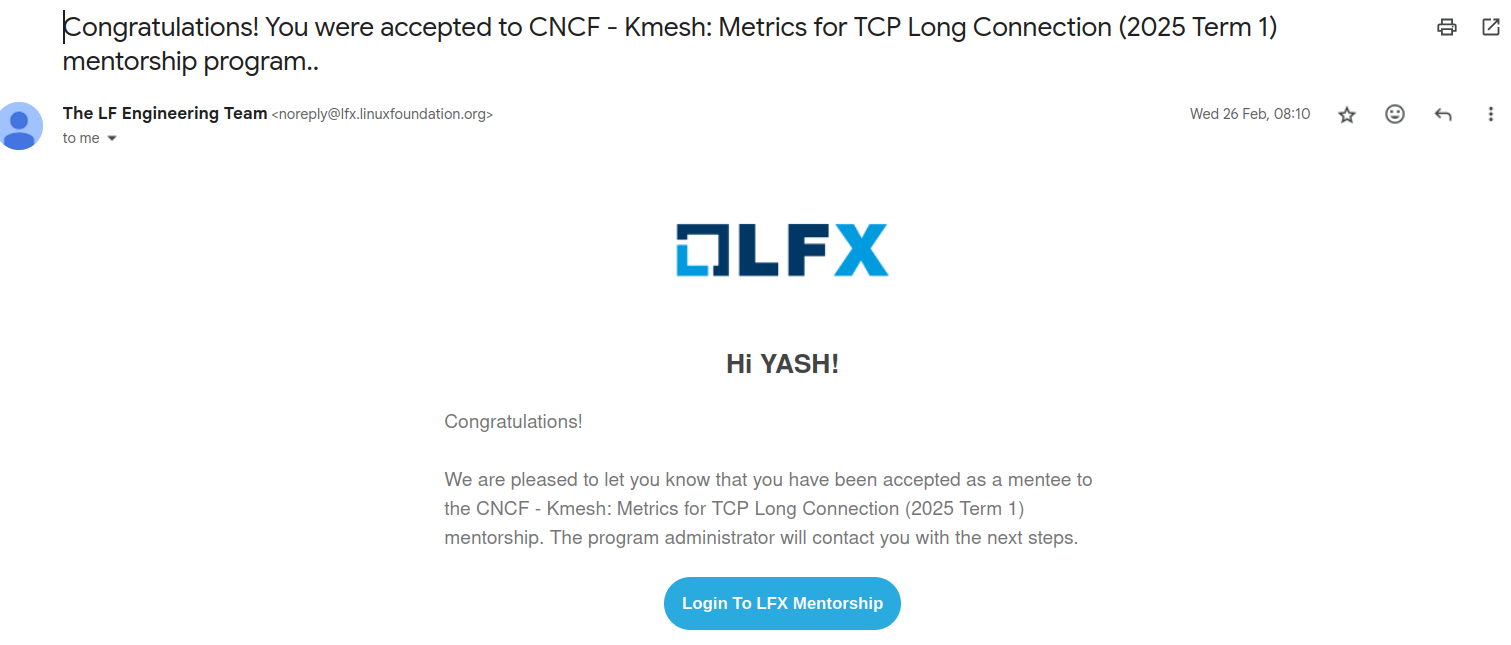
<p>In late February, I received an email from LFX notifying me of my selection.
<img decoding="async" loading="lazy" alt="email" src="https://kmesh.net/zh/assets/images/acceptance-email-e4ad3b1c0dac69817f113a9a143b25c9.png" width="1511" height="645" class="img_ev3q"></p>
<h2 class="anchor anchorWithStickyNavbar_LWe7" id="project-workthrough">Project Workthrough<a href="https://kmesh.net/zh/blog/lfx_2025_tcp_long_conn#project-workthrough" class="hash-link" aria-label="Project Workthrough的直接链接" title="Project Workthrough的直接链接">​</a></h2>
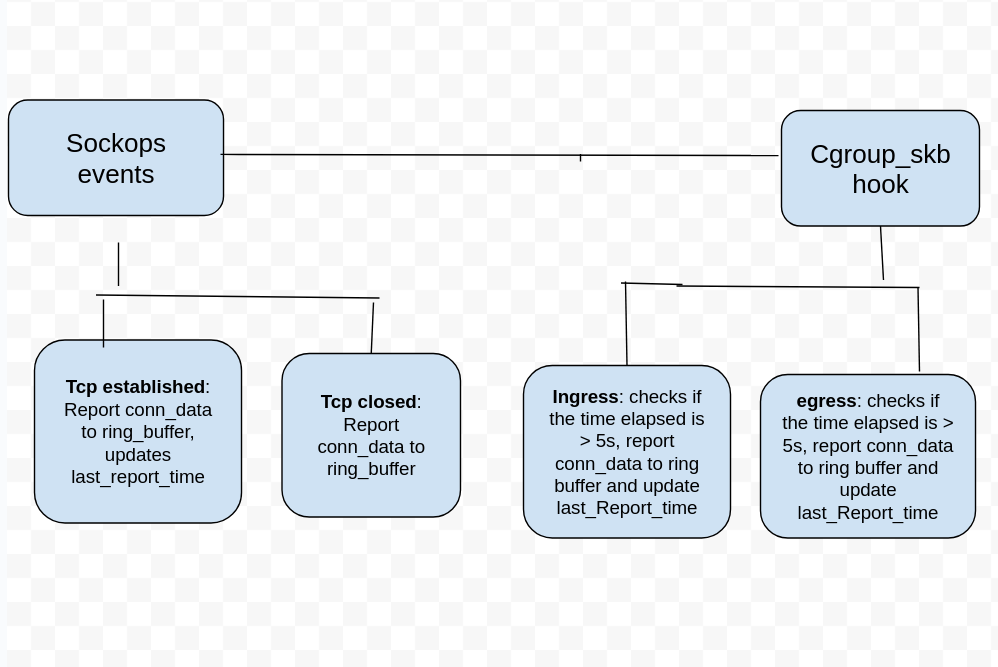
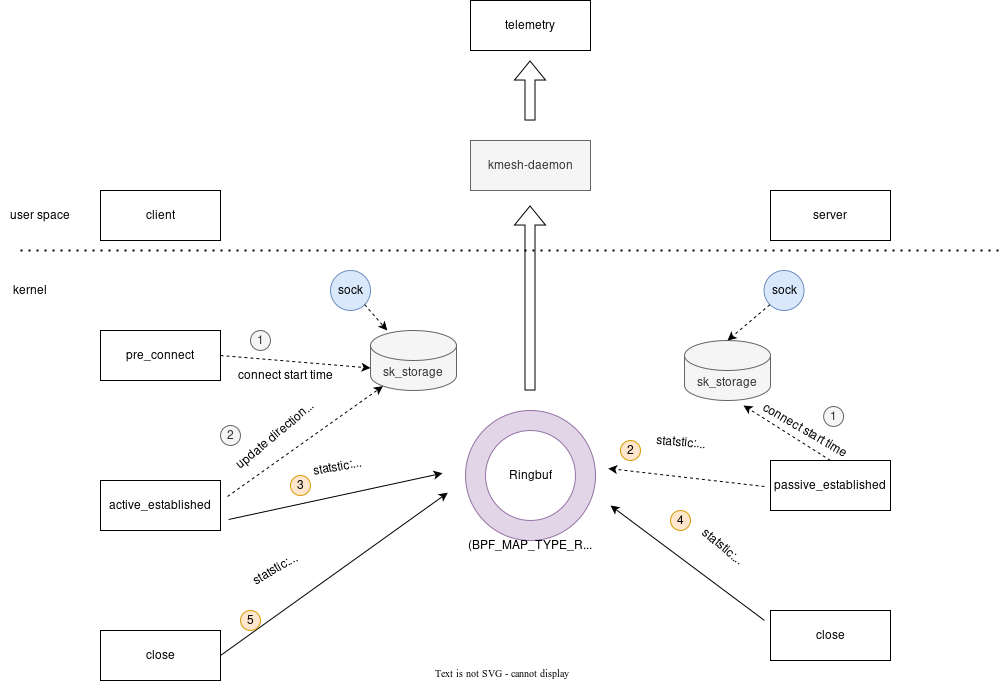
<p>The <code>tcp long connection metrics</code> project aims to implement access logs and metrics for TCP long connections, developing a continuous monitoring and reporting mechanisms that captures detailed, real-time data throughout the lifetime of long-lived TCP connections.</p>
<p>Ebpf hooks are used to collect connection stats such as send/received bytes, packets losts, retransmissions etc.</p>
<p><img decoding="async" loading="lazy" alt="design" src="https://kmesh.net/zh/assets/images/tcp_long_conn_design-90eeb8afcc010fca6dc0e1657245f00e.png" width="998" height="667" class="img_ev3q"></p>
<p><a href="https://kmesh.net/docs/transpot-layer/l4-metrics" target="_blank" rel="noopener noreferrer">More-information</a></p>
<h2 class="anchor anchorWithStickyNavbar_LWe7" id="mentorship-experience">Mentorship Experience<a href="https://kmesh.net/zh/blog/lfx_2025_tcp_long_conn#mentorship-experience" class="hash-link" aria-label="Mentorship Experience的直接链接" title="Mentorship Experience的直接链接">​</a></h2>
<p>The Kmesh maintainers were always available to help me with any doubts, whether on Slack or GitHub. Additionally, there is a community meeting held regularly every Thursday, where I could ask questions and discuss various topics. I’ve learned a lot from them, including how to approach problems effectively and consider edge cases during development in these three months.</p>
<p>Based on my contributions and active involvement, the Kmesh community recognized my efforts and promoted me to a member of the organization. This acknowledgment was truly encouraging and motivated me to continue contributing to Kmesh and help the project grow.</p>]]></content>
        <author>
            <name>Yash Patel</name>
            <uri>https://github.com/yp969803</uri>
        </author>
        <category label="LFX-2025" term="LFX-2025"/>
    </entry>
    <entry>
        <title type="html"><![CDATA[Kmesh V1.1.0 Officially Released!]]></title>
        <id>https://kmesh.net/zh/blog/kmesh-1.1-release</id>
        <link href="https://kmesh.net/zh/blog/kmesh-1.1-release"/>
        <updated>2025-05-23T00:00:00.000Z</updated>
        <summary type="html"><![CDATA[We are delighted to announce the release of ​​Kmesh v1.1.0​​, a milestone achieved through the collective efforts of our global community over the past three months. Special recognition goes to the contributors from the ​​LXF Project​​, whose dedication has been pivotal in driving this release forward.]]></summary>
        <content type="html"><![CDATA[<p>We are delighted to announce the release of ​​Kmesh v1.1.0​​, a milestone achieved through the collective efforts of our global community over the past three months. Special recognition goes to the contributors from the ​​LXF Project​​, whose dedication has been pivotal in driving this release forward.</p>
<p>Building on the foundation of v1.0.0, this release introduces significant enhancements to Kmesh’s architecture, observability, and ecosystem integration. The official Kmesh website has undergone a comprehensive redesign, offering an intuitive interface and streamlined documentation to empower both users and developers. Under the hood, we’ve refactored the DNS module and added metrics for long connections, providing deeper insights into more traffic patterns.</p>
<p>In Kernel-Native mode, we’ve reduced invasive kernel modifications. Also, we use global variables to replace the BPF config map to simplify the underlying complexity. Compatibility with ​​Istio 1.25​​ has been rigorously validated, ensuring seamless interoperability with the latest Istio version. Notably, the persistent TestKmeshRestart E2E test case flaky—a long-standing issue—has been resolved through long-term investigation and reconstruction of the underlying BPF program, marking a leap forward in runtime reliability.</p>
<h2 class="anchor anchorWithStickyNavbar_LWe7" id="main-features">Main Features<a href="https://kmesh.net/zh/blog/kmesh-1.1-release#main-features" class="hash-link" aria-label="Main Features的直接链接" title="Main Features的直接链接">​</a></h2>
<h3 class="anchor anchorWithStickyNavbar_LWe7" id="website-overhaul">Website overhaul<a href="https://kmesh.net/zh/blog/kmesh-1.1-release#website-overhaul" class="hash-link" aria-label="Website overhaul的直接链接" title="Website overhaul的直接链接">​</a></h3>
<p>The Kmesh official website has undergone a complete redesign, offering an intuitive user experience with improved documentation, reorganized content hierarchy and streamlined navigation. In addressing feedback from the previous iteration, we focused on key areas where user experience could be enhanced. The original interface presented some usability challenges that occasionally led to navigation difficulties. Our blog module in particular required attention, as its content organization and visual hierarchy impacted content discoverability and readability. From an engineering perspective, we recognized opportunities to improve the code structure through better component organization and more systematic styling approaches, as the existing implementation had grown complex to maintain over time.</p>
<p>To address these problems, we shifted to React with Docusaurus, a modern documentation framework that's much more developer-friendly. This allowed us to create modular components, eliminating redundant code through reusability. Docusaurus provides built-in navigation systems specifically designed for documentation and blogs, plus version-controlled documentation features. We've implemented multilingual support with both English and Chinese documentation, added advanced search functionality, and completely reorganized the content structure. The result is a dramatically improved experience that makes the Kmesh site more accessible and valuable for all users.</p>
<h3 class="anchor anchorWithStickyNavbar_LWe7" id="long-connection-metrics">Long connection metrics<a href="https://kmesh.net/zh/blog/kmesh-1.1-release#long-connection-metrics" class="hash-link" aria-label="Long connection metrics的直接链接" title="Long connection metrics的直接链接">​</a></h3>
<p>Before this release, Kmesh provides access logs during termination and establishment of a TCP connection with more detailed information about the connection, such as bytes sent, received, packet lost, rtt and retransmits. Kmesh also provides workload and service specific metrics such as bytes sent and received, lost packets, minimum rtt, total connection opened and closed by a pod. These metrics are only updated after a connection is closed.</p>
<p>In this release, we implement access logs and metrics for TCP long connections, developing a continuous monitoring and reporting mechanism that captures detailed, real-time data throughout the lifetime of long-lived TCP connections. Access logs are reported periodically with information such as reporting time, connection establishment time, bytes sent, received, packet loss, rtt, retransmits and state. Metrics such as bytes sent and received, packet loss, retransmits are also reported periodically for long connections.</p>
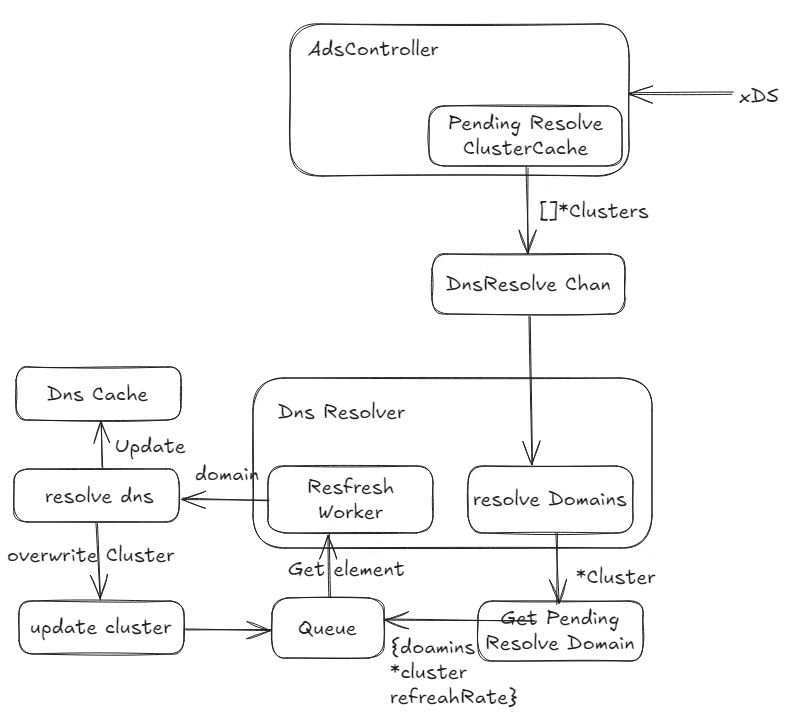
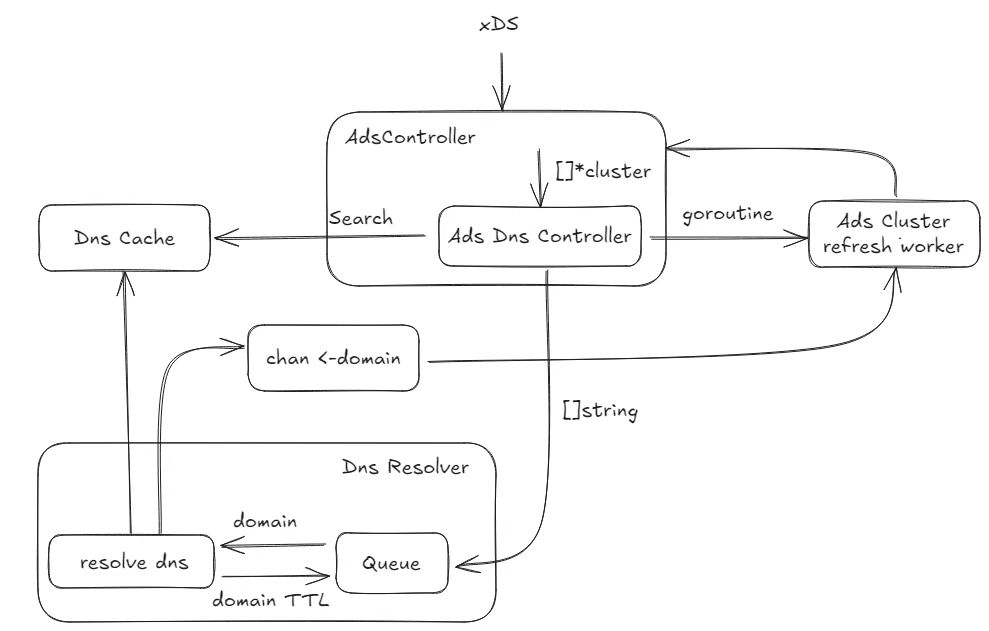
<h3 class="anchor anchorWithStickyNavbar_LWe7" id="dns-refactor">DNS refactor<a href="https://kmesh.net/zh/blog/kmesh-1.1-release#dns-refactor" class="hash-link" aria-label="DNS refactor的直接链接" title="DNS refactor的直接链接">​</a></h3>
<p>The current DNS process includes the CDS refresh process. As a result, DNS is deeply coupled with kernel-native mode and cannot be used in dual-engine mode.</p>
<p><img decoding="async" loading="lazy" alt="image" src="https://kmesh.net/zh/assets/images/dns1-7c31a381778c08b597ce644832f873a0.jpg" width="787" height="715" class="img_ev3q"></p>
<p>In release 1.1 we refactored the DNS module of Kmesh. Instead of a structure containing cds, the data looped through the refresh queue in the Dns is now a domain, so that the Dns module no longer cares about the Kmesh mode, only providing the hostname to be resolved.</p>
<p><img decoding="async" loading="lazy" alt="image" src="https://kmesh.net/zh/assets/images/dns2-8fce30851718fb6822f5e40e3211ae68.jpg" width="989" height="631" class="img_ev3q"></p>
<h3 class="anchor anchorWithStickyNavbar_LWe7" id="bpf-config-map-optimization">BPF config map optimization<a href="https://kmesh.net/zh/blog/kmesh-1.1-release#bpf-config-map-optimization" class="hash-link" aria-label="BPF config map optimization的直接链接" title="BPF config map optimization的直接链接">​</a></h3>
<p>Kmesh has eliminated the dedicated kmesh_config_map BPF map, which previously stored global runtime configurations such as BPF logging level and monitoring toggle. These settings are now managed through global variables. Leveraging global variables simplifies BPF configuration management, enhancing runtime efficiency and maintainability.</p>
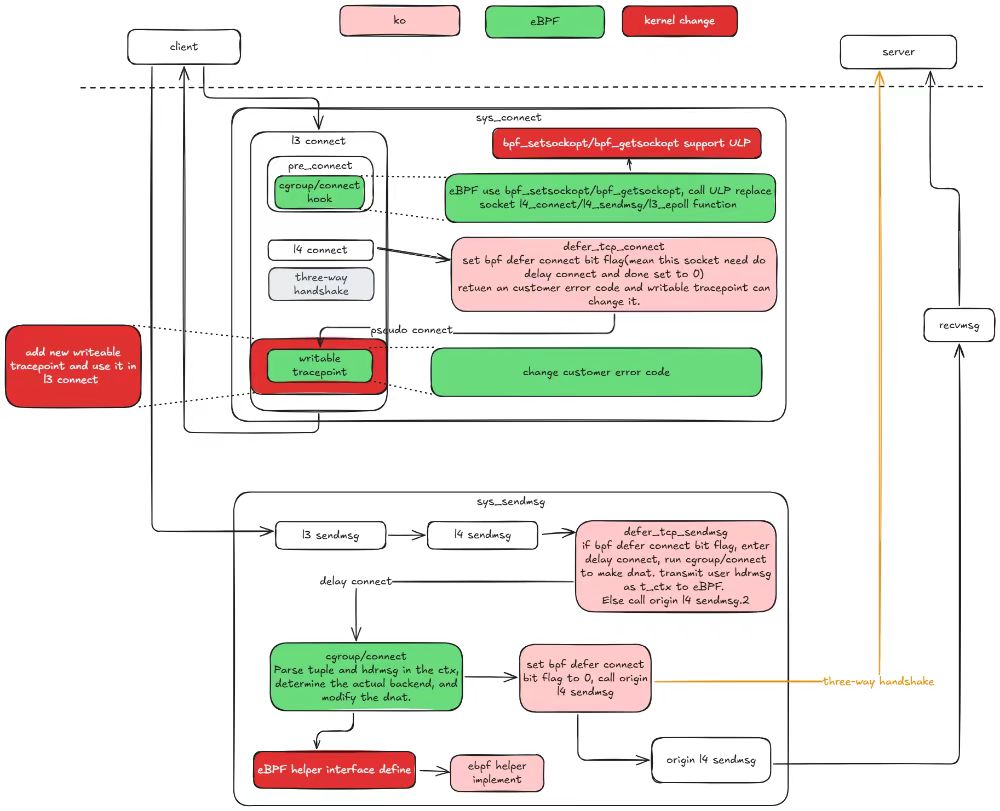
<p>Optimise Kernel Native mode to reduce intrusive modifications to the kernel
The kernel-native mode requires a large number of intrusive kernel reconstructions to implement HTTP-based traffic control. Some of these modifications may have a significant impact on the kernel, which makes the kernel-native mode difficult to deploy and use in a real production environment.
To resolve this problem, we have modified the kernel in kernel-native mode and the involved ko and eBPF synchronously. Through the optimization of this release. In kernel 5.10, the kernel modification is limited to four, and in kernel 6.6, the kernel modification is reduced to only one. This last one will be eliminated as much as possible, with the goal of eventually running kernel-native mode on native version 6.6 and above.</p>
<p><img decoding="async" loading="lazy" alt="image" src="https://kmesh.net/zh/assets/images/bpf-e827d1750df1fb46d0ee9c28adc3a898.jpg" width="1000" height="811" class="img_ev3q"></p>
<h3 class="anchor anchorWithStickyNavbar_LWe7" id="adopt-istio-125">Adopt istio 1.25<a href="https://kmesh.net/zh/blog/kmesh-1.1-release#adopt-istio-125" class="hash-link" aria-label="Adopt istio 1.25的直接链接" title="Adopt istio 1.25的直接链接">​</a></h3>
<p>Kmesh has verified compatibility with istio 1.25 and has added the corresponding E2E test to CI. The Kmesh community maintains verification of the three istio versions in CI, so the E2E test of istio 1.22 has been removed from CI.</p>
<h2 class="anchor anchorWithStickyNavbar_LWe7" id="critical-bug-fix">Critical Bug Fix<a href="https://kmesh.net/zh/blog/kmesh-1.1-release#critical-bug-fix" class="hash-link" aria-label="Critical Bug Fix的直接链接" title="Critical Bug Fix的直接链接">​</a></h2>
<p><strong>kmeshctl install waypoint error (<a href="https://github.com/kmesh-net/kmesh/issues/1287" target="_blank" rel="noopener noreferrer">#1287</a>)</strong></p>
<p><em>root analysis:</em></p>
<p><em>Remove the extra v before the version number when building the waypoint image.</em></p>
<p><strong>TestKmeshRestart flaky (<a href="https://github.com/kmesh-net/kmesh/issues/1192" target="_blank" rel="noopener noreferrer">#1192</a>)</strong></p>
<p><em>root analysis:</em></p>
<p><em>This issue is actually not related Kmesh restart, and it can also be produced in non-restart scenario.</em></p>
<p><em>The root case is that it's not appropriate to use <a href="https://github.com/kmesh-net/kmesh/blob/main/bpf/kmesh/workload/cgroup_sock.c#L64" target="_blank" rel="noopener noreferrer">sk</a> as the key of map <a href="https://github.com/kmesh-net/kmesh/blob/main/bpf/kmesh/workload/cgroup_sock.c#L80" target="_blank" rel="noopener noreferrer">map_of_orig_dst</a>, because it is reused and the value of map will be incorrectly overwritten, resulting in the metadata is not being encoded when it should be encoded in the connection sent to the waypoint, resulting the reset error in this issue.</em></p>
<p><strong>TestServiceEntrySelectsWorkloadEntry flaky (<a href="https://github.com/kmesh-net/kmesh/issues/1352" target="_blank" rel="noopener noreferrer">#1352</a>)</strong></p>
<p><em>root analysis:</em></p>
<p><em>before this test case, there is a test <code>TestServiceEntryInlinedWorkloadEntry</code> which will generate two workload objects, for example, <code>Kubernetes/networking.istio.io/ServiceEntry/echo-1-21618/test-se-v4/10.244.1.103</code> and <code>ServiceEntry/echo-1-21618/test-se-v6/10.244.1.103</code>.</em></p>
<p><em>In the current use case, WorkloadEntry will generate the workload object <code>Kubernetes/networking.istio.io/WorkloadEntry/echo-1-21618/test-we</code>.</em></p>
<p><em>If the test case runs fast enough, the removal operation of the first two workload objects will be aggregated with the creation operation of the latter object.</em></p>
<p><em>Kmesh will process the new object first and then remove the old resources, <a href="https://github.com/kmesh-net/kmesh/blob/main/pkg/controller/workload/workload_processor.go#L841" target="_blank" rel="noopener noreferrer">reference</a>.</em></p>
<p><em>The IP addresses of these three objects are the same, which will eventually lead to the inability to find the IP address in the Kmesh workload cache, which will cause auth failure and connection timeout.</em></p>
<h2 class="anchor anchorWithStickyNavbar_LWe7" id="acknowledgment">Acknowledgment<a href="https://kmesh.net/zh/blog/kmesh-1.1-release#acknowledgment" class="hash-link" aria-label="Acknowledgment的直接链接" title="Acknowledgment的直接链接">​</a></h2>
<p>Kmesh v1.1.0 includes 118 commits from 14 contributors. We would like to express our sincere gratitude to all contributors:</p>
<table><thead><tr><th></th><th></th><th></th><th></th></tr></thead><tbody><tr><td>@hzxuzhonghu</td><td>@LiZhenCheng9527</td><td>@YaoZengzeng</td><td>@silenceper</td></tr><tr><td>@weli-l</td><td>@sancppp</td><td>@Kuromesi</td><td>@yp969803</td></tr><tr><td>@lec-bit</td><td>@ravjot07</td><td>@jayesh9747</td><td>@harish2773</td></tr><tr><td>@Dhiren-Mhatre</td><td>@Murdock9803</td><td></td><td></td></tr></tbody></table>
<p>We have always developed Kmesh with an open and neutral attitude, and continue to build a benchmark solution for the Sidecarless service mesh industry, serving thousands of industries and promoting the healthy and orderly development of service mesh. Kmesh is currently in a stage of rapid development, and we sincerely invite people with lofty ideals to join us!</p>
<h2 class="anchor anchorWithStickyNavbar_LWe7" id="reference-links">Reference Links<a href="https://kmesh.net/zh/blog/kmesh-1.1-release#reference-links" class="hash-link" aria-label="Reference Links的直接链接" title="Reference Links的直接链接">​</a></h2>
<ul>
<li><a href="https://github.com/kmesh-net/kmesh/releases/tag/v1.1.0" target="_blank" rel="noopener noreferrer">Kmesh Release v1.1.0</a></li>
<li><a href="https://github.com/kmesh-net/kmesh" target="_blank" rel="noopener noreferrer">Kmesh GitHub</a></li>
<li><a href="https://kmesh.net/" target="_blank" rel="noopener noreferrer">Kmesh Website</a></li>
</ul>]]></content>
        <author>
            <name>Kmesh</name>
            <uri>https://github.com/kmesh-bot</uri>
        </author>
    </entry>
    <entry>
        <title type="html"><![CDATA[From Contributor to Maintainer: My LFX Mentorship Journey]]></title>
        <id>https://kmesh.net/zh/blog/lfx_2025_website_migration</id>
        <link href="https://kmesh.net/zh/blog/lfx_2025_website_migration"/>
        <updated>2025-02-14T00:00:00.000Z</updated>
        <summary type="html"><![CDATA[Introduction]]></summary>
        <content type="html"><![CDATA[<h3 class="anchor anchorWithStickyNavbar_LWe7" id="introduction">Introduction<a href="https://kmesh.net/zh/blog/lfx_2025_website_migration#introduction" class="hash-link" aria-label="Introduction的直接链接" title="Introduction的直接链接">​</a></h3>
<p>Hi everyone! I'm Jayesh Savaliya, a B.Tech student at IIIT Pune passionate about backend technologies and open source. Over the last two years, I've been selected for the C4GT program twice (2024 &amp; 2025) - yes, they let me back in - and recently completed LFX Mentorship 2025 (Term 1), where I somehow went from fixing typos to being responsible for reviewing other people's code at Kmesh.</p>
<p>In this blog, I'll share my journey and the strategies that actually worked (no generic "just be passionate" advice, I promise).</p>
<hr>
<h3 class="anchor anchorWithStickyNavbar_LWe7" id="my-background">My Background<a href="https://kmesh.net/zh/blog/lfx_2025_website_migration#my-background" class="hash-link" aria-label="My Background的直接链接" title="My Background的直接链接">​</a></h3>
<p>When I applied to LFX, I wasn't starting from scratch. I had already battle-tested myself with:</p>
<ul>
<li><strong>Sunbird</strong> (EkStep Foundation) via C4GT, where I learned that education tech is harder than it looks</li>
<li><strong>Mifos</strong>, a GSoC organization focused on financial services (because debugging payment systems at 2 AM builds character)</li>
<li>Various backend projects where I definitely didn't break production. Much.</li>
</ul>
<h4 class="anchor anchorWithStickyNavbar_LWe7" id="choosing-kmesh">Choosing Kmesh<a href="https://kmesh.net/zh/blog/lfx_2025_website_migration#choosing-kmesh" class="hash-link" aria-label="Choosing Kmesh的直接链接" title="Choosing Kmesh的直接链接">​</a></h4>
<p>I shortlisted projects from the LFX portal based on three key criteria:</p>
<ol>
<li><strong>Tech stack relevance</strong> - Technologies I wanted to master</li>
<li><strong>Learning potential</strong> - Projects that would challenge and grow my skills</li>
<li><strong>Active maintainers</strong> - Communities with responsive, helpful mentors</li>
</ol>
<p>I chose Kmesh, a high-performance service mesh data plane built on eBPF and programmable kernel technologies. Kmesh's sidecarless architecture eliminates proxy overhead, resulting in better performance and lower resource consumption.</p>
<p>Honestly? It had "eBPF" in the description and I wanted to sound cool at tech meetups. But it turned out to be genuinely fascinating work with a great community.</p>
<hr>
<h3 class="anchor anchorWithStickyNavbar_LWe7" id="how-to-succeed-in-open-source-programs">How to Succeed in Open Source Programs<a href="https://kmesh.net/zh/blog/lfx_2025_website_migration#how-to-succeed-in-open-source-programs" class="hash-link" aria-label="How to Succeed in Open Source Programs的直接链接" title="How to Succeed in Open Source Programs的直接链接">​</a></h3>
<p>Here's my three-step approach that worked for LFX:</p>
<h4 class="anchor anchorWithStickyNavbar_LWe7" id="1-make-meaningful-contributions">1. Make Meaningful Contributions<a href="https://kmesh.net/zh/blog/lfx_2025_website_migration#1-make-meaningful-contributions" class="hash-link" aria-label="1. Make Meaningful Contributions的直接链接" title="1. Make Meaningful Contributions的直接链接">​</a></h4>
<p>Start small and scale up gradually. Don't be the person who says "I'll rewrite the entire architecture!" on day one.</p>
<p>Instead:</p>
<ul>
<li><strong>Weeks 1-2:</strong> Fix typos, improve logs, update documentation</li>
<li><strong>Weeks 3-4:</strong> Fix small bugs, add tests</li>
<li><strong>Week 5+:</strong> Work on core features and refactoring</li>
</ul>
<p>This progression shows mentors you're not just throwing random PRs at the wall hoping something sticks.</p>
<h4 class="anchor anchorWithStickyNavbar_LWe7" id="2-write-a-strong-proposal">2. Write a Strong Proposal<a href="https://kmesh.net/zh/blog/lfx_2025_website_migration#2-write-a-strong-proposal" class="hash-link" aria-label="2. Write a Strong Proposal的直接链接" title="2. Write a Strong Proposal的直接链接">​</a></h4>
<p>Your proposal should be:</p>
<ul>
<li><strong>Clear:</strong> Explain your approach in straightforward language</li>
<li><strong>Structured:</strong> Include a realistic timeline with milestones</li>
<li><strong>Convincing:</strong> Demonstrate why you're the right person for the project</li>
</ul>
<p>Make sure your proposal reflects genuine engagement with the project, not just surface-level research.</p>
<h4 class="anchor anchorWithStickyNavbar_LWe7" id="3-be-actively-involved">3. Be Actively Involved<a href="https://kmesh.net/zh/blog/lfx_2025_website_migration#3-be-actively-involved" class="hash-link" aria-label="3. Be Actively Involved的直接链接" title="3. Be Actively Involved的直接链接">​</a></h4>
<p>Stay engaged in project channels (Slack, Discord, mailing lists). Communicate regularly with mentors, ask thoughtful questions, and contribute to discussions.</p>
<p>But also: don't be <em>that</em> person who asks questions Google could answer or pings everyone at 3 AM with "quick question." Balance is everything.</p>
<p><strong>The Formula:</strong> Consistent contributions + Strong proposal + Active communication = Standing out</p>
<hr>
<h3 class="anchor anchorWithStickyNavbar_LWe7" id="the-path-to-maintainership">The Path to Maintainership<a href="https://kmesh.net/zh/blog/lfx_2025_website_migration#the-path-to-maintainership" class="hash-link" aria-label="The Path to Maintainership的直接链接" title="The Path to Maintainership的直接链接">​</a></h3>
<p>Becoming a maintainer wasn't planned. It happened naturally through sustained engagement after the mentorship period ended.</p>
<h4 class="anchor anchorWithStickyNavbar_LWe7" id="consistency">Consistency<a href="https://kmesh.net/zh/blog/lfx_2025_website_migration#consistency" class="hash-link" aria-label="Consistency的直接链接" title="Consistency的直接链接">​</a></h4>
<p>I continued contributing regularly after my initial PRs were merged:</p>
<ul>
<li>Fixing overlooked bugs</li>
<li>Adding requested features</li>
<li>Refactoring code for better maintainability</li>
</ul>
<h4 class="anchor anchorWithStickyNavbar_LWe7" id="learning-mindset">Learning Mindset<a href="https://kmesh.net/zh/blog/lfx_2025_website_migration#learning-mindset" class="hash-link" aria-label="Learning Mindset的直接链接" title="Learning Mindset的直接链接">​</a></h4>
<p>I embraced every learning opportunity, even when I had no idea what I was doing. eBPF concepts? Started clueless, ended slightly less clueless. Performance optimization? Learned by making things slower first. CI/CD improvements? Broke the build a few times, but now I own it.</p>
<h4 class="anchor anchorWithStickyNavbar_LWe7" id="patience--feedback">Patience &amp; Feedback<a href="https://kmesh.net/zh/blog/lfx_2025_website_migration#patience--feedback" class="hash-link" aria-label="Patience &amp; Feedback的直接链接" title="Patience &amp; Feedback的直接链接">​</a></h4>
<p>Code reviews can be humbling (read: brutal). I learned to take feedback seriously even when it stung, iterate quickly, and stay patient when things inevitably broke.</p>
<h4 class="anchor anchorWithStickyNavbar_LWe7" id="taking-initiative">Taking Initiative<a href="https://kmesh.net/zh/blog/lfx_2025_website_migration#taking-initiative" class="hash-link" aria-label="Taking Initiative的直接链接" title="Taking Initiative的直接链接">​</a></h4>
<p>I started acting like a maintainer before having the title:</p>
<ul>
<li>Suggesting project improvements</li>
<li>Writing comprehensive tests (because flaky tests are the worst)</li>
<li>Automating repetitive tasks (laziness is a virtue in programming)</li>
<li>Reviewing other contributors' work</li>
</ul>
<p>By the end of my mentorship, the trust I built with the team led to being granted maintainer access. Going from "hey, can I fix this typo?" to "you're now responsible for reviewing PRs" was equal parts surreal and terrifying.</p>
<hr>
<h3 class="anchor anchorWithStickyNavbar_LWe7" id="key-takeaways">Key Takeaways<a href="https://kmesh.net/zh/blog/lfx_2025_website_migration#key-takeaways" class="hash-link" aria-label="Key Takeaways的直接链接" title="Key Takeaways的直接链接">​</a></h3>
<p>Here's what I learned that might help you:</p>
<p><strong>Start small, stay consistent</strong> - Begin with simple contributions and build from there. Consistency matters more than individual genius.</p>
<p><strong>Focus on learning</strong> - Getting selected is great, but learning enough to make real contributions is what counts.</p>
<p><strong>Communicate effectively</strong> - Ask questions, share progress, and be helpful. Respectful, clear communication goes a long way.</p>
<p><strong>Suggest improvements</strong> - If you see something that could be better, speak up. Good ideas are always welcome.</p>
<p><strong>Embrace feedback</strong> - Your first PR won't be perfect. Nobody's is. Take feedback as learning opportunities, iterate, and move on. Arguing about semicolons is not a productive use of anyone's time.</p>
<p>You don't need to be a genius. You just need to show up, contribute meaningfully, and improve consistently.</p>
<hr>
<h3 class="anchor anchorWithStickyNavbar_LWe7" id="final-thoughts">Final Thoughts<a href="https://kmesh.net/zh/blog/lfx_2025_website_migration#final-thoughts" class="hash-link" aria-label="Final Thoughts的直接链接" title="Final Thoughts的直接链接">​</a></h3>
<p>The LFX Mentorship taught me more than just technical skills. I learned how to work with distributed teams across timezones, think critically about production software (logs are your friends!), and grow into a leadership role in an open source community.</p>
<p>If you're considering applying to LFX or any open source program, take the leap. With consistent effort and genuine engagement, you can make a real impact. If I can go from nervous first-time contributor to maintainer, so can you.</p>
<hr>
<h3 class="anchor anchorWithStickyNavbar_LWe7" id="connect-with-me">Connect With Me<a href="https://kmesh.net/zh/blog/lfx_2025_website_migration#connect-with-me" class="hash-link" aria-label="Connect With Me的直接链接" title="Connect With Me的直接链接">​</a></h3>
<p>Feel free to reach out if you want to discuss open source, eBPF, or systems programming:</p>
<ul>
<li><a href="https://linkedin.com/in/jayesh-savaliya" target="_blank" rel="noopener noreferrer">LinkedIn</a></li>
<li><a href="https://github.com/jayesh9747" target="_blank" rel="noopener noreferrer">GitHub</a></li>
</ul>
<p>Thanks for reading, and see you in the next PR!</p>]]></content>
        <author>
            <name>Jayesh Savaliya</name>
            <uri>https://github.com/jayesh9747</uri>
        </author>
    </entry>
    <entry>
        <title type="html"><![CDATA[使用 Kmesh 作为阿里云服务网格（ASM）无边车模式的数据平面]]></title>
        <id>https://kmesh.net/zh/blog/deploy-kmesh-in-asm</id>
        <link href="https://kmesh.net/zh/blog/deploy-kmesh-in-asm"/>
        <updated>2024-11-27T00:00:00.000Z</updated>
        <summary type="html"><![CDATA[使用 Kmesh 作为阿里云服务网格（ASM）无边车模式的数据平面]]></summary>
        <content type="html"><![CDATA[<h2 class="anchor anchorWithStickyNavbar_LWe7" id="概述">概述<a href="https://kmesh.net/zh/blog/deploy-kmesh-in-asm#%E6%A6%82%E8%BF%B0" class="hash-link" aria-label="概述的直接链接" title="概述的直接链接">​</a></h2>
<p>阿里云服务网格（ASM）支持边车模式和无边车模式。边车模式中，每个服务实例旁边运行一个代理，这种模式目前是最常选且较为稳定的解决方案。然而，这种架构会引入延迟和资源开销。为了解决边车模式中固有的延迟和资源消耗问题，近年来出现了各种无边车模式的解决方案，例如 Istio Ambient。Istio Ambient 在每个节点上部署 ztunnel 对节点上运行的 Pod 进行 L4 流量代理，并部署 waypoint 来处理 L7 流量代理。虽然无边车模式可以降低延迟和资源消耗，但其稳定性和功能完整性仍有待提高。</p>
<p>ASM 目前支持多种无边车模式，例如 Istio Ambient 模式、ACMG 模式以及 Kmesh 等。Kmesh（详细信息请参见 <a href="https://kmesh.net/" target="_blank" rel="noopener noreferrer">https://kmesh.net/</a>）是一款基于 eBPF 和可编程内核实现的高性能服务网格数据面软件。通过将流量管理卸载到内核中，Kmesh 使得网格内服务间的通信无需经过代理软件，从而显著缩短流量转发路径，并有效提升服务访问的转发性能。</p>
<h3 class="anchor anchorWithStickyNavbar_LWe7" id="kmesh-简介">Kmesh 简介<a href="https://kmesh.net/zh/blog/deploy-kmesh-in-asm#kmesh-%E7%AE%80%E4%BB%8B" class="hash-link" aria-label="Kmesh 简介的直接链接" title="Kmesh 简介的直接链接">​</a></h3>
<p>Kmesh 的双引擎模式使用 eBPF 在内核空间截获流量，同时部署 Waypoint 代理来处理复杂的 L7 流量管理，从而实现内核空间（eBPF）和用户空间（Waypoint）间的 L4 与 L7 分离治理。与 Istio Ambient Mesh 相比，它降低了约 30% 的延迟；与内核原生模式相比，双引擎模式不需要内核增强，具有更广泛的适用性。</p>
<p><img decoding="async" loading="lazy" alt="双引擎模式" src="https://kmesh.net/zh/assets/images/kmesh-arch-b2156d693528f867523cbc9bd129075e.png" width="992" height="536" class="img_ev3q"></p>
<p>目前，ASM 支持将 Kmesh 的双引擎模式作为服务网格的数据面之一，从而实现更高效的服务管理。具体来说，ASM 可作为控制面使用，而 Kmesh 则可作为数据面部署在阿里云容器服务 Kubernetes（ACK）集群中。</p>
<h2 class="anchor anchorWithStickyNavbar_LWe7" id="在-ack-中部署-kmesh-并连接到-asm">在 ACK 中部署 Kmesh 并连接到 ASM<a href="https://kmesh.net/zh/blog/deploy-kmesh-in-asm#%E5%9C%A8-ack-%E4%B8%AD%E9%83%A8%E7%BD%B2-kmesh-%E5%B9%B6%E8%BF%9E%E6%8E%A5%E5%88%B0-asm" class="hash-link" aria-label="在 ACK 中部署 Kmesh 并连接到 ASM的直接链接" title="在 ACK 中部署 Kmesh 并连接到 ASM的直接链接">​</a></h2>
<h3 class="anchor anchorWithStickyNavbar_LWe7" id="前提条件">前提条件<a href="https://kmesh.net/zh/blog/deploy-kmesh-in-asm#%E5%89%8D%E6%8F%90%E6%9D%A1%E4%BB%B6" class="hash-link" aria-label="前提条件的直接链接" title="前提条件的直接链接">​</a></h3>
<p>首先需要创建一个 ASM 集群，并将 ACK 集群添加到 ASM 集群中进行管理。详细步骤请参阅文档：<a href="https://www.alibabacloud.com/help/en/asm/getting-started/add-a-cluster-to-an-asm-instance-1?spm=a2c63.l28256.help-menu-search-147365.d_0" target="_blank" rel="noopener noreferrer">将集群添加到 ASM 实例</a>。</p>
<h3 class="anchor anchorWithStickyNavbar_LWe7" id="安装-kmesh">安装 Kmesh<a href="https://kmesh.net/zh/blog/deploy-kmesh-in-asm#%E5%AE%89%E8%A3%85-kmesh" class="hash-link" aria-label="安装 Kmesh的直接链接" title="安装 Kmesh的直接链接">​</a></h3>
<p>运行以下命令将 Kmesh 项目克隆到本地。</p>
<div class="language-shell codeBlockContainer_Ckt0 theme-code-block" style="--prism-color:#393A34;--prism-background-color:#f6f8fa"><div class="codeBlockContent_biex"><pre tabindex="0" class="prism-code language-shell codeBlock_bY9V thin-scrollbar" style="color:#393A34;background-color:#f6f8fa"><code class="codeBlockLines_e6Vv"><span class="token-line" style="color:#393A34"><span class="token function" style="color:#d73a49">git</span><span class="token plain"> clone https://github.com/kmesh-net/kmesh.git </span><span class="token operator" style="color:#393A34">&amp;&amp;</span><span class="token plain"> </span><span class="token builtin class-name">cd</span><span class="token plain"> kmesh</span><br></span></code></pre><div class="buttonGroup__atx"><button type="button" aria-label="复制代码到剪贴板" title="复制" class="clean-btn"><span class="copyButtonIcons_eSgA" aria-hidden="true"><svg viewBox="0 0 24 24" class="copyButtonIcon_y97N"><path fill="currentColor" d="M19,21H8V7H19M19,5H8A2,2 0 0,0 6,7V21A2,2 0 0,0 8,23H19A2,2 0 0,0 21,21V7A2,2 0 0,0 19,5M16,1H4A2,2 0 0,0 2,3V17H4V3H16V1Z"></path></svg><svg viewBox="0 0 24 24" class="copyButtonSuccessIcon_LjdS"><path fill="currentColor" d="M21,7L9,19L3.5,13.5L4.91,12.09L9,16.17L19.59,5.59L21,7Z"></path></svg></span></button></div></div></div>
<h4 class="anchor anchorWithStickyNavbar_LWe7" id="检查-asm-控制面的服务">检查 ASM 控制面的服务<a href="https://kmesh.net/zh/blog/deploy-kmesh-in-asm#%E6%A3%80%E6%9F%A5-asm-%E6%8E%A7%E5%88%B6%E9%9D%A2%E7%9A%84%E6%9C%8D%E5%8A%A1" class="hash-link" aria-label="检查 ASM 控制面的服务的直接链接" title="检查 ASM 控制面的服务的直接链接">​</a></h4>
<p>下载 Kmesh 后，首先需要执行以下命令以检查集群中当前 ASM 控制面的服务名称，从而配置 Kmesh 与 ASM 控制面之间的连接。</p>
<div class="language-shell codeBlockContainer_Ckt0 theme-code-block" style="--prism-color:#393A34;--prism-background-color:#f6f8fa"><div class="codeBlockContent_biex"><pre tabindex="0" class="prism-code language-shell codeBlock_bY9V thin-scrollbar" style="color:#393A34;background-color:#f6f8fa"><code class="codeBlockLines_e6Vv"><span class="token-line" style="color:#393A34"><span class="token plain">kubectl get svc </span><span class="token parameter variable" style="color:#36acaa">-n</span><span class="token plain"> istio-system </span><span class="token operator" style="color:#393A34">|</span><span class="token plain"> </span><span class="token function" style="color:#d73a49">grep</span><span class="token plain"> istiod</span><br></span><span class="token-line" style="color:#393A34"><span class="token plain" style="display:inline-block"></span><br></span><span class="token-line" style="color:#393A34"><span class="token plain"></span><span class="token comment" style="color:#999988;font-style:italic"># istiod-1-22-6   ClusterIP   None   &lt;none&gt;   15012/TCP   2d</span><br></span></code></pre><div class="buttonGroup__atx"><button type="button" aria-label="复制代码到剪贴板" title="复制" class="clean-btn"><span class="copyButtonIcons_eSgA" aria-hidden="true"><svg viewBox="0 0 24 24" class="copyButtonIcon_y97N"><path fill="currentColor" d="M19,21H8V7H19M19,5H8A2,2 0 0,0 6,7V21A2,2 0 0,0 8,23H19A2,2 0 0,0 21,21V7A2,2 0 0,0 19,5M16,1H4A2,2 0 0,0 2,3V17H4V3H16V1Z"></path></svg><svg viewBox="0 0 24 24" class="copyButtonSuccessIcon_LjdS"><path fill="currentColor" d="M21,7L9,19L3.5,13.5L4.91,12.09L9,16.17L19.59,5.59L21,7Z"></path></svg></span></button></div></div></div>
<h4 class="anchor anchorWithStickyNavbar_LWe7" id="使用-kubectl-安装-kmesh">使用 Kubectl 安装 Kmesh<a href="https://kmesh.net/zh/blog/deploy-kmesh-in-asm#%E4%BD%BF%E7%94%A8-kubectl-%E5%AE%89%E8%A3%85-kmesh" class="hash-link" aria-label="使用 Kubectl 安装 Kmesh的直接链接" title="使用 Kubectl 安装 Kmesh的直接链接">​</a></h4>
<p>你可以使用 kubectl 或 helm 在 ACK Kubernetes 集群中安装 Kmesh。但在安装前，请将 <code>ClusterId</code> 和 <code>xdsAddress</code> 环境变量添加到 Kmesh 的 DaemonSet 中。这些变量用于 Kmesh 与 ASM 控制面之间的身份验证和连接。ClusterId 为 Kmesh 部署所在 ACK 集群的 ID，而 xdsAddress 为 ASM 控制面的服务地址。</p>
<div class="language-yaml codeBlockContainer_Ckt0 theme-code-block" style="--prism-color:#393A34;--prism-background-color:#f6f8fa"><div class="codeBlockContent_biex"><pre tabindex="0" class="prism-code language-yaml codeBlock_bY9V thin-scrollbar" style="color:#393A34;background-color:#f6f8fa"><code class="codeBlockLines_e6Vv"><span class="token-line" style="color:#393A34"><span class="token comment" style="color:#999988;font-style:italic"># 你可以在以下文件中找到资源定义：</span><span class="token plain"></span><br></span><span class="token-line" style="color:#393A34"><span class="token plain"></span><span class="token comment" style="color:#999988;font-style:italic"># helm: deploy/charts/kmesh-helm/templates/daemonset.yaml</span><span class="token plain"></span><br></span><span class="token-line" style="color:#393A34"><span class="token plain"></span><span class="token comment" style="color:#999988;font-style:italic"># kubectl: deploy/yaml/kmesh.yaml</span><span class="token plain"></span><br></span><span class="token-line" style="color:#393A34"><span class="token plain"></span><span class="token key atrule" style="color:#00a4db">apiVersion</span><span class="token punctuation" style="color:#393A34">:</span><span class="token plain"> apps/v1</span><br></span><span class="token-line" style="color:#393A34"><span class="token plain"></span><span class="token key atrule" style="color:#00a4db">kind</span><span class="token punctuation" style="color:#393A34">:</span><span class="token plain"> DaemonSet</span><br></span><span class="token-line" style="color:#393A34"><span class="token plain"></span><span class="token key atrule" style="color:#00a4db">metadata</span><span class="token punctuation" style="color:#393A34">:</span><span class="token plain"></span><br></span><span class="token-line" style="color:#393A34"><span class="token plain">  </span><span class="token key atrule" style="color:#00a4db">name</span><span class="token punctuation" style="color:#393A34">:</span><span class="token plain"> kmesh</span><br></span><span class="token-line" style="color:#393A34"><span class="token plain">  </span><span class="token key atrule" style="color:#00a4db">labels</span><span class="token punctuation" style="color:#393A34">:</span><span class="token plain"></span><br></span><span class="token-line" style="color:#393A34"><span class="token plain">    </span><span class="token key atrule" style="color:#00a4db">app</span><span class="token punctuation" style="color:#393A34">:</span><span class="token plain"> kmesh</span><br></span><span class="token-line" style="color:#393A34"><span class="token plain">  </span><span class="token key atrule" style="color:#00a4db">namespace</span><span class="token punctuation" style="color:#393A34">:</span><span class="token plain"> kmesh</span><span class="token punctuation" style="color:#393A34">-</span><span class="token plain">system</span><br></span><span class="token-line" style="color:#393A34"><span class="token plain"></span><span class="token key atrule" style="color:#00a4db">spec</span><span class="token punctuation" style="color:#393A34">:</span><span class="token plain"></span><br></span><span class="token-line" style="color:#393A34"><span class="token plain">  </span><span class="token key atrule" style="color:#00a4db">template</span><span class="token punctuation" style="color:#393A34">:</span><span class="token plain"></span><br></span><span class="token-line" style="color:#393A34"><span class="token plain">    </span><span class="token key atrule" style="color:#00a4db">spec</span><span class="token punctuation" style="color:#393A34">:</span><span class="token plain"></span><br></span><span class="token-line" style="color:#393A34"><span class="token plain">      </span><span class="token key atrule" style="color:#00a4db">containers</span><span class="token punctuation" style="color:#393A34">:</span><span class="token plain"></span><br></span><span class="token-line" style="color:#393A34"><span class="token plain">        </span><span class="token punctuation" style="color:#393A34">-</span><span class="token plain"> </span><span class="token key atrule" style="color:#00a4db">env</span><span class="token punctuation" style="color:#393A34">:</span><span class="token plain"></span><br></span><span class="token-line" style="color:#393A34"><span class="token plain">          </span><span class="token comment" style="color:#999988;font-style:italic"># ASM 控制面服务</span><span class="token plain"></span><br></span><span class="token-line" style="color:#393A34"><span class="token plain">          </span><span class="token punctuation" style="color:#393A34">-</span><span class="token plain"> </span><span class="token key atrule" style="color:#00a4db">name</span><span class="token punctuation" style="color:#393A34">:</span><span class="token plain"> XDS_ADDRESS</span><br></span><span class="token-line" style="color:#393A34"><span class="token plain">            </span><span class="token key atrule" style="color:#00a4db">value</span><span class="token punctuation" style="color:#393A34">:</span><span class="token plain"> </span><span class="token string" style="color:#e3116c">"istiod-1-22-6.istio-system.svc:15012"</span><span class="token plain"></span><br></span><span class="token-line" style="color:#393A34"><span class="token plain">          </span><span class="token comment" style="color:#999988;font-style:italic"># 添加 ACK 集群 ID</span><span class="token plain"></span><br></span><span class="token-line" style="color:#393A34"><span class="token plain">          </span><span class="token punctuation" style="color:#393A34">-</span><span class="token plain"> </span><span class="token key atrule" style="color:#00a4db">name</span><span class="token punctuation" style="color:#393A34">:</span><span class="token plain"> CLUSTER_ID</span><br></span><span class="token-line" style="color:#393A34"><span class="token plain">            </span><span class="token key atrule" style="color:#00a4db">value</span><span class="token punctuation" style="color:#393A34">:</span><span class="token plain"> </span><span class="token string" style="color:#e3116c">"cluster-id"</span><span class="token plain"></span><br></span><span class="token-line" style="color:#393A34"><span class="token plain">    </span><span class="token punctuation" style="color:#393A34">...</span><br></span></code></pre><div class="buttonGroup__atx"><button type="button" aria-label="复制代码到剪贴板" title="复制" class="clean-btn"><span class="copyButtonIcons_eSgA" aria-hidden="true"><svg viewBox="0 0 24 24" class="copyButtonIcon_y97N"><path fill="currentColor" d="M19,21H8V7H19M19,5H8A2,2 0 0,0 6,7V21A2,2 0 0,0 8,23H19A2,2 0 0,0 21,21V7A2,2 0 0,0 19,5M16,1H4A2,2 0 0,0 2,3V17H4V3H16V1Z"></path></svg><svg viewBox="0 0 24 24" class="copyButtonSuccessIcon_LjdS"><path fill="currentColor" d="M21,7L9,19L3.5,13.5L4.91,12.09L9,16.17L19.59,5.59L21,7Z"></path></svg></span></button></div></div></div>
<p>完成修改后，可运行以下命令安装 Kmesh。</p>
<div class="language-shell codeBlockContainer_Ckt0 theme-code-block" style="--prism-color:#393A34;--prism-background-color:#f6f8fa"><div class="codeBlockContent_biex"><pre tabindex="0" class="prism-code language-shell codeBlock_bY9V thin-scrollbar" style="color:#393A34;background-color:#f6f8fa"><code class="codeBlockLines_e6Vv"><span class="token-line" style="color:#393A34"><span class="token comment" style="color:#999988;font-style:italic"># 使用 kubectl 安装</span><span class="token plain"></span><br></span><span class="token-line" style="color:#393A34"><span class="token plain">kubectl apply </span><span class="token parameter variable" style="color:#36acaa">-f</span><span class="token plain"> deploy/yaml</span><br></span><span class="token-line" style="color:#393A34"><span class="token plain" style="display:inline-block"></span><br></span><span class="token-line" style="color:#393A34"><span class="token plain"></span><span class="token comment" style="color:#999988;font-style:italic"># 使用 helm 安装</span><span class="token plain"></span><br></span><span class="token-line" style="color:#393A34"><span class="token plain">helm </span><span class="token function" style="color:#d73a49">install</span><span class="token plain"> kmesh deploy/charts/kmesh-helm </span><span class="token parameter variable" style="color:#36acaa">-n</span><span class="token plain"> kmesh-system --create-namespace</span><br></span></code></pre><div class="buttonGroup__atx"><button type="button" aria-label="复制代码到剪贴板" title="复制" class="clean-btn"><span class="copyButtonIcons_eSgA" aria-hidden="true"><svg viewBox="0 0 24 24" class="copyButtonIcon_y97N"><path fill="currentColor" d="M19,21H8V7H19M19,5H8A2,2 0 0,0 6,7V21A2,2 0 0,0 8,23H19A2,2 0 0,0 21,21V7A2,2 0 0,0 19,5M16,1H4A2,2 0 0,0 2,3V17H4V3H16V1Z"></path></svg><svg viewBox="0 0 24 24" class="copyButtonSuccessIcon_LjdS"><path fill="currentColor" d="M21,7L9,19L3.5,13.5L4.91,12.09L9,16.17L19.59,5.59L21,7Z"></path></svg></span></button></div></div></div>
<h3 class="anchor anchorWithStickyNavbar_LWe7" id="检查-kmesh-启动状态">检查 Kmesh 启动状态<a href="https://kmesh.net/zh/blog/deploy-kmesh-in-asm#%E6%A3%80%E6%9F%A5-kmesh-%E5%90%AF%E5%8A%A8%E7%8A%B6%E6%80%81" class="hash-link" aria-label="检查 Kmesh 启动状态的直接链接" title="检查 Kmesh 启动状态的直接链接">​</a></h3>
<p>安装完成后，运行以下命令检查 Kmesh 的启动状态。</p>
<div class="language-shell codeBlockContainer_Ckt0 theme-code-block" style="--prism-color:#393A34;--prism-background-color:#f6f8fa"><div class="codeBlockContent_biex"><pre tabindex="0" class="prism-code language-shell codeBlock_bY9V thin-scrollbar" style="color:#393A34;background-color:#f6f8fa"><code class="codeBlockLines_e6Vv"><span class="token-line" style="color:#393A34"><span class="token plain">kubectl get pods </span><span class="token parameter variable" style="color:#36acaa">-A</span><span class="token plain"> </span><span class="token operator" style="color:#393A34">|</span><span class="token plain"> </span><span class="token function" style="color:#d73a49">grep</span><span class="token plain"> kmesh</span><br></span><span class="token-line" style="color:#393A34"><span class="token plain" style="display:inline-block"></span><br></span><span class="token-line" style="color:#393A34"><span class="token plain"></span><span class="token comment" style="color:#999988;font-style:italic"># kmesh-system   kmesh-l5z2j   1/1   Running   0    117m</span><br></span></code></pre><div class="buttonGroup__atx"><button type="button" aria-label="复制代码到剪贴板" title="复制" class="clean-btn"><span class="copyButtonIcons_eSgA" aria-hidden="true"><svg viewBox="0 0 24 24" class="copyButtonIcon_y97N"><path fill="currentColor" d="M19,21H8V7H19M19,5H8A2,2 0 0,0 6,7V21A2,2 0 0,0 8,23H19A2,2 0 0,0 21,21V7A2,2 0 0,0 19,5M16,1H4A2,2 0 0,0 2,3V17H4V3H16V1Z"></path></svg><svg viewBox="0 0 24 24" class="copyButtonSuccessIcon_LjdS"><path fill="currentColor" d="M21,7L9,19L3.5,13.5L4.91,12.09L9,16.17L19.59,5.59L21,7Z"></path></svg></span></button></div></div></div>
<p>运行以下命令查看 Kmesh 运行状态。</p>
<div class="language-shell codeBlockContainer_Ckt0 theme-code-block" style="--prism-color:#393A34;--prism-background-color:#f6f8fa"><div class="codeBlockContent_biex"><pre tabindex="0" class="prism-code language-shell codeBlock_bY9V thin-scrollbar" style="color:#393A34;background-color:#f6f8fa"><code class="codeBlockLines_e6Vv"><span class="token-line" style="color:#393A34"><span class="token plain">kubectl logs </span><span class="token parameter variable" style="color:#36acaa">-f</span><span class="token plain"> </span><span class="token parameter variable" style="color:#36acaa">-n</span><span class="token plain"> kmesh-system kmesh-l5z2j</span><br></span><span class="token-line" style="color:#393A34"><span class="token plain" style="display:inline-block"></span><br></span><span class="token-line" style="color:#393A34"><span class="token plain"></span><span class="token comment" style="color:#999988;font-style:italic"># time="2024-02-19T10:16:52Z" level=info msg="service node sidecar~192.168.11.53~kmesh-system.kmesh-system~kmesh-system.svc.cluster.local connect to discovery address istiod.istio-system.svc:15012" subsys=controller/envoy</span><span class="token plain"></span><br></span><span class="token-line" style="color:#393A34"><span class="token plain"></span><span class="token comment" style="color:#999988;font-style:italic"># time="2024-02-19T10:16:52Z" level=info msg="options InitDaemonConfig successful" subsys=manager</span><span class="token plain"></span><br></span><span class="token-line" style="color:#393A34"><span class="token plain"></span><span class="token comment" style="color:#999988;font-style:italic"># time="2024-02-19T10:16:53Z" level=info msg="bpf Start successful" subsys=manager</span><span class="token plain"></span><br></span><span class="token-line" style="color:#393A34"><span class="token plain"></span><span class="token comment" style="color:#999988;font-style:italic"># time="2024-02-19T10:16:53Z" level=info msg="controller Start successful" subsys=manager</span><span class="token plain"></span><br></span><span class="token-line" style="color:#393A34"><span class="token plain"></span><span class="token comment" style="color:#999988;font-style:italic"># time="2024-02-19T10:16:53Z" level=info msg="command StartServer successful" subsys=manager</span><span class="token plain"></span><br></span><span class="token-line" style="color:#393A34"><span class="token plain"></span><span class="token comment" style="color:#999988;font-style:italic"># time="2024-02-19T10:16:53Z" level=info msg="start write CNI config\n" subsys="cni installer"</span><span class="token plain"></span><br></span><span class="token-line" style="color:#393A34"><span class="token plain"></span><span class="token comment" style="color:#999988;font-style:italic"># time="2024-02-19T10:16:53Z" level=info msg="kmesh cni use chained\n" subsys="cni installer"</span><span class="token plain"></span><br></span><span class="token-line" style="color:#393A34"><span class="token plain"></span><span class="token comment" style="color:#999988;font-style:italic"># time="2024-02-19T10:16:54Z" level=info msg="Copied /usr/bin/kmesh-cni to /opt/cni/bin." subsys="cni installer"</span><span class="token plain"></span><br></span><span class="token-line" style="color:#393A34"><span class="token plain"></span><span class="token comment" style="color:#999988;font-style:italic"># time="2024-02-19T10:16:54Z" level=info msg="kubeconfig either does not exist or is out of date, writing a new one" subsys="cni installer"</span><span class="token plain"></span><br></span><span class="token-line" style="color:#393A34"><span class="token plain"></span><span class="token comment" style="color:#999988;font-style:italic"># time="2024-02-19T10:16:54Z" level=info msg="wrote kubeconfig file /etc/cni/net.d/kmesh-cni-kubeconfig" subsys="cni installer"</span><span class="token plain"></span><br></span><span class="token-line" style="color:#393A34"><span class="token plain"></span><span class="token comment" style="color:#999988;font-style:italic"># time="2024-02-19T10:16:54Z" level=info msg="command Start cni successful" subsys=manager</span><br></span></code></pre><div class="buttonGroup__atx"><button type="button" aria-label="复制代码到剪贴板" title="复制" class="clean-btn"><span class="copyButtonIcons_eSgA" aria-hidden="true"><svg viewBox="0 0 24 24" class="copyButtonIcon_y97N"><path fill="currentColor" d="M19,21H8V7H19M19,5H8A2,2 0 0,0 6,7V21A2,2 0 0,0 8,23H19A2,2 0 0,0 21,21V7A2,2 0 0,0 19,5M16,1H4A2,2 0 0,0 2,3V17H4V3H16V1Z"></path></svg><svg viewBox="0 0 24 24" class="copyButtonSuccessIcon_LjdS"><path fill="currentColor" d="M21,7L9,19L3.5,13.5L4.91,12.09L9,16.17L19.59,5.59L21,7Z"></path></svg></span></button></div></div></div>
<p>你可以通过以下命令为特定命名空间启用 Kmesh。</p>
<div class="language-shell codeBlockContainer_Ckt0 theme-code-block" style="--prism-color:#393A34;--prism-background-color:#f6f8fa"><div class="codeBlockContent_biex"><pre tabindex="0" class="prism-code language-shell codeBlock_bY9V thin-scrollbar" style="color:#393A34;background-color:#f6f8fa"><code class="codeBlockLines_e6Vv"><span class="token-line" style="color:#393A34"><span class="token plain">kubectl label namespace default istio.io/dataplane-mode</span><span class="token operator" style="color:#393A34">=</span><span class="token plain">Kmesh</span><br></span></code></pre><div class="buttonGroup__atx"><button type="button" aria-label="复制代码到剪贴板" title="复制" class="clean-btn"><span class="copyButtonIcons_eSgA" aria-hidden="true"><svg viewBox="0 0 24 24" class="copyButtonIcon_y97N"><path fill="currentColor" d="M19,21H8V7H19M19,5H8A2,2 0 0,0 6,7V21A2,2 0 0,0 8,23H19A2,2 0 0,0 21,21V7A2,2 0 0,0 19,5M16,1H4A2,2 0 0,0 2,3V17H4V3H16V1Z"></path></svg><svg viewBox="0 0 24 24" class="copyButtonSuccessIcon_LjdS"><path fill="currentColor" d="M21,7L9,19L3.5,13.5L4.91,12.09L9,16.17L19.59,5.59L21,7Z"></path></svg></span></button></div></div></div>
<h2 class="anchor anchorWithStickyNavbar_LWe7" id="流量切换演示">流量切换演示<a href="https://kmesh.net/zh/blog/deploy-kmesh-in-asm#%E6%B5%81%E9%87%8F%E5%88%87%E6%8D%A2%E6%BC%94%E7%A4%BA" class="hash-link" aria-label="流量切换演示的直接链接" title="流量切换演示的直接链接">​</a></h2>
<h3 class="anchor anchorWithStickyNavbar_LWe7" id="部署示例应用及流量切换规则">部署示例应用及流量切换规则<a href="https://kmesh.net/zh/blog/deploy-kmesh-in-asm#%E9%83%A8%E7%BD%B2%E7%A4%BA%E4%BE%8B%E5%BA%94%E7%94%A8%E5%8F%8A%E6%B5%81%E9%87%8F%E5%88%87%E6%8D%A2%E8%A7%84%E5%88%99" class="hash-link" aria-label="部署示例应用及流量切换规则的直接链接" title="部署示例应用及流量切换规则的直接链接">​</a></h3>
<p>在为默认命名空间启用 Kmesh 后，运行以下命令安装示例应用。</p>
<div class="language-shell codeBlockContainer_Ckt0 theme-code-block" style="--prism-color:#393A34;--prism-background-color:#f6f8fa"><div class="codeBlockContent_biex"><pre tabindex="0" class="prism-code language-shell codeBlock_bY9V thin-scrollbar" style="color:#393A34;background-color:#f6f8fa"><code class="codeBlockLines_e6Vv"><span class="token-line" style="color:#393A34"><span class="token plain">kubectl apply </span><span class="token parameter variable" style="color:#36acaa">-f</span><span class="token plain"> samples/fortio/fortio-route.yaml</span><br></span><span class="token-line" style="color:#393A34"><span class="token plain">kubectl apply </span><span class="token parameter variable" style="color:#36acaa">-f</span><span class="token plain"> samples/fortio/netutils.yaml</span><br></span></code></pre><div class="buttonGroup__atx"><button type="button" aria-label="复制代码到剪贴板" title="复制" class="clean-btn"><span class="copyButtonIcons_eSgA" aria-hidden="true"><svg viewBox="0 0 24 24" class="copyButtonIcon_y97N"><path fill="currentColor" d="M19,21H8V7H19M19,5H8A2,2 0 0,0 6,7V21A2,2 0 0,0 8,23H19A2,2 0 0,0 21,21V7A2,2 0 0,0 19,5M16,1H4A2,2 0 0,0 2,3V17H4V3H16V1Z"></path></svg><svg viewBox="0 0 24 24" class="copyButtonSuccessIcon_LjdS"><path fill="currentColor" d="M21,7L9,19L3.5,13.5L4.91,12.09L9,16.17L19.59,5.59L21,7Z"></path></svg></span></button></div></div></div>
<p>运行以下命令检查示例应用的运行状态。</p>
<div class="language-shell codeBlockContainer_Ckt0 theme-code-block" style="--prism-color:#393A34;--prism-background-color:#f6f8fa"><div class="codeBlockContent_biex"><pre tabindex="0" class="prism-code language-shell codeBlock_bY9V thin-scrollbar" style="color:#393A34;background-color:#f6f8fa"><code class="codeBlockLines_e6Vv"><span class="token-line" style="color:#393A34"><span class="token plain">kubectl get pod</span><br></span><span class="token-line" style="color:#393A34"><span class="token plain"></span><span class="token comment" style="color:#999988;font-style:italic"># NAME                         READY   STATUS    RESTARTS   AGE</span><span class="token plain"></span><br></span><span class="token-line" style="color:#393A34"><span class="token plain"></span><span class="token comment" style="color:#999988;font-style:italic"># fortio-v1-596b55cb8b-sfktr   1/1     Running   0          57m</span><span class="token plain"></span><br></span><span class="token-line" style="color:#393A34"><span class="token plain"></span><span class="token comment" style="color:#999988;font-style:italic"># fortio-v2-76997f99f4-qjsmd   1/1     Running   0          57m</span><span class="token plain"></span><br></span><span class="token-line" style="color:#393A34"><span class="token plain"></span><span class="token comment" style="color:#999988;font-style:italic"># netutils-575f5c569-lr98z     1/1     Running   0          67m</span><span class="token plain"></span><br></span><span class="token-line" style="color:#393A34"><span class="token plain" style="display:inline-block"></span><br></span><span class="token-line" style="color:#393A34"><span class="token plain">kubectl describe pod netutils-575f5c569-lr98z </span><span class="token operator" style="color:#393A34">|</span><span class="token plain"> </span><span class="token function" style="color:#d73a49">grep</span><span class="token plain"> Annotations</span><br></span><span class="token-line" style="color:#393A34"><span class="token plain"></span><span class="token comment" style="color:#999988;font-style:italic"># Annotations:      kmesh.net/redirection: enabled</span><br></span></code></pre><div class="buttonGroup__atx"><button type="button" aria-label="复制代码到剪贴板" title="复制" class="clean-btn"><span class="copyButtonIcons_eSgA" aria-hidden="true"><svg viewBox="0 0 24 24" class="copyButtonIcon_y97N"><path fill="currentColor" d="M19,21H8V7H19M19,5H8A2,2 0 0,0 6,7V21A2,2 0 0,0 8,23H19A2,2 0 0,0 21,21V7A2,2 0 0,0 19,5M16,1H4A2,2 0 0,0 2,3V17H4V3H16V1Z"></path></svg><svg viewBox="0 0 24 24" class="copyButtonSuccessIcon_LjdS"><path fill="currentColor" d="M21,7L9,19L3.5,13.5L4.91,12.09L9,16.17L19.59,5.59L21,7Z"></path></svg></span></button></div></div></div>
<p>Pod 的标签 <code>kmesh.net/redirection: enabled</code> 表示该 Pod 已启用 Kmesh 转发功能。</p>
<p>运行以下命令查看当前定义的流量路由规则。从输出中可以看出，90% 的流量被导向 fortio 的 v1 版本，而 10% 的流量被导向 v2 版本。</p>
<div class="language-shell codeBlockContainer_Ckt0 theme-code-block" style="--prism-color:#393A34;--prism-background-color:#f6f8fa"><div class="codeBlockContent_biex"><pre tabindex="0" class="prism-code language-shell codeBlock_bY9V thin-scrollbar" style="color:#393A34;background-color:#f6f8fa"><code class="codeBlockLines_e6Vv"><span class="token-line" style="color:#393A34"><span class="token plain">kubectl get virtualservices </span><span class="token parameter variable" style="color:#36acaa">-o</span><span class="token plain"> yaml</span><br></span><span class="token-line" style="color:#393A34"><span class="token plain" style="display:inline-block"></span><br></span><span class="token-line" style="color:#393A34"><span class="token plain"></span><span class="token comment" style="color:#999988;font-style:italic"># apiVersion: v1</span><span class="token plain"></span><br></span><span class="token-line" style="color:#393A34"><span class="token plain"></span><span class="token comment" style="color:#999988;font-style:italic"># items:</span><span class="token plain"></span><br></span><span class="token-line" style="color:#393A34"><span class="token plain"></span><span class="token comment" style="color:#999988;font-style:italic"># - apiVersion: networking.istio.io/v1beta1</span><span class="token plain"></span><br></span><span class="token-line" style="color:#393A34"><span class="token plain"></span><span class="token comment" style="color:#999988;font-style:italic">#   kind: VirtualService</span><span class="token plain"></span><br></span><span class="token-line" style="color:#393A34"><span class="token plain"></span><span class="token comment" style="color:#999988;font-style:italic">#   metadata:</span><span class="token plain"></span><br></span><span class="token-line" style="color:#393A34"><span class="token plain"></span><span class="token comment" style="color:#999988;font-style:italic">#     annotations:</span><span class="token plain"></span><br></span><span class="token-line" style="color:#393A34"><span class="token plain"></span><span class="token comment" style="color:#999988;font-style:italic">#       kubectl.kubernetes.io/last-applied-configuration: |</span><span class="token plain"></span><br></span><span class="token-line" style="color:#393A34"><span class="token plain"></span><span class="token comment" style="color:#999988;font-style:italic">#         {"apiVersion":"networking.istio.io/v1alpha3","kind":"VirtualService","metadata":{"annotations":{},"name":"fortio","namespace":"default"},"spec":{"hosts":["fortio"],"http":[{"route":[{"destination":{"host":"fortio","subset":"v1"},"weight":90},{"destination":{"host":"fortio","subset":"v2"},"weight":10}]}]}}</span><span class="token plain"></span><br></span><span class="token-line" style="color:#393A34"><span class="token plain"></span><span class="token comment" style="color:#999988;font-style:italic">#     creationTimestamp: "2024-07-09T09:00:36Z"</span><span class="token plain"></span><br></span><span class="token-line" style="color:#393A34"><span class="token plain"></span><span class="token comment" style="color:#999988;font-style:italic">#     generation: 1</span><span class="token plain"></span><br></span><span class="token-line" style="color:#393A34"><span class="token plain"></span><span class="token comment" style="color:#999988;font-style:italic">#     name: fortio</span><span class="token plain"></span><br></span><span class="token-line" style="color:#393A34"><span class="token plain"></span><span class="token comment" style="color:#999988;font-style:italic">#     namespace: default</span><span class="token plain"></span><br></span><span class="token-line" style="color:#393A34"><span class="token plain"></span><span class="token comment" style="color:#999988;font-style:italic">#     resourceVersion: "11166"</span><span class="token plain"></span><br></span><span class="token-line" style="color:#393A34"><span class="token plain"></span><span class="token comment" style="color:#999988;font-style:italic">#     uid: 0a07f283-ac26-4d86-b3bd-ce6aa07dc628</span><span class="token plain"></span><br></span><span class="token-line" style="color:#393A34"><span class="token plain"></span><span class="token comment" style="color:#999988;font-style:italic">#   spec:</span><span class="token plain"></span><br></span><span class="token-line" style="color:#393A34"><span class="token plain"></span><span class="token comment" style="color:#999988;font-style:italic">#     hosts:</span><span class="token plain"></span><br></span><span class="token-line" style="color:#393A34"><span class="token plain"></span><span class="token comment" style="color:#999988;font-style:italic">#     - fortio</span><span class="token plain"></span><br></span><span class="token-line" style="color:#393A34"><span class="token plain"></span><span class="token comment" style="color:#999988;font-style:italic">#     http:</span><span class="token plain"></span><br></span><span class="token-line" style="color:#393A34"><span class="token plain"></span><span class="token comment" style="color:#999988;font-style:italic">#     - route:</span><span class="token plain"></span><br></span><span class="token-line" style="color:#393A34"><span class="token plain"></span><span class="token comment" style="color:#999988;font-style:italic">#       - destination:</span><span class="token plain"></span><br></span><span class="token-line" style="color:#393A34"><span class="token plain"></span><span class="token comment" style="color:#999988;font-style:italic">#           host: fortio</span><span class="token plain"></span><br></span><span class="token-line" style="color:#393A34"><span class="token plain"></span><span class="token comment" style="color:#999988;font-style:italic">#           subset: v1</span><span class="token plain"></span><br></span><span class="token-line" style="color:#393A34"><span class="token plain"></span><span class="token comment" style="color:#999988;font-style:italic">#         weight: 90</span><span class="token plain"></span><br></span><span class="token-line" style="color:#393A34"><span class="token plain"></span><span class="token comment" style="color:#999988;font-style:italic">#       - destination:</span><span class="token plain"></span><br></span><span class="token-line" style="color:#393A34"><span class="token plain"></span><span class="token comment" style="color:#999988;font-style:italic">#           host: fortio</span><span class="token plain"></span><br></span><span class="token-line" style="color:#393A34"><span class="token plain"></span><span class="token comment" style="color:#999988;font-style:italic">#           subset: v2</span><span class="token plain"></span><br></span><span class="token-line" style="color:#393A34"><span class="token plain"></span><span class="token comment" style="color:#999988;font-style:italic">#         weight: 10</span><span class="token plain"></span><br></span><span class="token-line" style="color:#393A34"><span class="token plain"></span><span class="token comment" style="color:#999988;font-style:italic"># kind: List</span><span class="token plain"></span><br></span><span class="token-line" style="color:#393A34"><span class="token plain"></span><span class="token comment" style="color:#999988;font-style:italic"># metadata:</span><span class="token plain"></span><br></span><span class="token-line" style="color:#393A34"><span class="token plain"></span><span class="token comment" style="color:#999988;font-style:italic">#   resourceVersion: ""</span><br></span></code></pre><div class="buttonGroup__atx"><button type="button" aria-label="复制代码到剪贴板" title="复制" class="clean-btn"><span class="copyButtonIcons_eSgA" aria-hidden="true"><svg viewBox="0 0 24 24" class="copyButtonIcon_y97N"><path fill="currentColor" d="M19,21H8V7H19M19,5H8A2,2 0 0,0 6,7V21A2,2 0 0,0 8,23H19A2,2 0 0,0 21,21V7A2,2 0 0,0 19,5M16,1H4A2,2 0 0,0 2,3V17H4V3H16V1Z"></path></svg><svg viewBox="0 0 24 24" class="copyButtonSuccessIcon_LjdS"><path fill="currentColor" d="M21,7L9,19L3.5,13.5L4.91,12.09L9,16.17L19.59,5.59L21,7Z"></path></svg></span></button></div></div></div>
<h3 class="anchor anchorWithStickyNavbar_LWe7" id="为-fortio-服务部署-waypoint">为 Fortio 服务部署 Waypoint<a href="https://kmesh.net/zh/blog/deploy-kmesh-in-asm#%E4%B8%BA-fortio-%E6%9C%8D%E5%8A%A1%E9%83%A8%E7%BD%B2-waypoint" class="hash-link" aria-label="为 Fortio 服务部署 Waypoint的直接链接" title="为 Fortio 服务部署 Waypoint的直接链接">​</a></h3>
<p>你可以在默认命名空间中执行以下命令部署 Waypoint，以处理服务级别的 L7 流量。</p>
<div class="language-shell codeBlockContainer_Ckt0 theme-code-block" style="--prism-color:#393A34;--prism-background-color:#f6f8fa"><div class="codeBlockContent_biex"><pre tabindex="0" class="prism-code language-shell codeBlock_bY9V thin-scrollbar" style="color:#393A34;background-color:#f6f8fa"><code class="codeBlockLines_e6Vv"><span class="token-line" style="color:#393A34"><span class="token plain">kubectl apply </span><span class="token parameter variable" style="color:#36acaa">-f</span><span class="token plain"> - </span><span class="token operator" style="color:#393A34">&lt;&lt;</span><span class="token string" style="color:#e3116c">EOF</span><br></span><span class="token-line" style="color:#393A34"><span class="token string" style="color:#e3116c">apiVersion: gateway.networking.k8s.io/v1</span><br></span><span class="token-line" style="color:#393A34"><span class="token string" style="color:#e3116c">kind: Gateway</span><br></span><span class="token-line" style="color:#393A34"><span class="token string" style="color:#e3116c">metadata:</span><br></span><span class="token-line" style="color:#393A34"><span class="token string" style="color:#e3116c">  labels:</span><br></span><span class="token-line" style="color:#393A34"><span class="token string" style="color:#e3116c">    istio.io/waypoint-for: service</span><br></span><span class="token-line" style="color:#393A34"><span class="token string" style="color:#e3116c">  name: fortio-waypoint</span><br></span><span class="token-line" style="color:#393A34"><span class="token string" style="color:#e3116c">  namespace: default</span><br></span><span class="token-line" style="color:#393A34"><span class="token string" style="color:#e3116c">spec:</span><br></span><span class="token-line" style="color:#393A34"><span class="token string" style="color:#e3116c">  gatewayClassName: istio-waypoint</span><br></span><span class="token-line" style="color:#393A34"><span class="token string" style="color:#e3116c">  listeners:</span><br></span><span class="token-line" style="color:#393A34"><span class="token string" style="color:#e3116c">  - name: mesh</span><br></span><span class="token-line" style="color:#393A34"><span class="token string" style="color:#e3116c">    port: 15008</span><br></span><span class="token-line" style="color:#393A34"><span class="token string" style="color:#e3116c">    protocol: HBONE</span><br></span><span class="token-line" style="color:#393A34"><span class="token string" style="color:#e3116c">EOF</span><br></span></code></pre><div class="buttonGroup__atx"><button type="button" aria-label="复制代码到剪贴板" title="复制" class="clean-btn"><span class="copyButtonIcons_eSgA" aria-hidden="true"><svg viewBox="0 0 24 24" class="copyButtonIcon_y97N"><path fill="currentColor" d="M19,21H8V7H19M19,5H8A2,2 0 0,0 6,7V21A2,2 0 0,0 8,23H19A2,2 0 0,0 21,21V7A2,2 0 0,0 19,5M16,1H4A2,2 0 0,0 2,3V17H4V3H16V1Z"></path></svg><svg viewBox="0 0 24 24" class="copyButtonSuccessIcon_LjdS"><path fill="currentColor" d="M21,7L9,19L3.5,13.5L4.91,12.09L9,16.17L19.59,5.59L21,7Z"></path></svg></span></button></div></div></div>
<p>接着，为 fortio 服务启用 Waypoint。</p>
<div class="language-shell codeBlockContainer_Ckt0 theme-code-block" style="--prism-color:#393A34;--prism-background-color:#f6f8fa"><div class="codeBlockContent_biex"><pre tabindex="0" class="prism-code language-shell codeBlock_bY9V thin-scrollbar" style="color:#393A34;background-color:#f6f8fa"><code class="codeBlockLines_e6Vv"><span class="token-line" style="color:#393A34"><span class="token plain">kubectl label </span><span class="token function" style="color:#d73a49">service</span><span class="token plain"> fortio istio.io/use-waypoint</span><span class="token operator" style="color:#393A34">=</span><span class="token plain">fortio-waypoint</span><br></span></code></pre><div class="buttonGroup__atx"><button type="button" aria-label="复制代码到剪贴板" title="复制" class="clean-btn"><span class="copyButtonIcons_eSgA" aria-hidden="true"><svg viewBox="0 0 24 24" class="copyButtonIcon_y97N"><path fill="currentColor" d="M19,21H8V7H19M19,5H8A2,2 0 0,0 6,7V21A2,2 0 0,0 8,23H19A2,2 0 0,0 21,21V7A2,2 0 0,0 19,5M16,1H4A2,2 0 0,0 2,3V17H4V3H16V1Z"></path></svg><svg viewBox="0 0 24 24" class="copyButtonSuccessIcon_LjdS"><path fill="currentColor" d="M21,7L9,19L3.5,13.5L4.91,12.09L9,16.17L19.59,5.59L21,7Z"></path></svg></span></button></div></div></div>
<p>运行以下命令检查当前 Waypoint 的状态。</p>
<div class="language-shell codeBlockContainer_Ckt0 theme-code-block" style="--prism-color:#393A34;--prism-background-color:#f6f8fa"><div class="codeBlockContent_biex"><pre tabindex="0" class="prism-code language-shell codeBlock_bY9V thin-scrollbar" style="color:#393A34;background-color:#f6f8fa"><code class="codeBlockLines_e6Vv"><span class="token-line" style="color:#393A34"><span class="token plain">kubectl get gateway.gateway.networking.k8s.io</span><br></span><span class="token-line" style="color:#393A34"><span class="token plain" style="display:inline-block"></span><br></span><span class="token-line" style="color:#393A34"><span class="token plain"></span><span class="token comment" style="color:#999988;font-style:italic"># NAME              CLASS            ADDRESS          PROGRAMMED   AGE</span><span class="token plain"></span><br></span><span class="token-line" style="color:#393A34"><span class="token plain"></span><span class="token comment" style="color:#999988;font-style:italic"># fortio-waypoint   istio-waypoint   192.168.227.95   True         8m37s</span><br></span></code></pre><div class="buttonGroup__atx"><button type="button" aria-label="复制代码到剪贴板" title="复制" class="clean-btn"><span class="copyButtonIcons_eSgA" aria-hidden="true"><svg viewBox="0 0 24 24" class="copyButtonIcon_y97N"><path fill="currentColor" d="M19,21H8V7H19M19,5H8A2,2 0 0,0 6,7V21A2,2 0 0,0 8,23H19A2,2 0 0,0 21,21V7A2,2 0 0,0 19,5M16,1H4A2,2 0 0,0 2,3V17H4V3H16V1Z"></path></svg><svg viewBox="0 0 24 24" class="copyButtonSuccessIcon_LjdS"><path fill="currentColor" d="M21,7L9,19L3.5,13.5L4.91,12.09L9,16.17L19.59,5.59L21,7Z"></path></svg></span></button></div></div></div>
<h3 class="anchor anchorWithStickyNavbar_LWe7" id="开始测试流量">开始测试流量<a href="https://kmesh.net/zh/blog/deploy-kmesh-in-asm#%E5%BC%80%E5%A7%8B%E6%B5%8B%E8%AF%95%E6%B5%81%E9%87%8F" class="hash-link" aria-label="开始测试流量的直接链接" title="开始测试流量的直接链接">​</a></h3>
<p>你可以通过执行以下命令启动测试流量。结果应显示约 10% 的流量被导向 fortio 的 v2 版本。</p>
<div class="language-shell codeBlockContainer_Ckt0 theme-code-block" style="--prism-color:#393A34;--prism-background-color:#f6f8fa"><div class="codeBlockContent_biex"><pre tabindex="0" class="prism-code language-shell codeBlock_bY9V thin-scrollbar" style="color:#393A34;background-color:#f6f8fa"><code class="codeBlockLines_e6Vv"><span class="token-line" style="color:#393A34"><span class="token keyword" style="color:#00009f">for</span><span class="token plain"> </span><span class="token for-or-select variable" style="color:#36acaa">i</span><span class="token plain"> </span><span class="token keyword" style="color:#00009f">in</span><span class="token plain"> </span><span class="token punctuation" style="color:#393A34">{</span><span class="token number" style="color:#36acaa">1</span><span class="token punctuation" style="color:#393A34">..</span><span class="token number" style="color:#36acaa">20</span><span class="token punctuation" style="color:#393A34">}</span><span class="token punctuation" style="color:#393A34">;</span><span class="token plain"> </span><span class="token keyword" style="color:#00009f">do</span><span class="token plain"> kubectl </span><span class="token builtin class-name">exec</span><span class="token plain"> </span><span class="token parameter variable" style="color:#36acaa">-it</span><span class="token plain"> </span><span class="token variable" style="color:#36acaa">$(</span><span class="token variable" style="color:#36acaa">kubectl get pod </span><span class="token variable operator" style="color:#393A34">|</span><span class="token variable" style="color:#36acaa"> </span><span class="token variable function" style="color:#d73a49">grep</span><span class="token variable" style="color:#36acaa"> netutils </span><span class="token variable operator" style="color:#393A34">|</span><span class="token variable" style="color:#36acaa"> </span><span class="token variable function" style="color:#d73a49">awk</span><span class="token variable" style="color:#36acaa"> </span><span class="token variable string" style="color:#e3116c">'{print $1}'</span><span class="token variable" style="color:#36acaa">)</span><span class="token plain"> -- </span><span class="token function" style="color:#d73a49">curl</span><span class="token plain"> </span><span class="token parameter variable" style="color:#36acaa">-v</span><span class="token plain"> </span><span class="token variable" style="color:#36acaa">$(</span><span class="token variable" style="color:#36acaa">kubectl get svc </span><span class="token variable parameter variable" style="color:#36acaa">-owide</span><span class="token variable" style="color:#36acaa"> </span><span class="token variable operator" style="color:#393A34">|</span><span class="token variable" style="color:#36acaa"> </span><span class="token variable function" style="color:#d73a49">grep</span><span class="token variable" style="color:#36acaa"> fortio </span><span class="token variable operator" style="color:#393A34">|</span><span class="token variable" style="color:#36acaa"> </span><span class="token variable function" style="color:#d73a49">awk</span><span class="token variable" style="color:#36acaa"> </span><span class="token variable string" style="color:#e3116c">'{print $3}'</span><span class="token variable" style="color:#36acaa">)</span><span class="token plain">:80 </span><span class="token operator" style="color:#393A34">|</span><span class="token plain"> </span><span class="token function" style="color:#d73a49">grep</span><span class="token plain"> </span><span class="token string" style="color:#e3116c">"Server:"</span><span class="token punctuation" style="color:#393A34">;</span><span class="token plain"> </span><span class="token keyword" style="color:#00009f">done</span><span class="token plain"></span><br></span><span class="token-line" style="color:#393A34"><span class="token plain" style="display:inline-block"></span><br></span><span class="token-line" style="color:#393A34"><span class="token plain"></span><span class="token comment" style="color:#999988;font-style:italic"># &lt; Server: 1</span><span class="token plain"></span><br></span><span class="token-line" style="color:#393A34"><span class="token plain"></span><span class="token comment" style="color:#999988;font-style:italic"># &lt; Server: 1</span><span class="token plain"></span><br></span><span class="token-line" style="color:#393A34"><span class="token plain"></span><span class="token comment" style="color:#999988;font-style:italic"># &lt; Server: 1</span><span class="token plain"></span><br></span><span class="token-line" style="color:#393A34"><span class="token plain"></span><span class="token comment" style="color:#999988;font-style:italic"># &lt; Server: 1</span><span class="token plain"></span><br></span><span class="token-line" style="color:#393A34"><span class="token plain"></span><span class="token comment" style="color:#999988;font-style:italic"># &lt; Server: 1</span><span class="token plain"></span><br></span><span class="token-line" style="color:#393A34"><span class="token plain"></span><span class="token comment" style="color:#999988;font-style:italic"># &lt; Server: 1</span><span class="token plain"></span><br></span><span class="token-line" style="color:#393A34"><span class="token plain"></span><span class="token comment" style="color:#999988;font-style:italic"># &lt; Server: 1</span><span class="token plain"></span><br></span><span class="token-line" style="color:#393A34"><span class="token plain"></span><span class="token comment" style="color:#999988;font-style:italic"># &lt; Server: 1</span><span class="token plain"></span><br></span><span class="token-line" style="color:#393A34"><span class="token plain"></span><span class="token comment" style="color:#999988;font-style:italic"># &lt; Server: 2</span><span class="token plain"></span><br></span><span class="token-line" style="color:#393A34"><span class="token plain"></span><span class="token comment" style="color:#999988;font-style:italic"># &lt; Server: 1</span><span class="token plain"></span><br></span><span class="token-line" style="color:#393A34"><span class="token plain"></span><span class="token comment" style="color:#999988;font-style:italic"># &lt; Server: 1</span><span class="token plain"></span><br></span><span class="token-line" style="color:#393A34"><span class="token plain"></span><span class="token comment" style="color:#999988;font-style:italic"># &lt; Server: 1</span><span class="token plain"></span><br></span><span class="token-line" style="color:#393A34"><span class="token plain"></span><span class="token comment" style="color:#999988;font-style:italic"># &lt; Server: 1</span><span class="token plain"></span><br></span><span class="token-line" style="color:#393A34"><span class="token plain"></span><span class="token comment" style="color:#999988;font-style:italic"># &lt; Server: 1</span><span class="token plain"></span><br></span><span class="token-line" style="color:#393A34"><span class="token plain"></span><span class="token comment" style="color:#999988;font-style:italic"># &lt; Server: 1</span><span class="token plain"></span><br></span><span class="token-line" style="color:#393A34"><span class="token plain"></span><span class="token comment" style="color:#999988;font-style:italic"># &lt; Server: 1</span><span class="token plain"></span><br></span><span class="token-line" style="color:#393A34"><span class="token plain"></span><span class="token comment" style="color:#999988;font-style:italic"># &lt; Server: 1</span><span class="token plain"></span><br></span><span class="token-line" style="color:#393A34"><span class="token plain"></span><span class="token comment" style="color:#999988;font-style:italic"># &lt; Server: 2</span><span class="token plain"></span><br></span><span class="token-line" style="color:#393A34"><span class="token plain"></span><span class="token comment" style="color:#999988;font-style:italic"># &lt; Server: 1</span><span class="token plain"></span><br></span><span class="token-line" style="color:#393A34"><span class="token plain"></span><span class="token comment" style="color:#999988;font-style:italic"># &lt; Server: 1</span><br></span></code></pre><div class="buttonGroup__atx"><button type="button" aria-label="复制代码到剪贴板" title="复制" class="clean-btn"><span class="copyButtonIcons_eSgA" aria-hidden="true"><svg viewBox="0 0 24 24" class="copyButtonIcon_y97N"><path fill="currentColor" d="M19,21H8V7H19M19,5H8A2,2 0 0,0 6,7V21A2,2 0 0,0 8,23H19A2,2 0 0,0 21,21V7A2,2 0 0,0 19,5M16,1H4A2,2 0 0,0 2,3V17H4V3H16V1Z"></path></svg><svg viewBox="0 0 24 24" class="copyButtonSuccessIcon_LjdS"><path fill="currentColor" d="M21,7L9,19L3.5,13.5L4.91,12.09L9,16.17L19.59,5.59L21,7Z"></path></svg></span></button></div></div></div>]]></content>
    </entry>
    <entry>
        <title type="html"><![CDATA[Kmesh：详细解析指标与访问日志]]></title>
        <id>https://kmesh.net/zh/blog/kmesh-observability</id>
        <link href="https://kmesh.net/zh/blog/kmesh-observability"/>
        <updated>2024-10-11T06:35:00.000Z</updated>
        <summary type="html"><![CDATA[引言]]></summary>
        <content type="html"><![CDATA[<h2 class="anchor anchorWithStickyNavbar_LWe7" id="引言">引言<a href="https://kmesh.net/zh/blog/kmesh-observability#%E5%BC%95%E8%A8%80" class="hash-link" aria-label="引言的直接链接" title="引言的直接链接">​</a></h2>
<p>Kmesh 是一个内核原生、无边车(sidecarless) 的服务网格数据平面。借助 <code>ebpf</code> 和可编程内核，它将流量治理下沉到操作系统内核，从而减少了服务网格的资源开销和网络延迟。</p>
<p>内核中可以直接获取流量数据，并通过 <code>bpf map</code> 将数据传递到用户态。这些数据用于构建指标和访问日志。</p>
<h2 class="anchor anchorWithStickyNavbar_LWe7" id="如何获取数据">如何获取数据<a href="https://kmesh.net/zh/blog/kmesh-observability#%E5%A6%82%E4%BD%95%E8%8E%B7%E5%8F%96%E6%95%B0%E6%8D%AE" class="hash-link" aria-label="如何获取数据的直接链接" title="如何获取数据的直接链接">​</a></h2>
<p>在内核中，可以直接从 socket 中获取携带的指标数据。</p>
<p>bpf_tcp_sock 中携带的数据如下：</p>
<div class="language-c codeBlockContainer_Ckt0 theme-code-block" style="--prism-color:#393A34;--prism-background-color:#f6f8fa"><div class="codeBlockContent_biex"><pre tabindex="0" class="prism-code language-c codeBlock_bY9V thin-scrollbar" style="color:#393A34;background-color:#f6f8fa"><code class="codeBlockLines_e6Vv"><span class="token-line" style="color:#393A34"><span class="token keyword" style="color:#00009f">struct</span><span class="token plain"> </span><span class="token class-name">bpf_tcp_sock</span><span class="token plain"> </span><span class="token punctuation" style="color:#393A34">{</span><span class="token plain"></span><br></span><span class="token-line" style="color:#393A34"><span class="token plain"> __u32 snd_cwnd</span><span class="token punctuation" style="color:#393A34">;</span><span class="token plain">  </span><span class="token comment" style="color:#999988;font-style:italic">/* 发送拥塞窗口 */</span><span class="token plain"></span><br></span><span class="token-line" style="color:#393A34"><span class="token plain"> __u32 srtt_us</span><span class="token punctuation" style="color:#393A34">;</span><span class="token plain">  </span><span class="token comment" style="color:#999988;font-style:italic">/* 平滑往返时延（左移 3 位，以微秒为单位） */</span><span class="token plain"></span><br></span><span class="token-line" style="color:#393A34"><span class="token plain"> __u32 rtt_min</span><span class="token punctuation" style="color:#393A34">;</span><span class="token plain"></span><br></span><span class="token-line" style="color:#393A34"><span class="token plain"> __u32 snd_ssthresh</span><span class="token punctuation" style="color:#393A34">;</span><span class="token plain"> </span><span class="token comment" style="color:#999988;font-style:italic">/* 慢启动阈值 */</span><span class="token plain"></span><br></span><span class="token-line" style="color:#393A34"><span class="token plain"> __u32 rcv_nxt</span><span class="token punctuation" style="color:#393A34">;</span><span class="token plain">  </span><span class="token comment" style="color:#999988;font-style:italic">/* 下一个期望接收的数据 */</span><span class="token plain"></span><br></span><span class="token-line" style="color:#393A34"><span class="token plain"> __u32 snd_nxt</span><span class="token punctuation" style="color:#393A34">;</span><span class="token plain">  </span><span class="token comment" style="color:#999988;font-style:italic">/* 下一个将要发送的序列号 */</span><span class="token plain"></span><br></span><span class="token-line" style="color:#393A34"><span class="token plain"> __u32 snd_una</span><span class="token punctuation" style="color:#393A34">;</span><span class="token plain">  </span><span class="token comment" style="color:#999988;font-style:italic">/* 第一个等待确认的字节 */</span><span class="token plain"></span><br></span><span class="token-line" style="color:#393A34"><span class="token plain"> __u32 mss_cache</span><span class="token punctuation" style="color:#393A34">;</span><span class="token plain"> </span><span class="token comment" style="color:#999988;font-style:italic">/* 缓存的有效 MSS，不包括 SACKS */</span><span class="token plain"></span><br></span><span class="token-line" style="color:#393A34"><span class="token plain"> __u32 ecn_flags</span><span class="token punctuation" style="color:#393A34">;</span><span class="token plain"> </span><span class="token comment" style="color:#999988;font-style:italic">/* ECN 状态位 */</span><span class="token plain"></span><br></span><span class="token-line" style="color:#393A34"><span class="token plain"> __u32 rate_delivered</span><span class="token punctuation" style="color:#393A34">;</span><span class="token plain"> </span><span class="token comment" style="color:#999988;font-style:italic">/* 保存的速率采样：已交付的包数量 */</span><span class="token plain"></span><br></span><span class="token-line" style="color:#393A34"><span class="token plain"> __u32 rate_interval_us</span><span class="token punctuation" style="color:#393A34">;</span><span class="token plain"> </span><span class="token comment" style="color:#999988;font-style:italic">/* 保存的速率采样：经过的时间（微秒） */</span><span class="token plain"></span><br></span><span class="token-line" style="color:#393A34"><span class="token plain"> __u32 packets_out</span><span class="token punctuation" style="color:#393A34">;</span><span class="token plain"> </span><span class="token comment" style="color:#999988;font-style:italic">/* 正在“飞行”中的包 */</span><span class="token plain"></span><br></span><span class="token-line" style="color:#393A34"><span class="token plain"> __u32 retrans_out</span><span class="token punctuation" style="color:#393A34">;</span><span class="token plain"> </span><span class="token comment" style="color:#999988;font-style:italic">/* 重传的包 */</span><span class="token plain"></span><br></span><span class="token-line" style="color:#393A34"><span class="token plain"> __u32 total_retrans</span><span class="token punctuation" style="color:#393A34">;</span><span class="token plain"> </span><span class="token comment" style="color:#999988;font-style:italic">/* 整个连接的重传总数 */</span><span class="token plain"></span><br></span><span class="token-line" style="color:#393A34"><span class="token plain"> __u32 segs_in</span><span class="token punctuation" style="color:#393A34">;</span><span class="token plain">  </span><span class="token comment" style="color:#999988;font-style:italic">/* RFC4898 tcpEStatsPerfSegsIn：接收的总段数 */</span><span class="token plain"></span><br></span><span class="token-line" style="color:#393A34"><span class="token plain"> __u32 data_segs_in</span><span class="token punctuation" style="color:#393A34">;</span><span class="token plain"> </span><span class="token comment" style="color:#999988;font-style:italic">/* RFC4898 tcpEStatsPerfDataSegsIn：接收的数据段总数 */</span><span class="token plain"></span><br></span><span class="token-line" style="color:#393A34"><span class="token plain"> __u32 segs_out</span><span class="token punctuation" style="color:#393A34">;</span><span class="token plain">  </span><span class="token comment" style="color:#999988;font-style:italic">/* RFC4898 tcpEStatsPerfSegsOut：发送的总段数 */</span><span class="token plain"></span><br></span><span class="token-line" style="color:#393A34"><span class="token plain"> __u32 data_segs_out</span><span class="token punctuation" style="color:#393A34">;</span><span class="token plain"> </span><span class="token comment" style="color:#999988;font-style:italic">/* RFC4898 tcpEStatsPerfDataSegsOut：发送的数据段总数 */</span><span class="token plain"></span><br></span><span class="token-line" style="color:#393A34"><span class="token plain"> __u32 lost_out</span><span class="token punctuation" style="color:#393A34">;</span><span class="token plain">  </span><span class="token comment" style="color:#999988;font-style:italic">/* 丢失的包 */</span><span class="token plain"></span><br></span><span class="token-line" style="color:#393A34"><span class="token plain"> __u32 sacked_out</span><span class="token punctuation" style="color:#393A34">;</span><span class="token plain"> </span><span class="token comment" style="color:#999988;font-style:italic">/* 被 SACK 确认的包 */</span><span class="token plain"></span><br></span><span class="token-line" style="color:#393A34"><span class="token plain"> __u64 bytes_received</span><span class="token punctuation" style="color:#393A34">;</span><span class="token plain"> </span><span class="token comment" style="color:#999988;font-style:italic">/* RFC4898 tcpEStatsAppHCThruOctetsReceived：累计接收（或确认）的字节数 */</span><span class="token plain"></span><br></span><span class="token-line" style="color:#393A34"><span class="token plain"> __u64 bytes_acked</span><span class="token punctuation" style="color:#393A34">;</span><span class="token plain"> </span><span class="token comment" style="color:#999988;font-style:italic">/* RFC4898 tcpEStatsAppHCThruOctetsAcked：累计确认的字节数 */</span><span class="token plain"></span><br></span><span class="token-line" style="color:#393A34"><span class="token plain"> __u32 dsack_dups</span><span class="token punctuation" style="color:#393A34">;</span><span class="token plain"> </span><span class="token comment" style="color:#999988;font-style:italic">/* RFC4898 tcpEStatsStackDSACKDups：接收到的 DSACK 块数 */</span><span class="token plain"></span><br></span><span class="token-line" style="color:#393A34"><span class="token plain"> __u32 delivered</span><span class="token punctuation" style="color:#393A34">;</span><span class="token plain"> </span><span class="token comment" style="color:#999988;font-style:italic">/* 包括重传在内的数据包总交付数 */</span><span class="token plain"></span><br></span><span class="token-line" style="color:#393A34"><span class="token plain"> __u32 delivered_ce</span><span class="token punctuation" style="color:#393A34">;</span><span class="token plain"> </span><span class="token comment" style="color:#999988;font-style:italic">/* 同上，但仅限 ECE 标记的数据包 */</span><span class="token plain"></span><br></span><span class="token-line" style="color:#393A34"><span class="token plain"> __u32 icsk_retransmits</span><span class="token punctuation" style="color:#393A34">;</span><span class="token plain"> </span><span class="token comment" style="color:#999988;font-style:italic">/* 未恢复（RTO）超时次数 */</span><span class="token plain"></span><br></span><span class="token-line" style="color:#393A34"><span class="token plain"></span><span class="token punctuation" style="color:#393A34">}</span><span class="token punctuation" style="color:#393A34">;</span><br></span></code></pre><div class="buttonGroup__atx"><button type="button" aria-label="复制代码到剪贴板" title="复制" class="clean-btn"><span class="copyButtonIcons_eSgA" aria-hidden="true"><svg viewBox="0 0 24 24" class="copyButtonIcon_y97N"><path fill="currentColor" d="M19,21H8V7H19M19,5H8A2,2 0 0,0 6,7V21A2,2 0 0,0 8,23H19A2,2 0 0,0 21,21V7A2,2 0 0,0 19,5M16,1H4A2,2 0 0,0 2,3V17H4V3H16V1Z"></path></svg><svg viewBox="0 0 24 24" class="copyButtonSuccessIcon_LjdS"><path fill="currentColor" d="M21,7L9,19L3.5,13.5L4.91,12.09L9,16.17L19.59,5.59L21,7Z"></path></svg></span></button></div></div></div>
<p><strong>注意：</strong> 上述数据并未全部用于构建指标和访问日志。Kmesh 后续会完善指标数据。目前使用的数据包括：</p>
<div class="language-c codeBlockContainer_Ckt0 theme-code-block" style="--prism-color:#393A34;--prism-background-color:#f6f8fa"><div class="codeBlockContent_biex"><pre tabindex="0" class="prism-code language-c codeBlock_bY9V thin-scrollbar" style="color:#393A34;background-color:#f6f8fa"><code class="codeBlockLines_e6Vv"><span class="token-line" style="color:#393A34"><span class="token keyword" style="color:#00009f">struct</span><span class="token plain"> </span><span class="token class-name">tcp_probe_info</span><span class="token plain"> </span><span class="token punctuation" style="color:#393A34">{</span><span class="token plain"></span><br></span><span class="token-line" style="color:#393A34"><span class="token plain">    __u32 type</span><span class="token punctuation" style="color:#393A34">;</span><span class="token plain"></span><br></span><span class="token-line" style="color:#393A34"><span class="token plain">    </span><span class="token keyword" style="color:#00009f">struct</span><span class="token plain"> </span><span class="token class-name">bpf_sock_tuple</span><span class="token plain"> tuple</span><span class="token punctuation" style="color:#393A34">;</span><span class="token plain"></span><br></span><span class="token-line" style="color:#393A34"><span class="token plain">    __u32 sent_bytes</span><span class="token punctuation" style="color:#393A34">;</span><span class="token plain"></span><br></span><span class="token-line" style="color:#393A34"><span class="token plain">    __u32 received_bytes</span><span class="token punctuation" style="color:#393A34">;</span><span class="token plain"></span><br></span><span class="token-line" style="color:#393A34"><span class="token plain">    __u32 conn_success</span><span class="token punctuation" style="color:#393A34">;</span><span class="token plain"></span><br></span><span class="token-line" style="color:#393A34"><span class="token plain">    __u32 direction</span><span class="token punctuation" style="color:#393A34">;</span><span class="token plain"></span><br></span><span class="token-line" style="color:#393A34"><span class="token plain">    __u64 duration</span><span class="token punctuation" style="color:#393A34">;</span><span class="token plain"> </span><span class="token comment" style="color:#999988;font-style:italic">// 单位：纳秒</span><span class="token plain"></span><br></span><span class="token-line" style="color:#393A34"><span class="token plain">    __u64 close_ns</span><span class="token punctuation" style="color:#393A34">;</span><span class="token plain"></span><br></span><span class="token-line" style="color:#393A34"><span class="token plain">    __u32 state</span><span class="token punctuation" style="color:#393A34">;</span><span class="token plain"> </span><span class="token comment" style="color:#999988;font-style:italic">/* TCP 状态 */</span><span class="token plain"></span><br></span><span class="token-line" style="color:#393A34"><span class="token plain">    __u32 protocol</span><span class="token punctuation" style="color:#393A34">;</span><span class="token plain"></span><br></span><span class="token-line" style="color:#393A34"><span class="token plain">    __u32 srtt_us</span><span class="token punctuation" style="color:#393A34">;</span><span class="token plain"> </span><span class="token comment" style="color:#999988;font-style:italic">/* 平滑往返时延（左移 3 位，以微秒为单位） */</span><span class="token plain"></span><br></span><span class="token-line" style="color:#393A34"><span class="token plain">    __u32 rtt_min</span><span class="token punctuation" style="color:#393A34">;</span><span class="token plain"></span><br></span><span class="token-line" style="color:#393A34"><span class="token plain">    __u32 mss_cache</span><span class="token punctuation" style="color:#393A34">;</span><span class="token plain">     </span><span class="token comment" style="color:#999988;font-style:italic">/* 缓存的有效 MSS，不包括 SACKS */</span><span class="token plain"></span><br></span><span class="token-line" style="color:#393A34"><span class="token plain">    __u32 total_retrans</span><span class="token punctuation" style="color:#393A34">;</span><span class="token plain"> </span><span class="token comment" style="color:#999988;font-style:italic">/* 整个连接的重传总数 */</span><span class="token plain"></span><br></span><span class="token-line" style="color:#393A34"><span class="token plain">    __u32 segs_in</span><span class="token punctuation" style="color:#393A34">;</span><span class="token plain">       </span><span class="token comment" style="color:#999988;font-style:italic">/* RFC4898 tcpEStatsPerfSegsIn：接收的总段数 */</span><span class="token plain"></span><br></span><span class="token-line" style="color:#393A34"><span class="token plain">    __u32 segs_out</span><span class="token punctuation" style="color:#393A34">;</span><span class="token plain">      </span><span class="token comment" style="color:#999988;font-style:italic">/* RFC4898 tcpEStatsPerfSegsOut：发送的总段数 */</span><span class="token plain"></span><br></span><span class="token-line" style="color:#393A34"><span class="token plain">    __u32 lost_out</span><span class="token punctuation" style="color:#393A34">;</span><span class="token plain">      </span><span class="token comment" style="color:#999988;font-style:italic">/* 丢失的包 */</span><span class="token plain"></span><br></span><span class="token-line" style="color:#393A34"><span class="token plain"></span><span class="token punctuation" style="color:#393A34">}</span><span class="token punctuation" style="color:#393A34">;</span><br></span></code></pre><div class="buttonGroup__atx"><button type="button" aria-label="复制代码到剪贴板" title="复制" class="clean-btn"><span class="copyButtonIcons_eSgA" aria-hidden="true"><svg viewBox="0 0 24 24" class="copyButtonIcon_y97N"><path fill="currentColor" d="M19,21H8V7H19M19,5H8A2,2 0 0,0 6,7V21A2,2 0 0,0 8,23H19A2,2 0 0,0 21,21V7A2,2 0 0,0 19,5M16,1H4A2,2 0 0,0 2,3V17H4V3H16V1Z"></path></svg><svg viewBox="0 0 24 24" class="copyButtonSuccessIcon_LjdS"><path fill="currentColor" d="M21,7L9,19L3.5,13.5L4.91,12.09L9,16.17L19.59,5.59L21,7Z"></path></svg></span></button></div></div></div>
<p>除了上述可直接访问的数据外，Kmesh 在链路建立期间还会临时记录数据，例如在链路关闭时获取链路时长等信息。</p>
<h2 class="anchor anchorWithStickyNavbar_LWe7" id="如何处理数据">如何处理数据<a href="https://kmesh.net/zh/blog/kmesh-observability#%E5%A6%82%E4%BD%95%E5%A4%84%E7%90%86%E6%95%B0%E6%8D%AE" class="hash-link" aria-label="如何处理数据的直接链接" title="如何处理数据的直接链接">​</a></h2>
<p>当 Kmesh 完成对该链路数据的处理后，它会通过 ringbuf 将数据传递到用户态。</p>
<p>在用户态解析 ringbuf 中的数据后，Kmesh 根据链路的源和目的信息构建 <code>metricLabels</code>，然后更新 <code>metricController</code> 中的缓存。</p>
<p>这是因为通过 ringbuf 上报的数据是以 Pod 为粒度的链路数据，而呈现给用户的指标既有 Pod 级别也有服务级别，因此还需要进行聚合处理。</p>
<p>从目的工作负载的 <code>Services</code> 信息中获取集群内目的服务的主机名和命名空间：</p>
<div class="language-go codeBlockContainer_Ckt0 theme-code-block" style="--prism-color:#393A34;--prism-background-color:#f6f8fa"><div class="codeBlockContent_biex"><pre tabindex="0" class="prism-code language-go codeBlock_bY9V thin-scrollbar" style="color:#393A34;background-color:#f6f8fa"><code class="codeBlockLines_e6Vv"><span class="token-line" style="color:#393A34"><span class="token plain">namespacedhost </span><span class="token operator" style="color:#393A34">:=</span><span class="token plain"> </span><span class="token string" style="color:#e3116c">""</span><span class="token plain"></span><br></span><span class="token-line" style="color:#393A34"><span class="token plain"></span><span class="token keyword" style="color:#00009f">for</span><span class="token plain"> k</span><span class="token punctuation" style="color:#393A34">,</span><span class="token plain"> portList </span><span class="token operator" style="color:#393A34">:=</span><span class="token plain"> </span><span class="token keyword" style="color:#00009f">range</span><span class="token plain"> dstWorkload</span><span class="token punctuation" style="color:#393A34">.</span><span class="token plain">Services </span><span class="token punctuation" style="color:#393A34">{</span><span class="token plain"></span><br></span><span class="token-line" style="color:#393A34"><span class="token plain">    </span><span class="token keyword" style="color:#00009f">for</span><span class="token plain"> </span><span class="token boolean" style="color:#36acaa">_</span><span class="token punctuation" style="color:#393A34">,</span><span class="token plain"> port </span><span class="token operator" style="color:#393A34">:=</span><span class="token plain"> </span><span class="token keyword" style="color:#00009f">range</span><span class="token plain"> portList</span><span class="token punctuation" style="color:#393A34">.</span><span class="token plain">Ports </span><span class="token punctuation" style="color:#393A34">{</span><span class="token plain"></span><br></span><span class="token-line" style="color:#393A34"><span class="token plain">        </span><span class="token keyword" style="color:#00009f">if</span><span class="token plain"> port</span><span class="token punctuation" style="color:#393A34">.</span><span class="token plain">TargetPort </span><span class="token operator" style="color:#393A34">==</span><span class="token plain"> </span><span class="token function" style="color:#d73a49">uint32</span><span class="token punctuation" style="color:#393A34">(</span><span class="token plain">dstPort</span><span class="token punctuation" style="color:#393A34">)</span><span class="token plain"> </span><span class="token punctuation" style="color:#393A34">{</span><span class="token plain"></span><br></span><span class="token-line" style="color:#393A34"><span class="token plain">            namespacedhost </span><span class="token operator" style="color:#393A34">=</span><span class="token plain"> k</span><br></span><span class="token-line" style="color:#393A34"><span class="token plain">            </span><span class="token keyword" style="color:#00009f">break</span><span class="token plain"></span><br></span><span class="token-line" style="color:#393A34"><span class="token plain">        </span><span class="token punctuation" style="color:#393A34">}</span><span class="token plain"></span><br></span><span class="token-line" style="color:#393A34"><span class="token plain">    </span><span class="token punctuation" style="color:#393A34">}</span><span class="token plain"></span><br></span><span class="token-line" style="color:#393A34"><span class="token plain">    </span><span class="token keyword" style="color:#00009f">if</span><span class="token plain"> namespacedhost </span><span class="token operator" style="color:#393A34">!=</span><span class="token plain"> </span><span class="token string" style="color:#e3116c">""</span><span class="token plain"> </span><span class="token punctuation" style="color:#393A34">{</span><span class="token plain"></span><br></span><span class="token-line" style="color:#393A34"><span class="token plain">        </span><span class="token keyword" style="color:#00009f">break</span><span class="token plain"></span><br></span><span class="token-line" style="color:#393A34"><span class="token plain">    </span><span class="token punctuation" style="color:#393A34">}</span><span class="token plain"></span><br></span><span class="token-line" style="color:#393A34"><span class="token plain"></span><span class="token punctuation" style="color:#393A34">}</span><br></span></code></pre><div class="buttonGroup__atx"><button type="button" aria-label="复制代码到剪贴板" title="复制" class="clean-btn"><span class="copyButtonIcons_eSgA" aria-hidden="true"><svg viewBox="0 0 24 24" class="copyButtonIcon_y97N"><path fill="currentColor" d="M19,21H8V7H19M19,5H8A2,2 0 0,0 6,7V21A2,2 0 0,0 8,23H19A2,2 0 0,0 21,21V7A2,2 0 0,0 19,5M16,1H4A2,2 0 0,0 2,3V17H4V3H16V1Z"></path></svg><svg viewBox="0 0 24 24" class="copyButtonSuccessIcon_LjdS"><path fill="currentColor" d="M21,7L9,19L3.5,13.5L4.91,12.09L9,16.17L19.59,5.59L21,7Z"></path></svg></span></button></div></div></div>
<p>在构建了工作负载粒度和服务粒度的 metricLabels 后，缓存会被更新。</p>
<p>每 5 秒，指标信息会通过 Prometheus API 更新到 Prometheus 中。</p>
<p>在处理指标的同时，会生成与访问日志相关的数据。每当链路关闭时，系统会利用这些数据生成访问日志，并将其打印到 Kmesh 的日志中。</p>
<p>下图展示了架构图：</p>
<p><img decoding="async" loading="lazy" alt="probe" src="https://kmesh.net/zh/assets/images/probe-d0aefc75e00dc4c07abf18175846e878.png" width="1002" height="681" class="img_ev3q"></p>
<h3 class="anchor anchorWithStickyNavbar_LWe7" id="结果">结果<a href="https://kmesh.net/zh/blog/kmesh-observability#%E7%BB%93%E6%9E%9C" class="hash-link" aria-label="结果的直接链接" title="结果的直接链接">​</a></h3>
<p>当前阶段由 Kmesh L4 监控的指标如下：</p>
<p><strong>工作负载：</strong></p>
<table><thead><tr><th>名称</th><th>描述</th></tr></thead><tbody><tr><td>kmesh_tcp_workload_connections_opened_total</td><td>打开到工作负载的 TCP 连接总数</td></tr><tr><td>kmesh_tcp_workload_connections_closed_total</td><td>关闭到工作负载的 TCP 连接总数</td></tr><tr><td>kmesh_tcp_workload_received_bytes_total</td><td>通过 TCP 连接从工作负载接收的总字节数</td></tr><tr><td>kmesh_tcp_workload_sent_bytes_total</td><td>通过 TCP 连接向工作负载发送的总字节数</td></tr><tr><td>kmesh_tcp_workload_conntections_failed_total</td><td>连接工作负载失败的 TCP 连接总数</td></tr></tbody></table>
<p><strong>服务：</strong></p>
<table><thead><tr><th>名称</th><th>描述</th></tr></thead><tbody><tr><td>kmesh_tcp_connections_opened_total</td><td>打开到服务的 TCP 连接总数</td></tr><tr><td>kmesh_tcp_connections_closed_total</td><td>关闭到服务的 TCP 连接总数</td></tr><tr><td>kmesh_tcp_received_bytes_total</td><td>通过 TCP 连接从服务接收的总字节数</td></tr><tr><td>kmesh_tcp_sent_bytes_total</td><td>通过 TCP 连接向服务发送的总字节数</td></tr><tr><td>kmesh_tcp_conntections_failed_total</td><td>连接服务失败的 TCP 连接总数</td></tr></tbody></table>
<p>指标示例结果：</p>
<div class="language-sh codeBlockContainer_Ckt0 theme-code-block" style="--prism-color:#393A34;--prism-background-color:#f6f8fa"><div class="codeBlockContent_biex"><pre tabindex="0" class="prism-code language-sh codeBlock_bY9V thin-scrollbar" style="color:#393A34;background-color:#f6f8fa"><code class="codeBlockLines_e6Vv"><span class="token-line" style="color:#393A34"><span class="token plain">kmesh_tcp_workload_received_bytes_total</span><span class="token punctuation" style="color:#393A34">{</span><span class="token plain">connection_security_policy</span><span class="token operator" style="color:#393A34">=</span><span class="token string" style="color:#e3116c">"mutual_tls"</span><span class="token plain">,destination_app</span><span class="token operator" style="color:#393A34">=</span><span class="token string" style="color:#e3116c">"httpbin"</span><span class="token plain">,destination_canonical_revision</span><span class="token operator" style="color:#393A34">=</span><span class="token string" style="color:#e3116c">"v1"</span><span class="token plain">,destination_canonical_service</span><span class="token operator" style="color:#393A34">=</span><span class="token string" style="color:#e3116c">"httpbin"</span><span class="token plain">,destination_cluster</span><span class="token operator" style="color:#393A34">=</span><span class="token string" style="color:#e3116c">"Kubernetes"</span><span class="token plain">,destination_pod_address</span><span class="token operator" style="color:#393A34">=</span><span class="token string" style="color:#e3116c">"10.244.0.11"</span><span class="token plain">,destination_pod_name</span><span class="token operator" style="color:#393A34">=</span><span class="token string" style="color:#e3116c">"httpbin-5c5944c58c-v9mlk"</span><span class="token plain">,destination_pod_namespace</span><span class="token operator" style="color:#393A34">=</span><span class="token string" style="color:#e3116c">"default"</span><span class="token plain">,destination_principal</span><span class="token operator" style="color:#393A34">=</span><span class="token string" style="color:#e3116c">"-"</span><span class="token plain">,destination_version</span><span class="token operator" style="color:#393A34">=</span><span class="token string" style="color:#e3116c">"v1"</span><span class="token plain">,destination_workload</span><span class="token operator" style="color:#393A34">=</span><span class="token string" style="color:#e3116c">"httpbin"</span><span class="token plain">,destination_workload_namespace</span><span class="token operator" style="color:#393A34">=</span><span class="token string" style="color:#e3116c">"default"</span><span class="token plain">,reporter</span><span class="token operator" style="color:#393A34">=</span><span class="token string" style="color:#e3116c">"destination"</span><span class="token plain">,request_protocol</span><span class="token operator" style="color:#393A34">=</span><span class="token string" style="color:#e3116c">"tcp"</span><span class="token plain">,response_flags</span><span class="token operator" style="color:#393A34">=</span><span class="token string" style="color:#e3116c">"-"</span><span class="token plain">,source_app</span><span class="token operator" style="color:#393A34">=</span><span class="token string" style="color:#e3116c">"sleep"</span><span class="token plain">,source_canonical_revision</span><span class="token operator" style="color:#393A34">=</span><span class="token string" style="color:#e3116c">"latest"</span><span class="token plain">,source_canonical_service</span><span class="token operator" style="color:#393A34">=</span><span class="token string" style="color:#e3116c">"sleep"</span><span class="token plain">,source_cluster</span><span class="token operator" style="color:#393A34">=</span><span class="token string" style="color:#e3116c">"Kubernetes"</span><span class="token plain">,source_principal</span><span class="token operator" style="color:#393A34">=</span><span class="token string" style="color:#e3116c">"-"</span><span class="token plain">,source_version</span><span class="token operator" style="color:#393A34">=</span><span class="token string" style="color:#e3116c">"latest"</span><span class="token plain">,source_workload</span><span class="token operator" style="color:#393A34">=</span><span class="token string" style="color:#e3116c">"sleep"</span><span class="token plain">,source_workload_namespace</span><span class="token operator" style="color:#393A34">=</span><span class="token string" style="color:#e3116c">"default"</span><span class="token punctuation" style="color:#393A34">}</span><span class="token plain"> </span><span class="token number" style="color:#36acaa">231</span><br></span></code></pre><div class="buttonGroup__atx"><button type="button" aria-label="复制代码到剪贴板" title="复制" class="clean-btn"><span class="copyButtonIcons_eSgA" aria-hidden="true"><svg viewBox="0 0 24 24" class="copyButtonIcon_y97N"><path fill="currentColor" d="M19,21H8V7H19M19,5H8A2,2 0 0,0 6,7V21A2,2 0 0,0 8,23H19A2,2 0 0,0 21,21V7A2,2 0 0,0 19,5M16,1H4A2,2 0 0,0 2,3V17H4V3H16V1Z"></path></svg><svg viewBox="0 0 24 24" class="copyButtonSuccessIcon_LjdS"><path fill="currentColor" d="M21,7L9,19L3.5,13.5L4.91,12.09L9,16.17L19.59,5.59L21,7Z"></path></svg></span></button></div></div></div>
<p>这些指标也可以通过 Prometheus 仪表板进行查看。参见 <a href="https://kmesh.net/zh/docs/transpot-layer/l4-metrics">Kmesh 可观测性</a></p>
<p>当前阶段由 Kmesh L4 监控的访问日志包括：</p>
<table><thead><tr><th>名称</th><th>描述</th></tr></thead><tbody><tr><td>src.addr</td><td>请求的源地址和端口，发起请求的源工作负载</td></tr><tr><td>src.workload</td><td>发起请求的 Pod 名称</td></tr><tr><td>src.namespace</td><td>源工作负载所在的命名空间</td></tr><tr><td>dst.addr</td><td>请求的目的地址和端口，接收请求的目的工作负载</td></tr><tr><td>dst.service</td><td>目的服务的主机名</td></tr><tr><td>dst.workload</td><td>接收请求的 Pod 名称</td></tr><tr><td>dst.namespace</td><td>目的工作负载所在的命名空间</td></tr><tr><td>direction</td><td>流量方向。 INBOUND 表示流入目的服务，OUTBOUND 表示流出源服务</td></tr><tr><td>sent_bytes</td><td>该连接发送的字节数</td></tr><tr><td>received_bytes</td><td>该连接接收的字节数</td></tr><tr><td>duration</td><td>该连接的持续时间</td></tr></tbody></table>
<p>访问日志示例结果：</p>
<div class="language-sh codeBlockContainer_Ckt0 theme-code-block" style="--prism-color:#393A34;--prism-background-color:#f6f8fa"><div class="codeBlockContent_biex"><pre tabindex="0" class="prism-code language-sh codeBlock_bY9V thin-scrollbar" style="color:#393A34;background-color:#f6f8fa"><code class="codeBlockLines_e6Vv"><span class="token-line" style="color:#393A34"><span class="token plain">accesslog: </span><span class="token number" style="color:#36acaa">2024</span><span class="token plain">-09-14 08:19:26.552709932 +0000 UTC</span><br></span><span class="token-line" style="color:#393A34"><span class="token plain"></span><span class="token assign-left variable" style="color:#36acaa">src.addr</span><span class="token operator" style="color:#393A34">=</span><span class="token number" style="color:#36acaa">10.244</span><span class="token plain">.0.17:51842, </span><span class="token assign-left variable" style="color:#36acaa">src.workload</span><span class="token operator" style="color:#393A34">=</span><span class="token plain">prometheus-5fb7f6f8d8-h9cts, </span><span class="token assign-left variable" style="color:#36acaa">src.namespace</span><span class="token operator" style="color:#393A34">=</span><span class="token plain">istio-system,</span><br></span><span class="token-line" style="color:#393A34"><span class="token plain"></span><span class="token assign-left variable" style="color:#36acaa">dst.addr</span><span class="token operator" style="color:#393A34">=</span><span class="token number" style="color:#36acaa">10.244</span><span class="token plain">.0.13:9080, </span><span class="token assign-left variable" style="color:#36acaa">dst.service</span><span class="token operator" style="color:#393A34">=</span><span class="token plain">productpage.echo-1-27855.svc.cluster.local, </span><span class="token assign-left variable" style="color:#36acaa">dst.workload</span><span class="token operator" style="color:#393A34">=</span><span class="token plain">productpage-v1-8499c849b9-bz9t9, </span><span class="token assign-left variable" style="color:#36acaa">dst.namespace</span><span class="token operator" style="color:#393A34">=</span><span class="token plain">echo-1-27855, </span><span class="token assign-left variable" style="color:#36acaa">direction</span><span class="token operator" style="color:#393A34">=</span><span class="token plain">INBOUND, </span><span class="token assign-left variable" style="color:#36acaa">sent_bytes</span><span class="token operator" style="color:#393A34">=</span><span class="token number" style="color:#36acaa">5</span><span class="token plain">, </span><span class="token assign-left variable" style="color:#36acaa">received_bytes</span><span class="token operator" style="color:#393A34">=</span><span class="token number" style="color:#36acaa">292</span><span class="token plain">, </span><span class="token assign-left variable" style="color:#36acaa">duration</span><span class="token operator" style="color:#393A34">=</span><span class="token number" style="color:#36acaa">2</span><span class="token plain">.733902ms</span><br></span></code></pre><div class="buttonGroup__atx"><button type="button" aria-label="复制代码到剪贴板" title="复制" class="clean-btn"><span class="copyButtonIcons_eSgA" aria-hidden="true"><svg viewBox="0 0 24 24" class="copyButtonIcon_y97N"><path fill="currentColor" d="M19,21H8V7H19M19,5H8A2,2 0 0,0 6,7V21A2,2 0 0,0 8,23H19A2,2 0 0,0 21,21V7A2,2 0 0,0 19,5M16,1H4A2,2 0 0,0 2,3V17H4V3H16V1Z"></path></svg><svg viewBox="0 0 24 24" class="copyButtonSuccessIcon_LjdS"><path fill="currentColor" d="M21,7L9,19L3.5,13.5L4.91,12.09L9,16.17L19.59,5.59L21,7Z"></path></svg></span></button></div></div></div>
<h2 class="anchor anchorWithStickyNavbar_LWe7" id="总结">总结<a href="https://kmesh.net/zh/blog/kmesh-observability#%E6%80%BB%E7%BB%93" class="hash-link" aria-label="总结的直接链接" title="总结的直接链接">​</a></h2>
<p>Kmesh 直接从 socket 中获取流量数据，并通过 ringbuf 将数据传递到用户态以生成 <code>Metric</code> 和 <code>Accesslog</code>，并将其暴露给 Prometheus。</p>
<p>这种方式避免了在用户态截取流量并以原生方式获取指标，同时通过定时批量更新用户态指标，避免在高流量时增加网络延迟。</p>
<p>后续，我们还将开发链路追踪功能，以补全 Kmesh 的可观测能力。</p>
<p>欢迎加入 <a href="https://github.com/kmesh-net/kmesh" target="_blank" rel="noopener noreferrer">Kmesh 社区</a>!</p>]]></content>
        <author>
            <name>lizhencheng</name>
            <uri>https://github.com/LiZhenCheng9527</uri>
        </author>
        <category label="introduce" term="introduce"/>
    </entry>
    <entry>
        <title type="html"><![CDATA[Kmesh 加入 CNCF 云原生生态图谱]]></title>
        <id>https://kmesh.net/zh/blog/Kmesh 已被纳入 CNCF 云原生生态图谱中的服务网格类别。</id>
        <link href="https://kmesh.net/zh/blog/Kmesh 已被纳入 CNCF 云原生生态图谱中的服务网格类别。"/>
        <updated>2024-07-17T08:46:09.000Z</updated>
        <summary type="html"><![CDATA[CNCF 生态图谱帮助用户了解各云原生实践阶段中具体软件和产品的选择。Kmesh 加入了 CNCF 生态图谱，成为 CNCF 构建云原生服务网格最佳实践的一部分。]]></summary>
        <content type="html"><![CDATA[<p>CNCF 生态图谱帮助用户了解各云原生实践阶段中具体软件和产品的选择。Kmesh 加入了 CNCF 生态图谱，成为 CNCF 构建云原生服务网格最佳实践的一部分。</p>
<p><img decoding="async" loading="lazy" alt="image" src="https://kmesh.net/zh/assets/images/introduce-2bb6c460c66e313bce898a01dcf99d60.png" width="830" height="387" class="img_ev3q"></p>
<h2 class="anchor anchorWithStickyNavbar_LWe7" id="kmesh业界首个基于内核的无边车流量管理引擎">Kmesh：业界首个基于内核的无边车流量管理引擎<a href="https://kmesh.net/zh/blog/Kmesh%20%E5%B7%B2%E8%A2%AB%E7%BA%B3%E5%85%A5%20CNCF%20%E4%BA%91%E5%8E%9F%E7%94%9F%E7%94%9F%E6%80%81%E5%9B%BE%E8%B0%B1%E4%B8%AD%E7%9A%84%E6%9C%8D%E5%8A%A1%E7%BD%91%E6%A0%BC%E7%B1%BB%E5%88%AB%E3%80%82#kmesh%E4%B8%9A%E7%95%8C%E9%A6%96%E4%B8%AA%E5%9F%BA%E4%BA%8E%E5%86%85%E6%A0%B8%E7%9A%84%E6%97%A0%E8%BE%B9%E8%BD%A6%E6%B5%81%E9%87%8F%E7%AE%A1%E7%90%86%E5%BC%95%E6%93%8E" class="hash-link" aria-label="Kmesh：业界首个基于内核的无边车流量管理引擎的直接链接" title="Kmesh：业界首个基于内核的无边车流量管理引擎的直接链接">​</a></h2>
<h3 class="anchor anchorWithStickyNavbar_LWe7" id="ebpf-与无边车服务网格的未来">eBPF 与无边车：服务网格的未来<a href="https://kmesh.net/zh/blog/Kmesh%20%E5%B7%B2%E8%A2%AB%E7%BA%B3%E5%85%A5%20CNCF%20%E4%BA%91%E5%8E%9F%E7%94%9F%E7%94%9F%E6%80%81%E5%9B%BE%E8%B0%B1%E4%B8%AD%E7%9A%84%E6%9C%8D%E5%8A%A1%E7%BD%91%E6%A0%BC%E7%B1%BB%E5%88%AB%E3%80%82#ebpf-%E4%B8%8E%E6%97%A0%E8%BE%B9%E8%BD%A6%E6%9C%8D%E5%8A%A1%E7%BD%91%E6%A0%BC%E7%9A%84%E6%9C%AA%E6%9D%A5" class="hash-link" aria-label="eBPF 与无边车：服务网格的未来的直接链接" title="eBPF 与无边车：服务网格的未来的直接链接">​</a></h3>
<p>近年来，服务网格越来越受欢迎，但边车模式仍面临资源开销、升级和部署以及延迟等挑战。如何降低代理开销、构建无边车服务网格成为业界长期存在的问题。</p>
<p>在项目初期，Kmesh 创新性地提出了业界首个基于内核的无边车流量管理引擎来解决这一问题。通过使用 eBPF 和可编程内核技术，将 L4–L7 流量治理下沉至操作系统。此时流量无需经过代理，服务通信路径由三跳减少到仅一跳，从而消除代理开销，实现无边车服务网格。</p>
<p><img decoding="async" loading="lazy" alt="image" src="https://kmesh.net/zh/assets/images/kmesh-arch-b2156d693528f867523cbc9bd129075e.png" width="992" height="536" class="img_ev3q"></p>
<h3 class="anchor anchorWithStickyNavbar_LWe7" id="kmesh-的优势">Kmesh 的优势<a href="https://kmesh.net/zh/blog/Kmesh%20%E5%B7%B2%E8%A2%AB%E7%BA%B3%E5%85%A5%20CNCF%20%E4%BA%91%E5%8E%9F%E7%94%9F%E7%94%9F%E6%80%81%E5%9B%BE%E8%B0%B1%E4%B8%AD%E7%9A%84%E6%9C%8D%E5%8A%A1%E7%BD%91%E6%A0%BC%E7%B1%BB%E5%88%AB%E3%80%82#kmesh-%E7%9A%84%E4%BC%98%E5%8A%BF" class="hash-link" aria-label="Kmesh 的优势的直接链接" title="Kmesh 的优势的直接链接">​</a></h3>
<ul>
<li><strong>高性能</strong><br>
<!-- -->利用内核技术，提供原生的 L4–L7 流量治理支持，与边车相比，将微服务转发延迟降低了 60%，微服务启动性能提升了 40%。</li>
<li><strong>低开销</strong><br>
<!-- -->业务工作负载无需注入边车，数据平面开销降低了 70%。</li>
<li><strong>高可用性</strong><br>
<!-- -->内核流量治理不会中断连接，Kmesh 组件升级或重启不会影响现有服务连接。</li>
<li><strong>零信任网络</strong><br>
<!-- -->基于内核 mTLS 可实现透明的零信任网络。</li>
<li><strong>安全隔离</strong><br>
<!-- -->支持基于 eBPF 的 VM 安全和 cgroup 级别的治理隔离。</li>
<li><strong>灵活的管理模式</strong><br>
<!-- -->除了全内核管理外，Kmesh 还支持对 L4 和 L7 流量治理进行切分隔离。内核中的 eBPF 程序和 waypoint 组件分别处理 L4 和 L7 流量，使用户可以逐步实现从 L4 服务管理向 L7 服务管理的迁移。</li>
<li><strong>无缝兼容</strong><br>
<!-- -->理论上可无缝集成任意支持 xDS 协议的控制面。Istio 是 Kmesh 首次集成的控制面，支持 Istio API 和 Gateway API。同时，Kmesh 还能与边车模式协同工作，实现从边车向 Kmesh 的平滑迁移。</li>
</ul>
<h3 class="anchor anchorWithStickyNavbar_LWe7" id="为什么选择-kmesh">为什么选择 Kmesh？<a href="https://kmesh.net/zh/blog/Kmesh%20%E5%B7%B2%E8%A2%AB%E7%BA%B3%E5%85%A5%20CNCF%20%E4%BA%91%E5%8E%9F%E7%94%9F%E7%94%9F%E6%80%81%E5%9B%BE%E8%B0%B1%E4%B8%AD%E7%9A%84%E6%9C%8D%E5%8A%A1%E7%BD%91%E6%A0%BC%E7%B1%BB%E5%88%AB%E3%80%82#%E4%B8%BA%E4%BB%80%E4%B9%88%E9%80%89%E6%8B%A9-kmesh" class="hash-link" aria-label="为什么选择 Kmesh？的直接链接" title="为什么选择 Kmesh？的直接链接">​</a></h3>
<p>Kmesh 构建于无边车网络架构，目前已获得 Istio 社区和 Cilium 社区的认可，并广受用户接受。与边车模式相比，无边车模式避免了额外的资源开销；它将应用和代理的生命周期分离，消除了一对一绑定，从而简化了部署和维护。</p>
<p>Kmesh 利用 eBPF 技术在内核态执行流量治理，确保流量治理与流量传输无缝衔接。通过防止服务连接中断，Kmesh 减少了流量路径中的连接数量，最大程度降低了应用访问延迟。</p>
<p><img decoding="async" loading="lazy" alt="image" src="https://kmesh.net/zh/assets/images/compare-5bb5317ff00c8de2f2dfe6eba147b8fd.png" width="2550" height="1723" class="img_ev3q"></p>
<p>用户态流量治理的一个明显缺陷是，代理升级可能导致服务流量中断。Kmesh 通过利用可编程内核技术解决了这一问题，从而获得了显著的业界优势。eBPF 技术的潜力已经显现，并有望推动更多网络创新。</p>
<p>Kmesh 还提供了一种高级模式，通过分离 L4 和 L7 流量治理进一步增强 L7 流量管理能力。这种分离方式实现了更细粒度的物理隔离，租户、命名空间或服务可以独享 L7 代理 waypoint，并可根据流量负载动态缩放，比传统的集中式网关更灵活可靠，且不存在单点故障。</p>
<p><strong>因此，我们坚信，结合 eBPF 技术与 waypoint 的无边车架构是最佳方案。该方案旨在降低资源开销和延迟：具体而言，eBPF 在节点上处理 L4 路由和简单的 L7 流量治理，而更复杂的 L7 协议则交由 waypoint 进行全面管理。</strong></p>
<h3 class="anchor anchorWithStickyNavbar_LWe7" id="为社区做出贡献">为社区做出贡献<a href="https://kmesh.net/zh/blog/Kmesh%20%E5%B7%B2%E8%A2%AB%E7%BA%B3%E5%85%A5%20CNCF%20%E4%BA%91%E5%8E%9F%E7%94%9F%E7%94%9F%E6%80%81%E5%9B%BE%E8%B0%B1%E4%B8%AD%E7%9A%84%E6%9C%8D%E5%8A%A1%E7%BD%91%E6%A0%BC%E7%B1%BB%E5%88%AB%E3%80%82#%E4%B8%BA%E7%A4%BE%E5%8C%BA%E5%81%9A%E5%87%BA%E8%B4%A1%E7%8C%AE" class="hash-link" aria-label="为社区做出贡献的直接链接" title="为社区做出贡献的直接链接">​</a></h3>
<p>Kmesh 由华为发起，并在 openEuler 社区孵化，目前作为一个独立项目托管在 GitHub 上。它为用户提供了性能卓越的流量治理技术解决方案。</p>
<p>作为中国首个参与服务网格的厂商，华为自 2018 年起为 Istio 社区做出贡献，并在亚洲贡献最多。华为还在 Istio Steering Committee 中占有一席之地，参与 Istio 社区的治理。</p>
<p><img decoding="async" loading="lazy" alt="image" src="https://kmesh.net/zh/assets/images/contribution-8ee6cda46c864f286e2144d5504e1f90.png" width="912" height="453" class="img_ev3q"></p>
<p>凭借在 Istio 社区积累的丰富经验，我们期望以开放、中立的方式推动 Kmesh 的成长。我们的目标是打造业界领先的无边车服务网格标杆解决方案，满足各行业需求，并促进服务网格技术的健康、有序演进。Kmesh 正在快速发展，我们热忱欢迎有志之士加入我们的行列。</p>
<p><strong>Kmesh 社区：</strong> <a href="https://github.com/kmesh-net/kmesh" target="_blank" rel="noopener noreferrer">https://github.com/kmesh-net/kmesh</a></p>
<h3 class="anchor anchorWithStickyNavbar_LWe7" id="参考文献">参考文献<a href="https://kmesh.net/zh/blog/Kmesh%20%E5%B7%B2%E8%A2%AB%E7%BA%B3%E5%85%A5%20CNCF%20%E4%BA%91%E5%8E%9F%E7%94%9F%E7%94%9F%E6%80%81%E5%9B%BE%E8%B0%B1%E4%B8%AD%E7%9A%84%E6%9C%8D%E5%8A%A1%E7%BD%91%E6%A0%BC%E7%B1%BB%E5%88%AB%E3%80%82#%E5%8F%82%E8%80%83%E6%96%87%E7%8C%AE" class="hash-link" aria-label="参考文献的直接链接" title="参考文献的直接链接">​</a></h3>
<p>[1] CNCF 生态图谱: <a href="https://landscape.cncf.io/" target="_blank" rel="noopener noreferrer">https://landscape.cncf.io/</a></p>
<p>[2] 介绍 Ambient Mesh: <a href="https://istio.io/latest/blog/2022/introducing-ambient-mesh/" target="_blank" rel="noopener noreferrer">https://istio.io/latest/blog/2022/introducing-ambient-mesh/</a></p>
<p>[3] 华为云 ASM: <a href="https://support.huaweicloud.com/intl/en-us/asm/index.html" target="_blank" rel="noopener noreferrer">https://support.huaweicloud.com/intl/en-us/asm/index.html</a></p>
<p>[4] Kmesh 快速上手: <a href="https://kmesh.net/en/docs/setup/quickstart/" target="_blank" rel="noopener noreferrer">https://kmesh.net/en/docs/setup/quickstart/</a></p>]]></content>
        <author>
            <name>Kmesh</name>
            <uri>https://github.com/kmesh-bot</uri>
        </author>
        <category label="介绍" term="介绍"/>
    </entry>
    <entry>
        <title type="html"><![CDATA[Kmesh：内核级流量管理引擎，带来极致性能体验]]></title>
        <id>https://kmesh.net/zh/blog/内核级流量管理引擎，带来极致性能体验.</id>
        <link href="https://kmesh.net/zh/blog/内核级流量管理引擎，带来极致性能体验."/>
        <updated>2024-03-08T02:05:09.000Z</updated>
        <summary type="html"><![CDATA[Kmesh 是一款全新的内核级流量管理引擎，通过基础软件创新帮助用户在云原生场景中构建高性能通信基础设施。用户可在服务网格环境中通过 helm 一键部署 Kmesh，与 Istiod 实现无缝连接。通过将流量管理下沉到操作系统，Kmesh 相比 Istio Sidecar 方案可降低超过 50% 的转发延迟，为应用提供极致的转发性能体验。]]></summary>
        <content type="html"><![CDATA[<p>Kmesh 是一款全新的内核级流量管理引擎，通过基础软件创新帮助用户在云原生场景中构建高性能通信基础设施。用户可在服务网格环境中通过 helm 一键部署 Kmesh，与 Istiod 实现无缝连接。通过将流量管理下沉到操作系统，Kmesh 相比 Istio Sidecar 方案可降低超过 50% 的转发延迟，为应用提供极致的转发性能体验。</p>
<h2 class="anchor anchorWithStickyNavbar_LWe7" id="kmesh-简介">Kmesh 简介<a href="https://kmesh.net/zh/blog/%E5%86%85%E6%A0%B8%E7%BA%A7%E6%B5%81%E9%87%8F%E7%AE%A1%E7%90%86%E5%BC%95%E6%93%8E%EF%BC%8C%E5%B8%A6%E6%9D%A5%E6%9E%81%E8%87%B4%E6%80%A7%E8%83%BD%E4%BD%93%E9%AA%8C.#kmesh-%E7%AE%80%E4%BB%8B" class="hash-link" aria-label="Kmesh 简介的直接链接" title="Kmesh 简介的直接链接">​</a></h2>
<p>基于 eBPF 和可编程内核技术，Kmesh 将流量管理下沉到操作系统，消除了数据路径上代理层的需求，从而实现了内核级无 Sidecar 的网格数据平面。
<img decoding="async" loading="lazy" alt="image" src="https://kmesh.net/zh/assets/images/kmesh-arch-76c1c4cb8c85e3b55525ff0f18994671.png" width="959" height="728" class="img_ev3q"></p>
<h3 class="anchor anchorWithStickyNavbar_LWe7" id="kmesh-的关键能力">Kmesh 的关键能力<a href="https://kmesh.net/zh/blog/%E5%86%85%E6%A0%B8%E7%BA%A7%E6%B5%81%E9%87%8F%E7%AE%A1%E7%90%86%E5%BC%95%E6%93%8E%EF%BC%8C%E5%B8%A6%E6%9D%A5%E6%9E%81%E8%87%B4%E6%80%A7%E8%83%BD%E4%BD%93%E9%AA%8C.#kmesh-%E7%9A%84%E5%85%B3%E9%94%AE%E8%83%BD%E5%8A%9B" class="hash-link" aria-label="Kmesh 的关键能力的直接链接" title="Kmesh 的关键能力的直接链接">​</a></h3>
<ul>
<li><strong>高性能：</strong> 原生支持内核中 L4~L7 的流量管理功能，无需经过物理代理组件即可完成治理流程。这使得网格内服务通信路径由代理架构下的三跳降为一跳，显著提升了网格数据平面的转发性能。</li>
<li><strong>低开销：</strong> 无需在工作负载 Pod 附侧部署 Sidecar，大幅降低了网格基础设施的资源开销。</li>
<li><strong>安全隔离：</strong> 基于 eBPF 的运行时安全机制，支持 cgroup 级别的治理隔离。</li>
<li><strong>无缝兼容：</strong> 支持与遵循 xDS 协议的服务网格控制平面（如 Istiod）集成，同时也能与现有的 Sidecar 网格协同工作。<br>
<img decoding="async" loading="lazy" alt="image" src="https://kmesh.net/zh/assets/images/kmesh-comp-8d47da5972e497782489e9cb15b6a9ed.png" width="524" height="424" class="img_ev3q"></li>
</ul>
<p>Kmesh 的主要组件包括：</p>
<ul>
<li><strong>kmesh-controller：</strong> 负责 BPF 生命周期管理、xDS 资源订阅、可观测性等功能。</li>
<li><strong>kmesh-api：</strong> 适配层，包含 xDS 转换后的编排 API、可观测性通道等。</li>
<li><strong>kmesh-runtime：</strong> 在内核中实现的运行时，支持 L4~L7 流量编排；第 7 层编排能力依赖于内核的增强。</li>
<li><strong>kmesh-orchestration：</strong> 基于 eBPF 实现 L4~L7 流量编排，如路由、金丝雀发布、负载均衡等。</li>
<li><strong>kmesh-probe：</strong> 提供端到端可观测性的探针工具。</li>
</ul>
<h2 class="anchor anchorWithStickyNavbar_LWe7" id="性能测试">性能测试<a href="https://kmesh.net/zh/blog/%E5%86%85%E6%A0%B8%E7%BA%A7%E6%B5%81%E9%87%8F%E7%AE%A1%E7%90%86%E5%BC%95%E6%93%8E%EF%BC%8C%E5%B8%A6%E6%9D%A5%E6%9E%81%E8%87%B4%E6%80%A7%E8%83%BD%E4%BD%93%E9%AA%8C.#%E6%80%A7%E8%83%BD%E6%B5%8B%E8%AF%95" class="hash-link" aria-label="性能测试的直接链接" title="性能测试的直接链接">​</a></h2>
<p>我们使用 fortio 在相同流量管理场景下测试了 Istio（Envoy）与 Istio(Kmesh) 的性能，同时以基于 kube-proxy(iptables) 的服务通信延迟作为基准参考。</p>
<p><strong>不同连接数下的延迟对比：</strong>
<img decoding="async" loading="lazy" alt="image" src="https://kmesh.net/zh/assets/images/kmesh-perf-latency-ade6c082d8bcb88da8bec2b1056be488.png" width="1202" height="519" class="img_ev3q"></p>
<p><strong>相同 QPS 下 CPU 开销对比：</strong>
<img decoding="async" loading="lazy" alt="image" src="https://kmesh.net/zh/assets/images/kmesh-perf-cpu-0989d3153ec3044d9b9b514ed5ad03b4.png" width="717" height="370" class="img_ev3q"></p>
<p>从测试结果中可以看出：</p>
<ul>
<li>Kmesh 的转发延迟几乎接近原生 Kubernetes 的转发延迟，明显优于 Istio Sidecar 模式。</li>
<li>在相同 QPS 下，Kmesh 的 CPU 开销基本与原生 Kubernetes 持平，相较于 Istio Sidecar 模式有大幅降低。</li>
</ul>
<p>详细演示测试细节，请观看我们的演示视频：</p>
<div class="video-responsive"><iframe src=" https://youtube.com/embed/Sk39kNJIKZE" frameborder="0"></iframe></div>
<h2 class="anchor anchorWithStickyNavbar_LWe7" id="kmesh-的关键技术解析">Kmesh 的关键技术解析<a href="https://kmesh.net/zh/blog/%E5%86%85%E6%A0%B8%E7%BA%A7%E6%B5%81%E9%87%8F%E7%AE%A1%E7%90%86%E5%BC%95%E6%93%8E%EF%BC%8C%E5%B8%A6%E6%9D%A5%E6%9E%81%E8%87%B4%E6%80%A7%E8%83%BD%E4%BD%93%E9%AA%8C.#kmesh-%E7%9A%84%E5%85%B3%E9%94%AE%E6%8A%80%E6%9C%AF%E8%A7%A3%E6%9E%90" class="hash-link" aria-label="Kmesh 的关键技术解析的直接链接" title="Kmesh 的关键技术解析的直接链接">​</a></h2>
<h3 class="anchor anchorWithStickyNavbar_LWe7" id="内核级流量编排运行时">内核级流量编排运行时<a href="https://kmesh.net/zh/blog/%E5%86%85%E6%A0%B8%E7%BA%A7%E6%B5%81%E9%87%8F%E7%AE%A1%E7%90%86%E5%BC%95%E6%93%8E%EF%BC%8C%E5%B8%A6%E6%9D%A5%E6%9E%81%E8%87%B4%E6%80%A7%E8%83%BD%E4%BD%93%E9%AA%8C.#%E5%86%85%E6%A0%B8%E7%BA%A7%E6%B5%81%E9%87%8F%E7%BC%96%E6%8E%92%E8%BF%90%E8%A1%8C%E6%97%B6" class="hash-link" aria-label="内核级流量编排运行时的直接链接" title="内核级流量编排运行时的直接链接">​</a></h3>
<p>在微服务通信中，通常在发送业务消息之前先建立连接。如果要对业务消息进行无缝编排，通常需要进行流量拦截，在完成编排后再根据拦截的内容进行消息转发。这是当前代理实现的方式。Kmesh 则旨在在流量传递过程中完成治理，并将连接建立延迟到业务消息发送阶段，以实现更高的编排处理性能。</p>
<h4 class="anchor anchorWithStickyNavbar_LWe7" id="伪连接建立">伪连接建立<a href="https://kmesh.net/zh/blog/%E5%86%85%E6%A0%B8%E7%BA%A7%E6%B5%81%E9%87%8F%E7%AE%A1%E7%90%86%E5%BC%95%E6%93%8E%EF%BC%8C%E5%B8%A6%E6%9D%A5%E6%9E%81%E8%87%B4%E6%80%A7%E8%83%BD%E4%BD%93%E9%AA%8C.#%E4%BC%AA%E8%BF%9E%E6%8E%A5%E5%BB%BA%E7%AB%8B" class="hash-link" aria-label="伪连接建立的直接链接" title="伪连接建立的直接链接">​</a></h4>
<p>在 pre_connect 过程中加载 BPF 程序。如果所访问的目标地址位于 xDS 监听器范围内，则调用 bpf_setsockopt，通过 TCP_ULP 将当前套接字的 TCP 协议钩子重新加载到 kmesh_defer 内核模块中。</p>
<h4 class="anchor anchorWithStickyNavbar_LWe7" id="延迟连接建立">延迟连接建立<a href="https://kmesh.net/zh/blog/%E5%86%85%E6%A0%B8%E7%BA%A7%E6%B5%81%E9%87%8F%E7%AE%A1%E7%90%86%E5%BC%95%E6%93%8E%EF%BC%8C%E5%B8%A6%E6%9D%A5%E6%9E%81%E8%87%B4%E6%80%A7%E8%83%BD%E4%BD%93%E9%AA%8C.#%E5%BB%B6%E8%BF%9F%E8%BF%9E%E6%8E%A5%E5%BB%BA%E7%AB%8B" class="hash-link" aria-label="延迟连接建立的直接链接" title="延迟连接建立的直接链接">​</a></h4>
<p>kmesh_defer 内核模块对 connect/send 钩子进行了重写（即对原生钩子的增强）：</p>
<ul>
<li>当服务首次进入 connect 钩子时，会设置 bpf_defer_connect 标志，并不会触发握手过程。</li>
<li>在 send 钩子中，如果检测到套接字上设置了 bpf_defer_connect 标志，则触发 connect，此时通过扩展 BPF 程序调用 BPF_SOCK_OPS_TCP_DEFER_CONNECT_CB，完成流量治理后，再根据调整后的通信五元组和消息建立连接并发送数据。</li>
</ul>
<p>整个治理过程大致如下图所示：
<img decoding="async" loading="lazy" alt="image" src="https://kmesh.net/zh/assets/images/kmesh-orch-7278d5e05d0729b0f860a49b87eae9f0.png" width="878" height="456" class="img_ev3q"></p>
<h3 class="anchor anchorWithStickyNavbar_LWe7" id="xds-规则管理">xDS 规则管理<a href="https://kmesh.net/zh/blog/%E5%86%85%E6%A0%B8%E7%BA%A7%E6%B5%81%E9%87%8F%E7%AE%A1%E7%90%86%E5%BC%95%E6%93%8E%EF%BC%8C%E5%B8%A6%E6%9D%A5%E6%9E%81%E8%87%B4%E6%80%A7%E8%83%BD%E4%BD%93%E9%AA%8C.#xds-%E8%A7%84%E5%88%99%E7%AE%A1%E7%90%86" class="hash-link" aria-label="xDS 规则管理的直接链接" title="xDS 规则管理的直接链接">​</a></h3>
<p>xDS 模型是一种分层树形规则表达，不同版本的模型定义可能有所调整。Kmesh 需要将模型信息转换为 eBPF map 存储，同时保持模型规则之间的层级关系。</p>
<h4 class="anchor anchorWithStickyNavbar_LWe7" id="将-xds-模型转换为-ebpf-map-数据">将 xDS 模型转换为 eBPF map 数据<a href="https://kmesh.net/zh/blog/%E5%86%85%E6%A0%B8%E7%BA%A7%E6%B5%81%E9%87%8F%E7%AE%A1%E7%90%86%E5%BC%95%E6%93%8E%EF%BC%8C%E5%B8%A6%E6%9D%A5%E6%9E%81%E8%87%B4%E6%80%A7%E8%83%BD%E4%BD%93%E9%AA%8C.#%E5%B0%86-xds-%E6%A8%A1%E5%9E%8B%E8%BD%AC%E6%8D%A2%E4%B8%BA-ebpf-map-%E6%95%B0%E6%8D%AE" class="hash-link" aria-label="将 xDS 模型转换为 eBPF map 数据的直接链接" title="将 xDS 模型转换为 eBPF map 数据的直接链接">​</a></h4>
<p><img decoding="async" loading="lazy" alt="image" src="https://kmesh.net/zh/assets/images/kmesh-xds-18a5ca3d49d7eb56ca2c46a9324a386a.png" width="440" height="333" class="img_ev3q"></p>
<p><strong>具体过程：</strong></p>
<ol>
<li>Kmesh 订阅 Istiod 的 xDS 模型，并基于 protobuf-c 将 pb 模型转换为 C 数据结构风格。</li>
<li>对于顶层模型（例如 listener），Kmesh 定义了对应的知名 map 表，其值的数据结构复用了 protobuf-c 导出的 C 结构体。</li>
<li>map 的更新从顶层模型的知名 map 表开始。对于记录中的指针成员，xds-adapter 会创建一个 inner-map 表，用于存储指针指向的实际数据区域；然后将 inner-map 的 map fd 添加到 map-in-map 表中，最终使用其在 map-in-map 表中的 key（索引）作为指针成员的值。</li>
</ol>
<h4 class="anchor anchorWithStickyNavbar_LWe7" id="map-in-map-解决-xds-模型的层级特性">map-in-map 解决 xDS 模型的层级特性<a href="https://kmesh.net/zh/blog/%E5%86%85%E6%A0%B8%E7%BA%A7%E6%B5%81%E9%87%8F%E7%AE%A1%E7%90%86%E5%BC%95%E6%93%8E%EF%BC%8C%E5%B8%A6%E6%9D%A5%E6%9E%81%E8%87%B4%E6%80%A7%E8%83%BD%E4%BD%93%E9%AA%8C.#map-in-map-%E8%A7%A3%E5%86%B3-xds-%E6%A8%A1%E5%9E%8B%E7%9A%84%E5%B1%82%E7%BA%A7%E7%89%B9%E6%80%A7" class="hash-link" aria-label="map-in-map 解决 xDS 模型的层级特性的直接链接" title="map-in-map 解决 xDS 模型的层级特性的直接链接">​</a></h4>
<p><img decoding="async" loading="lazy" alt="image" src="https://kmesh.net/zh/assets/images/kmesh-map-in-map-797a0ca039ce4fef3eb7c3ee610c4466.png" width="1012" height="357" class="img_ev3q"></p>
<p>对于 map 记录中的值成员，如果它们是指针变量（涉及引用其他数据结构），则通过 inner-map 存储所指向的数据区域：</p>
<ul>
<li>如果值成员为基本数据类型（如 int），则可直接访问。</li>
<li>如果值成员为指针类型，则指针存储的值为 inner-map 中实际数据所在的索引（注：该索引与 kmesh-daemon 的 xds-adapter 模块在更新 bpf map 时协调写入）。在访问时，首先根据该索引查找 inner-map 的 map fd，然后从 inner-map 表中获取实际数据。对于多级指针成员，此过程会重复进行，直至所有指针信息被剥离。</li>
</ul>
<h3 class="anchor anchorWithStickyNavbar_LWe7" id="流量管理编排实现">流量管理编排实现<a href="https://kmesh.net/zh/blog/%E5%86%85%E6%A0%B8%E7%BA%A7%E6%B5%81%E9%87%8F%E7%AE%A1%E7%90%86%E5%BC%95%E6%93%8E%EF%BC%8C%E5%B8%A6%E6%9D%A5%E6%9E%81%E8%87%B4%E6%80%A7%E8%83%BD%E4%BD%93%E9%AA%8C.#%E6%B5%81%E9%87%8F%E7%AE%A1%E7%90%86%E7%BC%96%E6%8E%92%E5%AE%9E%E7%8E%B0" class="hash-link" aria-label="流量管理编排实现的直接链接" title="流量管理编排实现的直接链接">​</a></h3>
<p>由于 xDS 的治理规则较为复杂，涉及层级匹配，其复杂度超出单个 eBPF 程序的处理能力。基于 eBPF Tail Calls 特性，Kmesh 将治理过程拆分为多个独立的 eBPF 程序，从而具备良好的可扩展性。
<img decoding="async" loading="lazy" alt="image" src="https://kmesh.net/zh/assets/images/kmesh-bpf-tailcall-c0ec101550a1be4c4ded19cc545403d2.png" width="992" height="62" class="img_ev3q"></p>
<h2 class="anchor anchorWithStickyNavbar_LWe7" id="kmesh-最新关键特性">Kmesh 最新关键特性<a href="https://kmesh.net/zh/blog/%E5%86%85%E6%A0%B8%E7%BA%A7%E6%B5%81%E9%87%8F%E7%AE%A1%E7%90%86%E5%BC%95%E6%93%8E%EF%BC%8C%E5%B8%A6%E6%9D%A5%E6%9E%81%E8%87%B4%E6%80%A7%E8%83%BD%E4%BD%93%E9%AA%8C.#kmesh-%E6%9C%80%E6%96%B0%E5%85%B3%E9%94%AE%E7%89%B9%E6%80%A7" class="hash-link" aria-label="Kmesh 最新关键特性的直接链接" title="Kmesh 最新关键特性的直接链接">​</a></h2>
<ul>
<li><strong>一键部署</strong><br>
<!-- -->Kmesh 社区已发布 Kmesh 部署镜像，并支持通过 helm 一键部署 Kmesh。</li>
<li><strong>基于命名空间的启用</strong><br>
<!-- -->Kmesh 支持基于命名空间启用流量接管，例如：<br>
<code>kubectl label namespace default label istio.io/dataplane-mode=Kmesh</code></li>
<li><strong>与 Istio Sidecar 的无缝集成</strong><br>
<!-- -->对于集群中未启用 Kmesh 数据平面的命名空间，如使用 Sidecar 代理（例如 Envoy），Kmesh 同样支持互联。此外，可使用 sockmap 加速 Sidecar 的流量转发，带来 10% 至 15% 的转发性能提升，同时不影响业务流程。</li>
<li><strong>与服务网格控制平面的自动集成</strong><br>
<!-- -->Kmesh 支持与 Istiod 自动集成，理论上任何遵循 xDS 协议的网格控制平面均可与 Kmesh 集成。通过修改 yaml 中的 MESH_CONTROLLER 环境变量即可指定。</li>
<li><strong>支持 xDS/工作负载</strong><br>
<!-- -->Kmesh 支持 xDS 模型，实现 TCP 流量转发、HTTP/1.1 头匹配、路由及灰度发布，同时支持随机和轮询负载均衡算法。此外，还基于工作负载模型提供基本的转发功能。</li>
</ul>
<h2 class="anchor anchorWithStickyNavbar_LWe7" id="展望未来">展望未来<a href="https://kmesh.net/zh/blog/%E5%86%85%E6%A0%B8%E7%BA%A7%E6%B5%81%E9%87%8F%E7%AE%A1%E7%90%86%E5%BC%95%E6%93%8E%EF%BC%8C%E5%B8%A6%E6%9D%A5%E6%9E%81%E8%87%B4%E6%80%A7%E8%83%BD%E4%BD%93%E9%AA%8C.#%E5%B1%95%E6%9C%9B%E6%9C%AA%E6%9D%A5" class="hash-link" aria-label="展望未来的直接链接" title="展望未来的直接链接">​</a></h2>
<p>Kmesh 是一款基于 eBPF 和可编程内核实现的高性能流量管理引擎。与业内解决方案相比，它在转发性能上更高、资源开销更低。Kmesh 可在未打增强补丁的内核版本上以兼容模式运行，而对于完整的治理能力，目前 openEuler 23.03 版本已原生支持，其他操作系统则需基于增强补丁进行构建。<br>
<!-- -->Kmesh 正在逐步演进为更受欢迎的流量管理引擎，还有大量工作待完成。目前已计划支持将 L7 流量转发到 waypoint 以及 mTLS 功能。欢迎大家尝试 Kmesh，并与 Kmesh 社区保持联系。我们也非常期待您的参与。</p>
<h2 class="anchor anchorWithStickyNavbar_LWe7" id="在-kubecon--cloudnativecon-europe-2024-与-kmesh-相见">在 KubeCon + CloudNativeCon Europe 2024 与 Kmesh 相见<a href="https://kmesh.net/zh/blog/%E5%86%85%E6%A0%B8%E7%BA%A7%E6%B5%81%E9%87%8F%E7%AE%A1%E7%90%86%E5%BC%95%E6%93%8E%EF%BC%8C%E5%B8%A6%E6%9D%A5%E6%9E%81%E8%87%B4%E6%80%A7%E8%83%BD%E4%BD%93%E9%AA%8C.#%E5%9C%A8-kubecon--cloudnativecon-europe-2024-%E4%B8%8E-kmesh-%E7%9B%B8%E8%A7%81" class="hash-link" aria-label="在 KubeCon + CloudNativeCon Europe 2024 与 Kmesh 相见的直接链接" title="在 KubeCon + CloudNativeCon Europe 2024 与 Kmesh 相见的直接链接">​</a></h2>
<p>在 KubeCon + CloudNativeCon Europe 2024 期间，Kmesh 将参与多项活动，包括：</p>
<h3 class="anchor anchorWithStickyNavbar_LWe7" id="kmesh-展台">Kmesh 展台<a href="https://kmesh.net/zh/blog/%E5%86%85%E6%A0%B8%E7%BA%A7%E6%B5%81%E9%87%8F%E7%AE%A1%E7%90%86%E5%BC%95%E6%93%8E%EF%BC%8C%E5%B8%A6%E6%9D%A5%E6%9E%81%E8%87%B4%E6%80%A7%E8%83%BD%E4%BD%93%E9%AA%8C.#kmesh-%E5%B1%95%E5%8F%B0" class="hash-link" aria-label="Kmesh 展台的直接链接" title="Kmesh 展台的直接链接">​</a></h3>
<p><strong>3 月 20 日至 22 日全天</strong><br>
<!-- -->欢迎前往 KubeCon 的 J1 展位，与专家交流或观看演示！</p>
<h3 class="anchor anchorWithStickyNavbar_LWe7" id="kmesh-开放演讲">Kmesh 开放演讲<a href="https://kmesh.net/zh/blog/%E5%86%85%E6%A0%B8%E7%BA%A7%E6%B5%81%E9%87%8F%E7%AE%A1%E7%90%86%E5%BC%95%E6%93%8E%EF%BC%8C%E5%B8%A6%E6%9D%A5%E6%9E%81%E8%87%B4%E6%80%A7%E8%83%BD%E4%BD%93%E9%AA%8C.#kmesh-%E5%BC%80%E6%94%BE%E6%BC%94%E8%AE%B2" class="hash-link" aria-label="Kmesh 开放演讲的直接链接" title="Kmesh 开放演讲的直接链接">​</a></h3>
<p><strong>3 月 22 日（星期五），中欧时间 11:10-11:30</strong><br>
<em>内核原生流量治理框架带来全新性能体验</em><br>
<img decoding="async" loading="lazy" alt="image" src="https://kmesh.net/zh/assets/images/kmesh-kubecon-europe-84901776f90aa220ebb587a2bada8d21.png" width="1500" height="500" class="img_ev3q"></p>
<h2 class="anchor anchorWithStickyNavbar_LWe7" id="参考链接">参考链接<a href="https://kmesh.net/zh/blog/%E5%86%85%E6%A0%B8%E7%BA%A7%E6%B5%81%E9%87%8F%E7%AE%A1%E7%90%86%E5%BC%95%E6%93%8E%EF%BC%8C%E5%B8%A6%E6%9D%A5%E6%9E%81%E8%87%B4%E6%80%A7%E8%83%BD%E4%BD%93%E9%AA%8C.#%E5%8F%82%E8%80%83%E9%93%BE%E6%8E%A5" class="hash-link" aria-label="参考链接的直接链接" title="参考链接的直接链接">​</a></h2>
<p>[1] Kmesh 发布信息: <a href="https://github.com/kmesh-net/kmesh/releases" target="_blank" rel="noopener noreferrer">https://github.com/kmesh-net/kmesh/releases</a></p>
<p>[2] Kmesh 部署镜像: <a href="https://github.com/orgs/kmesh-net/packages" target="_blank" rel="noopener noreferrer">https://github.com/orgs/kmesh-net/packages</a></p>
<p>[3] Kmesh 一键部署: <a href="https://github.com/kmesh-net/kmesh?tab=readme-ov-file#quick-start" target="_blank" rel="noopener noreferrer">https://github.com/kmesh-net/kmesh?tab=readme-ov-file#quick-start</a></p>
<p>[4] openEuler 23.03 版本: <a href="https://repo.openeuler.org/openEuler-23.03/" target="_blank" rel="noopener noreferrer">https://repo.openeuler.org/openEuler-23.03/</a></p>
<p>[5] 基于增强补丁的构建: <a href="https://github.com/kmesh-net/kmesh/blob/main/docs/kmesh_kernel_compile.md" target="_blank" rel="noopener noreferrer">https://github.com/kmesh-net/kmesh/blob/main/docs/kmesh_kernel_compile.md</a></p>
<p>[6] Kmesh 社区地址: <a href="https://github.com/kmesh-net/kmesh" target="_blank" rel="noopener noreferrer">https://github.com/kmesh-net/kmesh</a></p>]]></content>
        <author>
            <name>Kmesh</name>
            <uri>https://github.com/kmesh-bot</uri>
        </author>
        <category label="介绍" term="介绍"/>
    </entry>
    <entry>
        <title type="html"><![CDATA[Kmesh：高性能服务网格数据平面]]></title>
        <id>https://kmesh.net/zh/blog/kmesh_introduce</id>
        <link href="https://kmesh.net/zh/blog/kmesh_introduce"/>
        <updated>2023-07-08T02:05:09.000Z</updated>
        <summary type="html"><![CDATA[什么是服务网格]]></summary>
        <content type="html"><![CDATA[<h2 class="anchor anchorWithStickyNavbar_LWe7" id="什么是服务网格">什么是服务网格<a href="https://kmesh.net/zh/blog/kmesh_introduce#%E4%BB%80%E4%B9%88%E6%98%AF%E6%9C%8D%E5%8A%A1%E7%BD%91%E6%A0%BC" class="hash-link" aria-label="什么是服务网格的直接链接" title="什么是服务网格的直接链接">​</a></h2>
<p>服务网格的概念最初由开发 Linkerd 软件的公司 Buoyant 在 2016 年提出。Linkerd 的 CEO Willian Morgan 给出了服务网格的最初定义：</p>
<blockquote>
<p>服务网格是专门用于处理服务间通信的一个层。它负责在构成现代云原生应用的复杂服务拓扑中可靠地传递请求。实际上，服务网格通常通过部署在应用代码旁边的一组轻量级网络代理来实现，而应用程序本身无需感知这一层。</p>
</blockquote>
<p>简单来说，服务网格是一层处理服务间通信的机制。它通过部署一组轻量级网络代理，为现代云原生应用提供透明且可靠的网络通信。</p>
<p>服务网格的本质在于解决微服务如何高效通信的问题。通过实现负载均衡、金丝雀路由和熔断等治理规则，服务网格能够协调流量，最大化服务集群的能力。这是服务治理演进的产物。</p>
<p>我们可以将服务治理的演进分为三代，并进行比较。从这一演进中可以看出，服务治理能力逐步从业务逻辑中剥离，并下沉到更低层次。</p>
<p><img decoding="async" loading="lazy" alt="image" src="https://kmesh.net/zh/assets/images/servicemesh-evolution-6352f999bdc58386ea73eb5f092b7116.png" width="1208" height="485" class="img_ev3q"></p>
<p>作为处理服务间通信的一层，服务网格有效弥补了 Kubernetes（k8s）中微服务治理的不足。作为云原生环境的下一代技术，它已成为云计算的关键组件。</p>
<p>近年来，服务网格受到广泛关注，涌现出诸多服务网格软件解决方案，如 Linkerd、Istio、Consul Connect 和 Kuma。虽然它们在软件架构上可能存在细微差别，但以 Istio（最流行的服务网格项目之一）为例，可以说明服务网格的基本架构：</p>
<p><img decoding="async" loading="lazy" alt="image" src="https://kmesh.net/zh/assets/images/istio-arch-9a9fe3bf3a7ba09a469e35d8e5f198e4.png" width="652" height="475" class="img_ev3q"></p>
<p>以 Kubernetes 集群为例，当创建一个 Pod 实例时，服务网格软件会透明地在应用代码旁边部署一个代理容器（也称为边车，Istio 默认的边车软件为 Envoy）。Pods 之间的基本通信流程如下：</p>
<ul>
<li>流量通过 iptables 规则被透明拦截，并导向 Pod 内的代理组件。</li>
<li>代理组件应用流量治理逻辑（例如熔断、路由、负载均衡），确定目标服务实例并转发消息。</li>
<li>目标 Pod 内的代理组件拦截传入流量，应用基础流量治理逻辑（例如限流），然后将流量转发到 Pod。</li>
<li>处理完成后，响应沿原路径返回给请求的 Pod。</li>
</ul>
<h2 class="anchor anchorWithStickyNavbar_LWe7" id="服务网格数据平面面临的挑战">服务网格数据平面面临的挑战<a href="https://kmesh.net/zh/blog/kmesh_introduce#%E6%9C%8D%E5%8A%A1%E7%BD%91%E6%A0%BC%E6%95%B0%E6%8D%AE%E5%B9%B3%E9%9D%A2%E9%9D%A2%E4%B8%B4%E7%9A%84%E6%8C%91%E6%88%98" class="hash-link" aria-label="服务网格数据平面面临的挑战的直接链接" title="服务网格数据平面面临的挑战的直接链接">​</a></h2>
<p>正如前文所述，服务网格通过在数据平面中引入代理层来实现透明的服务治理。然而，这也带来了一个问题：代理层的引入不可避免地增加了服务通信的延迟并降低了性能。</p>
<p>以 Istio 官方网站提供的数据为例，在集群环境中，微服务之间每跳的平均延迟增加了 2.65 毫秒。考虑到在微服务集群中，外部请求往往涉及多个微服务之间的调用，因此服务网格引入的延迟开销十分显著。随着服务网格应用的不断增长，代理架构带来的额外延迟已成为一个关键挑战。</p>
<p><img decoding="async" loading="lazy" alt="image" src="https://kmesh.net/zh/assets/images/istio-performance-7cd3e1b676ec6942e219514a71e38e8b.png" width="810" height="197" class="img_ev3q"></p>
<p>为了解决这一问题，我们对 HTTP 服务的 L7 负载均衡进行了性能测试，以分析服务网格的通信性能。时间消耗的细分如下：</p>
<p><img decoding="async" loading="lazy" alt="image" src="https://kmesh.net/zh/assets/images/istio-perf-analysis-8942af8f6249da10809da45d0cc68924.png" width="670" height="143" class="img_ev3q"></p>
<p>从对网格流量的详细分析中可以看出，服务间通信从一次连接建立变为三次，从两次协议栈遍历变为六次。时间消耗主要集中在数据拷贝、连接建立、上下文切换等方面，而流量治理实际引入的开销相对较小。</p>
<p>这就引出了一个问题：在保持应用透明治理的同时，是否能降低服务网格的延迟开销？</p>
<h2 class="anchor anchorWithStickyNavbar_LWe7" id="高性能服务网格数据平面kmesh">高性能服务网格数据平面：Kmesh<a href="https://kmesh.net/zh/blog/kmesh_introduce#%E9%AB%98%E6%80%A7%E8%83%BD%E6%9C%8D%E5%8A%A1%E7%BD%91%E6%A0%BC%E6%95%B0%E6%8D%AE%E5%B9%B3%E9%9D%A2kmesh" class="hash-link" aria-label="高性能服务网格数据平面：Kmesh的直接链接" title="高性能服务网格数据平面：Kmesh的直接链接">​</a></h2>
<p>基于上述性能分析，我们对服务网格数据平面进行了两阶段优化。</p>
<h3 class="anchor anchorWithStickyNavbar_LWe7" id="sockmap利用-sockmap-加速服务网格数据平面">Sockmap：利用 Sockmap 加速服务网格数据平面<a href="https://kmesh.net/zh/blog/kmesh_introduce#sockmap%E5%88%A9%E7%94%A8-sockmap-%E5%8A%A0%E9%80%9F%E6%9C%8D%E5%8A%A1%E7%BD%91%E6%A0%BC%E6%95%B0%E6%8D%AE%E5%B9%B3%E9%9D%A2" class="hash-link" aria-label="Sockmap：利用 Sockmap 加速服务网格数据平面的直接链接" title="Sockmap：利用 Sockmap 加速服务网格数据平面的直接链接">​</a></h3>
<p>Sockmap 是 Linux 4.14 引入的 eBPF 特性，它能够在节点内部在套接字之间重定向数据流，而无需经过复杂的内核协议栈，从而优化了网络路径上套接字之间数据转发的性能。</p>
<p>在服务网格场景中，Pod 内业务容器与本地代理组件之间的默认通信需要经过完整的内核协议栈，从而产生不必要的开销。通过 Sockmap 可以优化这一开销。下图展示了这一概念：</p>
<p><img decoding="async" loading="lazy" alt="image" src="https://kmesh.net/zh/assets/images/sockmap-be91b08014ddf3ede3b4369440f4e64c.png" width="1180" height="235" class="img_ev3q"></p>
<p>利用 Sockmap 加速服务网格数据平面的基本步骤如下：</p>
<ul>
<li>在连接建立过程中，附加一个 eBPF 程序（类型为 BPF_PROG_TYPE_SOCK_OPS）拦截所有 TCP 连接建立动作：<!-- -->
<ul>
<li>在 BPF_SOCK_OPS_ACTIVE_ESTABLISHED_CB 状态下，添加客户端侧的 Sockmap 记录。</li>
<li>在 BPF_SOCK_OPS_PASSIVE_ESTABLISHED_CB 状态下，添加服务端侧的 Sockmap 记录。</li>
<li>将双方的套接字信息存储到 Sockmap 表中。</li>
</ul>
</li>
<li>在 sendmsg 过程中，附加一个 eBPF 程序（类型为 BPF_PROG_TYPE_SK_MSG）拦截消息发送动作：<!-- -->
<ul>
<li>程序根据当前套接字信息查找 Sockmap 表，并将其与目标方的套接字信息关联，直接将流量重定向到目标套接字的接收队列。</li>
</ul>
</li>
</ul>
<p>通过利用 Sockmap 加速服务网格数据平面，我们在 60 个长连接场景下观察到服务访问的平均延迟降低了 10% 到 15%。</p>
<p><img decoding="async" loading="lazy" alt="image" src="https://kmesh.net/zh/assets/images/sockmap-performance-caad5491ca9d1faaeea85ba329efc0da.png" width="475" height="252" class="img_ev3q"></p>
<p>虽然 Sockmap 是优化服务网格数据平面的常用方案，但它并未完全解决服务网格延迟相关的性能挑战。</p>
<h3 class="anchor anchorWithStickyNavbar_LWe7" id="offload利用可编程内核将流量治理卸载至操作系统">Offload：利用可编程内核将流量治理卸载至操作系统<a href="https://kmesh.net/zh/blog/kmesh_introduce#offload%E5%88%A9%E7%94%A8%E5%8F%AF%E7%BC%96%E7%A8%8B%E5%86%85%E6%A0%B8%E5%B0%86%E6%B5%81%E9%87%8F%E6%B2%BB%E7%90%86%E5%8D%B8%E8%BD%BD%E8%87%B3%E6%93%8D%E4%BD%9C%E7%B3%BB%E7%BB%9F" class="hash-link" aria-label="Offload：利用可编程内核将流量治理卸载至操作系统的直接链接" title="Offload：利用可编程内核将流量治理卸载至操作系统的直接链接">​</a></h3>
<p>基于前述性能分析，显而易见服务网格引入的额外开销中有很大一部分花费在将流量重定向到代理组件上，而实际执行流量治理的开销相对较小。这就引出了一个问题：是否可以绕过代理组件，直接在内核中进行流量治理，而内核本身就是网络通信的天然参与者？</p>
<p>Kmesh 正是我们提出的高性能服务网格数据平面解决方案，它利用可编程内核将流量治理卸载到操作系统中。通过 Kmesh，数据平面不再经过代理组件，服务间通信从三跳降低到一跳，实现了沿流量传输路径的流量治理。下图展示了 Kmesh 中微服务之间的流量流程：</p>
<p><img decoding="async" loading="lazy" alt="image" src="https://kmesh.net/zh/assets/images/istio-kmesh-datapath-compare-df4a529f3ff617c8321813f10c0c8816.png" width="784" height="225" class="img_ev3q"></p>
<p>Kmesh 的软件架构包括以下组件：</p>
<ul>
<li><strong>kmesh-controller</strong>：负责 Kmesh 生命周期管理、XDS 协议集成、可观察性等功能的管理程序。</li>
<li><strong>kmesh-api</strong>：Kmesh 提供的 API 接口层，包括由 XDS 转换而来的编排 API 以及可观察性通道。</li>
<li><strong>kmesh-runtime</strong>：在内核中实现的运行时，支持 L3-L7 流量编排。</li>
<li><strong>kmesh-orchestration</strong>：基于 eBPF 实现的 L3-L7 流量编排，包括路由、金丝雀发布、负载均衡等。</li>
<li><strong>kmesh-probe</strong>：提供端到端可观察性能力的探针。</li>
</ul>
<p>我们在 Istio 网格环境中进行了对比测试，使用 Fortio 测试工具对 HTTP 服务的 L7 负载均衡进行性能测试，结果显示 Kmesh 在服务间通信方面比 Istio 原生数据平面（Envoy）提升了 5 倍的性能。</p>
<p><img decoding="async" loading="lazy" alt="image" src="https://kmesh.net/zh/assets/images/kmesh-performance-3b8e015c3962aaca431d0f7cbcc1ec28.png" width="988" height="474" class="img_ev3q"></p>
<p>值得注意的是，我们还测试了基于 Kubernetes 的非网格环境下的服务间通信性能，其性能与 Kmesh 相当。这进一步验证了 Kmesh 的低延迟性能。（测试场景涉及实验室环境下的 L7 负载均衡，实际治理场景下的性能可能不尽相同，初步评估显示相比 Istio 有 2-3 倍的性能提升。）</p>
<h2 class="anchor anchorWithStickyNavbar_LWe7" id="结论">结论<a href="https://kmesh.net/zh/blog/kmesh_introduce#%E7%BB%93%E8%AE%BA" class="hash-link" aria-label="结论的直接链接" title="结论的直接链接">​</a></h2>
<p>作为云原生环境的下一代技术，服务网格为应用提供了透明的服务治理。然而，代理架构引入了额外的延迟开销，这已成为服务网格大规模采用的一大挑战。Kmesh 通过将流量治理卸载至操作系统、利用可编程内核提出了一种全新的解决方案，大幅提升了服务网格数据平面的性能，为服务网格数据平面的发展提供了全新的思路。</p>
<h2 class="anchor anchorWithStickyNavbar_LWe7" id="参考资料">参考资料<a href="https://kmesh.net/zh/blog/kmesh_introduce#%E5%8F%82%E8%80%83%E8%B5%84%E6%96%99" class="hash-link" aria-label="参考资料的直接链接" title="参考资料的直接链接">​</a></h2>
<p><a href="https://linkerd.io/2017/04/25/whats-a-service-mesh-and-why-do-i-need-one" target="_blank" rel="noopener noreferrer">https://linkerd.io/2017/04/25/whats-a-service-mesh-and-why-do-i-need-one</a></p>
<p><a href="https://istio.io/latest/docs/ops/deployment/architecture" target="_blank" rel="noopener noreferrer">https://istio.io/latest/docs/ops/deployment/architecture</a></p>
<p><a href="https://istio.io/v1.16/docs/ops/deployment/performance-and-scalability/#performance-summary-for-istio-hahahugoshortcode-s0-hbhb" target="_blank" rel="noopener noreferrer">https://istio.io/v1.16/docs/ops/deployment/performance-and-scalability/#performance-summary-for-istio-hahahugoshortcode-s0-hbhb</a></p>]]></content>
        <author>
            <name>Kmesh</name>
            <uri>https://github.com/kmesh-bot</uri>
        </author>
        <category label="介绍" term="介绍"/>
    </entry>
    <entry>
        <title type="html"><![CDATA[基于 Sockmap 加速 ServiceMesh 数据平面]]></title>
        <id>https://kmesh.net/zh/blog/sockmap-itroduce</id>
        <link href="https://kmesh.net/zh/blog/sockmap-itroduce"/>
        <updated>2023-07-01T00:00:00.000Z</updated>
        <summary type="html"><![CDATA[背景介绍]]></summary>
        <content type="html"><![CDATA[<h2 class="anchor anchorWithStickyNavbar_LWe7" id="背景介绍">背景介绍<a href="https://kmesh.net/zh/blog/sockmap-itroduce#%E8%83%8C%E6%99%AF%E4%BB%8B%E7%BB%8D" class="hash-link" aria-label="背景介绍的直接链接" title="背景介绍的直接链接">​</a></h2>
<p>早期的微服务架构面临着服务发现、负载均衡以及认证/授权等诸多挑战。最初，微服务实践者们各自实现了分布式通信系统来应对这些挑战，但这种方式导致业务功能的重复造轮子。为了解决这一问题，提出了一种方案：将通用的分布式系统通信代码抽取成框架，并以库的形式供程序调用。然而，这个看似完美的方案存在几个致命的弱点：</p>
<ul>
<li>框架需要对业务代码进行侵入式修改，迫使开发者学习如何使用该框架。</li>
<li>框架无法跨不同的编程语言使用。</li>
<li>在管理复杂的项目框架和库版本兼容性问题时，升级框架往往会迫使业务一同升级。</li>
</ul>
<p>随着微服务架构的演进，第一代服务网格应运而生，其代表产品有 Linkerd/Envoy/NginxMesh 以及边车代理模式。作为一种基础设施层，边车代理与业务进程解耦，并与业务进程一起部署，接管了业务组件之间的通信，将网络数据传输抽象为一个独立的层。该层集中处理分布式系统所需的服务发现、负载均衡、认证/授权等功能，为微服务框架库遇到的问题提供了更为全面的解决方案。</p>
<p><img decoding="async" loading="lazy" alt="Image 1" src="https://kmesh.net/zh/assets/images/1-cdba42a5964053f5452dd85130b5e216.png" width="1080" height="239" class="img_ev3q"></p>
<p>然而，软件开发没有万全之策。虽然服务网格带来了诸多便利，但它也不可避免地存在一些问题。在传统的方式中，客户端与服务端之间传递消息只需经过一次内核协议栈即可完成。但在边车代理模式中，业务流量通常利用内核的 iptables 能力被拦截，导致业务数据多次经过内核协议栈。这就增加了延迟，并降低了吞吐量。</p>
<p><img decoding="async" loading="lazy" alt="Image 2" src="https://kmesh.net/zh/assets/images/2-6043f66a9239e2bf3c3332ce0fa46217.png" width="1080" height="293" class="img_ev3q"></p>
<p>我们对服务网格性能进行了基准测试，发现边车模式（使用 Envoy）的延迟明显比非边车模式（无 Envoy）更高。</p>
<p><img decoding="async" loading="lazy" alt="Image 3" src="https://kmesh.net/zh/assets/images/3-31f98f8f8a22b51e42eea68ba7d63b21.png" width="461" height="427" class="img_ev3q"></p>
<h2 class="anchor anchorWithStickyNavbar_LWe7" id="基于-ebpf-能力加速-servicemesh">基于 eBPF 能力加速 ServiceMesh<a href="https://kmesh.net/zh/blog/sockmap-itroduce#%E5%9F%BA%E4%BA%8E-ebpf-%E8%83%BD%E5%8A%9B%E5%8A%A0%E9%80%9F-servicemesh" class="hash-link" aria-label="基于 eBPF 能力加速 ServiceMesh的直接链接" title="基于 eBPF 能力加速 ServiceMesh的直接链接">​</a></h2>
<p>是否有方法可以在享受 ServiceMesh 带来的便利的同时减少乃至消除网络延迟的影响？在这里，不得不提 eBPF 技术。eBPF 是内核中的一项革命性技术，旨在更安全高效地扩展内核功能，而无需修改内核代码或加载内核模块。利用 eBPF 绕过内核网络协议栈，可以降低网络延迟，从而提升 ServiceMesh 的用户体验。这也是当前业界的普遍做法。</p>
<p><img decoding="async" loading="lazy" alt="Image 4" src="https://kmesh.net/zh/assets/images/4-f4b773458c6bf9736ac5f11d6d892d04.png" width="840" height="213" class="img_ev3q"></p>
<p>为了实现绕过内核网络协议栈的目标，我们需要利用 eBPF 提供的两个能力：sockops 和套接字重定向。</p>
<ul>
<li><strong>Sockops</strong> 提供了在创建 TCP 连接时识别并将套接字（通常由四元组标识）存储到 sockmap 数据结构中的能力。</li>
<li><strong>套接字重定向</strong> 支持在传输 TCP 数据时，根据关键字在 sockmap 中引用套接字。当匹配成功时，可以直接将数据转发到对应的套接字。</li>
<li>对于在 sockmap 中未找到的套接字，数据包将照常通过内核网络协议栈发送。</li>
</ul>
<p>通过结合这两种能力，我们可以直接将数据包转发到对应的套接字，而无需经过内核网络协议栈，从而减少在内核网络协议栈中花费的时间。</p>
<p><img decoding="async" loading="lazy" alt="Image 5" src="https://kmesh.net/zh/assets/images/5-83cd85b240c04328d5f4613ab2473e0c.png" width="1008" height="403" class="img_ev3q"></p>
<p>在建立 TCP 套接字连接的过程中，实际上存在两个连接建立过程：正向连接和反向连接。通常在正向和反向连接建立过程中，会利用 iptables 信息获取实际的 IP 地址和端口号。通过调用 bpf_get_sockopt，在 eBPF 函数中可以主动获取经过 iptables 转换后的地址信息。这使得我们可以建立一个辅助映射，用于存储正向和反向连接之间的对应关系。在进行套接字重定向时，我们首先从辅助映射中查找对端的连接信息；如果成功找到，则执行套接字转发操作。其原理如下图所示：</p>
<p><img decoding="async" loading="lazy" alt="Image 6" src="https://kmesh.net/zh/assets/images/6-bb02bbb7cc8755033badd0c0e8127b5b.png" width="1080" height="526" class="img_ev3q"></p>
<p>我们在 openEuler 21.03 上进行了实际测试，以评估通过 sockmap 能力实现加速的效果。测试环境为 openEuler-21.03 / 5.10.0-4.17.0.28.oe1.x86_64，网络配置为 fortio-envoy-envoy:80 到 fortio_server:80。</p>
<p>根据测试结果，与不使用 ServiceMesh 的情况相比，在利用 sockmap 加速后，QPS 提升了约 18%，平均延迟降低了 15%。</p>
<p><img decoding="async" loading="lazy" alt="Image 7" src="https://kmesh.net/zh/assets/images/7-b91dab286e7be96158ed0ed4a2147263.png" width="461" height="424" class="img_ev3q"></p>
<h2 class="anchor anchorWithStickyNavbar_LWe7" id="服务网格的性能开销能否完全消除">服务网格的性能开销能否完全消除？<a href="https://kmesh.net/zh/blog/sockmap-itroduce#%E6%9C%8D%E5%8A%A1%E7%BD%91%E6%A0%BC%E7%9A%84%E6%80%A7%E8%83%BD%E5%BC%80%E9%94%80%E8%83%BD%E5%90%A6%E5%AE%8C%E5%85%A8%E6%B6%88%E9%99%A4" class="hash-link" aria-label="服务网格的性能开销能否完全消除？的直接链接" title="服务网格的性能开销能否完全消除？的直接链接">​</a></h2>
<p>然而，尽管利用 sockmap 为 ServiceMesh 带来了显著加速，但与不使用 ServiceMesh 相比，仍存在较大差距。这主要是因为当前服务网格代理架构引入了大量延迟开销。要完全消除服务网格带来的性能影响，关键在于从架构层面进行优化。</p>
<p>Kmesh 正在积极探索数据平面架构层面的新方法来解决这一挑战，业界在这方面也做出了大量努力。在后续文章中，我们将详细介绍这些举措和优化措施。</p>]]></content>
        <author>
            <name>Kmesh</name>
            <uri>https://github.com/kmesh-bot</uri>
        </author>
        <category label="introduce" term="introduce"/>
    </entry>
</feed>